1. Įvadas
This manual provides essential information for the proper installation, operation, and maintenance of your Alpine VIE-X08VS 7-inch WVGA HDD Navigation and AV Integrated System. Please read this manual thoroughly before using the product to ensure safe and optimal performance. Keep this manual for future reference.
2. Saugos informacija
ĮSPĖJIMAS: Nesilaikant šių saugos nurodymų, gali kilti gaisras, elektros smūgis arba būti kitaip sužalota ar apgadinta.
- Do not attempt to install or service this product yourself. Installation and service should be performed by qualified professionals.
- Do not operate the system in a way that distracts you from driving. Always prioritize road safety.
- Įsitikinkite, kad visi laidai yra tinkamai prijungti, kad išvengtumėte trumpojo jungimo ar pažeidimų.
- Keep the unit free from moisture and extreme temperatures.
- Neardykite ir nemodifikuokite įrenginio. Tai gali sukelti gedimą arba sužalojimą.
3. Pakuotės turinys
Patikrinkite, ar pakuotėje yra visi reikalingi daiktai:
- Alpine VIE-X08VS Main Unit
- Film TV Antenna (4 front pieces)
- Hands-free Call Microphone (4m cable)
- Vartotojo vadovas (šis dokumentas)
- Diegimo vadovas
4. Sąranka ir diegimas
Professional installation is highly recommended for this integrated system. Incorrect installation can lead to damage to the unit or your vehicle's electrical system.
4.1. Patikrinimai prieš montavimą
- Prieš pradėdami montavimą, įsitikinkite, kad automobilio akumuliatorius yra atjungtas.
- Confirm compatibility with your vehicle's dashboard and wiring harness.
4.2. Antenos montavimas
Install the included film TV antennas on the front windshield according to the separate installation guide. Ensure proper placement for optimal digital TV reception.
4.3. Mikrofono išdėstymas
Mount the hands-free microphone in a location that allows clear voice pickup, typically near the driver's sun visor or rearview mirror. Route the cable discreetly to the main unit.
4.4. Initial Power-On and Settings
After installation, reconnect the battery. Upon first power-on, the system may guide you through initial setup steps, including language selection, time zone, and basic navigation preferences. Follow the on-screen prompts.
5. Naudojimo instrukcijos
The Alpine VIE-X08VS offers a comprehensive range of features. This section outlines the basic operation of key functions.
5.1. Navigacijos sistema
The 7-inch WVGA LCD provides clear map displays. The system supports both 2D and 3D map views for enhanced situational awareness. Utilize the Eco-Guide display function to support fuel-efficient driving.
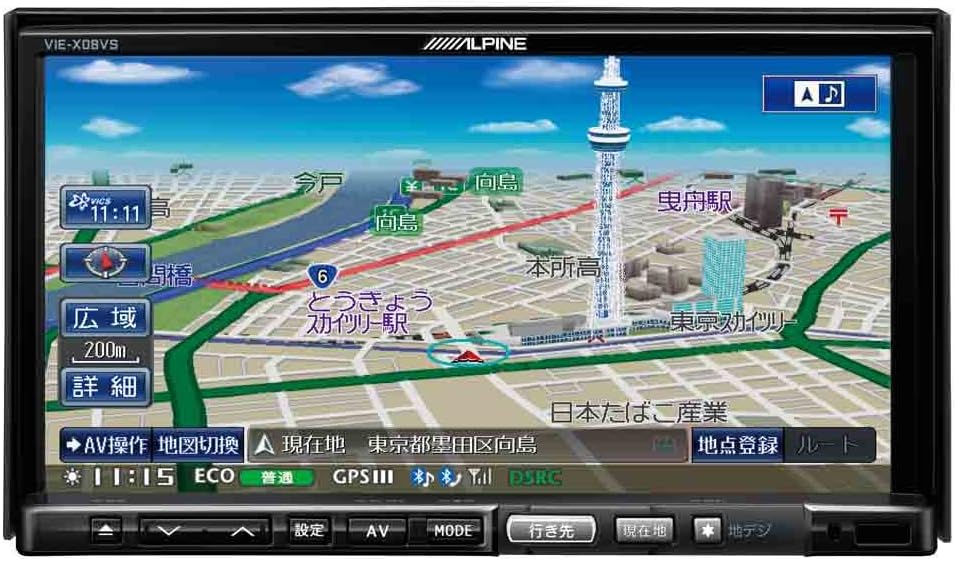
1 pav.: priekis view of the Alpine VIE-X08VS unit displaying a detailed navigation map with Tokyo Skytree visible.

2 pav.: Kampinis view of the Alpine VIE-X08VS unit, showing the navigation map and side profile.
5.1.1. Žemėlapių atnaujinimai
The system includes free map updates until the 2015 edition. For information on subsequent map updates, please refer to the Alpine support websvetainėje arba susisiekite su pardavėju.
5.2. Audio/Video (AV) Features
The VIE-X08VS integrates various AV sources for your entertainment.
- HDD Music Storage: The built-in 60GB HDD is designed for audio, capable of automatically recording approximately 5,500 songs.
- Skaitmeninė televizija: Access digital terrestrial TV broadcasts using the easy-to-use one-touch key.
- DVD-V/CD Playback: Insert DVDs or CDs into the disc slot for video and audio playback.
- Bluetooth ryšys: Pair your Bluetooth-enabled devices for audio streaming and hands-free calling.
- USB/SD laikmena: Connect USB devices or insert SD cards to play compatible audio and video files.
- 5.1ch Decoder: Enjoy enhanced audio quality with the built-in 5.1ch decoder.
- Rear Vision Link: Transmit high-quality video to rear monitors. This function also allows for navigation screen display and operation from the rear, enhancing the overall driving experience for passengers.
- Sony Walkman Compatibility: Connect compatible Sony Walkman devices for music playback.
5.3. Dual-Screen Display
The system supports a dual-screen display, allowing you to view both navigation and AV content simultaneously. This feature can be accessed via the on-screen menu or dedicated buttons.
6. Priežiūra
Regular maintenance helps ensure the longevity and optimal performance of your Alpine VIE-X08VS unit.
6.1. Ekrano valymas
Use a soft, dry cloth to gently wipe the display screen. For stubborn smudges, slightly dampen the cloth with water or a screen-cleaning solution specifically designed for electronic displays. Avoid harsh chemicals or abrasive materials.
6.2. Bendras valymas
Nuvalykite įrenginio išorę minkšta, sausa šluoste. Neleiskite, kad į įrenginį patektų skysčių.
6.3. Disc Slot Care
Keep the disc slot free of dust and debris. Avoid inserting bent, scratched, or dirty discs, as this can damage the disc drive.
7. Problemų sprendimas
If you encounter issues with your Alpine VIE-X08VS, refer to the following common problems and solutions before contacting support.
| Problema | Galima priežastis / sprendimas |
|---|---|
| Nėra galios | Check vehicle's fuse box. Ensure all power cables are securely connected. |
| Nėra garso | Verify volume level. Check speaker connections. Ensure audio source is selected correctly. |
| GPS signalo praradimas | Įsitikinkite, kad GPS antena turi laisvą view of the sky. Move to an open area away from tall buildings or tunnels. |
| „Bluetooth“ įrenginys nesusijungia | Ensure Bluetooth is enabled on both the unit and your device. Place devices close together. Delete previous pairings and try again. |
| Disko atkūrimo problemos | Ensure the disc is clean and free of scratches. Verify the disc format is supported. |
8. Specifikacijos
Detailed technical specifications for the Alpine VIE-X08VS unit:
| Funkcija | Specifikacija |
|---|---|
| Gamintojas | Alpinis |
| Modelio pavadinimas | VIE X08VS |
| Produkto modelio numeris | VIE-X08VS |
| Gaminio matmenys (IxPxH) | 18.73 x 17.8 x 10 cm |
| Prekės svoris | 3.2 kilogramo |
| Ekrano dydis | 7 colių |
| Ekrano tipas | WVGA LCD |
| Atminties talpa | 60 GB (HDD) |
| Ryšio technologija | Bluetooth, USB |
| Palaikoma laikmena | DVD-V, CD, USB, SD |
| Žemėlapio tipas | Gatvė |
| Montavimo tipas | Skydo tvirtinimas |
| Ypatingos savybės | Hands-free calling, Digital TV, 5.1ch Decoder, Eco-Guide, Rear Vision Link |
| Suderinamas transporto priemonės tipas | Lengvasis automobilis |
9. Garantija ir palaikymas
For warranty information, please refer to the warranty card included with your product or visit the official Alpine websvetainėje. Išsaugokite pirkimo įrodymą garantiniams reikalavimams.
9.1. Pagalba klientams
If you require technical assistance, have questions about your product, or need to arrange service, please contact Alpine customer support through their official websvetainėje arba kontaktinę informaciją, pateiktą jūsų produkto dokumentuose.


