1. Įvadas
The HP 1910-8G-PoE+ 180W Switch (Model JG350A) is an advanced smart-managed, fixed-configuration Gigabit Ethernet Layer 3 switch. Designed for small businesses, it offers enhanced features in an easy-to-administer solution, providing reliable network connectivity and Power over Ethernet Plus (PoE+) capabilities.
2. Pagrindinės savybės
- Gigabit Ethernet prievadai: Provides 8 Gigabit Ethernet ports for high-speed network connections.
- „PoE+“ galimybė: Supports Power over Ethernet Plus (802.3at) to power compatible devices such as IP phones, wireless access points, and IP cameras directly through the network cable.
- SFP prievadai: Includes additional true Gigabit SFP ports for fiber connectivity, extending network reach.
- Lankstus diegimas: Supports both rack mounting and desktop operation.
- Tylus veikimas: Utilizes variable-speed fans to minimize noise.
- IPv6 palaikymas: Operates at full wire-speed IPv6.
- Paslaugos kokybė (QoS): Supports traffic prioritization for optimal performance of critical applications.
- Saugos funkcijos: Includes 802.1X network login, access control lists (ACLs), and denial-of-service (DoS) prevention.
- Išplėstinės 3 sluoksnio funkcijos: Customizable features such as VLANs, link aggregation trunking, static routing, and Spanning Tree Protocols (STP, RSTP, MSTP).
3. Pakuotės turinys
Patikrinkite, ar jūsų pakuotėje yra šie elementai:
- HP 1910-8G-PoE+ 180W Switch (JG350A)
- Maitinimo laidas
- Stovo tvirtinimo rinkinys (jei taikoma)
- Greitas pradžios vadovas ir garantijos informacija
If any items are missing or damaged, contact your vendor immediately.
4. Fizinis aprašymas
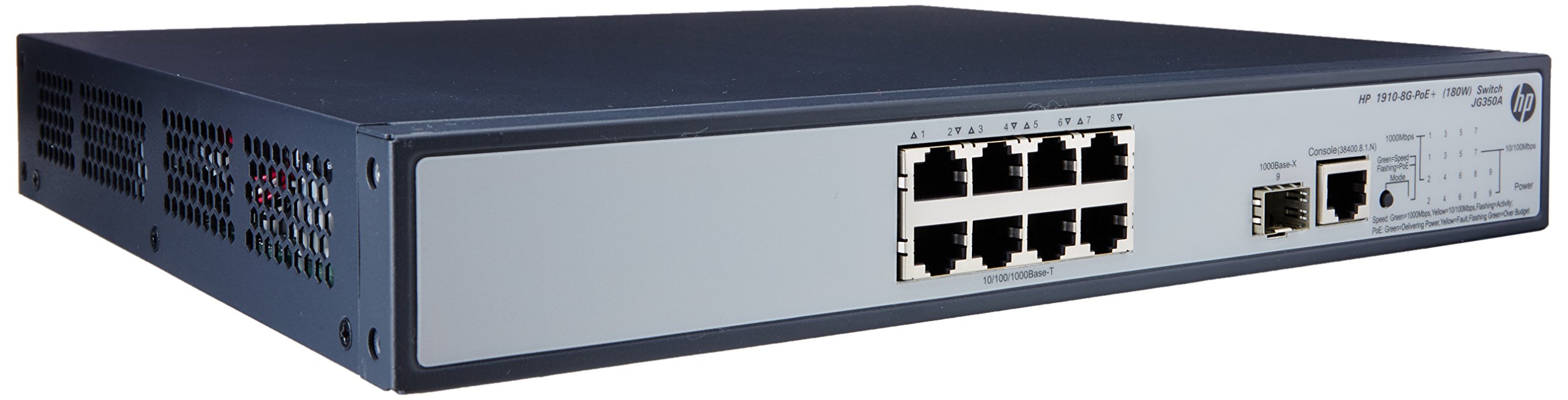

4.1 Priekinis skydelis
The front panel of the switch includes:
- 8 x RJ45 Gigabit Ethernet Ports: These ports support 10/100/1000 Mbps connections and are PoE+ enabled, providing power to connected devices.
- 2 x SFP Ports: Dedicated slots for Gigabit fiber optic transceivers, allowing for long-distance connections.
- LED indikatoriai: Status lights for power, system, and individual port activity/PoE status.
4.2 Galinis skydelis
The rear panel typically contains the AC power input connector and ventilation openings.
5. Sąranka
5.1 Saugos priemonės
- Užtikrinkite tinkamą vėdinimą aplink jungiklį, kad išvengtumėte perkaitimo.
- Neužblokuokite jokių ventiliacijos angų.
- Naudokite tik su prietaisu pateiktą maitinimo laidą.
- Venkite jungiklio laikymo tiesioginiuose saulės spinduliuose arba šalia šilumos šaltinių.
5.2 Jungiklio montavimas
The HP 1910-8G-PoE+ 180W Switch can be deployed in two ways:
- Vieta darbalaukyje: Place the switch on a flat, stable surface, ensuring adequate space for ventilation.
- Stovo montavimas: Use the provided rack-mount kit to install the switch into a standard 19-inch equipment rack. Follow the instructions included with the rack-mount kit for proper installation.
5.3 Maitinimo prijungimas
- Prijunkite vieną maitinimo laido galą prie kintamosios srovės maitinimo įvesties lizdo, esančio jungiklio galiniame skydelyje.
- Kitą maitinimo laido galą prijunkite prie įžeminto elektros lizdo.
- The power LED on the front panel should illuminate, indicating the switch is receiving power.
5.4 Tinklo įrenginių prijungimas
- RJ45 prievadai: Connect your network devices (computers, servers, IP phones, wireless access points) to the RJ45 ports using standard Ethernet cables. For PoE-powered devices, ensure they are PoE+ compatible.
- SFP prievadai: Insert compatible SFP transceivers into the SFP slots, then connect fiber optic cables to the transceivers for fiber uplinks or long-distance connections.
5.5 Pradinė konfigūracija
The HP 1910 switch is a smart-managed device, typically configured via a web-based graphical user interface (GUI). Refer to the Quick Start Guide for the default IP address, username, and password to access the management interface. It is recommended to change default credentials immediately after initial access for security purposes.
6. Jungiklio valdymas
6.1 Įjungimas
Once connected to power, the switch will automatically power on. Observe the system LED for boot-up status. A steady green light typically indicates normal operation.
6.2 Tinklo ryšys
When a device is connected to an RJ45 port, the corresponding port LED will illuminate. A blinking LED indicates network activity. Ensure the link LED is solid green for a stable connection.
6.3 PoE+ Functionality
For devices requiring Power over Ethernet, connect them to the PoE+ enabled RJ45 ports. The switch will automatically detect and provide power to compatible devices. The PoE status LED for the port will indicate power delivery.
7. Priežiūra
7.1 Valymas
Periodically clean the exterior of the switch with a soft, dry cloth. Do not use liquid or aerosol cleaners. Ensure ventilation openings are free from dust and debris to maintain proper airflow.
7.2 Firmware atnaujinimai
Regularly check the HP support website for firmware updates. Keeping the switch firmware up-to-date ensures optimal performance, security, and access to new features. Follow the instructions provided with the firmware update package carefully.
7.3 Aplinkosaugos aspektai
Operate the switch within its specified temperature and humidity ranges to ensure longevity and stable performance. Avoid extreme conditions.
8. Problemų sprendimas
8.1 Nėra galios
- Patikrinkite, ar maitinimo laidas yra tvirtai prijungtas tiek prie jungiklio, tiek prie elektros lizdo.
- Patikrinkite, ar elektros lizdas veikia, prijungdami prie jo kitą įrenginį.
- Ensure the power switch (if present) is in the ON position.
8.2 Nėra tinklo ryšio
- Check the Ethernet cable connections between the switch and the device.
- Verify that the port LED on the switch is illuminated for the connected device.
- Ensure the device's network adapter is enabled and configured correctly.
- Try connecting the device to a different port on the switch or using a different Ethernet cable.
8.3 Neveikia „PoE“
- Confirm that the connected device is PoE+ compatible.
- Patikrinkite konkretaus prievado PoE būsenos šviesos diodą.
- Ensure the total power budget of the switch is not exceeded.
- Try connecting the PoE device to a different PoE+ port.
8.4 Jungiklio nustatymas iš naujo
If the switch is unresponsive or experiencing persistent issues, a factory reset may be necessary. Refer to the device's management interface or the full user guide for instructions on performing a factory reset. Įspėjimas: A factory reset will erase all custom configurations and restore the switch to its default settings.
9. Specifikacijos
| Funkcija | Specifikacija |
|---|---|
| Modelio numeris | JG350A |
| Sąsajos tipas | PoE+, SFP |
| Prievadų skaičius | 8 (Gigabit Ethernet PoE+) |
| Duomenų perdavimo sparta | 1000 megabitų per sekundę |
| RAM | 128 MB |
| Prekės svoris | 8.35 svaro (3.79 kg) |
| Gaminio matmenys (IxPxH) | 17.5 x 13.12 x 3.5 colio (44.45 x 33.32 x 8.89 cm) |
| Suderinami įrenginiai | Camera, Desktop, Laptop, Printer |
| Gamintojas | HP |
10. Garantija ir palaikymas
For detailed warranty information and technical support, please refer to the documentation included with your product or visit the official HP support websvetainėje. website provides access to drivers, firmware updates, troubleshooting guides, and contact information for customer service.