1. Įvadas
This manual provides detailed instructions for the setup, operation, and maintenance of your INLAND 71102 Bluetooth Keyboard. This wireless keyboard is designed for use with Bluetooth-enabled devices, including iPads, PCs, notebooks, and iPhones, offering a wireless range of up to 33 feet (10 meters).
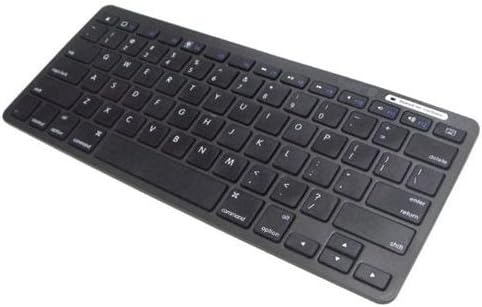
Image: The INLAND 71102 Bluetooth Keyboard. This image displays the full QWERTY keyboard layout, including dedicated function keys and media control buttons, in a sleek black finish.
Pagrindinės funkcijos:
- Compatible with iPad, PC, Notebook, and iPhone.
- Belaidis „Bluetooth“ ryšys.
- Up to 33 feet (10 meters) wireless operating range.
2. Pakuotės turinys
Prašome patikrinti, ar pakuotėje yra visi reikalingi daiktai:
- INLAND Bluetooth Keyboard (Model 71102)
- Vartotojo vadovas (šis dokumentas)
3. Sąranka ir susiejimas
3.1. Klaviatūros įjungimas
Locate the power switch on the keyboard. Slide the switch to the "ON" position. An indicator light may illuminate briefly, signifying that the keyboard is powered on and ready for pairing.
3.2. „Bluetooth“ susiejimo instrukcijos
Follow these steps to connect your INLAND 71102 Bluetooth Keyboard to your device:
- Įjunkite „Bluetooth“ savo įrenginyje: On your iPad, PC, Notebook, or iPhone, navigate to the settings menu and ensure Bluetooth is turned on.
- Activate Pairing Mode on Keyboard: Press and hold the dedicated Bluetooth pairing button on the keyboard (refer to the keyboard layout for exact location, often indicated by a Bluetooth symbol or "Connect" button). The Bluetooth indicator light on the keyboard will typically start blinking, indicating it is in pairing mode.
- Ieškokite Įrenginiai: On your device, initiate a search for new Bluetooth devices. The INLAND 71102 Keyboard should appear in the list of available devices, often named "INLAND Keyboard" or similar.
- Pasirinkite ir prijunkite: Tap or click on the keyboard's name in the list. Your device may prompt you to enter a pairing code displayed on your screen using the INLAND keyboard. Type the code and press Enter.
- Patvirtinimas: Once successfully paired, the indicator light on the keyboard may stop blinking or turn solid, and your device will confirm the connection.
If pairing fails, ensure the keyboard is charged, within range, and not connected to another device. Repeat the steps if necessary.
4. Naudojimo instrukcijos
4.1. Bendrasis naudojimas
The INLAND 71102 Bluetooth Keyboard functions like a standard QWERTY keyboard. Simply type as you would on any other keyboard. Ensure your device's input language settings are configured correctly for optimal performance.
4.2. Specialiųjų funkcijų klavišai
The keyboard includes several function keys (often accessed by pressing the Fn key in combination with other keys) and dedicated media control keys. These may include:
- Garsumo valdikliai: Padidinimo klavišaiasing, dekretasasing, or muting audio.
- Medijos atkūrimas: Keys for play/pause, previous track, and next track.
- Screen Lock/Home: A key to return to the home screen or lock the device.
- Ryškumo valdikliai: Keys to adjust screen brightness (functionality may vary by device).
Refer to the icons printed on the keys for their specific functions. The exact behavior of these keys can depend on the operating system of your connected device (e.g., iOS, Android, Windows).
4.3. Delete Key Functionality
Please note that the key labeled "delete" on this keyboard functions as a Ištrinti key, removing characters to the right of the cursor. It does not perform the Backspace function (removing characters to the left of the cursor) by default. Users requiring a Backspace function may need to adjust their device's settings or use third-party software to remap keys, depending on their operating system.
5. Priežiūra
To ensure the longevity and optimal performance of your INLAND 71102 Bluetooth Keyboard, follow these maintenance guidelines:
- Valymas: Klaviatūros paviršiui valyti naudokite minkštą, sausą, nepūkuotą šluostę. Jei nešvarumai sunkiai įveikiami, šiek tiek pamirkykite.ampNuvalykite šluostę vandeniu arba švelniu, neabrazyviniu valikliu. Venkite per didelės drėgmės.
- Saugykla: Kai klaviatūra ilgesnį laiką nenaudojama, ją laikykite vėsioje, sausoje vietoje, toliau nuo tiesioginių saulės spindulių ir ekstremalių temperatūrų.
- Akumuliatoriaus priežiūra: If the keyboard uses rechargeable batteries, ensure it is charged regularly. Avoid fully discharging the battery frequently to prolong its lifespan.
- Venkite skysčių: Do not expose the keyboard to liquids. In case of accidental spills, immediately power off the keyboard and allow it to dry completely before attempting to use it again.
6. Problemų sprendimas
If you encounter issues with your INLAND 71102 Bluetooth Keyboard, please refer to the following common solutions:
- Klaviatūra neprisijungia / nesusiejama:
- Įsitikinkite, kad klaviatūra įjungta ir visiškai įkrauta.
- Verify that Bluetooth is enabled on your device (iPad, PC, etc.).
- Make sure the keyboard is in pairing mode (indicator light blinking).
- Check if the keyboard is already paired with another device. Disconnect it from other devices if necessary.
- Move the keyboard closer to your device to ensure it is within the 33ft wireless range.
- Restart both the keyboard and your device, then attempt the pairing process again.
- Klavišai nereaguoja:
- Patikrinkite klaviatūros akumuliatoriaus lygį.
- Įsitikinkite, kad klaviatūra tinkamai prijungta per „Bluetooth“.
- Clean any debris that might be lodged under the keys.
- Test the keyboard with a different Bluetooth-enabled device to rule out device-specific issues.
- Pertraukiamas ryšys:
- Reduce interference by moving away from other wireless devices (Wi-Fi routers, cordless phones).
- Ensure the keyboard is within optimal range of your device.
- Check for any physical obstructions between the keyboard and your device.
If these steps do not resolve the issue, please contact INLAND customer support for further assistance.
7. Specifikacijos
| Funkcija | Specifikacija |
|---|---|
| Prekės ženklas | VIDAUS |
| Modelio pavadinimas | 71102 |
| Serija | Inland 71102 iPad Mac Bluetooth Keyboard Black |
| Ryšio technologija | Bluetooth |
| Belaidis tipas | 2.4 GHz radijo dažnis |
| Suderinami įrenginiai | iPad, PC, Notebook, iPhone |
| Aparatinės įrangos platforma | Planšetinis kompiuteris |
| Operacinė sistema | Android (also compatible with iOS, Windows) |
| Spalva | Juoda |
| Prekės svoris | 4.8 uncijos (apie 136 gramų) |
| Gaminio matmenys (IxPxH) | 9.09 x 0.79 x 5.11 colio (apytiksliai 23.1 x 2.0 x 13.0 cm) |
| Įtraukti komponentai | Inland Bluetooth Keyboard |
8. Garantija ir palaikymas
INLAND products are designed for reliability and performance. For specific warranty information regarding your INLAND 71102 Bluetooth Keyboard, please refer to the warranty card included with your purchase or visit the official INLAND website. If you require technical support or have questions not covered in this manual, please contact INLAND customer service through their official channels.
Daugiau informacijos galite rasti adresu INLAND Store on Amazon.


