Įvadas
This manual provides detailed instructions for the installation, operation, and maintenance of your Akasa AK-CC7108EP01 CPU Cooler. Please read this manual thoroughly before installation and use to ensure proper function and longevity of the product. This CPU cooler is designed to efficiently dissipate heat from your computer's central processing unit (CPU), maintaining optimal operating temperatures.
Saugos informacija
- Prieš įdiegdami arba išimdami bet kokius komponentus, visada atjunkite kompiuterį nuo maitinimo.
- Handle the CPU cooler and CPU with care to avoid damage to pins or components.
- Wear an anti-static wrist strap or frequently touch a grounded metal object to prevent electrostatic discharge (ESD) damage to sensitive electronic components.
- Laikyti vaikams nepasiekiamoje vietoje.
- Ensure proper ventilation inside your computer case.
Pakuotės turinys
Patikrinkite, ar pakuotėje yra visi reikalingi daiktai:
- Akasa AK-CC7108EP01 CPU Cooler (Heatsink with pre-attached fan)
- Integrated push-pin mounting mechanism
- Pre-applied thermal interface material (TIM) on the heatsink base
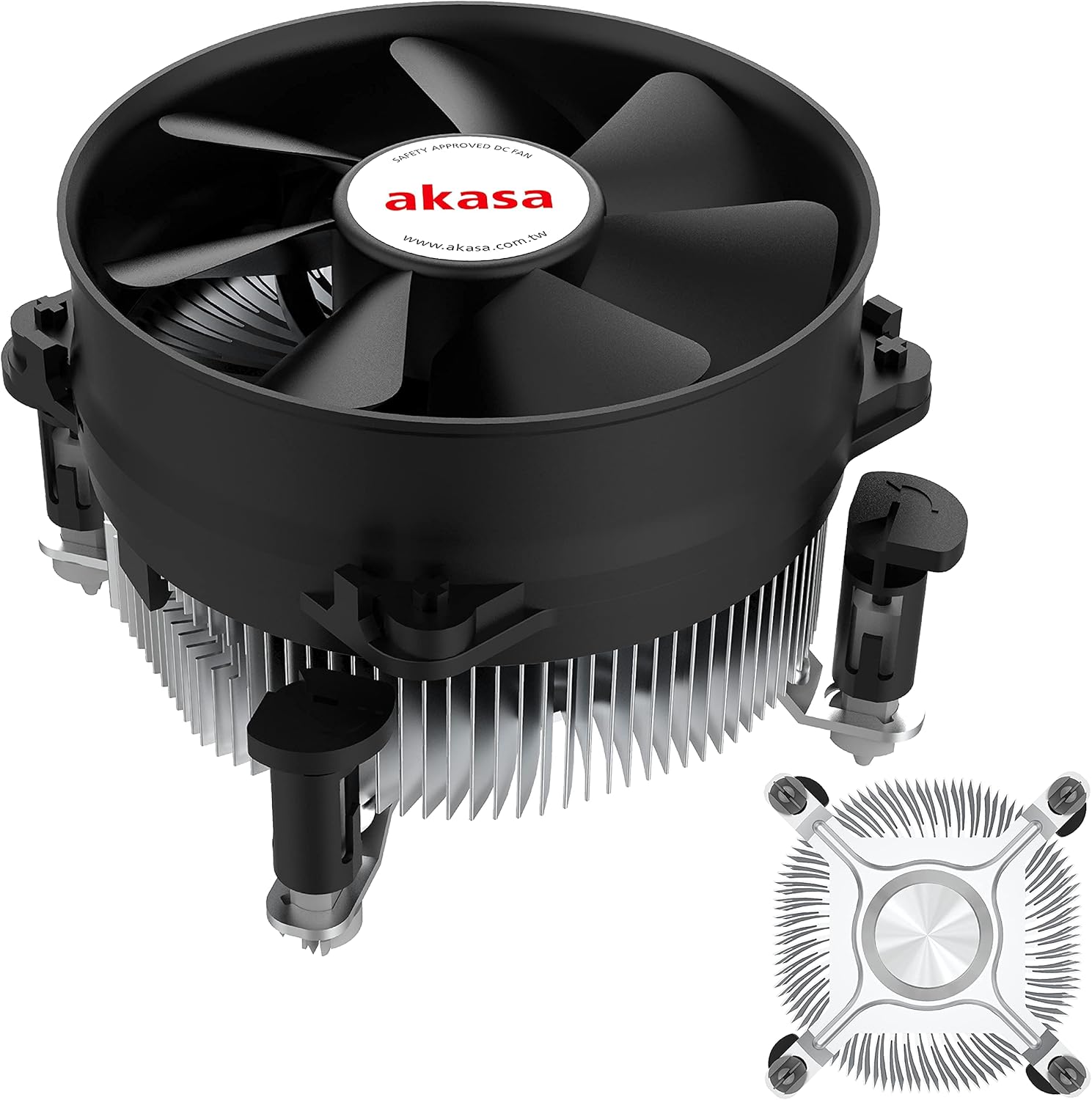
1 paveikslas: The Akasa AK-CC7108EP01 CPU Cooler, showing the fan, heatsink, and push-pin mounting system.
Sąranka ir diegimas
This section details the steps required to install the Akasa AK-CC7108EP01 CPU cooler onto your motherboard. This cooler utilizes a push-pin mounting system compatible with specific Intel sockets (e.g., LGA775, LGA115x).
1. Paruošimas
- Išjungti: Įsitikinkite, kad jūsų kompiuteris yra visiškai išjungtas ir atjungtas nuo sieninio lizdo.
- Prieiga prie pagrindinės plokštės: Open your computer case to gain access to the motherboard and CPU socket.
- Išimkite seną aušintuvą (jei taikoma): If replacing an existing cooler, carefully remove it. Clean any old thermal paste from the CPU surface using isopropyl alcohol and a lint-free cloth.
- Inspect CPU: Įsitikinkite, kad procesorius tinkamai įstatytas į lizdą, o laikiklis užfiksuotas.
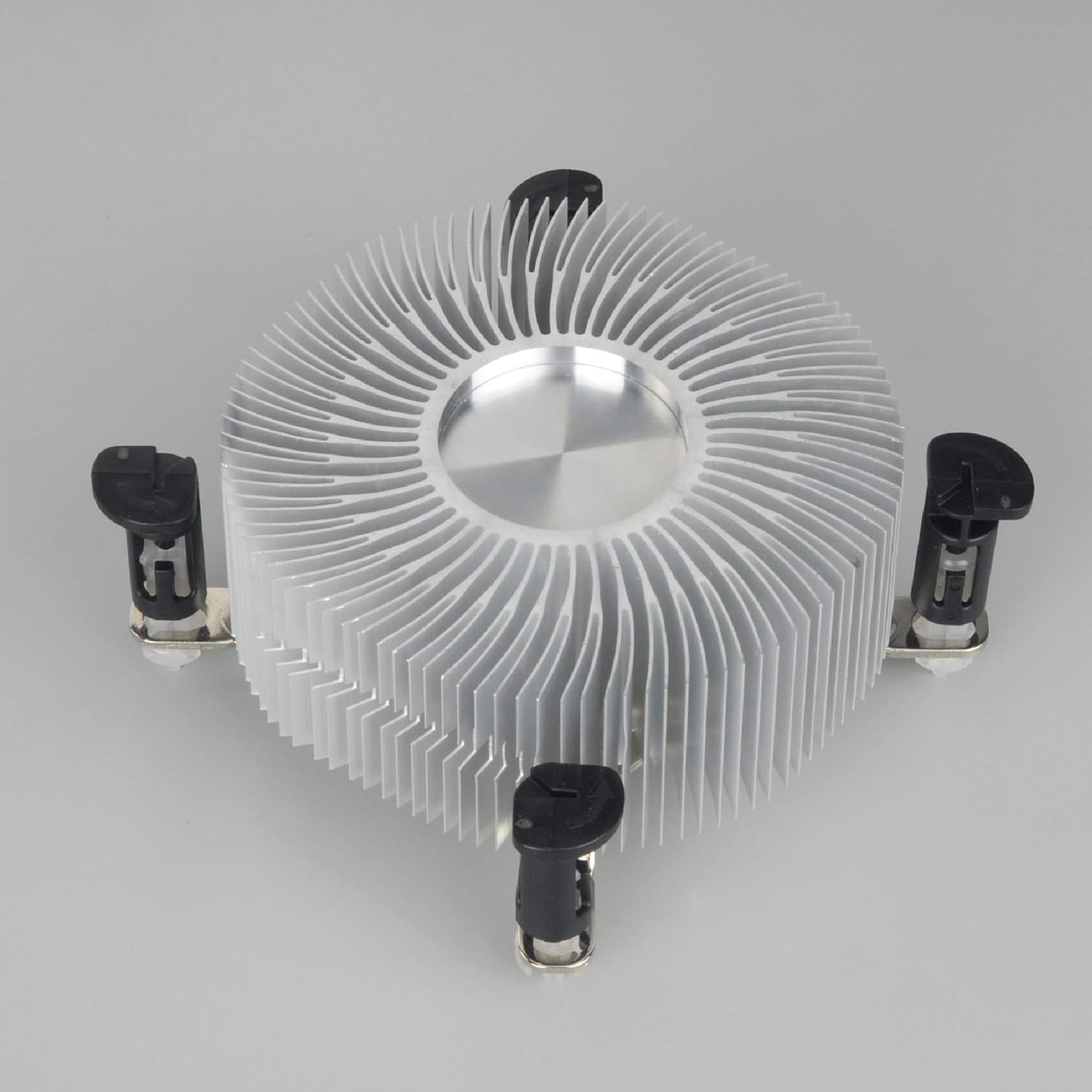
2 paveikslas: Apatinė dalis view of the heatsink, showing the pre-applied thermal paste and the four push-pin mounting posts.
2. Aušintuvo montavimas
- Align Cooler: Carefully align the four push-pins on the cooler with the four mounting holes around the CPU socket on the motherboard.
- Push Pins Down: Press down firmly and evenly on each of the four push-pins until they click into place. You should hear a distinct click for each pin, indicating it has secured properly. Ensure all four pins are fully engaged.
- Patvirtinkite saugų tinkamumą: Gently tug on the cooler to ensure it is securely attached to the motherboard and does not wobble. If it feels loose, re-engage the push-pins.
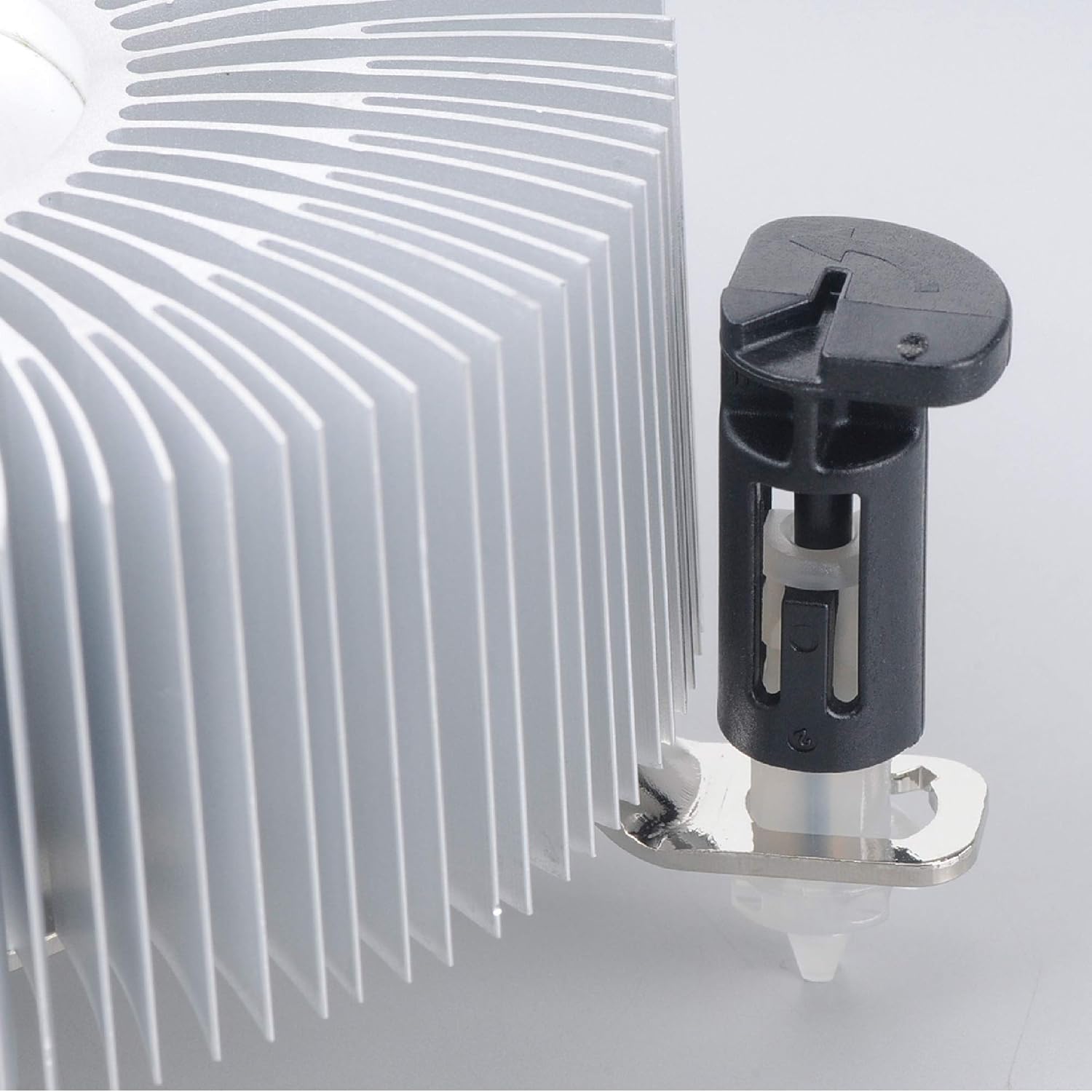
3 paveikslas: Detail of the push-pin mechanism. Ensure the black pin is pushed down through the white anchor to secure the cooler.
3. Ventiliatoriaus prijungimas
- Locate CPU_FAN Header: Find the 4-pin CPU_FAN header on your motherboard. Refer to your motherboard manual if you are unsure of its location.
- Prijunkite ventiliatoriaus laidą: Connect the 4-pin fan cable from the Akasa cooler to the CPU_FAN header on the motherboard. Ensure the connector is oriented correctly.

4 paveikslas: Šoninė view of the Akasa CPU cooler, highlighting the 4-pin fan power cable for connection to the motherboard.
4. Paskutiniai žingsniai
- Uždaryti bylą: Once the cooler is securely installed and the fan connected, close your computer case.
- Maitinimas: Prijunkite maitinimo laidą ir įjunkite kompiuterį.
- BIOS/UEFI patikrinimas: Enter your system's BIOS/UEFI settings to verify that the CPU fan is detected and operating at appropriate speeds. Monitor CPU temperatures during initial use to ensure proper cooling.
Naudojimo instrukcijos
The Akasa AK-CC7108EP01 CPU cooler operates automatically once installed and connected to the motherboard's CPU_FAN header. The 4-pin connector allows the motherboard to control the fan speed (PWM - Pulse Width Modulation) based on CPU temperature, optimizing cooling performance and noise levels.
- Automatinis greičio valdymas: The fan speed will adjust dynamically according to the CPU's thermal load.
- Stebėjimas: You can monitor CPU temperatures and fan speeds using motherboard monitoring software or within the BIOS/UEFI settings.
- Optimalus našumas: Ensure adequate airflow within your computer case to support the cooler's performance.
Priežiūra
Reguliarus techninis aptarnavimas padeda užtikrinti optimalų našumą ir pailgina procesoriaus aušintuvo tarnavimo laiką.
- Dulkių šalinimas: Periodiškai (pvz., kas 3–6 mėnesius) išjunkite kompiuterį ir atjunkite jį nuo elektros tinklo. Atidarykite korpusą ir suslėgtu oru švelniai nupūskite dulkes nuo radiatoriaus briaunų ir ventiliatoriaus menčių. Valymo metu laikykite ventiliatoriaus mentes, kad jos greitai nesisuktų, nes tai gali sugadinti ventiliatoriaus variklį.
- Patikra: Check the fan for any signs of damage or excessive noise. Ensure the cooler remains securely mounted to the motherboard.
- Terminė pasta: The pre-applied thermal paste is designed for long-term use. If you ever need to remove and re-install the cooler, it is recommended to clean off the old thermal paste from both the CPU and heatsink and apply a fresh layer of high-quality thermal paste.
Trikčių šalinimas
If you encounter issues with your Akasa AK-CC7108EP01 CPU cooler, refer to the following common problems and solutions:
- Problema: CPU temperatures are high.
Sprendimas:
- Ensure the cooler is securely mounted and all four push-pins are fully engaged.
- Verify the fan cable is correctly connected to the CPU_FAN header on the motherboard.
- Check for excessive dust buildup on the heatsink fins and fan blades, and clean if necessary.
- Confirm that the thermal paste application is adequate. If the cooler was removed and reinstalled without fresh thermal paste, reapply it.
- Ensure proper airflow within the computer case.
- Problema: Ventiliatorius nesisuka.
Sprendimas:
- Check the fan cable connection to the CPU_FAN header.
- Verify that the CPU_FAN header is enabled in the BIOS/UEFI settings.
- Ensure no cables or obstructions are preventing the fan blades from spinning.
- Problema: Ventiliatorius pernelyg triukšmingas.
Sprendimas:
- Clean any dust from the fan blades.
- Check if the fan is rubbing against any cables or components.
- In BIOS/UEFI, adjust fan speed curves if available, to reduce fan speed at lower temperatures.
- If the noise persists and is a grinding or rattling sound, the fan bearing may be failing, and replacement might be necessary.
Specifikacijos
The following table outlines the technical specifications for the Akasa AK-CC7108EP01 CPU Cooler:
| Funkcija | Specifikacija |
|---|---|
| Prekės ženklas | Akasa |
| Modelis | AK-CC7108EP01 |
| Suderinami įrenginiai | Desktop (Intel LGA775, LGA115x) |
| Aušinimo būdas | Oras |
| Medžiaga | Aliuminis |
| Maksimalus sukimosi greitis | 1800 aps./min |
| Triukšmo lygis | 92 Decibels (Maximum) |
| ttage | 12 voltų |
| Vattage | 77 watts (TDP) |
| Maitinimo jungties tipas | 4-Pin PWM |
| Gaminio matmenys | 9.5 x 9.5 x 5.85 cm |
| Prekės svoris | 290.3 g |
Garantija ir palaikymas
For warranty information and technical support, please refer to the official Akasa websvetainėje arba susisiekite su pardavėju. Išsaugokite pirkimo įrodymą, jei prireiktų pateikti garantinį prašymą.