Įvadas
This manual provides essential instructions for the safe and proper installation, operation, and maintenance of the SANYO POA-LMP124 / 610-341-1941 Projection Lamp. Šis lamp is designed for use with compatible Sanyo and EIKI projectors, including models LC-X85, LP-XP200L(K), and PLC-XP200L, as well as CHRISTIE LX700. Adhering to these guidelines will help ensure optimal performance and extend the lifespan of your projector lamp.
Saugos informacija
WARNING: Projector lamps operate at high temperatures and contain high-pressure mercury vapor. Improper handling can result in serious injury or damage.
- Always power off the projector and unplug it from the power source before attempting any installation or maintenance.
- Allow the projector to cool down for at least 30 minutes after use before handling the lamp. Lamps become extremely hot during operation.
- Do not touch the glass bulb of the lamp directly with bare hands. Oils from your skin can cause hot spots and reduce lamp life. Use gloves or a clean cloth.
- Never attempt to open or modify the lamp būstą.
- Išmeskite seną lamps according to local environmental regulations. They contain mercury.
- Refer to your projector's main user manual for specific safety guidelines and lamp pakeitimo procedūros.
Setup: Lamp Montavimas
Follow these steps carefully to install the new projector lamp:
- Paruoškite projektorių: Ensure the projector is powered off and unplugged from the electrical outlet. Allow it to cool completely.
- Raskite Lamp Skyrius: Refer to your projector's manual to find the lamp skyriaus dangtelis. Paprastai jis tvirtinamas vienu ar keliais varžtais.
- Nuimkite dangtelį: Use a screwdriver to loosen and remove the screws securing the lamp skyriaus dangtelį. Atsargiai nuimkite dangtelį.
- Nuimkite seną L raidęamp: Loosen any screws holding the old lamp module in place. Gently grasp the handle or designated area on the lamp module and pull it straight out of the projector. Avoid tilting or forcing it.
- Insert the New Lamp: Carefully insert the new POA-LMP124 / 610-341-1941 lamp module into the projector. Ensure it slides in smoothly and is seated firmly in place. Do not force it.
- Secure the New Lamp: Tighten any screws that hold the lamp modulis vietoje.
- Pakeiskite dangtelį: Iš naujo pritvirtinkite lamp compartment cover and secure it with its screws. Ensure the cover is properly closed, as many projectors have a safety switch that prevents operation if the cover is open.
- Iš naujo nustatyti Lamp Laikmatis: After installation, it is crucial to reset the lamp timer in your projector's menu. Consult your projector's manual for instructions on how to access and reset the lamp timer. This ensures accurate tracking of lamp usage and proper projector operation.
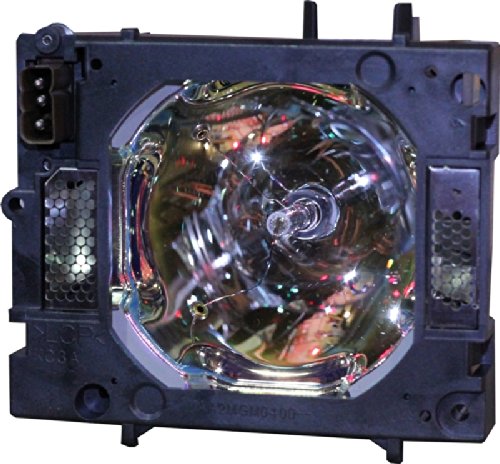
Image: The SANYO POA-LMP124 / 610-341-1941 projector lamp module, ready for installation. This image shows the complete lamp assembly with its housing.
Valdant Lamp
Once the POA-LMP124 / 610-341-1941 lamp is correctly installed, its operation is integrated with your projector's system. The lamp will illuminate when the projector is powered on and will turn off when the projector is shut down.
- Maitinimo įjungimas/išjungimas: Always follow the power-on and power-off procedures outlined in your projector's user manual.
- Atvėsimo laikotarpis: Allow the projector to complete its cool-down cycle after powering off. Interrupting this cycle can shorten lamp gyvenimą.
- Venkite dažno važiavimo dviračiu: Turning the projector on and off frequently can reduce the lamp's lifespan. Try to minimize unnecessary power cycles.
Priežiūra
Proper maintenance can help maximize the life and performance of your projector lamp.
- Lamp Gyvenimas: Projektorius lamps have a finite lifespan, typically measured in hours. Replace the lamp when the image brightness significantly diminishes, or when the projector's lamp užsidega indikatoriaus lemputė.
- Oro filtro valymas: Regularly clean or replace the air filters of your projector as recommended by the projector manufacturer. Clogged filters can lead to overheating, which drastically reduces lamp gyvenimą.
- Do Not Clean Lamp Lemputė: Do not attempt to clean the lamp bulb itself. Any residue or damage can affect its performance and safety.
- Aplinkos sąlygos: Operate your projector in a well-ventilated area with stable temperature and humidity to prevent overheating.
Trikčių šalinimas
If you encounter issues after installing your new lamp, apsvarstykite šiuos dalykus:
- Lamp Not Lighting:
- Įsitikinkite, kad lamp module is fully seated and secured in its compartment.
- Patikrinkite, ar lamp compartment cover is securely closed. Many projectors have a safety interlock switch.
- Check that the projector is properly plugged in and receiving power.
- Patvirtinkite, kad lamp timer has been reset in the projector's menu.
- Dim or Poor Image Quality:
- Lamp may be nearing the end of its operational life, even if recently replaced (rare for new lamps, but possible if the lamp timer was not reset).
- Check your projector's brightness and contrast settings.
- Įsitikinkite, kad projektoriaus objektyvas yra švarus, be dulkių ar dėmių.
- Projector Shuts Down Immediately After Powering On:
- This can indicate overheating. Ensure projector air filters are clean and ventilation is unobstructed.
- A faulty lamp or improper installation can also trigger safety shutdowns. Re-check lamp sėdimoji dalis.
For persistent issues, consult your projector's comprehensive user manual or contact the projector manufacturer's support.
Specifikacijos
| Modelio numeris | POA-LMP124 / 610-341-1941 |
| Suderinami projektoriai | SANYO PLC-XP200L, EIKI LC-X85, CHRISTIE LX700, SANYO LP-XP200L(K) |
| Lemputės tipas | Projektorius Lamp |
| Gaminio matmenys | 7.28 x 6.1 x 5.71 colio |
| Prekės svoris | 8 uncijos |
| Gamintojas | Comoze Lamps |
Garantija ir palaikymas
Warranty coverage for this projector lamp is typically provided by the seller or manufacturer at the time of purchase. Please refer to your purchase documentation for specific warranty terms and conditions.
For technical assistance regarding the lamp's performance or compatibility, please contact the vendor from whom you purchased the lamp. For issues related to your projector's operation, please consult your projector's user manual or contact the projector manufacturer's customer support.


