Įvadas
The Korg TMR-50 is a versatile device designed to assist musicians in improving their pitch and rhythm. It integrates a tuner, metronome, and recorder into a single compact unit. These three functions can be used independently or simultaneously, offering comprehensive support for practice and performance. The TMR-50 also features high-quality linear PCM recording, allowing up to 100 tracks to be stored, and a USB port for easy data transfer to a computer. With its built-in microphone, speaker, and various rhythm variations, the TMR-50 is an essential tool for any musician.
Saugos priemonės
- Do not expose the unit to extreme temperatures, direct sunlight, high humidity, or dusty environments.
- Venkite įrenginio numetimo ar stiprių smūgių.
- Nebandykite ardyti ar modifikuoti įrenginio. Visus techninės priežiūros darbus patikėkite kvalifikuotiems darbuotojams.
- Naudokite tik nurodyto tipo baterijas (AAA) ir įdėdami užtikrinkite teisingą poliškumą.
- Jei prietaisas ilgesnį laiką nebus naudojamas, išimkite baterijas, kad išvengtumėte elektrolito pratekėjimo.
- Keep the unit away from sources of strong electromagnetic interference.
Pakuotės turinys
Įsitikinkite, kad jūsų pakuotėje yra visi šie daiktai:
- Korg TMR-50 Tuner Metronome Recorder unit
- 2 x AAA batteries (for initial use)
- Vartotojo vadovas (šis dokumentas)
Dalių pavadinimai ir funkcijos
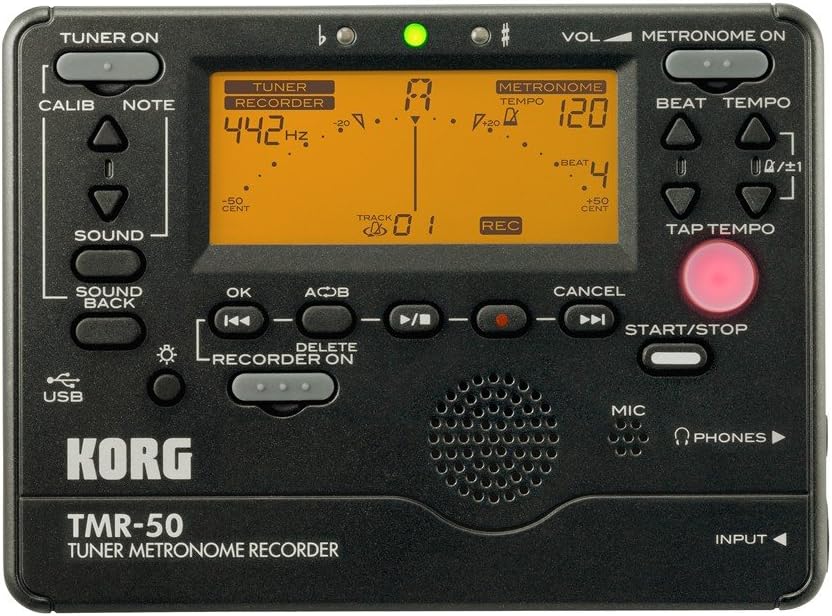
1 paveikslas: Virš priekinis skydelisview of the Korg TMR-50, showing all controls and the display.
Imtuvo valdikliai
- TUNER ON Button: Activates or deactivates the tuner function.
- KALIBRAVIMO mygtukas: Adjusts the calibration frequency (standard is 440Hz, often adjustable to 442Hz as shown).
- NOTE Buttons (Up/Down Arrows): Selects the target note for tuning.
- GARSO mygtukas: Activates the Sound Out function, which outputs a reference tone from the internal speaker.
- SOUND BACK Button: Engages the Sound Back function, allowing the unit to detect the input pitch and output the closest correct pitch for comparison.
Metronomo valdikliai
- METRONOME ON Button: Activates or deactivates the metronome function.
- VOL (Volume) Slider: Adjusts the output volume of the metronome and other audio.
- BEAT Buttons (Up/Down Arrows): Adjusts the number of beats per measure.
- TEMPO Buttons (Up/Down Arrows): Adjusts the metronome tempo in beats per minute (BPM).
- TAP TEMPO mygtuką: Allows you to set the tempo by tapping the button in time with the desired beat.
Recorder Controls
- RECORDER ON Button: Activates the recorder function.
- REC Button (Red Dot): Initiates recording when the recorder is active.
- Gerai mygtukas: Patvirtina pasirinkimus arba veiksmus.
- Rewind/Fast Forward Buttons (Double Arrows): Navigates through recorded tracks or within a track.
- Paleidimo / pauzės mygtukas (trikampis / du vertikalūs brūkšneliai): Starts or pauses playback of a recorded track.
- Stop mygtukas (kvadratinis): Sustabdo atkūrimą arba įrašymą.
- A<->B Button: Sets a loop playback region within a recorded track.
- Ištrinti mygtukas: Deletes selected recorded tracks.
- START/STOP mygtukas: A general control for starting and stopping various functions, including recording and metronome.
Ekranas ir indikatoriai
- LCD ekranas: Shows tuning information (note, cent deviation, calibration), metronome tempo and beat, and recorder track number and status.
- Flat (b) / Sharp (#) Indicators: Lights up to indicate if the detected pitch is flat or sharp.
- Žalia indikacinė lemputė: Illuminates when the detected pitch is in tune.
Input/Output and Other Features
- MIC (mikrofonas): Built-in microphone for recording and tuning.
- PHONES (Headphone Jack): Output for connecting headphones.
- Įvesties lizdas: Input for connecting an external microphone or instrument pickup.
- USB prievadas: For connecting to a computer to transfer recorded data.
- Pranešėjas: Built-in speaker for metronome clicks, reference tones, and playback.
Sąranka
Akumuliatoriaus montavimas
- Atidarykite baterijų skyriaus dangtelį, esantį įrenginio gale.
- Įdėkite dvi (2) AAA baterijas, užtikrindami teisingą poliškumą (+/-), kaip nurodyta skyriaus viduje.
- Saugiai uždarykite akumuliatoriaus skyriaus dangtelį.
Maitinimo įjungimas/išjungimas
- Norėdami įjungti, paspauskite ir palaikykite IMTURAS ĮJUNGTAS or METRONOME ON mygtuką maždaug vieną sekundę.
- Norėdami išjungti, paspauskite ir palaikykite IMTURAS ĮJUNGTAS or METRONOME ON button again for approximately one second. The unit will also automatically power off after a period of inactivity to conserve battery life.
Operating the Tuner
- Paspauskite IMTURAS ĮJUNGTAS button to activate the tuner. The display will show tuning information.
- Adjust the calibration frequency using the KALIBAS button if needed. The default is typically 440Hz, but can be set to 442Hz or other values.
- Play a single note on your instrument. The TMR-50 will detect the pitch via its built-in microphone or an external input.
- Stebėkite ekraną:
- The note name will be displayed.
- The meter indicates pitch deviation. Adjust your instrument until the meter is centered and the green indicator light illuminates.
- The 'b' (flat) or '#' (sharp) indicators will light up if the pitch is significantly off.
- Naudokite GARSAS button to output a reference pitch for ear training.
- Įtraukite SOUND BACK function to hear the closest correct pitch while you play, aiding in intonation practice.
Operating the Metronome
- Paspauskite METRONOME ON button to activate the metronome.
- Reguliuokite tempą naudodami TEMPO Up/Down arrow buttons. The tempo range is typically from 30 to 252 BPM.
- Set the desired beat pattern using the BEAT Up/Down arrow buttons. This controls the number of beats per measure and rhythm variations.
- Arba naudokite Bakstelėkite TEMPO button to set the tempo by tapping it at your desired speed.
- Paspauskite START/STOP mygtuką, norėdami pradėti arba baigti metronomo spragtelėjimą.
- Adjust the metronome volume using the VOL slankiklį.
Diktofono valdymas
- Paspauskite RECORDER ON button to enable the recording function.
- Norėdami pradėti įrašymą, paspauskite REC button (red dot). The display will show "REC" and the track number.
- Play your instrument or sing into the built-in microphone.
- Norėdami sustabdyti įrašymą, paspauskite STOP mygtuką.
- To play back a recorded track:
- Use the Rewind/Fast Forward buttons to select the desired track.
- Paspauskite Leisti / pristabdyti mygtuką, norėdami pradėti atkūrimą.
- Paspauskite STOP mygtuką, kad užbaigtumėte atkūrimą.
- To use the Loop Play function:
- Atkūrimo metu paspauskite A<->B button at the desired start point (A).
- Paspauskite A<->B button again at the desired end point (B). The section between A and B will loop continuously.
- Paspauskite A<->B a third time to cancel the loop.
- To delete a track:
- Select the track you wish to delete using the Rewind/Fast Forward buttons.
- Paspauskite IŠTRINTI mygtuką.
- Confirm the deletion if prompted (usually by pressing OK).
Prisijungimas prie kompiuterio
The TMR-50 features a USB port for transferring recorded audio files to your computer. Connect the unit to your computer using a standard USB cable (not included). The device should appear as a removable storage device, allowing you to copy files. Refer to your computer's operating system instructions for managing external storage devices.
Priežiūra
- Prietaisą valykite minkštu, sausu skudurėliu. Nenaudokite abrazyvinių valiklių ar tirpiklių.
- Jei prietaisas nebus naudojamas ilgesnį laiką, išimkite baterijas, kad išvengtumėte elektrolito pratekėjimo ir korozijos.
- Įrenginį laikykite vėsioje, sausoje vietoje, apsaugotoje nuo tiesioginių saulės spindulių.
Trikčių šalinimas
| Problema | Galima priežastis / sprendimas |
|---|---|
| Įrenginys neįsijungia. |
|
| Tuner is inaccurate or unresponsive. |
|
| Metronomo garsas per tylus arba jo visai nėra. |
|
| Recorded audio is too quiet or distorted. |
|
| Negalima perkelti fileper USB. |
|
Specifikacijos
| Funkcija | Detalė |
|---|---|
| Modelio numeris | TMR-50 |
| Matmenys (P x G x A) | 5.2 x 5.2 x 1.3 colio (apytiksliai) |
| Svoris | 6.7 ounces (excluding batteries) |
| Maitinimo šaltinis | 2 x AAA baterijos |
| Tuner diapazonas | A0 (27.50 Hz) – C8 (4186.01 Hz) |
| Kalibravimo diapazonas | A4 = 410–480 Hz |
| „Metronome Tempo“ diapazonas | 30–252 BPM |
| Metronome Beat Settings | 0 – 9 beats, duplets, triplets, quadruplets, etc. (15 variations) |
| Įrašymo formatas | Linear PCM (WAV) |
| Įrašymo talpa | Up to 100 tracks (approx. 20 minutes total) |
| Įvestis/išvestis | INPUT jack (mono), PHONES jack (stereo), USB port (Type B) |
Garantija ir palaikymas
For warranty information and technical support, please refer to the warranty card included with your product or visit the official Korg website. Keep your proof of purchase for warranty claims. Do not attempt to repair the unit yourself, as this may void your warranty.
Oficialus Korgas Websvetainė: www.korg.com