1. Įvadas
Thank you for choosing the Linq HB-02 Mini Speaker. This portable speaker is designed to provide amplified audio from a variety of devices, including smartphones, MP3/MP4 players, notebooks, and more. Its compact design and rechargeable battery make it ideal for on-the-go use. Please read this manual carefully before using the product to ensure proper operation and longevity.
2. Saugos informacija
- Saugokite garsiakalbį nuo vandens ar per didelės drėgmės.
- Venkite ekstremalių temperatūrų.
- Neardykite ir nebandykite taisyti garsiakalbio patys. Tai panaikins garantiją.
- Laikyti vaikams nepasiekiamoje vietoje.
- Įkrovimui naudokite tik pateiktą USB laidą.
- Bateriją utilizuokite atsakingai, laikydamiesi vietinių taisyklių.
3. Pakuotės turinys
The Linq HB-02 Mini Speaker package typically includes:
- Linq HB-02 Mini Speaker
- USB įkrovimo laidas
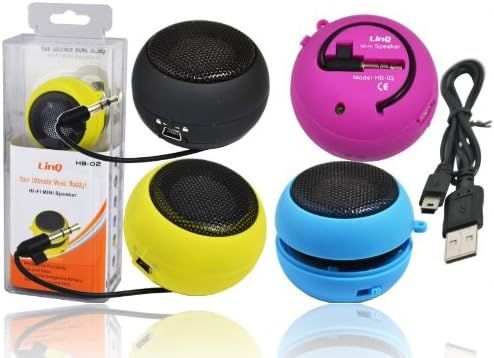
Image: Linq HB-02 Mini Speaker shown in its retail packaging, alongside other speakers and the included USB charging cable. This illustrates the typical contents and appearance of the product.
4. Produkto ypatybės
- Mini Pocket Speaker: Kompaktiškas ir nešiojamas dizainas, kad būtų lengva nešiotis.
- Visuotinis suderinamumas: Connects via 3.5mm audio jack to devices like iPhones, iPods, MP3/MP4 players, smartphones, notebooks, PSP, CD players, and more.
- Įkraunama baterija: Built-in lithium-ion battery for wireless use.
- Retractable Sound Resonator: Features a pneumatic suspension system that allows the acoustic membrane to be extended from one side, enhancing amplification and sound quality.
- USB įkrovimas: Conveniently recharges via the included USB cable.
- AmpLiftas garsas: Delivers excellent and pleasant acoustic performance despite its small size.

Image: Four Linq HB-02 Mini Speakers in pink, yellow, purple, and blue, shown with their retractable sound resonators extended, demonstrating the design and color variety.
5. Sąranka
5.1 Pradinis įkrovimas
- Prieš pirmą kartą naudodami, pilnai įkraukite garsiakalbį.
- Connect the small end of the included USB charging cable to the mini USB port on the speaker.
- Prijunkite standartinį USB laido galą prie USB maitinimo šaltinio (pvz., kompiuterio USB prievado, USB sieninio adapterio).
- Įkrovimo indikatoriaus lemputė (jei yra) šviečia įkrovimo metu ir užgęsta arba pakeičia spalvą, kai akumuliatorius visiškai įkraunamas.
5.2 Connecting to an Audio Device
- Locate the integrated 3.5mm audio jack on the speaker. This jack is often stored neatly within the speaker's body.
- Plug the 3.5mm audio jack into the headphone port of your audio device (e.g., smartphone, MP3 player, notebook).
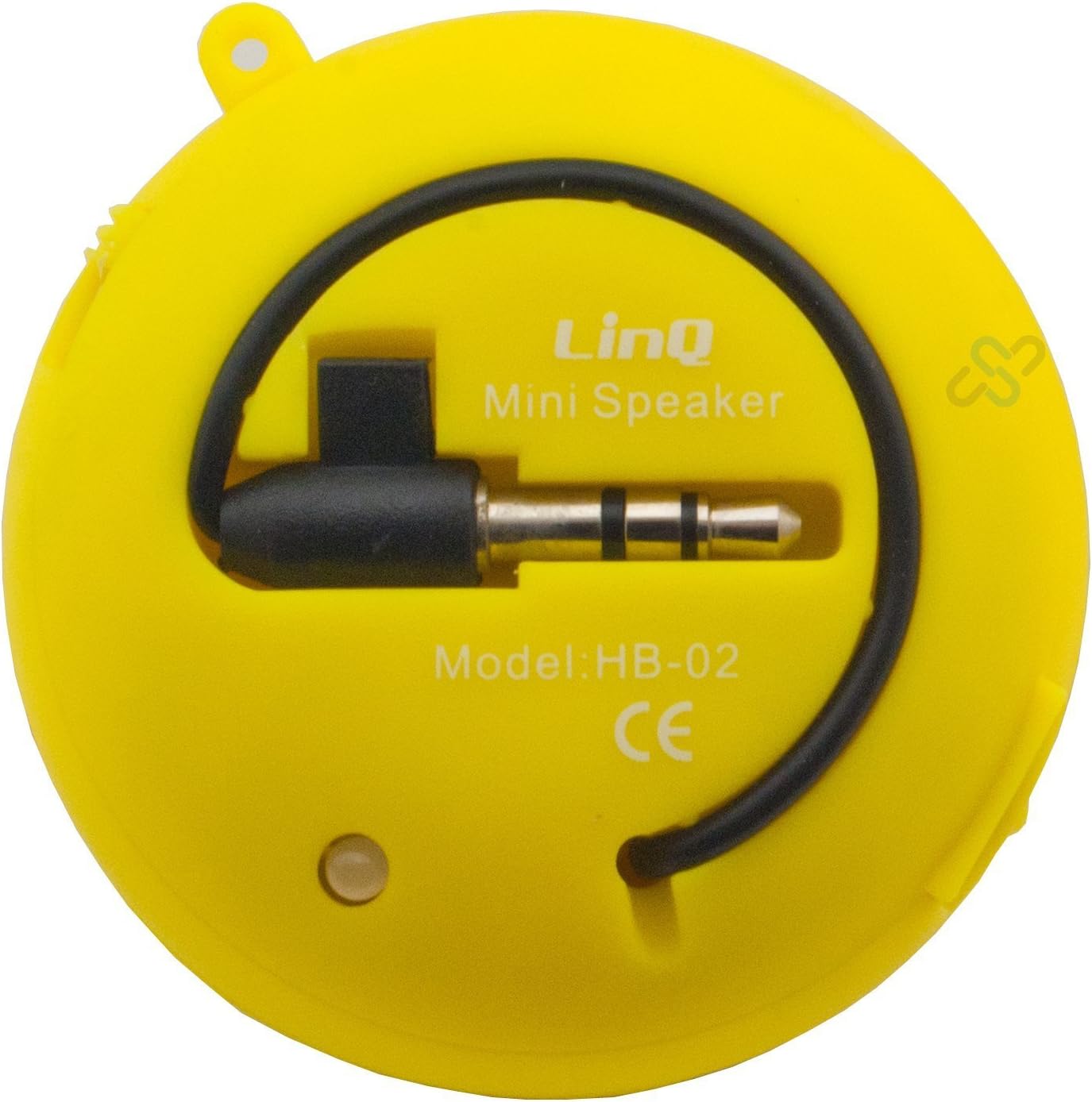
Image: A yellow Linq HB-02 Mini Speaker, viewed from the back, clearly showing the integrated 3.5mm audio jack coiled around the speaker and the model number 'HB-02'.
6. Naudojimo instrukcijos
6.1 Įjungimas / išjungimas
Locate the power switch on the speaker. Slide it to the 'ON' position to turn on the speaker. Slide it to the 'OFF' position to turn it off.
6.2 Garso grojimas
- Ensure the speaker is connected to your audio device via the 3.5mm jack.
- Įjunkite garsiakalbį.
- Start playing audio on your connected device. The sound will now be amplified through the Linq HB-02 speaker.
- Adjust the volume directly from your connected audio device. The speaker itself does not have volume controls.
6.3 Using the Retractable Sound Resonator
Dėl sustiprinto amplification and sound quality, gently pull and extend the acoustic membrane from one side of the speaker. This engages the 'Retractable Sound Resonator' system. To return to a more compact form, gently push the membrane back into the speaker body.
7. Priežiūra
- Valymas: Garsiakalbio išorę valykite minkšta, sausa šluoste. Nenaudokite skystų valiklių ar aerozolių.
- Saugykla: Kai nenaudojate garsiakalbio, laikykite jį vėsioje, sausoje vietoje, toliau nuo tiesioginių saulės spindulių ir ekstremalių temperatūrų.
- Akumuliatoriaus priežiūra: Norėdami pailginti baterijos veikimo laiką, venkite dažnai visiškai iškrauti garsiakalbį. Reguliariai jį įkraukite, net jei ilgą laiką nenaudojate.
8. Problemų sprendimas
8.1 Nėra garso
- Ensure the speaker is turned ON.
- Check if the 3.5mm audio jack is fully inserted into both the speaker and your audio device.
- Verify that your audio device's volume is turned up and not muted.
- Ensure the speaker's battery is charged.
8.2 Prasta garso kokybė
- Patikrinkite garso šaltinį, ar nėra kokybės problemų.
- Ensure the 3.5mm audio jack connection is secure.
- Try extending the 'Retractable Sound Resonator' for improved sound.
- Ensure the speaker is fully charged. Low battery can affect sound quality.
8.3 Speaker Not Charging
- Verify that the USB cable is correctly connected to both the speaker and the power source.
- Išbandykite kitą USB prievadą arba maitinimo adapterį.
- Įsitikinkite, kad USB laidas nepažeistas.
9. Specifikacijos
| Prekės ženklas | Linq |
| Modelis | HB-02 |
| Didžiausia išėjimo galia | 2 vatų |
| Ryšio technologija | AUX (3.5mm Jack), USB (for charging) |
| Montavimo tipas | Stalviršis |
| Garsiakalbio tipas | Nešiojamasis garsiakalbis |
| Varža | 8 omų |
| Maitinimo šaltinis | Maitinamas baterijomis (įkraunamas) |
| Svoris | Not specified, designed for portability. |
10. Garantija ir palaikymas
This product comes with a standard manufacturer's warranty. Please refer to the warranty card included with your purchase or contact your retailer for specific warranty terms and conditions. For technical support or further assistance, please contact the retailer or the manufacturer's customer service.