Įvadas
This manual provides essential information for the safe and efficient operation of your Sony KDL-55W900A 55-Inch 3D Internet LED HDTV. Please read these instructions thoroughly before using the television and retain them for future reference.
The Sony KDL-55W900A features a 55-inch display with 1080p resolution, 240Hz refresh rate, 3D capabilities, and integrated internet connectivity. It incorporates X-Reality PRO for enhanced detail and a TRILUMINOS display for brilliant colors.

Vaizdas: Priekyje view of the Sony KDL-55W900A 55-Inch 3D Internet LED HDTV, showcasindėl savo elegantiško dizaino ir ekrano.
Kas yra dėžutėje
Patikrinkite, ar prie televizoriaus yra visi šie daiktai:
- Television Unit (Sony KDL-55W900A)
- Nuotolinio valdymo pultas
- Televizoriaus staliukas
- Maitinimo laidas
- Active 3D Glasses (quantity may vary, typically 4 pairs)
- AA Batteries (2 for remote control)
- Dokumentacija (greito diegimo vadovas, saugos informacija)
Sąranka
1. Televizoriaus stovo pritvirtinimas
Place the TV screen face down on a soft, clean surface to prevent damage. Align the stand with the mounting holes on the bottom of the TV and secure it using the provided screws. Ensure the stand is firmly attached before proceeding.

Vaizdas: Diagram showing the dimensions of the Sony KDL-55W900A TV, including width, height, and depth.

Vaizdas: Šoninė view of the Sony KDL-55W900A TV, highlighting its slim profile.
2. Išorinių įrenginių prijungimas
Connect your external devices such as Blu-ray players, gaming consoles, or cable/satellite boxes to the appropriate input ports (HDMI, USB, etc.) on the rear of the TV.
- HDMI: Didelės raiškos garsui ir vaizdui.
- USB: Skirta USB atminties įrenginiams prijungti.
- Ethernet: Laidiniam interneto ryšiui.
- RF: Antenos arba kabelio prijungimui.
3. Maitinimo prijungimas
Prijunkite maitinimo laidą prie televizoriaus maitinimo įvesties, tada – prie sieninio lizdo.
4. Pradinės sąrankos vedlys
Upon first power-on, the TV will guide you through an initial setup process. This includes language selection, time zone, channel scanning, and network configuration.

Vaizdas: A person interacting with a tablet displaying a program guide, with the Sony TV visible in the background, demonstrating smart TV control.
Naudojimo instrukcijos
1. Pagrindinės televizoriaus funkcijos
- Galia: Norėdami įjungti / išjungti, paspauskite nuotolinio valdymo pulto arba televizoriaus maitinimo mygtuką.
- Įvesties pasirinkimas: Use the "Input" or "Source" button on the remote to switch between connected devices (HDMI 1, HDMI 2, TV, etc.).
- Apimtis: Adjust using the Volume Up/Down buttons.
- Kanalas: Change channels using the Channel Up/Down buttons or number pad.
2. Smart TV Features and Internet Connectivity
Your TV can connect to the internet via Wi-Fi or Ethernet. Access various online services and applications through the Smart TV interface.
- Navigate the Smart TV menu using the remote's directional pad.
- Select apps like Netflix, Hulu, or Amazon Prime Video for streaming content.
- Naudokite įmontuotą web browser for internet surfing.

Vaizdas: A family enjoying content on the Sony TV, with a smartphone mirroring its display to the TV, illustrating connectivity features.
3. Vaizdo ir garso nustatymai
Access the "Picture" and "Sound" menus to customize your viewklausymosi patirtis.
- Vaizdo režimai: Choose from Standard, Vivid, Cinema, Game, etc.
- Ryškumas, kontrastas, spalva: Koreguokite šiuos nustatymus pagal savo pageidavimus.
- X-Reality PRO: This feature enhances detail and texture.
- TRILUMINOS ekranas: Provides a wider spectrum of colors.
- Motionflow XR 960: Pagerina judesio aiškumą greitai judančiose scenose.

Vaizdas: A split-screen comparison demonstrating the enhanced detail and clarity provided by X-Reality PRO technology on the Sony TV.
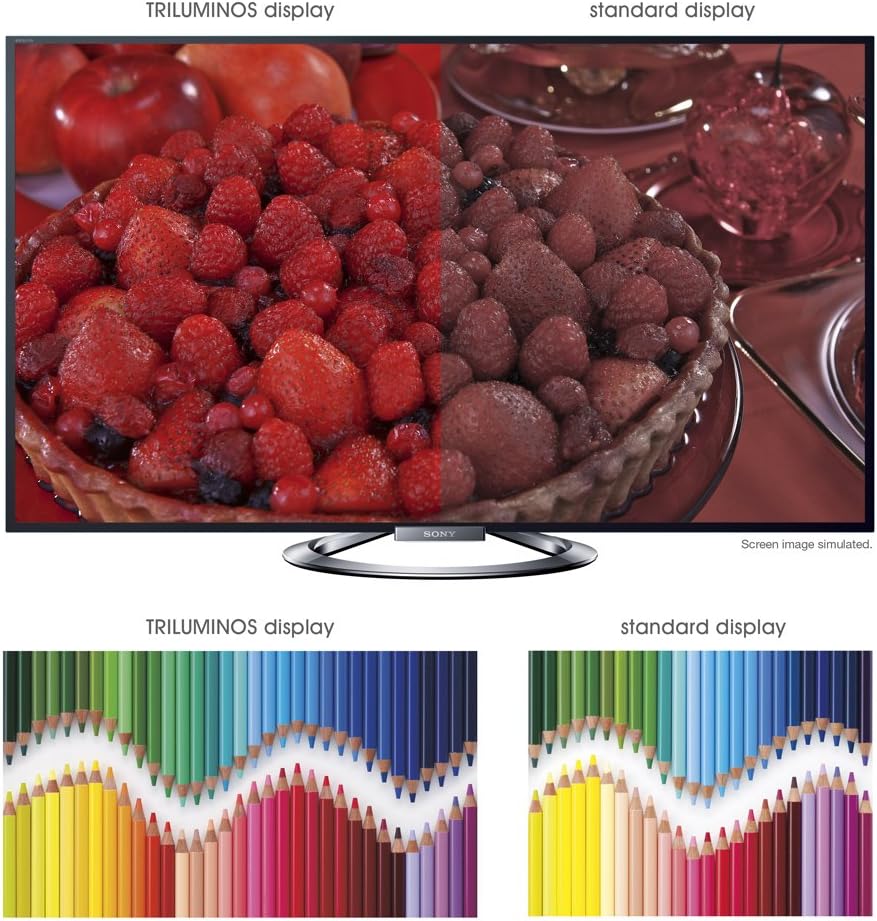
Vaizdas: A split-screen comparison illustrating the vibrant and expanded color palette of the TRILUMINOS display versus a standard display.
4D Viewing
To enjoy 3D content, ensure you have active 3D glasses and a 3D-compatible source (e.g., 3D Blu-ray player).
- Put on the active 3D glasses.
- Play 3D content from a connected source. The TV should automatically detect and switch to 3D mode.
- If 3D mode does not activate automatically, check the TV's picture settings for 3D options.
- Ensure 3D glasses are charged or have fresh batteries.
Priežiūra
1. Televizoriaus valymas
- Ekranas: Švelniai nuvalykite ekraną minkšta, sausa mikropluošto šluoste. Jei dėmės sunkiai įveikiamos, šiek tiek nuvalykite.ampNuvalykite šluostę vandeniu arba specializuotu ekrano valikliu (nepurkškite tiesiai ant ekrano).
- Kabinetas: Wipe the TV cabinet with a soft, dry cloth. Avoid using abrasive cleaners, waxes, or solvents.
- Prieš valydami visada atjunkite televizorių nuo elektros tinklo.
2. Programinės įrangos atnaujinimai
Periodically check for software updates to ensure optimal performance and access to the latest features.
- Navigate to the "Settings" menu on your TV.
- Look for "System Software Update" or similar options.
- Follow the on-screen instructions to download and install updates. Ensure the TV remains powered on during the update process.
3. 3D Glasses Care
- Clean lenses with a soft, dry cloth.
- Store glasses in a protective case when not in use.
- Replace batteries as needed (typically AA batteries).
Trikčių šalinimas
| Problema | Galima priežastis / sprendimas |
|---|---|
| Nėra galios |
|
| Nėra vaizdo / Juodas ekranas |
|
| Nėra garso |
|
| Tinklo ryšio problemos |
|
| 3D Image is Blurry or Not Working |
|
If the problem persists after attempting these solutions, please refer to the support section for further assistance.
Specifikacijos
| Funkcija | Detalė |
|---|---|
| Prekės ženklas | Sony |
| Modelio numeris | KDL-55W900A |
| Ekrano dydis | 55 colių |
| Ekrano technologija | LED |
| Rezoliucija | 1080p |
| Atnaujinimo dažnis | 240 Hz (Motionflow XR 960) |
| Krašto santykis | 16:9 |
| Ypatingos savybės | Flat, 3D Capable, Internet TV, X-Reality PRO, TRILUMINOS Display, Dynamic Edge LED Backlight |
| Ryšio technologija | Ethernet, HDMI, RF, USB, „Wi-Fi“ |
| Gaminio matmenys (su stovu) | 48.9 colių pločio x 29.9 colio aukščio x 11.8 colio gylio |
| Gaminio matmenys (be stovo) | 48.9 colių pločio x 28.5 colio aukščio x 2.5 colio gylio |
| Prekės svoris | 48.5 svaro |
| Reikalingos baterijos | 2 AA baterijos (nuotolinio valdymo pultui) |
| Pasiekiama pirmoji data | 7 m. sausio 2013 d |
Informacija apie garantiją
Your Sony KDL-55W900A television is covered by a limited warranty. The specific terms and duration of the warranty may vary by region and purchase date. Please refer to the warranty card included with your product or visit the official Sony support websvetainėje rasite išsamią informaciją apie garantiją, sąlygas ir nuostatas.
Išsaugokite pirkimo kvitą (įrodymą), nes jo reikės pateikiant pretenzijas dėl garantijos.
Pagalba klientams
For further assistance, technical support, or service inquiries regarding your Sony KDL-55W900A, please contact Sony customer support.
- Palaikymas internetu: Apsilankykite oficialioje „Sony“ palaikymo svetainėje websvetainė, kurioje rasite DUK, trikčių šalinimo vadovus, programinės įrangos atsisiuntimus ir susisiekimo galimybes.
- Pagalba telefonu: Žr. kontaktinę informaciją, pateiktą jūsų gaminio dokumentuose arba „Sony“ palaikymo svetainėje. website for regional telephone numbers.
When contacting support, please have your TV model number (KDL-55W900A) and serial number ready.


