Įvadas
The JENSEN CD-490 is a portable stereo CD player equipped with an AM/FM stereo radio and an auxiliary line-in. It features a top-loading CD player with an LED track display, skip/search/repeat functions, and programmable memory. The unit includes a telescopic antenna for radio reception, a foldable carrying handle for portability, and a stereo headphone jack. An auxiliary input allows connection of external audio devices such as MP3 players.
Svarbi saugos informacija
ĮSPĖJIMAS: Šiame gaminyje yra chemikalų, kuriuos Kalifornijos valstija žino apie vėžį, apsigimimus ar kitokią žalą reprodukcijai.
Naudodami elektros prietaisus, visada laikykitės pagrindinių saugos priemonių, kad sumažintumėte gaisro, elektros smūgio ir sužalojimo riziką. Išsaugokite šį vadovą ateičiai.
Kas įtraukta
- JENSEN CD-490 Portable Stereo CD Player with AM/FM Radio
- Kintamosios srovės maitinimo laidas
- Savininko vadovas
Produktas baigtasview
Familiarize yourself with the controls and features of your JENSEN CD-490 unit.
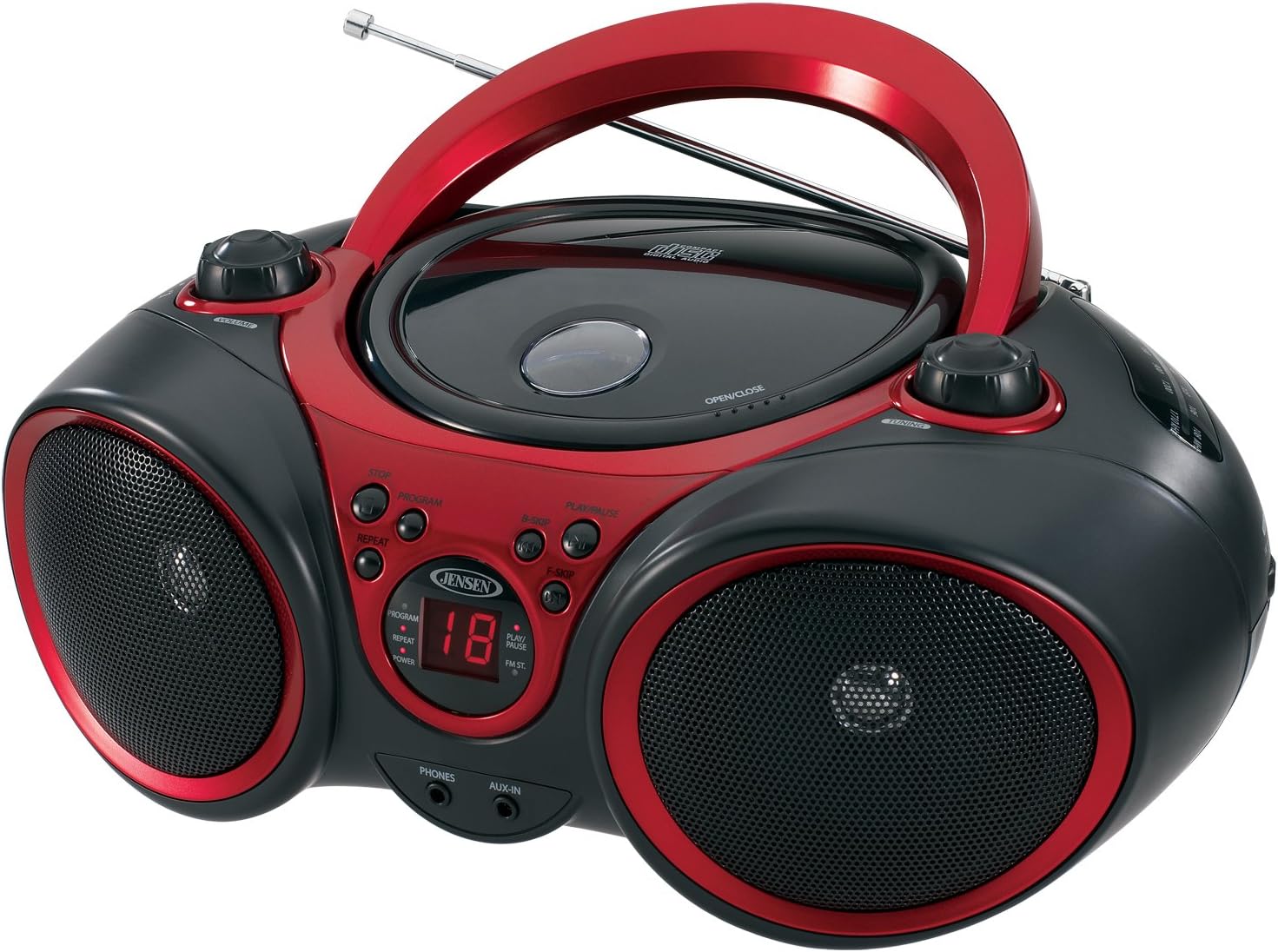
Vaizdas: priekis view of the JENSEN CD-490 unit, showing the CD compartment, speakers, control buttons, and display.
Priekinio skydelio valdikliai:
- GARSUMO rankenėlė: Reguliuoja garso išvesties lygį.
- STOP mygtukas: Sustabdo CD grojimą.
- PROGRAMOS mygtukas: Naudojamas CD takelių programavimui.
- Mygtukas REPEAT: Kartoja dabartinį takelį arba visus takelius.
- B-SKIP Button: Skips backward through CD tracks.
- PLAY/PAUSE mygtukas: Pradeda arba pristabdo CD atkūrimą.
- F-SKIP Button: Skips forward through CD tracks.
- Skystųjų kristalų ekranas: Shows CD track number and function indicators (PROGRAM, REPEAT, POWER, PLAY/PAUSE, FM ST).
- TELEFONAI Džekas: Skirtas prijungti stereo ausines.
- AUX-IN lizdas: Skirtas prijungti išorinius garso įrenginius.
Viršutinio skydelio valdikliai:
- CD skyrius: Top-loading area for compact discs.
- OPEN/CLOSE Latch: Atidaro CD skyriaus dangtelį.
- DERINIMO rankenėlė: Adjusts AM/FM radio frequency.
Side Panel Controls:
- FUNKCIJOS jungiklis: Selects between RADIO, CD/AUX IN, and OFF modes.
- AM/FM diapazono parinkiklis: Selects between AM and FM radio bands.
Galinio skydelio savybės:
- Kintamosios srovės įvestis: Kintamosios srovės maitinimo laido prijungimui.
- Baterijų skyrius: Holds 8 'C' (UM-2) batteries for portable operation.
- Teleskopinė antena: Ištraukiama antena FM radijo priėmimui.
Sąranka
Įrenginio maitinimas:
The CD-490 can be powered by either AC power or batteries.
Kintamosios srovės maitinimas:
- Ensure the unit is in the OFF position using the FUNCTION switch.
- Prijunkite kintamosios srovės maitinimo laidą prie kintamosios srovės maitinimo įvesties, esančios įrenginio gale.
- Plug the other end of the AC power cord into a standard AC 120V/60Hz wall outlet.
Baterijos galia:
- Ensure the unit is in the OFF position.
- Atidarykite baterijos skyriaus dangtį, esantį įrenginio apačioje.
- Insert 8 'C' (UM-2) size batteries (not included), ensuring correct polarity (+/-).
- Saugiai uždarykite akumuliatoriaus skyriaus dangtelį.
Antenos sąranka:
For optimal FM radio reception, fully extend the telescopic antenna. For AM reception, the unit has a built-in antenna, so no adjustment is typically needed.
Operating the CD Player
The CD-490 supports standard audio CDs and CD-R/RW discs.
- Set the FUNCTION switch to the 'CD/AUX IN' position.
- Press the 'OPEN/CLOSE' latch to open the CD compartment lid.
- Place an audio CD into the compartment with the label side facing up.
- Close the CD compartment lid firmly until it clicks. The LED display will show the total number of tracks on the CD.
- Press the 'PLAY/PAUSE' button to begin playback. The current track number will appear on the LED display.
- Adjust the 'VOLUME' knob to your desired listening level.
- To pause playback, press the 'PLAY/PAUSE' button. Press it again to resume.
- To skip to the next track, press the 'F-SKIP' button. To go back to the beginning of the current track or the previous track, press the 'B-SKIP' button.
- To stop playback, press the 'STOP' button.
Pakartojimo funkcija:
- During playback, press the 'REPEAT' button once to repeat the current track. The 'REPEAT' indicator will light up.
- Press the 'REPEAT' button a second time to repeat all tracks on the CD. The 'REPEAT' indicator will flash.
- Press the 'REPEAT' button a third time to cancel the repeat function.
Programuotas atkūrimas:
- In STOP mode, press the 'PROGRAM' button. The 'PROGRAM' indicator will light up and '00' will flash on the display.
- Use the 'F-SKIP' or 'B-SKIP' buttons to select your desired track.
- Press the 'PROGRAM' button again to confirm the track. The display will show the next program number.
- Pakartokite 2 ir 3 veiksmus, kad užprogramuotumėte iki 20 takelių.
- After programming, press the 'PLAY/PAUSE' button to start programmed playback.
- To cancel programmed playback, press the 'STOP' button twice.
Operating the AM/FM Radio
- Set the FUNCTION switch to the 'RADIO' position.
- Select either 'AM' or 'FM' using the AM/FM band selector switch.
- Extend the telescopic antenna for FM reception. Adjust its position for best reception.
- Pasukite „TUNING“ rankenėlę, kad pasirinktumėte norimą radijo stotį.
- Adjust the 'VOLUME' knob to your desired listening level.
Pagalbinės įvesties naudojimas
The AUX-IN jack allows you to connect an external audio device (e.g., MP3 player, smartphone) to play through the CD-490's speakers.
- Set the FUNCTION switch to the 'CD/AUX IN' position.
- Connect one end of a 3.5mm audio cable (not included) to the AUX-IN jack on the front of the CD-490.
- Connect the other end of the audio cable to the headphone jack or line-out jack of your external audio device.
- Turn on your external audio device and start playback.
- Adjust the volume on both your external device and the CD-490's 'VOLUME' knob for optimal sound.
Priežiūra ir priežiūra
- Laikykite įrenginį atokiau nuo tiesioginių saulės spindulių, šilumos šaltinių ir per didelio kiekio dulkių ar drėgmės.
- Prietaisą valykite minkštu, sausu skudurėliu. Nenaudokite abrazyvinių valiklių ar tirpiklių.
- To clean the CD lens, use a commercially available CD lens cleaner.
- Jei naudojate baterijas, išimkite jas, jei prietaisas nebus naudojamas ilgesnį laiką, kad išvengtumėte pratekėjimo.
Trikčių šalinimas
| Problema | Galima priežastis | Sprendimas |
|---|---|---|
| Nėra galios | Neprijungtas kintamosios srovės laidas; Baterijos išsikrovusios arba neteisingai įdėtos. | Patikrinkite kintamosios srovės laido jungtį; Pakeiskite baterijas arba įsitikinkite, kad jos tinkamai sujungtos. |
| CD does not play / 'NO DISC' error | CD inserted incorrectly; CD is dirty or scratched; Unit in wrong function mode. | Re-insert CD with label side up; Clean or replace CD; Set FUNCTION switch to 'CD/AUX IN'. |
| Prastas radijo priėmimas | Antena neištiesta / nesureguliuota; silpnas signalas. | Extend and adjust FM telescopic antenna; Reposition the unit for better signal. |
| Nėra garso iš AUX-IN | Audio cable not connected; Volume too low on external device or unit. | Ensure audio cable is securely connected; Increase volume on both devices. |
Specifikacijos
- Modelis: CD-490
- Maitinimo šaltinis: AC 120V/60Hz or 8 x 'C' (UM-2) batteries (not included)
- Išėjimo galia: 2 x 1.5 W RMS
- CD suderinamumas: CD, CD-R / RW
- Radijo grupės: AM/FM stereofoninis
- Ryšys: Pagalbinės įvesties lizdas, stereo ausinių lizdas
- Matmenys (P x P x A): 12.7 x 9.1 x 5.8 colio
- Svoris: 3.4 svaro
- Gamintojas: Spectra Merchandising International, Inc.
- Pirmas prieinamas: 14 m. gegužės 2003 d
Garantija ir palaikymas
Specific warranty information and customer support contact details are typically provided with your product packaging or on the manufacturer's official websvetainė. Norėdami gauti tiksliausią ir naujausią informaciją, žr. šiuos išteklius.
Produkto vaizdo įrašas
Peržiūrėkite šį oficialų produkto vaizdo įrašą, kad pamatytumėte daugiau informacijosview of the JENSEN CD-490 Stereo.
Vaizdo įrašas: Viršijimasview of the JENSEN CD-490 Portable Stereo CD Player, highlighting its features and design.


