1. Įvadas ir pabaigaview
This manual provides comprehensive instructions for the setup, operation, maintenance, and troubleshooting of your InFocus IN3124 Projector. Designed for clarity and ease of use, this guide will help you maximize your projector's performance and longevity.
The InFocus IN3124 is a high-performance projector featuring XGA (1024 x 868) native resolution, 4800 lumens of brightness, and a 3000:1 contrast ratio, making it suitable for various presentation environments. Its portable design allows for flexible placement and usage.
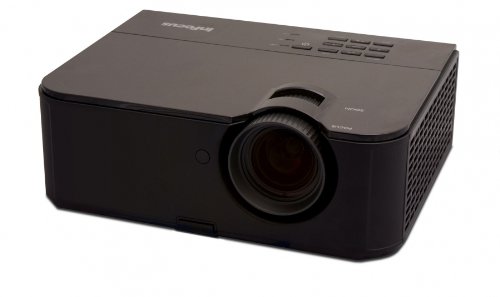
1 paveikslas: Priekinė pusė view of the InFocus IN3124 Projector, highlighting the main lens and the top-mounted control panel.
2. Sąranka
2.1 Išpakavimas
Carefully remove the projector and all accessories from the packaging. Verify that all components listed in the packing list are present. Retain the original packaging for future transport or storage.
2.2 Įdėjimas
Position the projector on a stable, level surface. Ensure adequate ventilation around the unit to prevent overheating. Maintain a clear path between the projector lens and the projection screen or surface. The optimal projection distance will vary based on the desired screen size.
2.3 Maitinimo prijungimas
- Prijunkite maitinimo laidą prie projektoriaus maitinimo įvesties.
- Kitą maitinimo laido galą įkiškite į įžemintą elektros lizdą.
2.4 Įvesties šaltinių prijungimas
The IN3124 projector supports various input sources. Connect your video source (e.g., computer, DVD player) to the appropriate input port on the projector. Common ports include VGA and HDMI (if available on your specific model).
- VGA: Use a VGA cable to connect to a computer's video output.
- HDMI: Use an HDMI cable for digital video and audio (check projector for HDMI port availability).
3. Naudojimo instrukcijos
3.1 Įjungimas / išjungimas
- Norėdami įjungti: Paspauskite projektoriaus valdymo skydelio arba nuotolinio valdymo pulto maitinimo mygtuką. Užsidegs maitinimo indikatoriaus lemputė.
- Norėdami išjungti: Press the power button twice. The projector will enter a cooling cycle before shutting down completely. Do not unplug the projector during the cooling cycle.
3.2 Fokusavimo ir priartinimo reguliavimas
Rotate the focus ring on the projector lens until the image appears sharp and clear. Use the zoom ring (if present) to adjust the image size to fit your screen.
3.3 Įvesties šaltinių pasirinkimas
Press the "Source" or "Input" button on the projector's control panel or remote control to cycle through available input sources (e.g., VGA, HDMI). Select the input corresponding to your connected device.
3.4 Menu Navigation and Keystone Correction
Use the menu buttons on the projector or remote to access the On-Screen Display (OSD). Navigate through the menu options to adjust settings such as brightness, contrast, color, and keystone correction. Keystone correction helps to square the image if the projector is not perfectly perpendicular to the screen.
4. Priežiūra
4.1 Objektyvo valymas
Gently wipe the projector lens with a soft, lint-free cloth specifically designed for optical surfaces. Do not use abrasive cleaners or excessive force, as this can scratch the lens.
4.2 Oro filtrų valymas
Regularly check and clean the projector's air filters to ensure proper airflow and prevent overheating. Refer to the projector's specific filter access instructions. Use a soft brush or vacuum cleaner to remove dust accumulation.
4.3 Lamp Pakeitimas
Projektorius lamp turi ribotą gyvavimo trukmę. Kai lamp life indicator appears or the image becomes dim, the lamp may need replacement. Consult the full service manual or manufacturer's website for detailed lamp replacement procedures and compatible lamp models. Always allow the projector to cool down completely before attempting lamp pakeitimas.
4.4 Saugykla
Kai projektorius ilgesnį laiką nenaudojamas, jį laikykite vėsioje, sausoje vietoje, toliau nuo tiesioginių saulės spindulių ir ekstremalių temperatūrų. Naudokite originalią pakuotę arba apsauginį dėklą, kad išvengtumėte dulkių ir pažeidimų.
5. Problemų sprendimas
This section addresses common issues you might encounter with your InFocus IN3124 Projector. For more complex problems, contact customer support.
- Nerodomas vaizdas:
- Įsitikinkite, kad projektorius įjungtas ir maitinimo indikatorius šviečia nuolat.
- Verify that the input source cable (VGA, HDMI) is securely connected to both the projector and the source device.
- Pasirinkite tinkamą įvesties šaltinį naudodami mygtuką „Šaltinis“.
- Check if the source device is outputting a signal.
- Dim or Faded Image:
- Koreguokite ryškumo ir kontrasto nustatymus OSD meniu.
- Įsitikinkite, kad lamp is not nearing the end of its lifespan.
- Clean the projector lens and air filters.
- Check the projection mode (e.g., Eco mode might reduce brightness).
- Vaizdas neryškus:
- Sureguliuokite fokusavimo žiedą ant projektoriaus objektyvo.
- Įsitikinkite, kad projektoriaus paviršius yra lygus, o projektorius stabilus.
- Check the resolution settings of your source device to match the projector's native resolution.
- Nuotolinio valdymo pultas neveikia:
- Pakeiskite nuotolinio valdymo pulto baterijas.
- Įsitikinkite, kad tarp nuotolinio valdymo pulto ir projektoriaus IR imtuvo nėra jokių kliūčių.
- Nukreipkite nuotolinio valdymo pultą tiesiai į projektorių.
6. Specifikacijos
The following table outlines the key technical specifications for the InFocus IN3124 Projector:
| Funkcija | Specifikacija |
|---|---|
| Modelio numeris | IN3124 |
| Ekrano raiška (natyvioji) | XGA (1024 x 868) |
| Ryškumas | 4800 liumenų |
| Kontrasto santykis | 3000:1 |
| Ekrano tipas | LCD, LCoS |
| Prekės svoris | 8.16 svaro (3.7 kg) |
| Gaminio matmenys (I x P x A) | 12.83 x 10.43 x 4.8 colio (32.59 x 26.49 x 12.19 cm) |
| Ypatinga funkcija | Nešiojami |
7. Garantija ir palaikymas
For detailed warranty information, please refer to the warranty card included with your product packaging or visit the official InFocus websvetainėje. Garantija paprastai taikoma gamybos defektams tam tikrą laikotarpį nuo įsigijimo datos.
If you encounter issues that cannot be resolved using the troubleshooting guide, or require technical assistance, please contact InFocus customer support. Contact details can usually be found on the manufacturer's websvetainėje arba savo produkto dokumentacijoje.


