1. Įvadas
This manual provides detailed instructions for the installation, configuration, and operation of your NETGEAR ProSAFE XS712T 12-Port 10GBase-T Gigabit Smart Managed Switch. Designed for small to medium-sized businesses (SMBs), this switch offers high-performance 10-Gigabit connectivity, advanced Layer 2 features, and easy web-based management to meet diverse networking needs.
2. Pagrindinės savybės
- Advanced VLAN features such as MAC (Media Access Control), protocol-based VLAN and guest VLAN.
- Advanced QoS (Quality of Service) including Q-in-Q.
- Dynamic VLAN assignment - Increases security by imposing consistent policy and user credentials across the network, regardless of where users connect.
- MLD snooping - Increases network efficiency by forwarding multicast traffic to designated hosts only, rather than flooding multicast packets across all ports.
- Security management.
- IPv6 for management, QoS and ACL.
- Lengva naudoti Web- pagrįstas valdymas.
3. Pakuotės turinys
Patikrinkite, ar jūsų pakuotėje yra šie elementai:
- NETGEAR ProSAFE XS712T 12-Port 10GBase-T Gigabit Smart Managed Switch
- Maitinimo laidas
- Stovo tvirtinimo rinkinys (jei taikoma)
- Diegimo vadovas
4. Produktas baigtasview
The NETGEAR ProSAFE XS712T switch features a robust design with multiple ports and indicators for efficient network management.
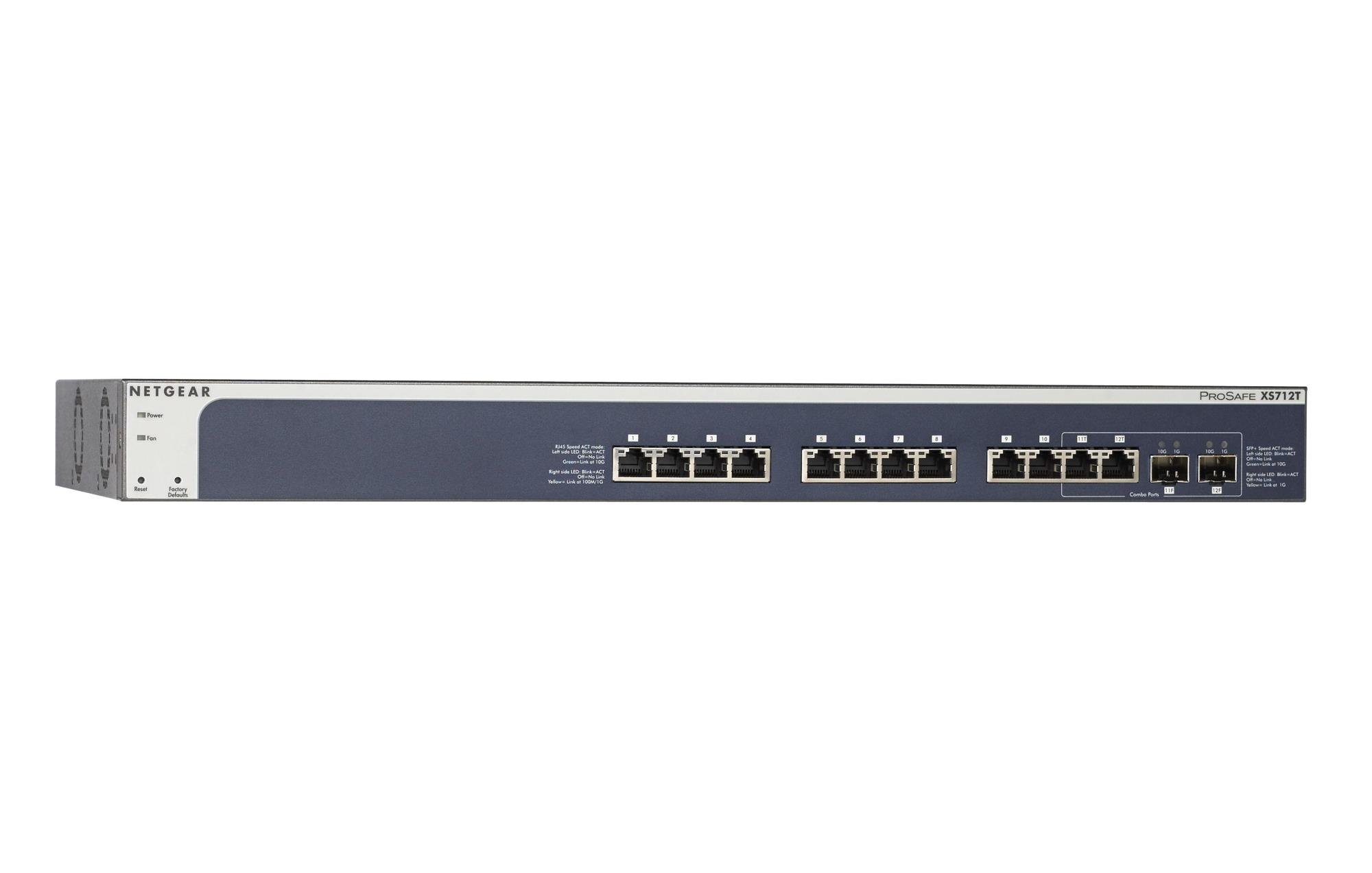
Figure 1: Front Panel of NETGEAR ProSAFE XS712T Switch
This image displays the front panel of the NETGEAR ProSAFE XS712T switch, showing the 12 10GBase-T ports, two combo SFP+ ports, and LED indicators for power, fan status, and port activity. The reset and factory defaults buttons are also visible on the left side.
Priekinio skydelio komponentai:
- Maitinimo šviesos diodas: Nurodo įrenginio maitinimo būseną.
- Fan LED: Indicates the operational status of the cooling fan.
- Atkūrimo mygtukas: Used to restart the switch.
- Factory Defaults Button: Used to restore the switch to its factory default settings.
- RJ45 prievadai (1–10): 10GBase-T Ethernet ports for high-speed network connections. Each port has associated Link/Act LEDs (Left side LED: Blink=ACT, Off=No Link, Green=Link at 100M/1G; Right side LED: Blink=ACT, Off=No Link, Yellow=Link at 10G).
- Combo Ports (11, 12): These ports can function as either 10GBase-T RJ45 ports or SFP+ fiber ports. Each combo port has associated SFP+ Speed/ACT LEDs (Left side LED: Blink=ACT, Off=No Link, Green=Link at 10G; Right side LED: Blink=ACT, Off=No Link, Yellow=Link at 1G).
5. Sąranka
5.1 Stovo montavimas (neprivaloma)
If you intend to install the switch in a standard 19-inch equipment rack, use the provided rack-mount kit. Secure the mounting brackets to the sides of the switch using the screws provided. Then, attach the switch to the rack using appropriate rack screws.
5.2 Darbastalio išdėstymas
For desktop use, ensure the switch is placed on a flat, stable surface. Allow adequate ventilation around the device to prevent overheating.
5.3 Maitinimo jungtis
- Prijunkite vieną pateikto maitinimo laido galą prie kintamosios srovės maitinimo įvado, esančio jungiklio galiniame skydelyje.
- Kitą maitinimo laido galą įkiškite į įžemintą elektros lizdą.
- Įsitikinkite, kad priekiniame skydelyje šviečia maitinimo šviesos diodas, rodantis, kad jungiklis gauna maitinimą.
5.4 Tinklo ryšiai
- Connect your network devices (servers, workstations, other switches) to the RJ45 ports (1-10) using appropriate Ethernet cables (Cat6a or higher for 10G speeds).
- For fiber optic connections, insert compatible SFP+ transceivers into the combo SFP+ ports (11F, 12F) and connect fiber optic cables.
- Observe the Link/Act LEDs for each connected port. A solid green or yellow light indicates a successful link, and blinking indicates activity.
6. Naudojimo instrukcijos
6.1 Pagrindinės operacijos
The NETGEAR ProSAFE XS712T is a plug-and-play device for basic connectivity. Once powered on and connected, it will automatically detect and configure connected devices for optimal performance.
6.2 Web-Pagrindinis valdymas
Norėdami atlikti išplėstinę konfigūraciją ir valdymą, eikite į komutatoriaus web- pagrįsta sąsaja:
- Įsitikinkite, kad jūsų kompiuteris prijungtas prie komutatoriaus.
- Atidarykite a web browser and enter the default IP address of the switch (refer to the Quick Start Guide or NETGEAR support for the specific default IP).
- Log in using the default username and password (typically "admin" and "password" or similar, check documentation).
- Iš web interface, you can configure VLANs, QoS settings, security features, and monitor network status.
7. Priežiūra
- Firmware atnaujinimai: Reguliariai tikrinkite NETGEAR palaikymo svetainę websvetainę, kurioje rasite naujausius programinės įrangos atnaujinimus, kad užtikrintumėte optimalų našumą ir saugumą.
- Valymas: Jungiklį laikykite švarų ir be dulkių. Valymui naudokite minkštą, sausą šluostę. Nenaudokite skystų ar aerozolinių valiklių.
- Vėdinimas: Įsitikinkite, kad ventiliacijos angos nėra užblokuotos, kad išvengtumėte perkaitimo.
- Kabelių valdymas: Organize network cables to prevent strain on ports and improve airflow.
8. Problemų sprendimas
- Nėra galios: If the Power LED is off, ensure the power cord is securely connected to both the switch and the electrical outlet. Try a different outlet or power cord.
- Nėra nuorodos prievade: Check the Ethernet cable connection at both ends. Try a different cable or port. Ensure the connected device is powered on and functioning correctly.
- Mažas tinklo greitis: Verify that you are using appropriate cables (Cat6a or higher for 10G). Check for network congestion or misconfigurations in the switch's settings (e.g., QoS).
- Nepavyksta pasiekti Web Sąsaja: Ensure your computer's IP address is in the same subnet as the switch's IP address. Verify the switch's IP address and login credentials. Try resetting the switch to factory defaults if necessary (this will erase all custom configurations).
- Ventiliatoriaus triukšmas: The switch may generate fan noise during operation, especially under heavy load or in warmer environments. This is normal. Ensure proper ventilation.
9. Specifikacijos
| Funkcija | Detalė |
|---|---|
| Prekės ženklas | NETGEAR |
| Modelio numeris | XS712T-100NES |
| Prievadų skaičius | 12 (10GBase-T RJ45, 2 Combo SFP+) |
| Duomenų perdavimo sparta | 10000 megabitų per sekundę (10 gigabitas) |
| Sąsajos tipas | RJ45, SFP+ |
| Bylos medžiaga | Plastikiniai |
| Prekės svoris | 1.32 svaro |
| Gaminio matmenys | 22.44 x 3.54 x 13.74 colio |
| Viršutinės temperatūros įvertinimas | 40 laipsniai Celsijaus |
| RAM | 2 MB |
| Kalba | anglų kalba |
10. Garantija ir palaikymas
For warranty information, technical support, and product registration, please visit the official NETGEAR support website or refer to the warranty card included in your product package. Keep your purchase receipt for warranty claims.
Internetiniai ištekliai:


