1. Įvadas
This manual provides instructions for the APEX LD200RM remote control, designed for use with various APEX LCD and LED television models. This remote control offers full functionality for your compatible APEX television, ensuring convenient operation of all features.
Compatible APEX TV Models:
- LD3249
- LD3288, LD3288T, LD3288M
- LD4077, LE4077M
- LD4088
- LD4688
- LE3212, LE3212D
- LE4012
- LE4612
- LE3242
- LE3942
- LE40B12
- LE4243
- LE4643
- LE5043
2. Sąranka
2.1 Akumuliatoriaus įdėjimas
The APEX LD200RM remote control requires two (2) AA batteries for operation. Follow these steps to install the batteries:
- Nuotolinio valdymo pulto gale raskite baterijų skyriaus dangtelį.
- Paspauskite skirtuką žemyn ir nustumkite dangtelį.
- Įdėkite dvi AA baterijas, užtikrindami, kad teigiamas (+) ir neigiamas (-) poliai teisingai sutaptų su žymėjimais skyriaus viduje.
- Stumkite baterijų skyriaus dangtelį atgal į vietą, kol jis tvirtai spragtelės.
Pastaba: Visada keiskite abi baterijas vienu metu. Nemaišykite senų ir naujų baterijų arba skirtingų tipų baterijų.
2.2 Pradinis naudojimas
The APEX LD200RM remote control is an original replacement and typically does not require any programming or pairing. Once batteries are installed, point the remote control towards your compatible APEX television and begin operation.
3. Naudojimo instrukcijos
This section details the functions of the buttons on your APEX LD200RM remote control.
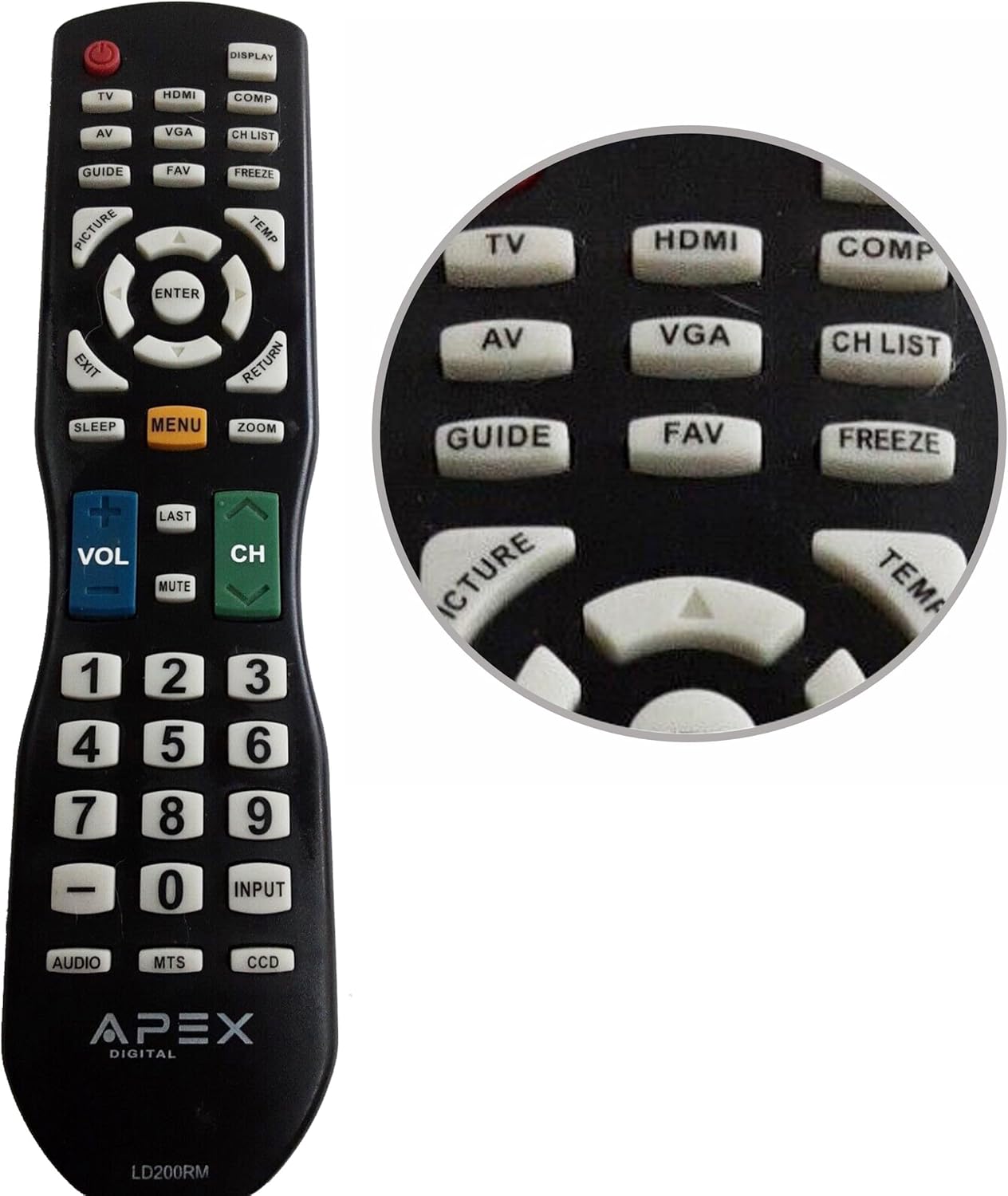
Figure 1: APEX LD200RM Remote Control Layout. This image displays the entire remote control, highlighting the arrangement of its various function buttons, including power, input selection, navigation, volume, channel, and numeric keypad.

Figure 2: Close-up of APEX LD200RM Remote Control Top Buttons. This image provides a detailed view of the upper section of the remote, focusing on buttons such as TV, HDMI, AV, VGA, COMP, CH LIST, DISPLAY, GUIDE, FAV, FREEZE, PICTURE, TEMP, MENU, ENTER, EXIT, RETURN, SLEEP, and ZOOM.
3.1 Maitinimo ir įvesties pasirinkimas
- MAITINIMO (raudonas mygtukas): Įjungia arba išjungia televizorių.
- TV: Selects the TV tuner input.
- HDMI: Selects the HDMI input.
- APIE: Selects the Audio/Video input.
- VGA: Selects the VGA input.
- COMP: Selects the Component video input.
- DISPLAY: Rodo ekrane rodomą informaciją.
3.2 Channel and Volume Control
- VOL (+/-): Padidina arba sumažina garsumo lygį.
- CH (Up/Down): Perjungia televizijos kanalą aukštyn arba žemyn.
- PASKUTINĖ: Grįžta prie ankstesnio viewed kanalas.
- Nutildyti: Nutildo arba įjungia televizoriaus garsą.
- CH SĄRAŠAS: Rodo kanalų sąrašą.
3.3 Meniu ir naršymas
- MENIU: Atidaro pagrindinį televizoriaus meniu.
- Įveskite: Confirms a selection within the menu.
- Rodyklių mygtukai (aukštyn / žemyn / kairėn / dešinėn): Navigates through menu options and adjusts settings.
- UŽDARYTI: Išeina iš dabartinio meniu arba ekrano rodinio.
- GRĄŽINIMAS: Grįžta į ankstesnį meniu arba ekraną.
3.4 Numeric Keypad and Special Functions
- 0-9 (Numeric Buttons): Tiesiogiai įvedami kanalų numeriai.
- INPUT: Perjungia galimus įvesties šaltinius.
- VADOVAS: Rodomas elektroninis programų gidas (jei yra).
- FAV: Prieina prie mėgstamų kanalų.
- ŠALDYTI: Sustabdo dabartinį vaizdą ekrane.
- NUOTRAUKA: Reguliuoja vaizdo nustatymus.
- TEMP: (Function may vary by model, often related to picture temperature or a specific mode).
- MIEGAS: Nustato miego laikmatį.
- ZOOM: Reguliuoja ekrano priartinimo lygį.
- GARSO: Selects audio modes or tracks.
- MTS: Multi-channel Television Sound (stereo/SAP).
- DCC: Closed Captioning Display.
4. Priežiūra
4.1 Akumuliatoriaus keitimas
When the remote control's performance degrades or it stops responding, it is likely time to replace the batteries. Refer to Section 2.1 for detailed battery installation instructions. Always use fresh AA batteries.
4.2 Valymas
Nuotolinio valdymo pultą valykite minkšta, sausa šluoste. Jei nešvarumai sunkiai įveikiami, šiek tiek nuvalykite.ampNuvalykite šluostę vandeniu arba švelniu, neabrazyviniu valikliu. Venkite naudoti stiprias chemines medžiagas ar abrazyvines medžiagas, nes jos gali pažeisti nuotolinio valdymo pulto paviršių arba vidinius komponentus.
4.3 Saugykla
Store the remote control in a cool, dry place away from direct sunlight and extreme temperatures. If the remote will not be used for an extended period, it is advisable to remove the batteries to prevent leakage and potential damage.
5. Problemų sprendimas
- Nuotolinio valdymo pultas nereaguoja:
- Įsitikinkite, kad baterijos įdėtos teisingai, laikantis teisingo poliškumo (+/-).
- Pakeiskite senas baterijas naujomis AA baterijomis.
- Check for any obstructions between the remote control and the television's infrared sensor.
- Ensure you are within the effective range of the television's IR receiver.
- Kai kurie mygtukai neveikia:
- Tai gali rodyti, kad baterijos išsikrovė. Pakeiskite baterijas.
- Įsitikinkite, kad nuotolinio valdymo pultas švarus ir po mygtukais nėra jokių nešvarumų.
- Verify that the button function is applicable to your specific TV model. Some functions may not be supported by all compatible TVs.
- Television is not turning on/off:
- Confirm the television is plugged into a working power outlet.
- Try using the power button directly on the television to rule out a TV issue.
6. Specifikacijos
| Funkcija | Detalė |
|---|---|
| Modelio numeris | LD200RM |
| Prekės ženklas | Viršūnė |
| Suderinami įrenginiai | APEX LCD & LED Televisions |
| Maitinimo šaltinis | 2 x AA baterijos (į komplektą neįeina) |
| Gaminio matmenys | 10 x 6 x 2 colio (apytiksliai) |
| Prekės svoris | 3.2 uncijos (apytiksliai) |
| Spalva | Juoda |
| Ypatinga funkcija | Ergonomiškas dizainas |
7. Informacija apie garantiją
This APEX LD200RM remote control typically comes with a 30-day warranty from the date of purchase. This warranty covers manufacturing defects. For specific details regarding warranty claims, returns, or replacements, please refer to your purchase documentation or contact the seller directly.
8. Parama
If you encounter issues not covered in this manual or require further assistance, please contact the retailer or the manufacturer's customer support. When contacting support, please have your product model number (LD200RM) and your television model number readily available.


