1. Produktas baigtasview
The D-Link AC1200 Wi-Fi Router (DIR-850L) delivers next-generation wireless speed and coverage to all your Wi-Fi devices. With wireless dual-band speeds of 300 Mbps (2.4 GHz) and 867 Mbps (5 GHz), the DIR-850L avoids interference to deliver fast wireless speeds, improved coverage, and reliable connections. This router is ideal for streaming HD video, gaming, connecting multiple devices, and watching shows on your TV simultaneously. The DIR-850L is also backward compatible with existing wireless 802.11a/g/n devices for seamless connectivity. D-Link’s free mobile apps provide easy setup, remote monitoring, and access to content from anywhere on your smartphone or tablet.
Pagrindinės funkcijos:
- Next Generation Wireless Technology: Wireless AC1200 for optimized performance and reliable coverage, delivering high-quality HD video streaming, gaming, and file pervedimai.
- Atgalinis suderinamumas: Compatible with wireless 802.11a/g/n devices.
- Kelių įrenginių ryšys: Connect more devices with four Gigabit Ethernet ports.
- Žiniasklaidos bendrinimas: Stream and share files using the USB Share Port and free mobile app.
- Lengvas nustatymas: Intelligent browser wizard and Quick Router Setup Mobile app for simplified installation.
- Išplėstinė sauga: Preset security with advanced WPA2 encryption.
2. Pakuotės turinys
Ensure all items are present in your D-Link DIR-850L package:
- D-Link Wireless AC 1200 Dual-Band Gigabit Router (DIR-850L)
- Maitinimo adapteris
- Ethernet kabelis
- Greito montavimo vadovas
Jei trūksta kokių nors daiktų arba jie pažeisti, susisiekite su pardavėju arba „D-Link“ palaikymo tarnyba.
3. Aparatūra baigtaview
Familiarize yourself with the physical components and indicators of your DIR-850L router.

3.1 pav.: priekis View. Shows the cylindrical design of the router with the D-Link logo and LED indicators for Power and Internet status.

3.2 pav.: šonas View. Illustrates the side of the router, highlighting the USB port for storage sharing and the Wi-Fi Protected Setup (WPS) button.
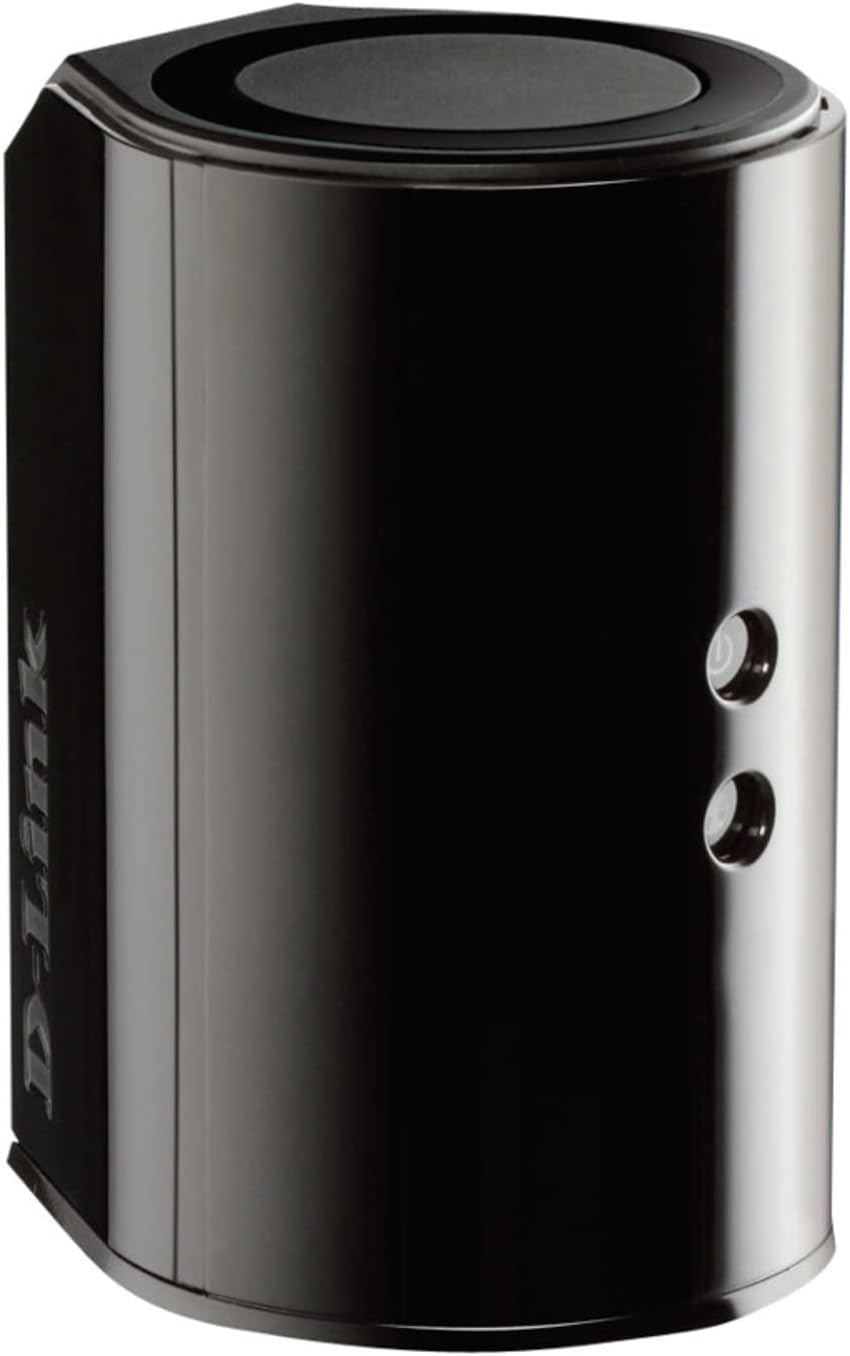
3.3 pav.: galinis View. Displays the back panel of the router, featuring the WAN (Internet) port, four LAN (Ethernet) ports, and the power input connector.
LED indikatoriai:
- Maitinimo šviesos diodas: Solid green indicates the router is powered on. Blinking green indicates a firmware upgrade or reset.
- Interneto šviesos diodas: Solid green indicates a successful connection to the internet. Blinking green indicates data activity. Amber indicates no internet connection.
Prievadai ir mygtukai:
- WAN (Internet) Port: Prisijungia prie modemo, kad galėtumėte naudotis internetu.
- LAN prievadai (1–4): Prijunkite laidinius įrenginius, tokius kaip kompiuteriai, žaidimų konsolės arba tinklo saugykla.
- USB prievadas: Connect a USB storage device for network sharing.
- Maitinimo jungtis: Jungiamas prie pridedamo maitinimo adapterio.
- Atkūrimo mygtukas: Paspauskite ir palaikykite 10 sekundžių, kad atkurtumėte gamyklinius numatytuosius nustatymus.
- WPS mygtukas: Initiates Wi-Fi Protected Setup for easy wireless connection of compatible devices.
4. Sąranka
Follow these steps to set up your D-Link DIR-850L router:
- Maršrutizatoriaus padėtis: Maršrutizatorių pastatykite centrinėje namų vietoje, atokiau nuo kliūčių ir įrenginių, kurie gali sukelti trikdžius (pvz., belaidžių telefonų, mikrobangų krosnelių).
- Prisijungimas prie modemo:
- Išjunkite modemą.
- Connect one end of the provided Ethernet cable to the WAN (Internet) port on your DIR-850L router.
- Prijunkite kitą Ethernet kabelio galą prie modemo Ethernet prievado.
- Maitinimas:
- Power on your modem and wait for its indicator lights to stabilize (usually indicating an active internet connection).
- Connect the power adapter to the power connector on your DIR-850L router and plug it into a power outlet.
- Wait for the Power LED on the router to turn solid green. The Internet LED should also turn green, indicating a successful connection.
- Prijunkite įrenginį:
- Laidinis ryšys: Connect an Ethernet cable from one of the LAN ports (1-4) on the router to your computer's Ethernet port.
- Belaidis ryšys: On your Wi-Fi enabled device (laptop, smartphone, tablet), search for available Wi-Fi networks. Select the network name (SSID) found on the Wi-Fi Configuration Card (usually a sticker on the bottom of the router) and enter the Wi-Fi password.
- Paleiskite sąrankos vedlį:
- Atidarykite a web browser (e.g., Chrome, Firefox) on the connected device.
- Tipas
http://dlinkrouter.localor192.168.0.1į adreso juostą ir paspauskite Enter. - Follow the on-screen instructions of the D-Link Setup Wizard to configure your internet connection and personalize your Wi-Fi network name (SSID) and password.
Setup Video (General D-Link Router Overview):
Video 4.1: D-Link Wireless AC 1200 Mbps Home Cloud App-Enabled Dual-Band Gigabit Router Overview. Šiame vaizdo įraše pateikiama bendra informacijaview of D-Link routers, including the DIR-850L, and highlights their features and target users. While not a step-by-step setup guide, it offers insights into the router's capabilities.
5. Naudojimo instrukcijos
Once your D-Link DIR-850L router is set up, you can manage and optimize your network.
Įrenginių prijungimas:
- Belaidis ryšys: Use the Wi-Fi network name (SSID) and password you configured during setup to connect your wireless devices. The router supports both 2.4 GHz and 5 GHz bands.
- Laidinis: Connect devices directly to the LAN ports using Ethernet cables for a stable, high-speed connection.
Prieiga prie maršrutizatoriaus nustatymų:
To access advanced settings, open a web naršyklę ir eikite į http://dlinkrouter.local or 192.168.0.1. Log in with the administrator password you set during the initial setup. From here, you can:
- Change Wi-Fi settings (SSID, password, security type).
- Configure guest Wi-Fi networks.
- Nustatykite tėvų kontrolę.
- Tvarkykite prijungtus įrenginius.
- Atnaujinkite programinę-aparatinę įrangą.
Using the USB Share Port:
Plug a USB storage device (e.g., flash drive, external hard drive) into the USB port on the router. You can then access and share files on this storage device across your network using the D-Link SharePort Mobile app or through network shares on your computer.
6. Priežiūra
Reguliarus maršrutizatoriaus aptarnavimas padeda užtikrinti optimalų našumą ir ilgaamžiškumą.
- Perkrovimas: Periodiškai paleiskite maršrutizatorių iš naujo (atjunkite jį nuo maitinimo šaltinio 10 sekundžių, tada vėl prijunkite), kad išvalytumėte jo atmintį ir atnaujintumėte tinklo ryšius. Tai gali išspręsti nedideles našumo problemas.
- Firmware atnaujinimai: Check the D-Link support website for firmware updates. Firmware updates can improve performance, add new features, and fix security vulnerabilities. Follow the instructions provided by D-Link carefully when performing updates.
- Valymas: Keep the router clean and free from dust. Use a soft, dry cloth to wipe the exterior. Do not use liquid cleaners or aerosols. Ensure ventilation openings are not blocked.
- Saugumas: Regularly change your Wi-Fi password and router administrator password to enhance network security.
7. Problemų sprendimas
If you encounter issues with your D-Link DIR-850L router, refer to the following common problems and solutions:
Nėra interneto ryšio:
- Patikrinkite kabelius: Įsitikinkite, kad visi Ethernet kabeliai yra tvirtai prijungti prie maršrutizatoriaus ir modemo.
- Modemo būsena: Patikrinkite, ar jūsų modemas veikia tinkamai ir ar jis turi aktyvų interneto ryšį.
- Perkrovimo seka: Power off your modem, then your router. Wait 30 seconds, then power on the modem first. Once the modem is fully online, power on the router.
- Interneto paslaugų teikėjo kontaktinis asmuo: If the issue persists, contact your Internet Service Provider (ISP) to confirm service status.
Mažas „Wi-Fi“ greitis:
- Maršrutizatoriaus išdėstymas: Move the router to a more central location, away from obstacles and interference sources.
- Kanalų trukdžiai: Prisijunkite prie maršrutizatoriaus web interface and try changing the Wi-Fi channel for both 2.4 GHz and 5 GHz bands to a less congested one.
- Prijungti įrenginiai: Disconnect unused devices from your network.
- Firmware: Įsitikinkite, kad jūsų maršrutizatoriaus programinė įranga yra atnaujinta.
Nepavyksta prisijungti prie „Wi-Fi“:
- Teisingas slaptažodis: Double-check that you are entering the correct Wi-Fi password (case-sensitive).
- SSID transliacija: Ensure the router is broadcasting its Wi-Fi network name (SSID).
- WPS: If your device supports WPS, try using the WPS button on the router to connect.
- Atstatyti maršrutizatorių: As a last resort, perform a factory reset (see Hardware Overview) and reconfigure the router.
8. Specifikacijos
| Funkcija | Aprašymas |
|---|---|
| Modelio pavadinimas | DIR-850L |
| Belaidis tipas | 802.11ac (suderinama atgal su 802.11a/b/g/n) |
| Dažnių juostos klasė | Dviejų juostų (2.4 GHz ir 5 GHz) |
| Belaidis greitis | Iki 300 Mbps (2.4 GHz), iki 867 Mbps (5 GHz) |
| Ethernet prievadai | 4 x gigabito LAN, 1 x gigabito WAN |
| USB prievadas | 1 x USB 2.0 (for SharePort) |
| Antenos tipas | Vidinis |
| Operacinės sistemos suderinamumas | Windows® 8, 7, Vista®, XP SP2, or Mac OS® X (v10.4 or higher) |
| Matmenys (IxPxH) | 4.45 x 3.43 x 5.72 colio |
| Prekės svoris | 9.9 uncijos (0.62 svaro) |
| Spalva | Juoda |
9. Garantija ir palaikymas
„D-Link“ gaminiams taikoma ribota garantija. Dėl konkrečių garantijos sąlygų žr. prie gaminio pridėtą garantijos informaciją arba apsilankykite oficialioje „D-Link“ svetainėje. websvetainę.
For technical support, product registration, and access to the latest drivers, firmware, and user manuals, please visit the D-Link support portal:
D-Link palaikymas Websvetainė: www.dlink.com/support
You may also find helpful resources and community forums on the D-Link websvetainę.


