1. Įvadas
The Kinesis Freestyle2 is an ergonomic keyboard designed to enhance comfort and productivity by adapting to individual body types and preferences. Its unique split design allows for adjustable separation, splay, and tenting, promoting natural hand, wrist, and forearm positions to reduce muscle tension and strain.
This keyboard features a standard Windows layout, including dedicated hotkeys for common functions like Cut, Copy, and Paste, as well as multimedia controls. An embedded numeric 10-key further supports productivity. The Freestyle2 utilizes low-force membrane key switches with tactile feedback, engineered to minimize finger fatigue and impact during typing.
The Freestyle2 is a plug-and-play device, requiring no special software or drivers for operation with Windows 7-10, Linux, and Chrome operating systems.
2. Sąranka
2.1. Pakuotės turinys
- Kinesis Freestyle2 USB Wired Keyboard (Standard Windows Layout)
- Detachable Pivot Tether (for adjustable splay)
- Greitos pradžios vadovas
2.2. Klaviatūros prijungimas
- Kompiuteryje raskite laisvą USB prievadą.
- Plug the USB cable from the Freestyle2 keyboard into the USB port.
- The keyboard is plug-and-play and should be recognized automatically by your operating system (Windows 7-10, Linux, Chrome). No additional drivers are typically required.
2.3. Adjusting Keyboard Separation and Splay
The Freestyle2 keyboard consists of two independent modules connected by a cable, allowing for flexible positioning.
- Atskyrimas: Gently pull the two keyboard modules apart to achieve your desired separation, up to 9 inches. This allows you to position your hands and wrists in a more natural, shoulder-width alignment.
- Splay: The detachable pivot tether, located at the top center of the keyboard, allows you to adjust the splay angle of the modules. This helps to keep your wrists straight and reduce ulnar deviation. Experiment with different angles to find the most comfortable position.
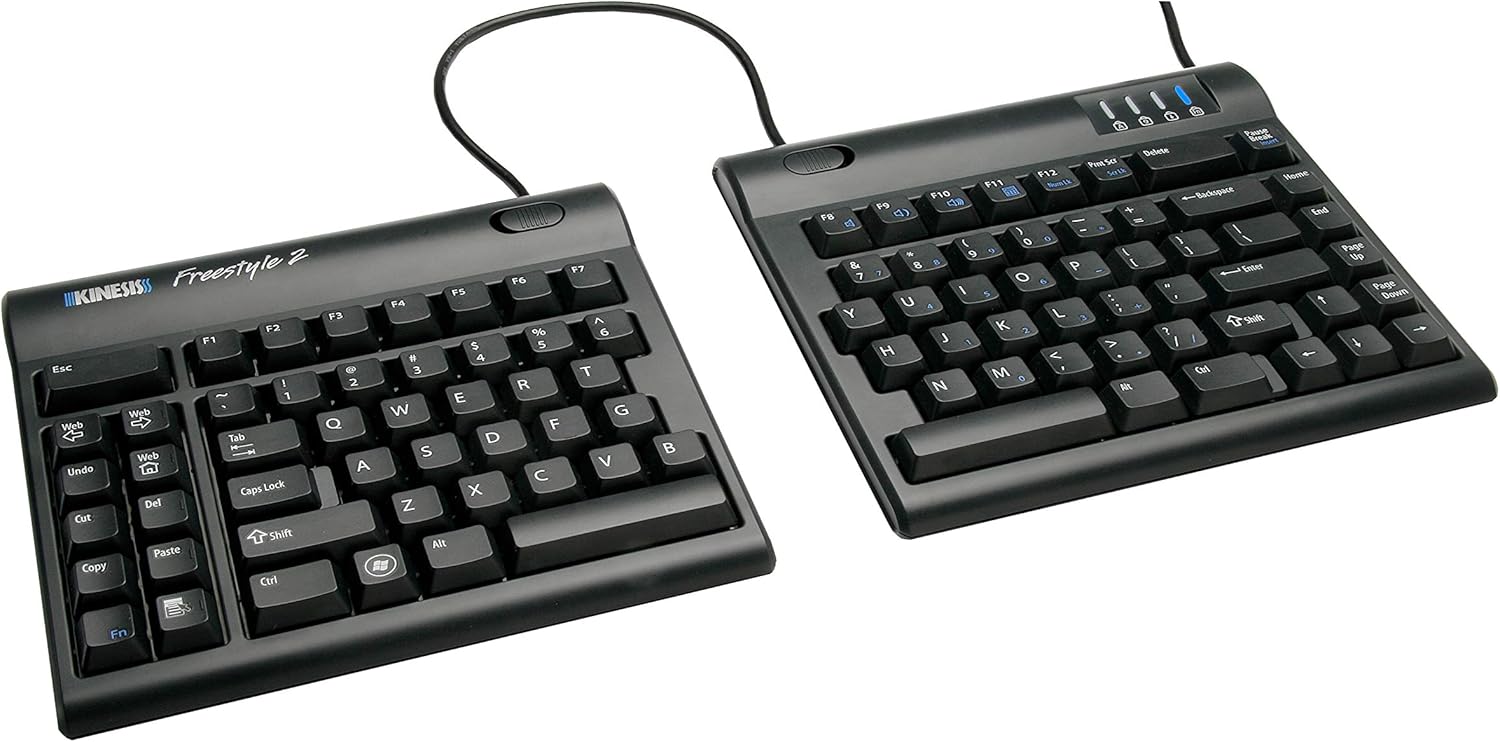
Image: The Kinesis Freestyle2 ergonomic keyboard showing its split design with 9-inch separation.

Image: The two modules of the Kinesis Freestyle2 keyboard separated on a desk, demonstrating how this positioning helps maintain straight wrists.

Image: The Kinesis Freestyle2 keyboard with optional cushioned palm supports, illustrating the adjustable splay angle using the pivot tether.
3. Naudojimo instrukcijos
3.1. Standard Layout and Hotkeys
The Freestyle2 keyboard features a standard QWERTY Windows layout. On the left module, dedicated hotkeys are provided for common functions:
- Web: Atidaro numatytąjį web naršyklė.
- Anuliuoti: Performs the undo action.
- Iškirpti: Cuts selected text or items.
- Kopijuoti: Copies selected text or items.
- Įklijuoti: Pastes copied or cut text/items.
- Del: Deletes characters or selected items.
The keyboard also includes multimedia keys for volume control and playback, typically accessed via the Fn key in combination with function keys (F1-F12).

Paveikslėlis: Iš viršaus į apačią view of the Kinesis Freestyle2 keyboard, highlighting its standard Windows layout and the dedicated hotkeys on the left module.
3.2. Embedded Numeric 10-Key
An embedded numeric 10-keypad is integrated into the right module of the keyboard. This allows for numerical data entry without requiring a separate keypad. Refer to the Quick Start Guide for specific key combinations to activate and use the embedded numeric keypad.

Image: A user's hands typing on the separated Kinesis Freestyle2 keyboard modules, with an optional external numeric keypad positioned between them.

Image: A close-up of a user's hands typing on the Kinesis Freestyle2 keyboard, emphasizing the low-force, tactile key switches designed to reduce finger impact and fatigue.
3.3. Papildomi priedai
For enhanced comfort, optional accessories such as cushioned palm supports and tenting kits (e.g., VIP3 accessory) are available. These accessories can further optimize wrist and forearm positioning.

Image: The Kinesis Freestyle2 keyboard shown with the VIP3 tenting accessory (AC820), which provides adjustable tenting angles for increased comfort.
4. Priežiūra
4.1. Valymas
To maintain the keyboard's performance and appearance:
- Prieš valydami atjunkite klaviatūrą nuo kompiuterio.
- Šiek tiek naudokite minkštą, be pūkelių šluostę damppaviršių nuvalykite vandeniu arba švelniu valymo tirpalu.
- Venkite naudoti stiprias chemines medžiagas, abrazyvinius valiklius ir nepurkškite skysčių tiesiai ant klaviatūros.
- Dulkėms ir šiukšlėms tarp klavišų pašalinti naudokite suslėgtą orą.
5. Problemų sprendimas
5.1. Klaviatūra nereaguoja
- Įsitikinkite, kad USB laidas yra tvirtai prijungtas prie klaviatūros ir kompiuterio.
- Pabandykite prijungti klaviatūrą prie kito kompiuterio USB prievado.
- Iš naujo paleiskite kompiuterį.
- Test the keyboard on another computer to determine if the issue is with the keyboard or the computer system.
5.2. Keys Not Functioning Correctly
- Check for any debris or obstructions under the affected keys. Use compressed air to clear if necessary.
- Ensure no software conflicts are present. Try using the keyboard in a different application or a clean boot environment.
- If specific hotkeys or multimedia keys are not working, verify that the Fn key (if applicable) is being used correctly or that no software has remapped the keys.
6. Specifikacijos
| Funkcija | Detalė |
|---|---|
| Gaminio matmenys | 15.94 x 9.25 x 1.26 colio |
| Prekės svoris | 2 svaro |
| Gamintojas | „Kinesis“ korporacija |
| Prekės modelio numeris | KIN-FS2-01US |
| Ryšio technologija | USB |
| Suderinami įrenginiai | Windows 7-10, Linux, Chrome |
| Klaviatūros aprašymas | Ergonomic, split-design keyboard with standard Windows layout, low-force tactile switches, embedded numeric keypad |
| Rekomenduojami naudojimo būdai | Biuras |
| Ypatinga funkcija | Ergonomiškas |
| Spalva | 9 Inch Separation (Black) |
| Pasiekiama pirmoji data | 3 m. spalio 2010 d |
7. Garantija ir palaikymas
For warranty information and technical support, please refer to the official Kinesis Corporation website or contact their customer service directly. Details regarding product registration, warranty claims, and support resources are typically available through these channels.
Gamintojas: Kinesis Corporation
Norėdami gauti daugiau pagalbos, apsilankykite Kinesis Store on Amazon.


