Įvadas
Thank you for choosing the Divoom Onbeat 200 Bluetooth Portable Speaker. This manual provides essential information for setting up, operating, and maintaining your speaker. Please read it thoroughly before use to ensure optimal performance and longevity of your device.
The Divoom Onbeat 200 is a compact and powerful portable speaker designed to deliver rich audio with the convenience of Bluetooth wireless connectivity. It features a built-in microphone for hands-free calling, making it versatile for both music playback and communication.
Pakuotės turinys
Patikrinkite pakuotę, ar joje yra šie daiktai:
- Divoom Onbeat 200 Bluetooth Portable Speaker
- USB įkrovimo laidas
- 3.5 mm garso laidas
- Vartotojo vadovas
Jei trūksta kokių nors daiktų arba jie pažeisti, kreipkitės pagalbos į pardavėją.
Produktas baigtasview
The Divoom Onbeat 200 features a sleek design with intuitive controls. Familiarize yourself with the speaker's components before use.
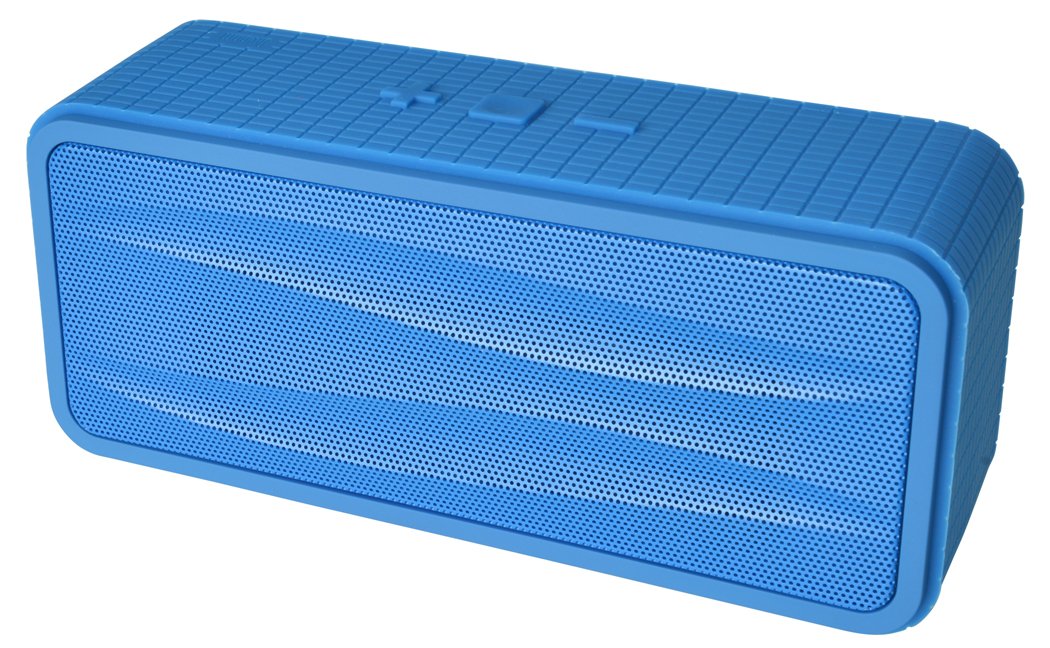
1 paveikslas: Divoom Onbeat 200 Bluetooth Portable Speaker shown with various compatible smartphones, highlighting its wireless connectivity. The speaker is blue and rectangular with a mesh grille.
The speaker is equipped with dual drivers for stereo sound and a passive radiator for enhanced bass. The control panel typically includes power, volume, and Bluetooth pairing buttons. A built-in microphone is integrated for hands-free communication.

2 paveikslas: Detailed dimensions of the Divoom Onbeat 200 speaker. The speaker measures approximately 16.5 cm in length, 7 cm in height, and 5.2 cm in depth.
Sąranka
1. Įkraukite garsiakalbį
- Prijunkite mažąjį USB įkrovimo laido galą prie garsiakalbio įkrovimo prievado.
- Prijunkite didesnį USB įkrovimo laido galą prie USB maitinimo adapterio (nepridedamas) arba kompiuterio USB prievado.
- Įkrovimo metu šviečia įkrovimo indikatoriaus lemputė, paprastai raudona.
- Once fully charged, the indicator light will change color or turn off (refer to specific LED behavior in the full manual if available). A full charge usually takes 2-3 hours.
Pastaba: For first-time use, ensure the speaker is fully charged.
2. „Bluetooth“ poravimas
- Įsitikinkite, kad garsiakalbis yra įkrautas ir išjungtas.
- Press and hold the Power button (or dedicated Bluetooth button) for a few seconds until you hear an audible prompt or see the Bluetooth indicator light flashing rapidly, indicating it's in pairing mode.
- Išmaniajame telefone, planšetiniame kompiuteryje ar kitame įrenginyje su „Bluetooth“ ryšiu eikite į „Bluetooth“ nustatymus.
- Įjunkite Bluetooth ir ieškokite galimų įrenginių.
- Select "Onbeat 200" from the list of devices.
- Once paired, you will hear a confirmation tone, and the Bluetooth indicator light will typically glow solid blue.
Patarimas: The speaker will automatically attempt to reconnect to the last paired device when powered on, if that device's Bluetooth is active and within range.
Naudojimo instrukcijos
Maitinimo įjungimas/išjungimas
- Norėdami įjungti: paspauskite ir palaikykite maitinimo mygtuką, kol užsidegs indikatoriaus lemputė.
- Norėdami išjungti: paspauskite ir palaikykite maitinimo mygtuką, kol užges indikatoriaus lemputė.
Garsumo valdymas
- To increase volume: Press the Volume Up (+) button.
- To decrease volume: Press the Volume Down (-) button.
Garsumą taip pat galite reguliuoti tiesiogiai iš prijungto įrenginio.
Muzikos atkūrimas
- Play/Pause: Press the Play/Pause button (often integrated with the Power or Bluetooth button).
- Next Track: Double-press the Volume Up (+) button (or a dedicated skip button).
- Previous Track: Double-press the Volume Down (-) button (or a dedicated skip button).
Pastaba: Specific button functions may vary slightly. Refer to the physical markings on your speaker.
Pagalbinė įvestis (AUX)
For devices without Bluetooth, you can use the 3.5mm audio cable:
- Prijunkite vieną 3.5 mm garso kabelio galą prie garsiakalbio AUX įvesties prievado.
- Kitą galą prijunkite prie savo garso įrenginio ausinių lizdo.
- The speaker will automatically switch to AUX mode, or you may need to press a mode button.
Skambinimas ir skambučių priėmimas
The Divoom Onbeat 200 features a built-in microphone for hands-free calling when connected via Bluetooth to a smartphone.
- Atsiliepimas į skambutį: When a call comes in, the music will pause. Press the Play/Pause button (or phone icon button) once to answer the call.
- Skambučio pabaiga: During a call, press the Play/Pause button (or phone icon button) once to end the call.
- Skambučio atmetimas: Press and hold the Play/Pause button (or phone icon button) for approximately 2 seconds to reject an incoming call.
- Paskutinio numerio perrinkimas: Double-press the Play/Pause button (or phone icon button) to redial the last number called.
Audio will be routed through the speaker, and your voice will be picked up by the built-in microphone.
Priežiūra
- Garsiakalbį saugokite nuo vandens, drėgmės ir ekstremalių temperatūrų.
- Garsiakalbį valykite minkšta, sausa šluoste. Nenaudokite abrazyvinių valiklių ar tirpiklių.
- Venkite garsiakalbio numetimo ir stiprių smūgių.
- Kai garsiakalbio nenaudojate ilgesnį laiką, laikykite jį vėsioje, sausoje vietoje ir periodiškai jį įkraukite, kad palaikytumėte baterijos veikimo laiką.
Trikčių šalinimas
| Problema | Galimas sprendimas |
|---|---|
| Garsiakalbis neįsijungia. | Įsitikinkite, kad garsiakalbis yra visiškai įkrautas. Prijunkite jį prie maitinimo šaltinio ir bandykite dar kartą. |
| Nepavyksta susieti per „Bluetooth“. |
|
| Nėra garso arba garsas per mažas. |
|
| Garso iškraipymas. |
|
Specifikacijos
- Modelio pavadinimas: Onbeat 200
- Prekės modelio numeris: Onbeat 200-Blue
- Prekinis ženklas: Divoom
- Garsiakalbio tipas: Knygų lentyna
- Ypatingos savybės: Built-in Microphone, Stereo
- Rekomenduojami naudojimo būdai: Muzika
- Suderinami įrenginiai: Išmanusis telefonas
- Erdvinio garso kanalo konfigūracija: 2.0
- Spalva: Mėlyna
- Prekės svoris: 544 g (1.2 svaro)
- Atsparus vandeniui: Nr
- Kontrolės metodas: App (Note: While listed, primary control is via physical buttons and connected device)
- Belaidžio ryšio technologija: Bluetooth
- Maitinimo šaltinis: Maitinamas su baterijomis (pridedama 1 ličio jonų baterija)
- Gaminio matmenys: 16.51 x 5.08 x 7.11 cm
- Didžiausia garsiakalbio išėjimo galia: 4 vatų
- Ryšio technologija: Bluetooth
- Montavimo tipas: Stalviršis
- Pirmas prieinamas: 17 m. gegužės 2013 d
Garantija ir palaikymas
The Divoom Onbeat 200 comes with a standard manufacturer's warranty. Please refer to the warranty card included in your package or visit the official Divoom websvetainėje, kurioje pateikiamos išsamios garantijos sąlygos.
For technical support, troubleshooting assistance, or service inquiries, please contact Divoom customer support through their official channels. Keep your purchase receipt and product model information handy when contacting support.


