1. Įvadas
This manual provides detailed instructions for the installation, operation, and maintenance of the Supermicro MBD-X10SLH-F-O uATX Server Motherboard. Please read this manual thoroughly before beginning installation to ensure proper setup and to maximize the performance and longevity of your system. This motherboard is designed for server applications, supporting Intel LGA1150 processors and DDR3 memory.
2. Produktas baigtasview
The Supermicro MBD-X10SLH-F-O is a high-performance uATX server motherboard featuring the Intel C226 chipset. It is engineered for reliability and efficiency in server environments.
Pagrindinės funkcijos:
- Procesoriaus lizdas: LGA1150, supporting Intel Xeon E3-1200 v3/v4 series, 4th/5th Gen Core i3, Pentium, Celeron processors.
- Atmintis: 4x 204-pin DDR3-1600 SODIMM slots, supporting up to 32GB ECC/non-ECC Unbuffered memory.
- Išplėtimo lizdai: 1x PCI-Express 3.0 x16, 1x PCI-Express 2.0 x8, 1x PCI-Express 2.0 x4.
- Saugykla: 6x SATA3 (6Gbps) ports.
- Ryšys: Dual Gigabit Ethernet LAN ports (2x RJ45) and 1x Dedicated IPMI LAN port (RJ45).
- USB prievadai: 4x USB 3.0 ports, 6x USB 2.0 ports.
- Vaizdo įrašo išvestis: 1x VGA port.
- Formos faktorius: uATX (9.6" x 9.6").
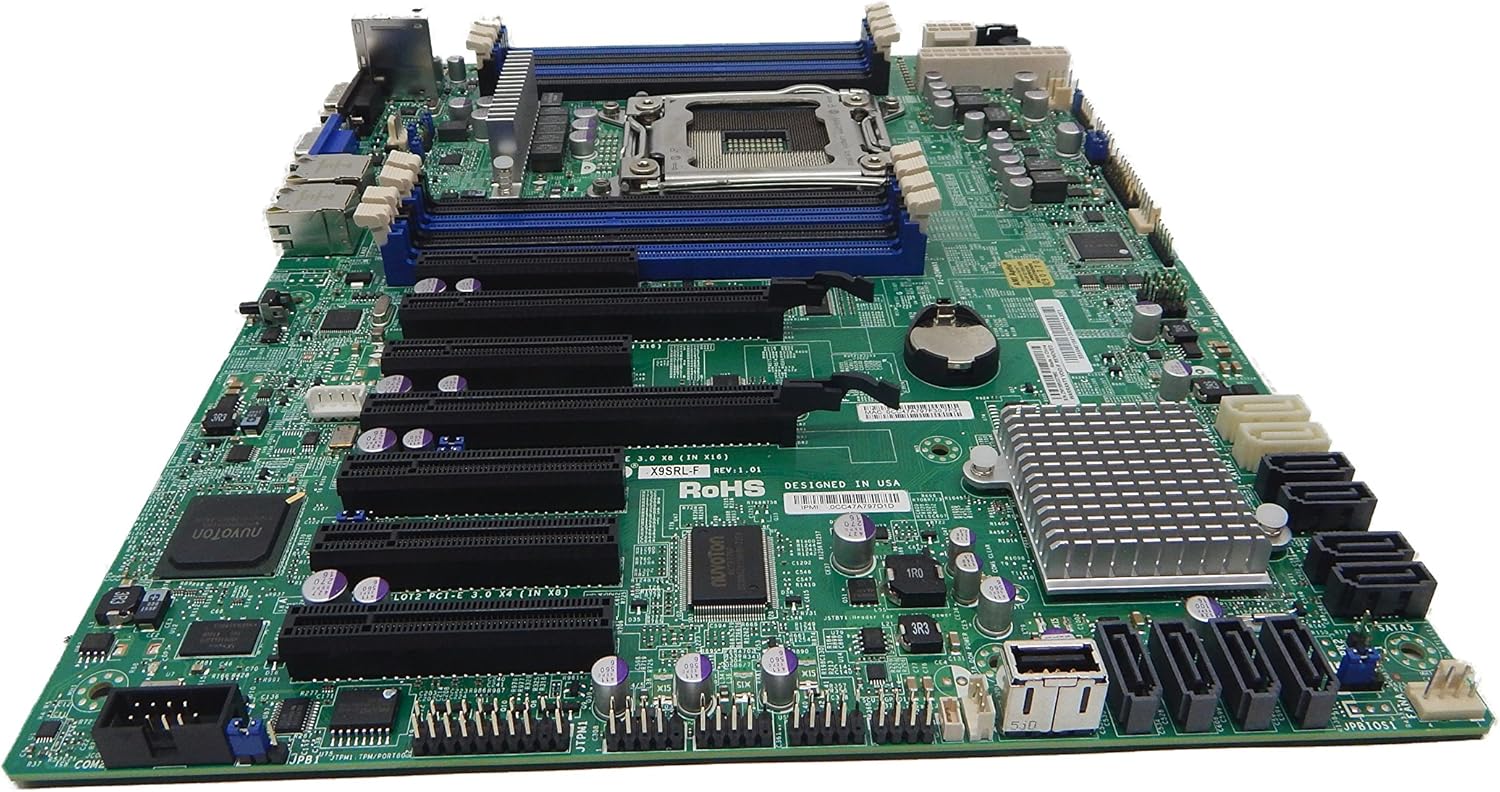
2.1 paveikslas: Iš viršaus į apačią view of the Supermicro MBD-X10SLH-F-O motherboard, showing the CPU socket, RAM slots, and various expansion slots.

2.2 paveikslas: Kampuotas view of the motherboard, highlighting the LGA1150 CPU socket and the four DDR3 SODIMM memory slots.

2.3 paveikslas: Galinis view of the Supermicro MBD-X10SLH-F-O motherboard, displaying the I/O panel with USB, VGA, LAN, and IPMI ports.

2.4 paveikslas: Iš arti view of the motherboard, showing the six SATA3 ports and other onboard connectors.
3. Specifikacijos
| Funkcija | Specifikacija |
|---|---|
| Prekės ženklas | Supermikro |
| Modelio pavadinimas | MBD-X10SLH-F-O |
| CPU lizdas | LGA 1150 |
| Lustų rinkinio tipas | Intel C226 |
| Suderinami procesoriai | Intel Core i3-4xxx, i5-4xxx, i7-4xxx, i3-5xxx, i5-5xxx, i7-5xxx, Intel Xeon E3-1200 v3/v4 series |
| RAM atminties technologija | DDR3 |
| Atminties greitis | 1600 MHz |
| Maksimali palaikoma RAM | 32 GB |
| USB 2.0 prievadų skaičius | 6 |
| USB 3.0 prievadų skaičius | 4 |
| SATA prievadai | 6x SATA3 (6Gbps) |
| Išplėtimo lizdai | 1 PCIe 3.0 x16, 1 PCIe 2.0 x8, 1 PCIe 2.0 x4 |
| Formos faktorius | uATX |
| Matmenys (IxPxH) | 14 x 11 x 3.5 colio |
| Prekės svoris | 3.52 uncijos |
4. Sąranka
Before beginning installation, ensure your system is powered off and disconnected from the power source. Always handle the motherboard by its edges to avoid static discharge.
4.1. CPU diegimas
- Švelniai pakelkite procesoriaus lizdo svirtį.
- Align the CPU with the socket, ensuring the gold triangle on the CPU matches the triangle on the socket.
- Atsargiai įdėkite procesorių į lizdą, jo nespausdami jėgos.
- Lower the socket lever and secure it.
- Užtepkite termopastos ir įdiekite procesoriaus aušintuvą pagal gamintojo instrukcijas.
4.2. Atminties diegimas
- Atidarykite spaustukus abiejuose DIMM lizdo galuose.
- Align the memory module's notch with the key in the DIMM slot.
- Tvirtai spauskite abu atminties modulio galus, kol spaustukai užsifiksuos vietoje.
4.3. Išplėtimo plokštės diegimas
- Remove the corresponding slot cover from your chassis.
- Sulygiuokite išplėtimo plokštę su norimu PCIe lizdu.
- Tvirtai spauskite kortelę žemyn, kol ji bus visiškai įstatyta.
- Secure the card with a screw or retention clip.
4.4. Atminties įrenginio prijungimas
- Prijunkite vieną SATA duomenų kabelio galą prie pagrindinės plokštės SATA prievado.
- Connect the other end of the SATA data cable to your storage device (HDD/SSD).
- Connect a SATA power cable from your power supply to the storage device.
4.5. Maitinimo jungtys
- Prijunkite 24 kontaktų ATX pagrindinį maitinimo jungtį iš maitinimo šaltinio prie pagrindinės plokštės.
- Prijunkite 8 kontaktų (arba 4 kontaktų) ATX 12V procesoriaus maitinimo jungtį prie pagrindinės plokštės.
4.6. Priekinio skydelio jungtys
Connect the front panel headers (Power LED, HDD LED, Power Switch, Reset Switch, USB, Audio) to the corresponding pins on the motherboard. Refer to the motherboard's silkscreen labels for correct pin orientation.
5. Naudojimo instrukcijos
5.1. Pradinis paleidimas
- After all components are installed and connected, connect the power cord to your power supply and turn on the power switch.
- Press the power button on your chassis.
- Sistema turėtų įsijungti ir monitoriuje turėtų matytis ekranas.
5.2. Prieiga prie BIOS / UEFI
Norėdami patekti į BIOS / UEFI sąrankos programą, paspauskite atitinkamą klavišą (dažniausiai DEL or F2) during the initial boot sequence. The exact key may vary; observe the on-screen prompts.
5.3. IPMI Remote Management
This motherboard features a dedicated IPMI LAN port for remote management. To access the IPMI interface, connect the IPMI LAN port to your network. Obtain the IP address assigned to the IPMI interface (either from BIOS or a network scan) and access it via a web browser from another computer on the same network. Java may be required for remote console functionality.
6. Priežiūra
Reguliarus pagrindinės plokštės ir sistemos aptarnavimas padeda užtikrinti jos stabilumą ir ilgaamžiškumą.
- Dulkių šalinimas: Reguliariai valykite dulkes nuo pagrindinės plokštės ir komponentų suslėgtu oru. Prieš valydami įsitikinkite, kad sistema išjungta ir atjungta nuo elektros tinklo.
- Kabelių valdymas: Ensure all cables are neatly routed and secured to prevent obstruction of airflow and accidental disconnections.
- BIOS / programinės įrangos atnaujinimai: Patikrinkite „Supermicro“. website for the latest BIOS and IPMI firmware updates. Follow the provided instructions carefully. Note that IPMI BIOS upgrades may require a separate license. Always update BIOS before IPMI firmware.
- Komponentų patikrinimai: Occasionally inspect all connections (power, data, expansion cards) to ensure they are securely seated.
7. Problemų sprendimas
Šiame skyriuje aptariamos dažniausiai pasitaikančios problemos, su kuriomis galite susidurti.
7.1. System Fails to Boot
- Patikrinkite maitinimo jungtis: Ensure the 24-pin ATX and 8-pin CPU power connectors are securely attached.
- Iš naujo įstatykite komponentus: Remove and re-install the CPU, memory modules, and any expansion cards to ensure they are properly seated.
- Išvalyti CMOS: Refer to your motherboard's detailed manual for instructions on how to clear the CMOS, which can resolve boot issues caused by incorrect BIOS settings.
- Minimali konfigūracija: Try booting with only essential components (CPU, one RAM stick, power supply, and display) to isolate the problem.
7.2. Fan Speed Issues
Some low RPM, high-efficiency fans may not be accurately detected by the motherboard's fan controller, leading to erratic fan speed behavior (e.g., fans spinning up to max RPM). This is often due to the controller expecting server-grade fans with higher RPM ranges.
- BIOS nustatymai: Check BIOS settings for fan control options. Adjust fan curves or modes if available.
- 3-Pin vs. 4-Pin Fans: If using 4-pin PWM fans that exhibit this behavior, consider using 3-pin adapters if available with your fans. This can sometimes provide a more stable, albeit less precise, fan control.
- IPMI Fan Control: While IPMI offers fan control, it may have limitations for low RPM fans.
7.3. SATA Port Obstruction
When installing a full-size graphics processing unit (GPU), some SATA ports may become physically blocked or difficult to access.
- Planuoti į priekį: Connect SATA cables to the necessary ports before installing large expansion cards.
- Angled SATA Cables: Use SATA cables with angled connectors if straight connectors are obstructed.
- Alternative Ports: Utilize any unblocked SATA ports first.
8. Garantijos ir palaikymo informacija
For detailed warranty information, including terms, conditions, and duration, please refer to the official Supermicro website or the warranty card included with your product. For technical support, driver downloads, and additional documentation, visit the Supermicro support portal.
„Supermicro“ oficialus Websvetainė: www.supermicro.com


