Įvadas
This manual provides essential information for setting up, operating, and maintaining your Microsoft Xbox 360 E 250GB Console. Please read this guide thoroughly before using your console to ensure proper function and longevity.
Pakuotės turinys
Patikrinkite, ar jūsų pakuotėje yra šie elementai:
- Xbox 360 E 250GB Console
- Xbox 360 Wireless Controller (Black)
- Maitinimo šaltinis ir maitinimo laidas
- HDMI kabelis
- AA Batteries for Wireless Controller
Konsolė baigtaview
Familiarize yourself with the various ports and buttons on your Xbox 360 E console.

Image: Microsoft Xbox 360 E 250GB Console. This image displays the front and side view of the Xbox 360 E console, showing its compact design and disc drive slot.
Priekinis skydelis
- Maitinimo mygtukas: Įjungia arba išjungia konsolę.
- Diskų įrenginys: Insert game discs or DVDs.
- USB prievadai: Connect accessories like USB drives or wired controllers.
- Controller Connect Button: Used to wirelessly sync controllers.
Galinis skydelis
- Maitinimo prievadas: Prijunkite maitinimo šaltinį.
- HDMI prievadas: Connect to a TV or monitor for high-definition video and audio.
- AV prievadas: For older composite or component cables (not included with all models).
- Ethernet prievadas: Prisijunkite prie laidinio tinklo.
- USB prievadai: Additional ports for accessories.
Wireless Controller Overview
The Xbox 360 Wireless Controller allows for intuitive gameplay. Familiarize yourself with its buttons and functions.
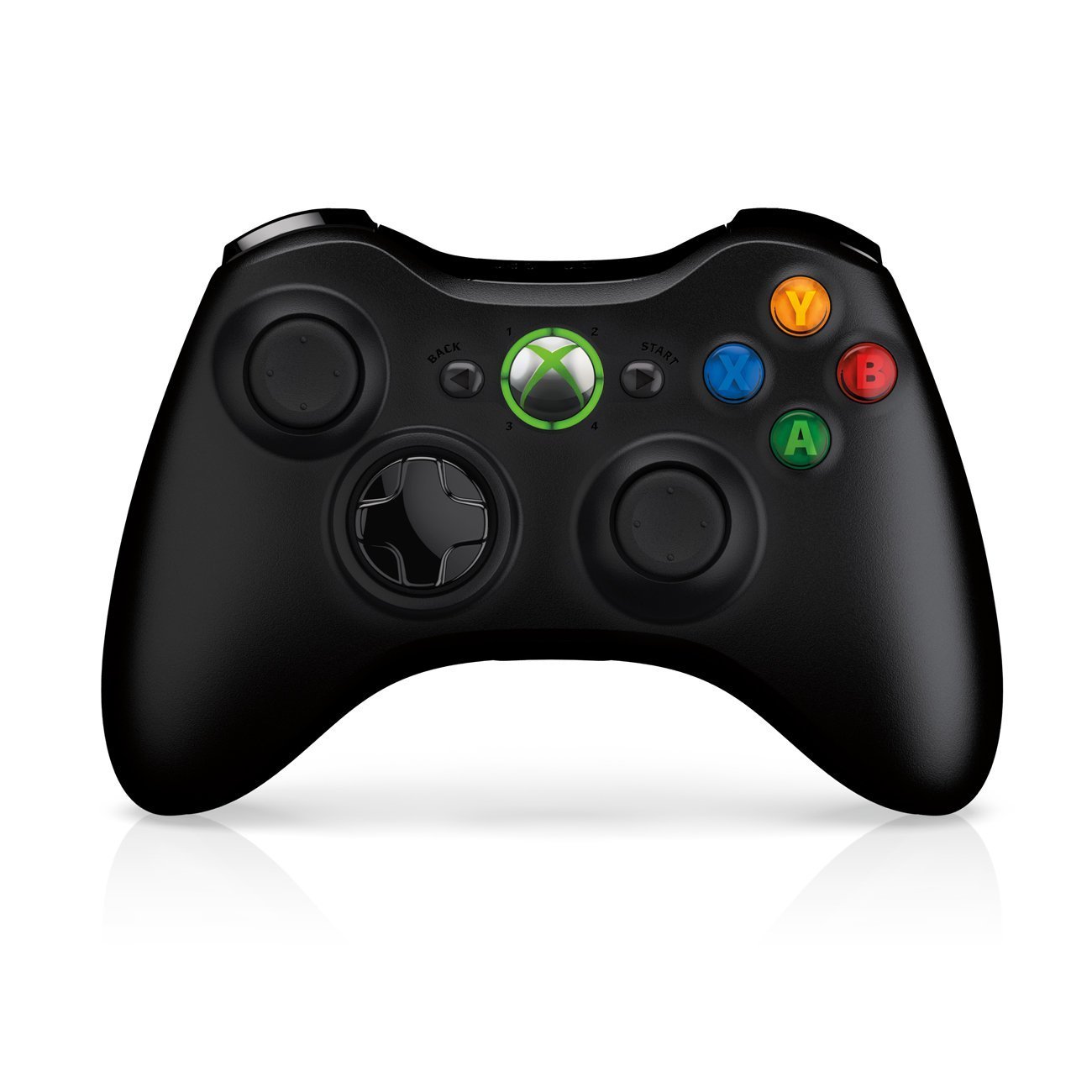
Image: Xbox 360 Wireless Controller. This image displays the front view of the black wireless controller, highlighting the D-pad, analog sticks, face buttons (A, B, X, Y), Guide button, Start button, and Back button.
Valdiklio mygtukai ir funkcijos
- Kairysis/dešinysis analoginiai valdikliai: Judėjimui ir kameros valdymui.
- D-Pad (krypties valdiklis): For menu navigation and specific game controls.
- A, B, X, Y mygtukai: Primary action buttons, color-coded (Green A, Red B, Blue X, Yellow Y).
- Start mygtukas: Pauses games or opens in-game menus.
- Atgal mygtukas: Returns to previous screens or opens specific game functions.
- Guide Button (Xbox Logo): Powers on the console, accesses the Xbox Guide, or turns off the controller.
- Left/Right Bumpers (LB, RB): Shoulder buttons for various in-game actions.
- Left/Right Triggers (LT, RT): Analog triggers for precise control, often used for acceleration/braking or firing weapons.
Akumuliatoriaus montavimas
The wireless controller requires two AA batteries. To install:
- Press the tab on the top of the battery pack and pull down to remove it.
- Įdėkite dvi AA tipo baterijas, užtikrindami teisingą poliškumą (+/-).
- Slide the battery pack back into the controller until it clicks into place.
Sąrankos vadovas
1. Konsolės prijungimas
- Maitinimo jungtis: Connect the power cord to the power supply, then connect the power supply to the console's power port. Plug the power cord into a wall outlet.
- Vaizdo / garso jungtis: Connect one end of the HDMI cable to the HDMI port on the back of your Xbox 360 E console. Connect the other end to an available HDMI input on your TV or monitor.
- Interneto ryšys (neprivaloma): For wired internet, connect an Ethernet cable from your router/modem to the Ethernet port on the console. For wireless, the console has built-in Wi-Fi.
2. Connecting the Wireless Controller
- Ensure batteries are installed in the controller.
- Turn on the console by pressing the Power button on the console or the Guide button on the controller.
- Press and release the Connect button on the console (small button near the USB ports on the front).
- Within 20 seconds, press and release the Connect button on the controller (small button on the top edge, between the bumpers).
- The lights around the Guide button on the controller and the console will flash and then glow steadily, indicating a successful connection.
3. Initial Power On and System Settings
After connecting, turn on your console. Follow the on-screen prompts to:
- Pasirinkite savo kalbą ir regioną.
- Adjust display settings (resolution, aspect ratio).
- Set up your internet connection (wired or wireless).
- Create or sign in to an Xbox Live profile.
Jūsų konsolės valdymas
Žaidimai ir medija
- Turn on your console and TV.
- Open the disc tray by pressing the eject button on the console.
- Place a game disc or DVD/Blu-ray disc into the tray, label side up.
- Close the disc tray. The console should automatically start the game or media. If not, select it from the dashboard.
- Digital games can be launched directly from the Xbox Dashboard.
Connecting to Xbox Live
Xbox Live allows you to play online, download games and content, and access streaming services. Ensure your console is connected to the internet.
- From the Xbox Dashboard, navigate to the "Social" or "Settings" tab.
- Select "Join Xbox Live" or "Network Settings" to configure your connection and create/manage your profile.
- A 1-month Xbox LIVE Gold trial may be included with your console.
Sistemos nustatymai
Access system settings to customize your console experience:
- Ekranas ir garsas: Adjust resolution, audio output, and screen format.
- Saugykla: Manage your 250GB hard drive, view free space, and delete content.
- Tinklo nustatymai: Configure wired or wireless internet connections.
- Family Settings: Set parental controls for content and online access.
Priežiūra
Konsolės valymas
- Always power off and unplug the console before cleaning.
- Konsolės ir valdiklio išorę nuvalykite minkštu, sausu, nepūkuotu skudurėliu.
- Nenaudokite skystų valiklių, aerozolių ar abrazyvinių medžiagų.
- Keep ventilation openings clear of dust and obstructions to ensure proper airflow.
Storage and Placement
- Place the console on a stable, flat surface.
- Ensure adequate ventilation around the console. Do not place it in an enclosed cabinet or on soft surfaces that can block vents.
- Avoid exposing the console to direct sunlight, excessive heat, or extreme cold.
Trikčių šalinimas
If you encounter issues with your Xbox 360 E console, refer to the following common solutions:
No Power / Console Not Turning On
- Ensure the power cord is securely connected to the console, power supply, and wall outlet.
- Check the power supply unit (PSU) indicator light. If it's off or red, try a different outlet or contact support.
- Išbandykite kitą maitinimo lizdą.
Nėra vaizdo ar garso išvesties
- Verify the HDMI cable is securely connected to both the console and your TV/monitor.
- Įsitikinkite, kad jūsų televizorius / monitorius nustatytas į tinkamą HDMI įvesties šaltinį.
- Išbandykite kitą HDMI kabelį arba kitą televizoriaus HDMI prievadą.
- Check your TV's volume and mute settings.
Disko skaitymo klaidos
- Ensure the disc is clean and free of scratches or smudges. Wipe gently with a soft cloth from the center outwards.
- Try a different game or movie disc to determine if the issue is with the disc or the console.
- Ensure the console is placed on a stable, flat surface and not being moved during disc operation.
Wireless Controller Not Connecting
- Ensure the controller has fresh batteries.
- Resync the controller by pressing the Connect buttons on both the console and controller as described in the "Setup Guide".
- Ensure there are no strong wireless interferences nearby.
For further assistance, please refer to the official Microsoft Xbox support websvetainę.
Specifikacijos
| Funkcija | Detalė |
|---|---|
| Modelio numeris | M9V-00001 |
| Sandėliavimas | 250 GB Kietasis diskas |
| Belaidis ryšys | Integruotas Wi-Fi |
| Valdiklis | 1 Black Wireless Controller |
| Regiono kodas | NTSC |
| Gaminio matmenys | 12 x 6 x 24 colio |
| Prekės svoris | 10.32 svaro |
| Reikalingos baterijos | 2 AA batteries for controller |
| Išleidimo data | 1 m. birželio 2013 d |
Informacija apie garantiją
For detailed warranty information regarding your Microsoft Xbox 360 E 250GB Console, please refer to the warranty card included with your product or visit the official Microsoft Xbox support websvetainėje. Garantijos sąlygos gali skirtis priklausomai nuo regiono ir pirkimo datos.
Palaikymas
If you require technical assistance, have questions about your console, or need to report an issue, please contact Microsoft Xbox Support:
- Palaikymas internetu: Aplankykite pareigūną Xbox palaikymas websvetainę DUK, trikčių šalinimo vadovus ir kontaktines parinktis.
- Pagalba telefonu: Refer to your product packaging or the Xbox Support webRegioninių telefono numerių svetainė.


