1. Produktas baigtasview
The CyberPower EC650LCD Ecologic Battery Backup & Surge Protector UPS System is designed to provide reliable power protection for your electronic devices. It features a compact design and incorporates energy-saving technologies to reduce power consumption.
Pagrindinės funkcijos:
- 650 VA / 390 W galia: Provides battery backup and surge protection for workstations, networking devices, and home entertainment equipment using simulated sine wave output.
- 8 NEMA 5-15R lizdai: Includes four battery backup & surge protected outlets and four surge protected outlets (three of which are ECO controlled).
- Multifunction LCD Panel: Displays real-time information on battery status and power conditions.
- ECO režimas: Automatically powers off computer peripherals connected to ECO mode outlets when the UPS detects the computer is off or in sleep mode, reducing energy usage.
- 3 metų garantija: Comprehensive warranty coverage, including the battery.
- $100,000 Connected Equipment Guarantee: Provides assurance for connected devices.
- FREE PowerPanel Personal Edition Management Software: Available for download to monitor and manage the UPS.

1 pav.: priekis view of the CyberPower EC650LCD UPS System, showing the LCD panel and outlets.
2. Saugos informacija
Please read and follow all safety instructions carefully before installing, operating, or servicing the UPS system. Failure to do so may result in electric shock, fire, or serious injury.
- Do not open the UPS housing. There are no user-serviceable parts inside. Refer servicing to qualified service personnel.
- Nenaudokite UPS aplinkoje, kurioje yra per didelė drėgmė arba ekstremali temperatūra.
- Ensure the UPS is connected to a grounded outlet.
- Do not plug non-computer related items, such as medical equipment, life support equipment, or household appliances, into the UPS.
- Pastatykite UPS gerai vėdinamoje vietoje, atokiau nuo tiesioginių saulės spindulių ar šilumos šaltinių.
- In case of fire, use a dry chemical fire extinguisher. Water may cause electrical shock.
3. Sąranka
3.1 Pradinis įkrovimas
Before initial use, the UPS must be connected to a grounded AC outlet and charged for at least 8 hours to ensure optimal battery performance. The unit will automatically charge when plugged in.
3.2 Įrenginių prijungimas
Identify the types of outlets on your UPS:
- Baterijos atsarginis maitinimas ir nuo viršįtampių apsaugoti lizdai: These outlets provide power from the battery during outages and protect against surges. Connect critical devices like your computer, monitor, and external hard drives here.
- Surge Protected Outlets (ECO Controlled): These outlets provide surge protection and can be automatically turned off by the ECO mode when the connected computer is off or in sleep mode. Connect non-critical peripherals like printers, speakers, or desk lamps čia.
- Surge Protected Outlets (Always On): These outlets provide continuous surge protection but no battery backup.
Plug your devices into the appropriate outlets. Ensure the total load does not exceed the UPS's capacity (390W).

2 paveikslas: viršuje view of the UPS showing the layout of battery-supported and surge-protected outlets.
3.3 USB ryšio prievadas
Connect the included USB cable from the UPS to your computer's USB port. This enables communication between the UPS and your computer, allowing for automatic shutdown during extended power outages and monitoring via the PowerPanel Personal Edition software.
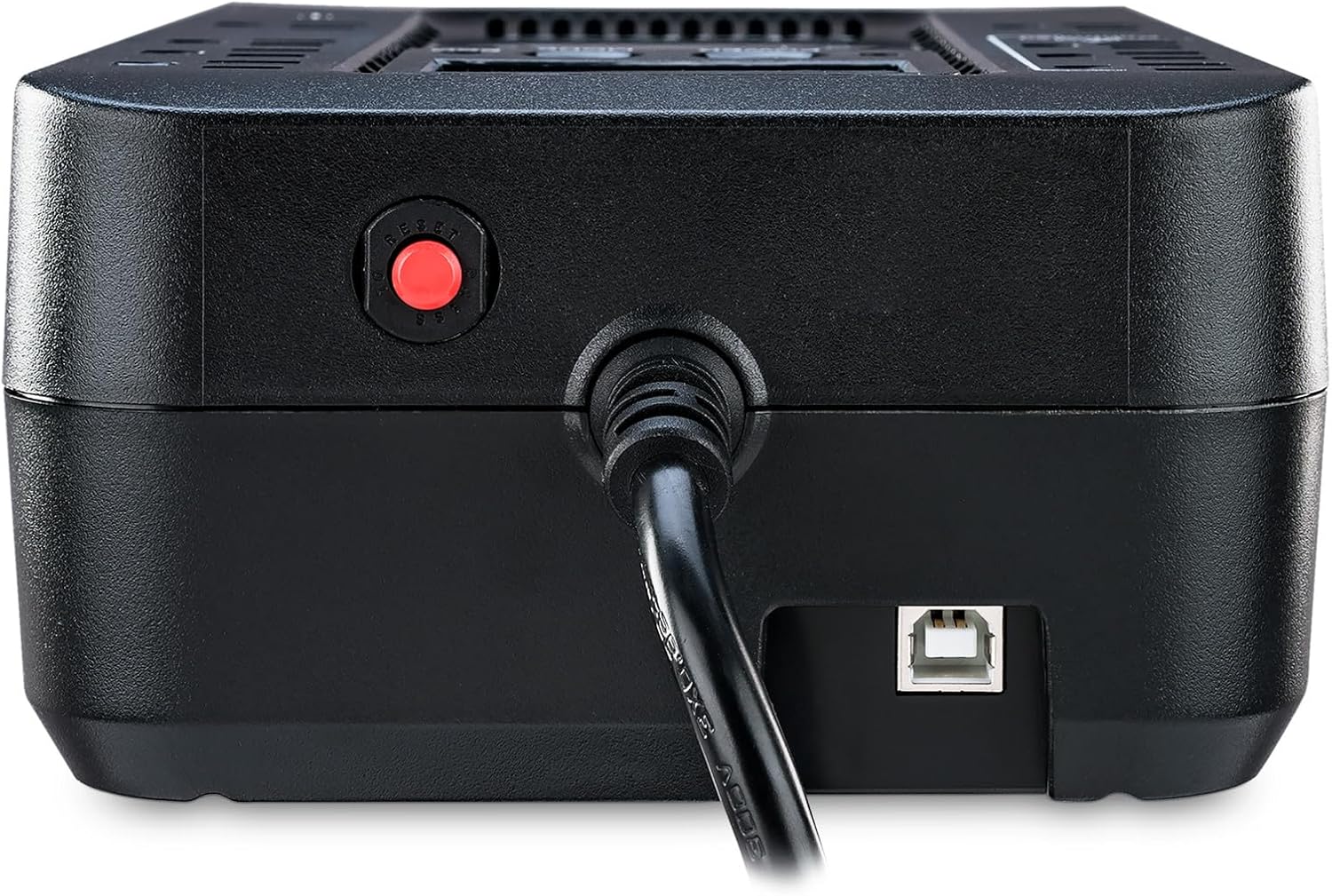
3 pav.: šonas view of the CyberPower EC650LCD UPS, showing the USB communication port and circuit breaker reset button.
4. Naudojimo instrukcijos
4.1 Įjungimas / išjungimas
- Įjungti: Press and hold the POWER button for approximately 2 seconds until you hear a beep. The LCD display will illuminate.
- Išjungti: Press and hold the POWER button for approximately 2 seconds until you hear a beep. The LCD display will turn off.
4.2 LCD ekranas ir valdikliai
The multifunction LCD panel provides real-time status of the UPS. Use the MODE button to cycle through different display screens:
- Įvesties tomastage: Rodo įeinančio kintamosios srovės garsumątage.
- Išėjimas ttage: Rodo ttage supplied by the UPS.
- Baterijos talpa: Rodo likusį akumuliatoriaus įkrovos lygį.
- Apkrovos lygis: Nurodo proctagPrijungtų įrenginių naudojamos UPS talpos e.
- Numatomas vykdymo laikas: Provides an estimate of how long the UPS can power connected devices during an outage.
4.3 EKO režimo veikimas
The ECO mode helps conserve energy. When the UPS detects that the computer connected via USB is off or in sleep mode, it will automatically cut power to the peripherals plugged into the ECO controlled outlets. This reduces phantom load and lowers energy costs.
To enable or disable ECO mode, refer to the PowerPanel Personal Edition software settings.
Video 1: Official CyberPower Systems Direct video demonstrating the features and benefits of the CyberPower Ecologic UPS Series, including ECO mode and power protection.
5. Priežiūra
5.1 Akumuliatoriaus keitimas
The UPS battery is designed for a lifespan of approximately 3-5 years under normal operating conditions. When the battery needs replacement, the UPS may indicate this via an alarm or the LCD display. To replace the battery:
- Turn off the UPS and disconnect it from the AC power outlet.
- Atjunkite visus prijungtus įrenginius.
- Locate the battery compartment on the bottom of the UPS.
- Remove the screw securing the battery cover and slide it off.
- Carefully disconnect the battery terminals and remove the old battery.
- Insert the new battery (ensure it is a compatible sealed lead-acid battery) and connect the terminals securely.
- Uždėkite akumuliatoriaus dangtelį ir pritvirtinkite varžtu.
- Plug the UPS back into the AC outlet and allow it to charge for 8 hours.

4 pav. Apatinė dalis view of the CyberPower EC650LCD UPS, showing the battery compartment access.
5.2 Valymas
Regularly clean the exterior of the UPS with a dry, soft cloth. Do not use liquid or aerosol cleaners. Ensure ventilation openings are free from dust and debris.
6. Problemų sprendimas
If the UPS is not functioning correctly, refer to the following common issues and solutions:
| Problema | Galima priežastis | Sprendimas |
|---|---|---|
| UPS neįsijungia. | Battery is low or discharged; UPS is not connected to AC power. | Connect to AC power and charge for 8 hours. Ensure the power button is pressed and held for 2 seconds. |
| UPS nuolat pypsi arba rodo perkrovos signalą. | Too many devices connected; short circuit in a connected device. | Disconnect non-essential devices to reduce load. Check connected devices for faults. |
| Trumpas baterijos veikimo laikas. | Battery is old or not fully charged; excessive load. | Charge the battery for 8 hours. Reduce the number of connected devices. Consider battery replacement if old. |
| ECO mode not functioning. | USB cable not connected; PowerPanel software not installed or configured. | Ensure USB cable is connected. Install and configure PowerPanel Personal Edition software. |
If the issue persists after attempting these solutions, please contact CyberPower customer support.
7. Specifikacijos
| Funkcija | Detalė |
|---|---|
| Modelio numeris | EC650LCD |
| Talpa (VA / vatai) | 650 390 VA / XNUMX W |
| Išvesties tipas | Imituota sinusinė banga |
| Išpardavimo vietų skaičius | 8 (4 Battery Backup & Surge, 4 Surge Only - 3 ECO Controlled) |
| Įvesties tomastage | 120 voltų |
| Baterijos tipas | Sealed Lead Acid (1 x 12V) |
| Matmenys (G x P x A) | 5.9 "D x 10.6" P x 3.1" A |
| Prekės svoris | 6.4 svaro |
8. Garantija ir palaikymas
The CyberPower EC650LCD UPS System comes with a 3 metų garantija, kuri apima baterijų draudimą. Be to, ją užtikrina 300 000 USD prijungtos įrangos garantija, providing financial protection for equipment connected to the UPS in the event of damage due to a power surge while properly connected.
Dėl techninės pagalbos, garantinių pretenzijų ar papildomos pagalbos apsilankykite oficialioje „CyberPower“ svetainėje website or contact their customer service department. You can also download the FREE PowerPanel Personal Edition Management Software from their website for advanced monitoring and control features.