1. Įvadas
This manual provides essential instructions for the safe and efficient use of your Kyocera EBVK-2650 Engine Blower Vacuum. Please read this manual thoroughly before operating the machine and keep it for future reference. The EBVK-2650 is designed for blowing and vacuuming leaves and light debris in outdoor environments.
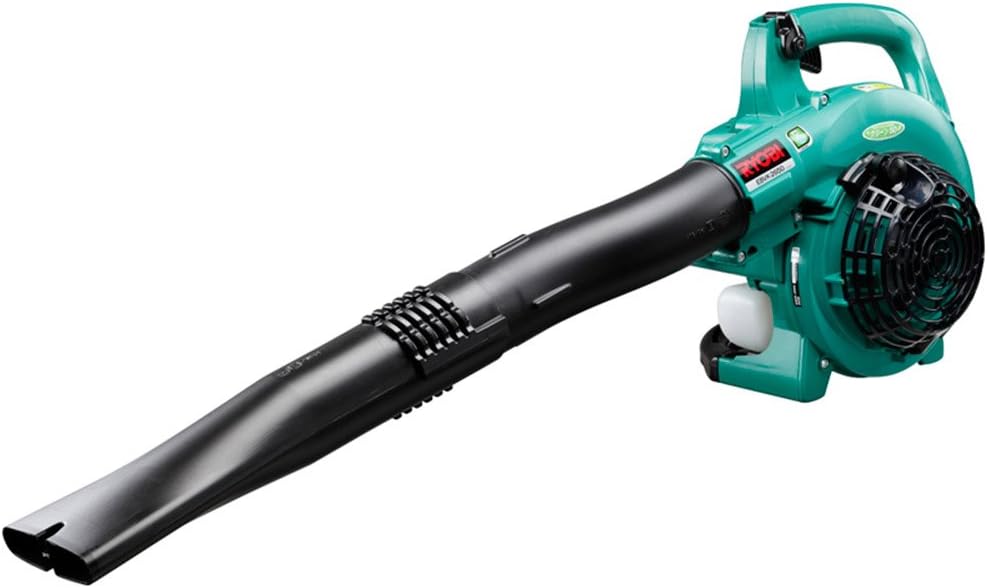
Image 1.1: The Kyocera EBVK-2650 Engine Blower Vacuum in its primary blower configuration. This image shows the main unit with the straight nozzle attached, ready for blowing leaves and debris.
2. Saugos informacija
Naudodami elektrinius įrankius, visada teikite pirmenybę saugai. Nesilaikant šių nurodymų, galite sunkiai susižaloti arba sugadinti turtą.
2.1 Bendrosios saugos taisyklės
- Prieš naudodami mašiną perskaitykite ir supraskite visas instrukcijas.
- Dėvėkite tinkamas asmenines apsaugos priemones (AAP), įskaitant akių apsaugos priemones, klausos apsaugos priemones, pirštines ir tvirtą avalynę.
- Do not operate the machine in wet conditions or in the presence of flammable liquids or gases.
- Keep children, bystanders, and pets at a safe distance (at least 15 meters / 50 feet) from the operating area.
- Inspect the machine for loose parts, damage, or wear before each use. Do not operate a damaged machine.
- Ensure proper ventilation when operating the engine, as exhaust fumes contain carbon monoxide.
- Niekada nenukreipkite pūstuvo antgalio į žmones ar gyvūnus.
- Turn off the engine and allow it to cool before refueling, cleaning, or performing maintenance.
- Laikykite mašiną sausoje, saugioje, vaikams nepasiekiamoje vietoje.
2.2 Degalų sauga
- Use only the recommended fuel mixture: unleaded gasoline and 2-cycle engine oil at a 50:1 ratio.
- Mix fuel in a well-ventilated area, away from sparks or open flames.
- Do not smoke while mixing or refueling.
- Nedelsdami nuvalykite išsiliejusius degalus.
- Kurą laikykite patvirtintoje talpykloje vėsioje, sausoje vietoje.
3. Pakuotės turinys ir komponentai
Išpakuodami patikrinkite, ar yra visi komponentai ir ar jie nepažeisti.
3.1 Pridedami priedai
- Main Unit (Engine Blower Vacuum)
- Tiesus antgalis
- Išlenktas antgalis
- Siurbimo vamzdis
- Ventiliatoriaus antgalis
- Dulkių maišas
- Socket Wrench (13x19mm)
- Instrukcijų vadovas
3.2 Pagrindiniai komponentaiview
Familiarize yourself with the main parts of the EBVK-2650.

Image 3.1: The Kyocera EBVK-2650 configured for vacuuming. This view shows the suction pipe and the dust bag attached, ready to collect leaves and debris.
- Variklio blokas: The core power source.
- Kuro bakas: For mixed fuel.
- Starterio rankena: For manual engine start.
- Droselio svirtis: Valdo variklio greitį.
- Stabdymo jungiklis: To turn off the engine.
- Oro filtro dangtelis: Apsaugo oro filtrą.
- Uždegimo žvakė: For ignition.
- Blower/Vacuum Port: Where nozzles or suction pipe attach.
- Dust Bag Connection: For attaching the collection bag in vacuum mode.
4. Sąranka ir surinkimas
4.1 Surinkimas pūtimo režimui
- Įsitikinkite, kad variklis išjungtas ir atvėsęs.
- Attach the desired nozzle (straight or curved) to the blower port. Twist until securely locked.
- Confirm all connections are tight before use.

4.1 pav.: Stambus planas view of the Kyocera EBVK-2650 in operation, demonstrating the blower function. The user is holding the unit, directing the airflow.
4.2 Assembling for Vacuum/Mulching Mode
- Įsitikinkite, kad variklis išjungtas ir atvėsęs.
- Remove any blower nozzles from the blower port.
- Attach the suction pipe to the intake port. Secure it firmly.
- Connect the dust bag to the exhaust port. Ensure the bag is properly sealed to prevent debris leakage.
- Confirm all connections are tight before use.

Image 4.2: The Kyocera EBVK-2650 being used in vacuum mode. The suction pipe is directed towards leaves, and the dust bag is visible, collecting the mulched debris.
4.3 Fuel Preparation and Filling
The EBVK-2650 uses a 2-cycle engine. It requires a specific mixture of unleaded gasoline and 2-cycle engine oil.
- Fuel Ratio: Unleaded Gasoline : 2-Cycle Engine Oil = 50:1
- Use high-quality 2-cycle engine oil specifically designed for air-cooled engines.
- Mix the fuel in a separate, approved fuel container. Shake well before filling.
- Open the fuel tank cap slowly to release pressure.
- Fill the fuel tank (capacity 0.47 L) carefully, avoiding overfilling.
- Tvirtai užsukite degalų bako dangtelį.
5. Naudojimo instrukcijos
5.1 Variklio užvedimas
- Pastatykite mašiną ant lygaus, stabilaus paviršiaus.
- Įsitikinkite, kad stabdymo jungiklis yra „ĮJUNGTA“ padėtyje.
- Įjunkite droselio svirtį (jei užvedimas šaltas).
- Kelis kartus paspauskite degalų užvedimo lemputę, kol pamatysite degalų.
- Pull the starter handle firmly and smoothly until the engine starts. Do not pull the rope to its full extension.
- Kai variklis užsives, palaipsniui atleiskite droselį.
- Prieš spausdami pilną akceleratorių, leiskite varikliui kelias akimirkas apšilti.

Image 5.1: A user demonstrating the engine starting procedure for the Kyocera EBVK-2650. The starter handle is being pulled to ignite the engine.
5.2 Pūstuvo veikimas
- Hold the machine firmly with both hands.
- Direct the nozzle towards the debris you wish to move.
- Gradually increase the throttle to achieve the desired airflow.
- Lapus ir šiukšles surinkite į krūvas šluojamuoju judesiu.

Image 5.2: A user operating the Kyocera EBVK-2650 in blower mode, clearing leaves from a path. The machine is held comfortably, directing the airflow.
5.3 Vacuum/Mulching Operation
- Ensure the machine is correctly assembled for vacuum mode with the dust bag attached.
- Hold the machine firmly, guiding the suction pipe over the leaves.
- Move slowly and steadily to allow the machine to pick up and mulch debris.
- Monitor the dust bag and empty it when it becomes full to maintain optimal performance.
- Note: Mulching performance varies based on leaf type, size, and moisture content. Avoid vacuuming wet leaves or large, hard objects.

Image 5.3: A user operating the Kyocera EBVK-2650 in vacuum mode, actively collecting leaves from a paved area. The dust bag is visible, indicating collection.
5.4 Variklio išjungimas
- Release the throttle lever to allow the engine to idle.
- Perjunkite stabdymo jungiklį į padėtį „OFF“.
- Allow the machine to cool down before storage or maintenance.
6. Priežiūra
Regular maintenance ensures optimal performance and extends the lifespan of your EBVK-2650. Always ensure the engine is off and cool before performing any maintenance.
6.1 Oro filtro valymas
- Nuimkite oro filtro dangtelį.
- Carefully remove the air filter element.
- Clean the filter by tapping it gently or using compressed air. If heavily soiled, wash with warm, soapy water, rinse thoroughly, and allow to dry completely before reinstallation.
- Pakeiskite oro filtro dangtelį.
6.2 Uždegimo žvakių patikra ir keitimas
- Nuimkite uždegimo žvakės dangtelį.
- Use the provided socket wrench to remove the spark plug (NGK BPM8Y).
- Inspect the spark plug for wear, carbon buildup, or damage. Clean if necessary.
- Check the electrode gap and adjust if needed.
- Replace with a new spark plug of the recommended type if worn or damaged.
- Reinstall the spark plug and cap securely.
6.3 kuro filtras
The fuel filter is located inside the fuel tank. Inspect it periodically for debris. If clogged, replace it. This procedure may require professional assistance.
6.4 Karbiuratoriaus reguliavimas
Carburetor adjustments should ideally be performed by a qualified service technician. Incorrect adjustments can lead to engine damage or poor performance.
6.5 Saugykla
- For long-term storage, drain all fuel from the tank and run the engine until it stops to clear the carburetor.
- Nuvalykite mašinos išorę.
- Store in a dry, dust-free location, away from direct sunlight and extreme temperatures.
7. Problemų sprendimas
Šiame skyriuje aptariamos dažniausiai pasitaikančios problemos, su kuriomis galite susidurti. Dėl problemų, kurios čia nepaminėtos, kreipkitės į klientų aptarnavimo tarnybą.
| Problema | Galima priežastis | Sprendimas |
|---|---|---|
| Variklis neužsiveda |
|
|
| Variklis veikia, bet trūksta galios |
|
|
| Per didelė vibracija |
|
|
8. Specifikacijos
| Funkcija | Detalė |
|---|---|
| Prekės ženklas | Kyocera |
| Modelio numeris | EBVK-2650 |
| Variklio tipas | Air-cooled 2-cycle single cylinder gasoline engine |
| Poslinkis | 25.4 ml |
| Average Air Volume | 8.7 m³/min |
| Maksimalus oro tūris | 67.5 m³/min |
| Uždegimo metodas | Electronic ignition (Flywheel magnet) |
| Uždegimo žvakė | NGK BPM8Y |
| Karbiuratoriaus tipas | Diafragmos tipas |
| Kuro | Mixed fuel (Unleaded gasoline: 2-cycle engine oil = 50:1) |
| Kuro bako talpa | 0.47 L |
| Dimensions (L x W x H, excluding nozzle) | 330 x 270 x 345 mm |
| Weight (excluding nozzle, fuel) | 4.2 kg |
| Pridedami priedai | Straight nozzle, Curved nozzle, Suction pipe, Fan nozzle, Dust bag, Socket wrench (13x19mm) |
| Rekomenduojamas naudojimas | Dust cleaning, Leaf cleaning |
Note: Product specifications are subject to change without notice for improvement. The listed weight of 8.1 kg in some product descriptions likely includes packaging and all accessories, while 4.2 kg refers to the bare unit.
9. Garantija ir palaikymas
For warranty information, service, or technical support, please refer to the warranty card included with your product or visit the official Kyocera websvetainėje. Išsaugokite pirkimo įrodymą garantiniams reikalavimams.
Kyocera Customer Support: Please visit the official Kyocera website or contact your local dealer for assistance.


