1. Įvadas
Thank you for choosing the Antec HCG-850M 850W Power Supply. This manual provides essential information for the safe and efficient installation, operation, and maintenance of your power supply unit. Please read this manual thoroughly before installation and retain it for future reference.
2. Saugos informacija
Always observe the following safety precautions to prevent injury or damage to your system:
- Negalima open the power supply casing. Didelis tūristagviduje yra dulkių, net kai įrenginys yra atjungtas nuo elektros tinklo.
- Negalima insert any objects into the power supply's ventilation openings.
- Ensure the power supply is installed in a well-ventilated area.
- Use only the modular cables provided with this power supply. Using incompatible cables can cause damage.
- Disconnect the AC power cord from the wall outlet before installing or removing the power supply.
- This product is designed for use in personal computers only.
3. Pakuotės turinys
Patikrinkite, ar pakuotėje yra visi reikalingi daiktai:
- Antec HCG-850M 850W Power Supply
- Modular Cable Set (PCI-E, SATA, Peripheral, CPU)
- Kintamosios srovės maitinimo laidas
- Tvirtinimo varžtai
- Vartotojo vadovas (šis dokumentas)
4. Produktas baigtasview
The Antec HCG-850M is an 850-watt, 80 PLUS Bronze certified, semi-modular power supply designed for high-performance personal computers. It features a quiet 135mm fan for efficient cooling and robust protection circuits to ensure stable power delivery.
4.1 Pagrindinės savybės
- 850 Watts Continuous Power
- 80 PLUS Bronze Certified Efficiency
- Semi-Modular Cable Management
- 135 mm tylus ventiliatorius
- ATX formos koeficientas
- Multiple Protection Circuits (OCP, OVP, UVP, SCP, OPP, OTP)
4.2 Maitinimo blokas
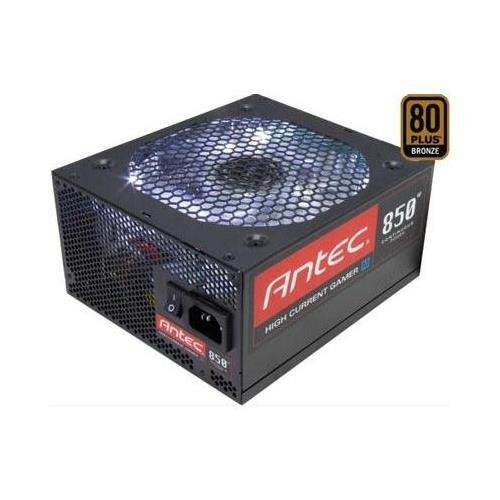
1 vaizdas: priekis view of the Antec HCG-850M 850W Power Supply, showing the fan grille and modular cable connectors. This unit provides stable power to your computer components.
5. Sąranka ir diegimas
Follow these steps to install your Antec HCG-850M power supply:
- Paruoškite savo sistemą: Įsitikinkite, kad jūsų kompiuteris yra visiškai išjungtas ir atjungtas nuo sieninio lizdo. Atidarykite kompiuterio korpusą.
- Išimkite seną maitinimo šaltinį (jei taikoma): Atjunkite visus laidus nuo seno maitinimo šaltinio. Atsukite ir išimkite seną maitinimo šaltinį iš korpuso.
- Prijunkite naują maitinimo šaltinį: Carefully place the Antec HCG-850M into the power supply bay of your computer case. Secure it with the provided mounting screws. Ensure the fan is oriented correctly for optimal airflow (typically facing down if there's a bottom vent, or up if not).
- Prijunkite būtiniausius kabelius:
- Connect the 24-pin ATX motherboard power cable.
- Connect the 4+4-pin or 8-pin EPS/CPU power cable to your motherboard.
- Prijunkite modulinius kabelius: Attach the necessary modular cables for your components (e.g., PCI-E for graphics cards, SATA for hard drives/SSDs, Peripheral for fans/accessories). Connect them securely to both the power supply and the respective components.
- Kabelių valdymas: Tvarkingai išvedžiokite laidus, kad pagerintumėte oro cirkuliaciją ir pagerintumėte estetiką.
- Uždarykite dėklą ir įjunkite: Close your computer case. Connect the AC power cord to the power supply and then to a wall outlet. Flip the power switch on the PSU to the 'ON' position. Power on your computer.
6. Naudojimo instrukcijos
Once installed, the Antec HCG-850M operates automatically. Here are some general operating guidelines:
- Maitinimo įjungimas/išjungimas: Use your computer's power button to turn the system on or off. The switch on the power supply itself should generally remain in the 'ON' position during normal operation.
- Sistemos stabilumas: Ensure your system is stable. If you experience unexpected shutdowns or reboots, refer to the troubleshooting section.
- Vėdinimas: Maintain good airflow around your computer case to prevent overheating of components, including the power supply.
7. Priežiūra
Proper maintenance can extend the lifespan of your power supply:
- Dulkių valymas: Periodically clean dust from the power supply's fan grille and the interior of your computer case using compressed air. Prieš valydami visada atjunkite kintamosios srovės maitinimo laidą.
- Kabelio patikrinimas: Occasionally check that all power cables are securely connected to the power supply and components.
- Aplinka: Operate the power supply in a clean, dry environment with stable temperatures.
8. Problemų sprendimas
If you encounter issues with your power supply, try the following steps:
8.1 Sistemai netiekiamas maitinimas
- Ensure the AC power cord is securely plugged into both the wall outlet and the power supply.
- Check that the power supply's ON/OFF switch is in the 'ON' position.
- Verify all internal power cables (24-pin ATX, CPU, PCI-E) are correctly and firmly connected.
- Patikrinkite sieninį lizdą su kitu įrenginiu, kad įsitikintumėte, jog jame yra maitinimas.
- If possible, test the power supply in another known working system or with a PSU tester.
8.2 Sistemos nestabilumas arba atsitiktiniai išsijungimai
- Įsitikinkite, kad jūsų sistemos energijos poreikiai neviršija maitinimo šaltinio 850 W galios.
- Check for overheating components. Ensure proper case ventilation and clean any dust buildup.
- Verify all power connections are secure. Loose connections can cause intermittent power delivery.
- If the issue persists, it may indicate a fault with the power supply or another component. Consider professional diagnosis.
9. Specifikacijos
| Funkcija | Detalė |
|---|---|
| Modelio numeris | HCG-850M |
| Išėjimo vattage | 850 vatų |
| Efektyvumo sertifikavimas | 80 PLUS bronza |
| Formos faktorius | ATX |
| Aušinimo būdas | Oras (135 mm ventiliatorius) |
| Modulinis tipas | Pusiau modulinis |
| Suderinami įrenginiai | Asmeninis kompiuteris |
| Prekės svoris | 9 svaro (apie 4.08 kg) |
| ASIN | B00ESAI3M0 |
10. Garantija ir palaikymas
Antec products are backed by a manufacturer's warranty. For specific warranty terms and conditions, please refer to the warranty card included with your product or visit the official Antec website. For technical support or customer service, please contact Antec directly through their official support channels.
Official Antec Websvetainė: www.antec.com


