Įvadas
This manual provides essential information for the safe and efficient operation of your Pioneer PDR-D5 CD Recorder. Please read it thoroughly before using the unit and keep it for future reference.
Saugos priemonės
- Maitinimas: Ensure the unit is connected to an AC 100V, 50/60Hz power source.
- Vėdinimas: Neužblokuokite ventiliacijos angų. Palikite pakankamai vietos aplink įrenginį tinkamam oro cirkuliavimui.
- Drėgmė: Saugokite įrenginį nuo lietaus ar drėgmės, kad išvengtumėte gaisro ar elektros smūgio.
- Užsienio objektai: Do not insert any objects into the unit's openings.
- Aptarnavimas: Visus techninės priežiūros darbus patikėkite kvalifikuotam techninės priežiūros personalui.
Pakuotės turinys
Patikrinkite, ar pakuotėje yra visi reikalingi daiktai:
- Pioneer PDR-D5 CD Recorder unit
- Nuotolinio valdymo pultas
- Maitinimo laidas
- RCA garso kabeliai
- Instrukcijų vadovas (šis dokumentas)

Sąranka
1. Įdėjimas
Place the PDR-D5 on a stable, level surface away from direct sunlight, heat sources, and excessive dust or vibrations. Ensure adequate ventilation around the unit.
2. Jungtys
Before making any connections, ensure the unit and all connected components are powered off.
- Garso įvestis: Connect the audio output of your source component (e.g., amplifier, tuner) to the LINE IN (L/R) jacks on the rear panel of the PDR-D5 using RCA audio cables.
- Garso išvestis: Prijunkite LINE OUT (L/R) jacks on the rear panel of the PDR-D5 to an available audio input on your ampkeltuvas arba imtuvas.
- Digital Input (Optional): For digital recording, connect a digital audio source (e.g., CD player, DAT player) to the DIGITAL IN (OPTICAL or COAXIAL) terminalai.
- Digital Output (Optional): For digital playback to a compatible receiver, connect the DIGITAL OUT (OPTICAL or COAXIAL) terminalai.
- Maitinimo jungtis: Prijunkite maitinimo laidą prie AC IN terminal on the rear panel, then plug the other end into a wall outlet.

Naudojimo instrukcijos
1. Maitinimo įjungimas/išjungimas
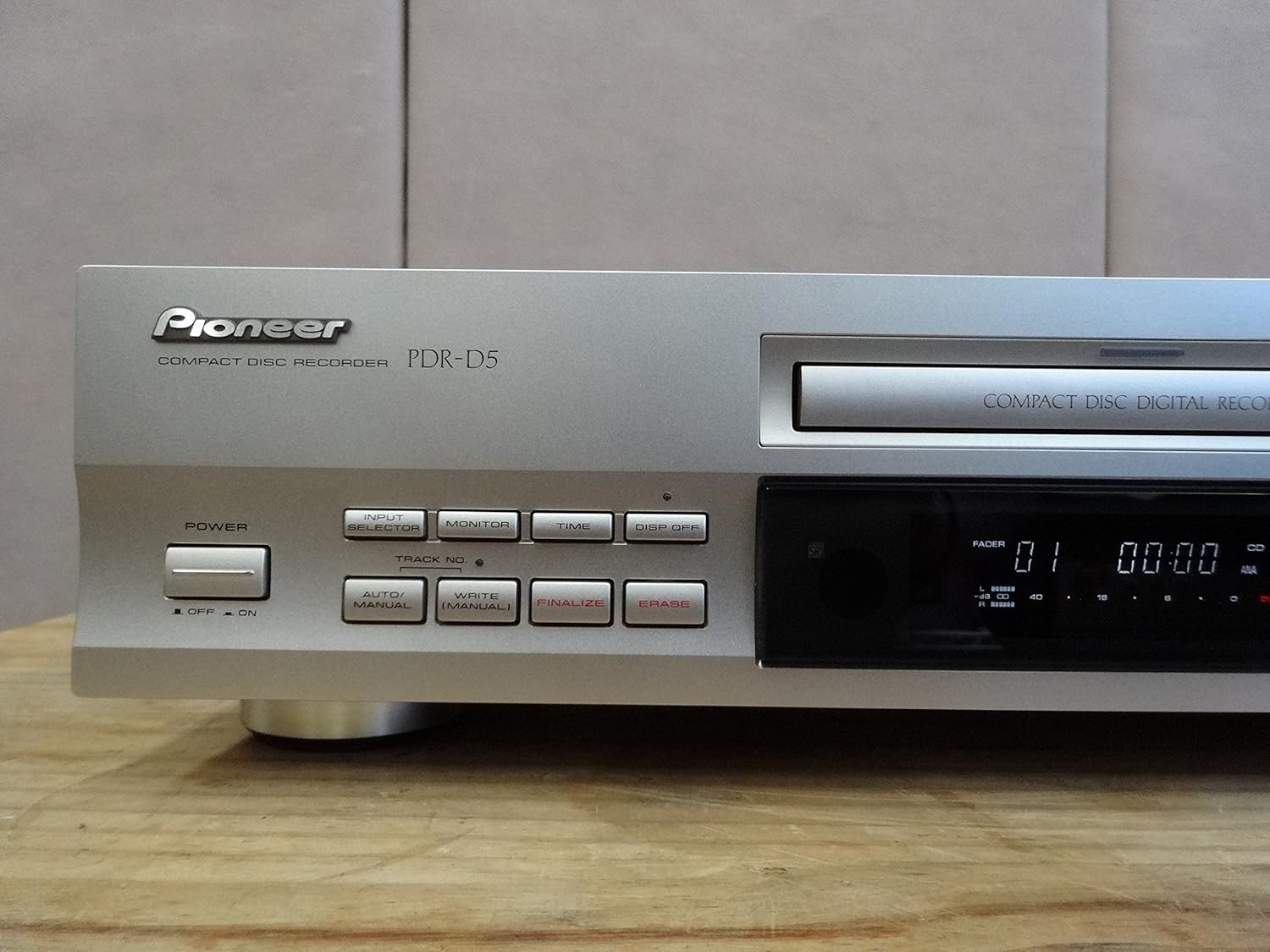
Paspauskite GALIA button on the front panel to turn the unit on or off. The display will illuminate when powered on.
2. CD grojimas
- Paspauskite ATIDARYTI/UŽDARYTI mygtuką, kad atidarytumėte disko dėklą.
- Place a CD (CD-DA format) onto the disc tray with the label side up.
- Paspauskite ATIDARYTI/UŽDARYTI Dar kartą paspauskite mygtuką, kad uždarytumėte dėklą. Įrenginys nuskaitys diską.
- Paspauskite ŽAISTI (►) mygtuką, norėdami pradėti atkūrimą.
- Naudokite SKIP (◀◀ / ►►) mygtukai, skirti naršyti tarp takelių.
- Paspauskite PAUSE (▐▐) button to temporarily stop playback, and STOP (■) to stop completely.

3. CD Recording
The PDR-D5 can record to CD-R (recordable) and CD-RW (rewritable) discs.
- Paspauskite ATIDARYTI/UŽDARYTI button and insert a blank CD-R or CD-RW disc. Close the tray.
- Pasirinkite įvesties šaltinį naudodami ĮVADŲ RINKIMAS button (e.g., Analog, Digital).
- Adjust the recording level using the ANALOG REC LEVEL or DIGITAL REC LEVEL knobs. Monitor the level indicators on the display to avoid distortion.
- Paspauskite ĮRAŠAS (●) button to enter record-pause mode.
- Start playback on your source component, then press the ŽAISTI (►) button on the PDR-D5 to begin recording.
- Norėdami sustabdyti įrašymą, paspauskite STOP (■) mygtuką.
4. Finalizing a Disc (CD-R)
After recording to a CD-R disc, it must be finalized to be playable on standard CD players.
- Ensure the recorded CD-R disc is in the tray.
- Paspauskite UŽBAIGTI mygtuką.
- Follow the on-screen prompts to confirm finalization. This process is irreversible.
5. Erasing a Disc (CD-RW)
CD-RW discs can be erased and re-recorded.
- Ensure the CD-RW disc is in the tray.
- Paspauskite IŠTRINTI mygtuką.
- Follow the on-screen prompts to confirm erasure.
Priežiūra
Įrenginio valymas
- Nuvalykite įrenginio išorę minkštu, sausu skudurėliu.
- Do not use abrasive cleaners, solvents, or chemical cloths, as they may damage the finish.
- Disko dėklą laikykite švarų ir be dulkių.
Disko tvarkymas
- Diskus imkite už kraštų, kad ant įrašymo paviršiaus neliktų pirštų atspaudų.
- Nenaudojamus diskus laikykite jų dėkluose, kad apsaugotumėte juos nuo dulkių ir įbrėžimų.
- Do not expose discs to direct sunlight or high temperatures.
Trikčių šalinimas
If you experience problems with your PDR-D5, refer to the following common issues before seeking service.
| Problema | Galima priežastis | Sprendimas |
|---|---|---|
| Įrenginys neįsijungia. | Maitinimo laidas nėra patikimai prijungtas. | Patikrinkite maitinimo laido jungtį su įrenginiu ir sieniniu lizdu. |
| "NO DISC" or "CHECK DISC" error displayed. | Disc is inserted incorrectly, dirty, scratched, or incompatible. | Ensure disc is inserted correctly. Clean the disc. Try a different, known-good disc. Ensure it's a standard CD-DA, CD-R, or CD-RW. |
| Atkūrimo metu nėra garso. | Audio cables are not connected correctly or input selector is wrong. | Check RCA audio cable connections. Ensure your amplifier/receiver is set to the correct input. |
| Recording fails or sound is distorted. | Recording levels are too high/low, or disc is faulty/full. | Adjust recording levels. Use a new, blank CD-R/RW. Ensure the disc is not scratched. |
| Disc cannot be finalized. | Disc is not a CD-R, or there is insufficient space. | Ensure you are using a CD-R disc. Finalization requires some disc space. |
Specifikacijos
| Funkcija | Specifikacija |
|---|---|
| Prekės ženklas | Pionierius |
| Gamintojas | Pionierius |
| Suderinama laikmena | CD, CD-R, CD-RW |
| Prekės svoris | 600 g |
| Pakuotės matmenys | 48.2 x 28.4 x 14.2 cm |
| Baterijos įtrauktos | Nr |
| Reikalingos baterijos | Nr |
| ASIN | B00ESY7I72 |
| Pirmoji prieinamumo data svetainėje Amazon.co.jp | 2013-8-27 |
| Įvertinimas | 2.5 iš 5 žvaigždučių (13 XNUMX įvertinimai) |
| „Amazon“ perkamiausių prekių reitingas | Electronics - 405,242nd; Disc Players/Recorders - 437th |
Garantija ir palaikymas
Pioneer products are designed for reliability and performance. For specific warranty details, please refer to the warranty card included with your purchase or visit the official Pioneer websvetainė jūsų regionui.
For technical support, troubleshooting assistance beyond this manual, or service inquiries, please contact Pioneer customer support through their official websvetainėje arba kontaktinę informaciją, pateiktą jūsų produkto dokumentuose.


