„Eurotime“ LCD skaitmeninio žadintuvo, modelio 23708-00, naudotojo vadovas
Modelis: 23708-00
Įvadas
This manual provides instructions for the setup, operation, and maintenance of your Eurotime LCD Digital Alarm Clock, Model 23708-00. Please read this manual thoroughly before using the product to ensure proper function and longevity.
The Eurotime LCD Digital Alarm Clock features an LCD display, 7-color changing LED lighting, multiple natural alarm tones, and displays time, date, day of the week, and indoor temperature. It also includes a snooze function and a countdown feature.
Saugos informacija
- Saugokite įrenginį nuo vandens ir didelės drėgmės.
- Nelaikykite prietaiso nuo tiesioginių saulės spindulių ar ekstremalių temperatūrų.
- Naudokite tik nurodyto tipo baterijas (3 x 1.5 V AAA tipo baterijas).
- Nemaišykite senų ir naujų baterijų arba skirtingų tipų baterijų.
- Naudotas baterijas išmeskite atsakingai pagal vietines taisykles.
- Nebandykite patys ardyti ar taisyti įrenginio. Dėl remonto kreipkitės į kvalifikuotus specialistus.
Pakuotės turinys
- Eurotime LCD Digital Alarm Clock (Model 23708-00)
- 3 x 1.5 V AAA baterijos
- Vartotojo vadovas (šis dokumentas)
Produktas baigtasview
Susipažinkite su savo žadintuvo komponentais ir valdikliais.
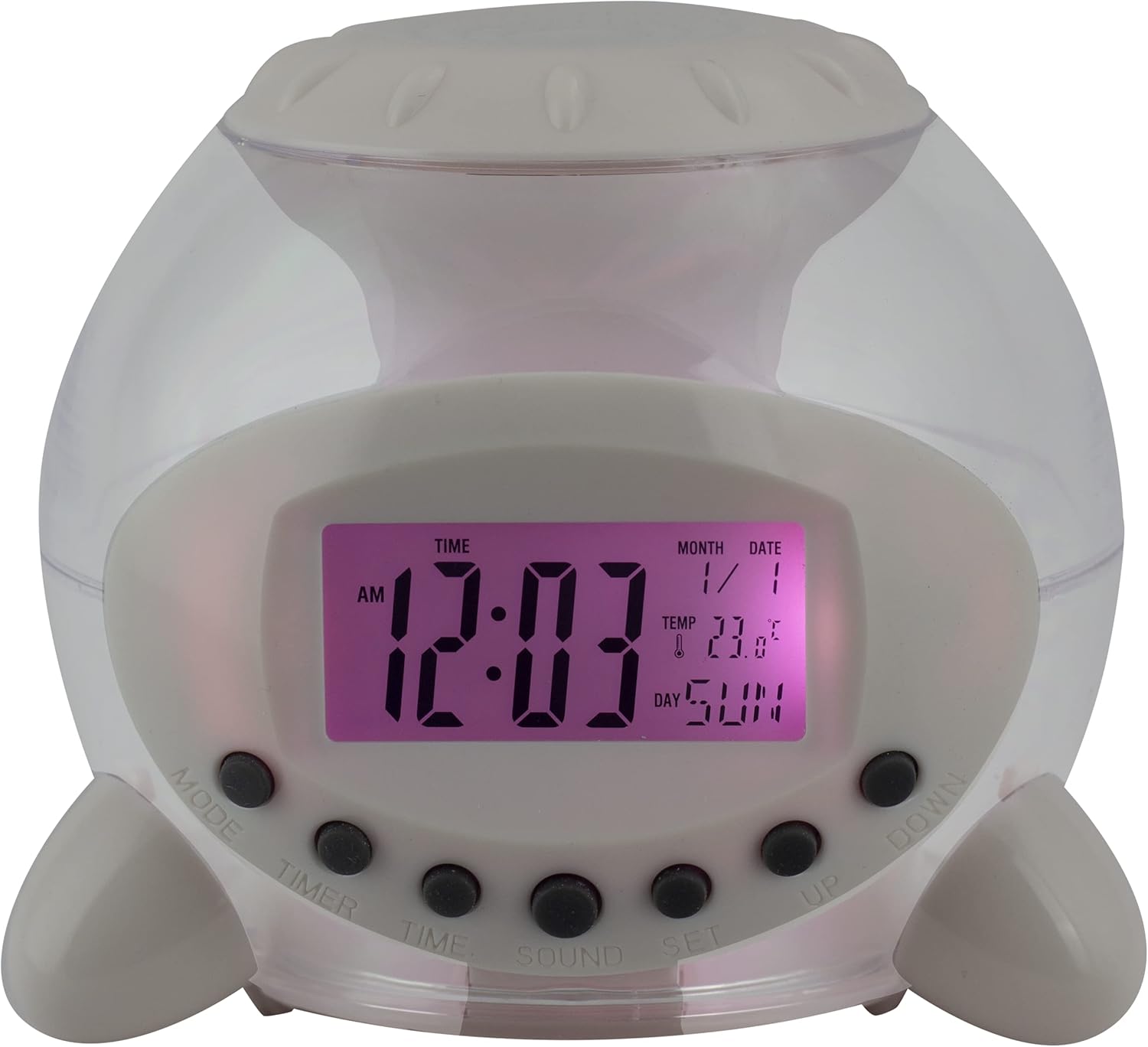
1 pav.: priekis View of the Alarm Clock. This image displays the front of the Eurotime LCD Digital Alarm Clock, highlighting its transparent plastic housing and the central LCD screen. The screen shows the time (12:03 AM), month (1), date (1), temperature (23.8°C), and day (SUN). Below the screen are control buttons labeled MODE, TIMER, TIME, SOUND, and SET, along with UP and DOWN buttons.

2 pav.: šonas View with Control Buttons. This image shows a side perspective of the alarm clock, emphasizing the array of control buttons located on the front-bottom edge. The transparent housing allows a glimpse of the internal structure and the LED lighting effect. The buttons are clearly visible for user interaction.

3 pav.: šonas View with Internal Lighting. Šis paveikslėlis atskleidžia kitą pusę view, illustrating the transparent housing and the internal LED lighting. The light emanates from the base, creating a soft glow within the clock's structure, demonstrating its color-changing feature.
Valdymo mygtukai:
- MODE: Switches between time display, alarm setting, and countdown timer.
- LAIKMATIS: Activates and sets the countdown timer.
- LAIKAS: Naudojamas dabartiniam laikui ir datai nustatyti.
- GARSU: Selects alarm tones or natural sounds.
- NUSTATYTI: Patvirtina nustatymus arba įjungia nustatymų režimą.
- AUKŠTYN ŽEMYN: Reguliuoja vertes nustatymo režimų metu.
Sąranka
1. Akumuliatoriaus įdėjimas
- Žadintuvo apačioje raskite baterijų skyrių.
- Atidarykite akumuliatoriaus skyriaus dangtelį.
- Įdėkite tris (3) 1.5 V AAA baterijas, užtikrindami teisingą poliškumą (+/-).
- Saugiai uždarykite akumuliatoriaus skyriaus dangtelį.
Pastaba: The clock will automatically power on after battery installation. The display may flash, indicating it's ready for time setting.
Naudojimo instrukcijos
1. Laiko ir datos nustatymas
- Įprastu laiko rodymo režimu paspauskite LAIKAS mygtuką vieną kartą. Pradės mirksėti valandų skaitmenys.
- Naudokite UP or ŽEMYN mygtukai valandoms reguliuoti.
- Paspauskite LAIKAS dar kartą, kad pereitumėte prie minučių nustatymo. Sureguliuokite su UP or ŽEMYN.
- Spauskite toliau LAIKAS , kad perjungtumėte metų, mėnesio ir datos nustatymus, kiekvieną koreguodami su UP or ŽEMYN.
- After setting the date, press LAIKAS one last time or wait a few seconds for the settings to be saved and return to normal display.
2. Signalo nustatymas
- Paspauskite REŽIMAS button until "ALARM" appears on the display (or an alarm icon).
- Paspauskite NUSTATYTI mygtuką. Mirksės žadintuvo valandų skaitmenys.
- Naudokite UP or ŽEMYN mygtukai žadintuvo valandoms reguliuoti.
- Paspauskite NUSTATYTI dar kartą, kad pereitumėte prie minučių nustatymo. Sureguliuokite su UP or ŽEMYN.
- Paspauskite NUSTATYTI one last time to confirm the alarm time.
- Norėdami įjungti / išjungti žadintuvą, paspauskite UP button in alarm display mode. An alarm icon will appear/disappear.
3. Snaudimo funkcija
When the alarm sounds, press any button (except NUSTATYTI or REŽIMAS) to activate the snooze function. The alarm will pause and sound again after a few minutes (duration is adjustable, refer to advanced settings if available).
Norėdami visiškai išjungti žadintuvą, paspauskite NUSTATYTI mygtuką, kai jis skamba.
4. Color Changing LED Lighting
The alarm clock features a 7-color changing LED light. This function typically activates automatically when the alarm sounds or can be manually toggled. Refer to the REŽIMAS or NUSTATYTI button for specific controls related to the lighting, if available.
5. Natural Alarm Tones
To select an alarm tone:
- In alarm setting mode (after pressing REŽIMAS to display alarm time), press the GARSAS mygtuką.
- Naudokite UP or ŽEMYN buttons to cycle through the available natural alarm tones.
- Paspauskite NUSTATYTI kad patvirtintumėte savo pasirinkimą.
6. Countdown Feature
Norėdami naudoti atgalinės atskaitos laikmatį:
- Paspauskite REŽIMAS button until "TIMER" appears on the display.
- Paspauskite LAIKMATIS mygtuką. Valandų skaitmenys pradės mirksėti.
- Naudokite UP or ŽEMYN to set the desired countdown hour.
- Paspauskite LAIKMATIS again to set minutes, then seconds.
- Paspauskite NUSTATYTI kad pradėtumėte atgalinį skaičiavimą.
- To pause or resume, press NUSTATYTI. Norėdami iš naujo nustatyti, paspauskite REŽIMAS.
Priežiūra
Valymas
- Nuvalykite laikrodį minkštu, sausu skudurėliu.
- Do not use abrasive cleaners or solvents, as they may damage the plastic housing or display.
Baterijos keitimas
When the display dims or functions become erratic, it is time to replace the batteries. Follow the "Battery Installation" steps in the Setup section.
Trikčių šalinimas
| Problema | Galima priežastis | Sprendimas |
|---|---|---|
| Ekranas tuščias arba blankus. | Išsikrovusios arba išsikrovusios baterijos. Neteisingas baterijų įdėjimas. | Replace batteries with new 1.5V AAA batteries. Ensure correct polarity. |
| Signalizacija neskamba. | Alarm is not activated. Alarm volume is too low (if adjustable). | Ensure the alarm icon is displayed. Check alarm settings. |
| Laikas / data neteisingi. | Not set correctly after battery installation or power interruption. | Follow "Setting Time and Date" instructions to reset. |
| Color changing light not working. | Feature not activated or malfunction. | Check operating instructions for light activation. If problem persists, contact support. |
Specifikacijos
- Prekinis ženklas: Eurotime
- Modelio numeris: 23708-00
- Gaminio matmenys: 8.99 x 8.99 x 8 cm
- Svoris: 120 g
- Medžiaga: Plastikiniai
- Ekrano tipas: Skaitmeninis LCD
- Ypatingos savybės: Calendar display, Snooze, Alarm, 7-Color Changing LED, Natural Alarm Tones, Countdown Feature, Indoor Temperature Display
- Maitinimo šaltinis: 3 x 1.5 V AAA baterijos (pridedamos)
Garantija ir palaikymas
For warranty information or technical support, please refer to the retailer where the product was purchased or visit the official Eurotime websvetainėje. Išsaugokite pirkimo kvitą kaip pirkimo įrodymą.


