Įvadas
This manual provides essential information for the proper use and care of your Beats Studio Wireless Over-Ear Headphones. Please read these instructions carefully before using your headphones to ensure optimal performance and longevity. The Beats Studio Wireless headphones offer a premium audio experience with wireless connectivity and Adaptive Noise Canceling technology.
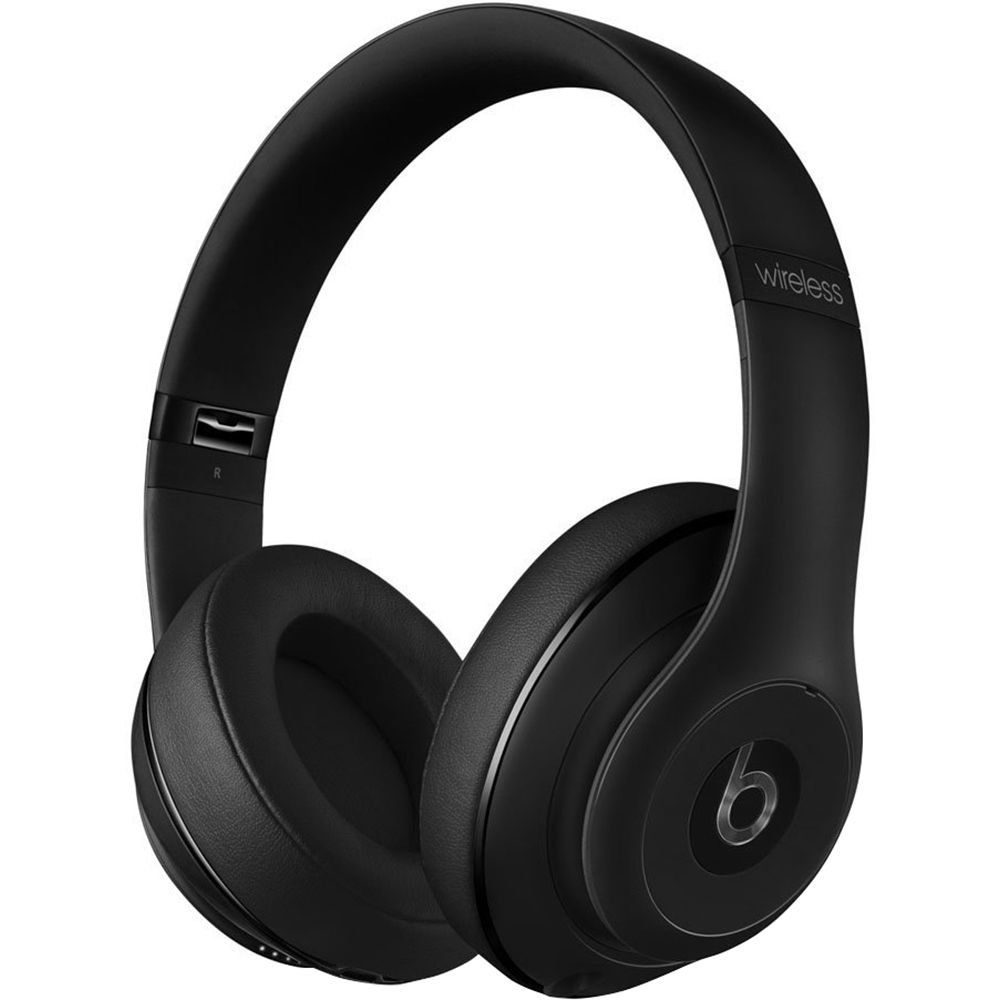
Image: Beats Studio Wireless Over-Ear Headphones in Matte Black, showcasing elegantiškas dizainas.
Kas yra dėžutėje
Patikrinkite, ar pakuotėje yra visi reikalingi daiktai:
- Beats Studio Wireless over-ear headphones
- 3.5mm audio cable with RemoteTalk (for wired connection and controls)
- Standard 3.5 mm audio cable (for wired connection without RemoteTalk features)
- USB 2.0 cable (USB-A to USB Micro-B) for charging
- Hard-shell carrying case with carabiner clip

Image: The Beats Studio Wireless headphones, hard-shell carrying case, and various cables laid out from the packaging.
Sąranka
1. Ausinių įkrovimas
Before first use, fully charge your Beats Studio Wireless headphones. A full charge provides approximately 12 hours of wireless playback or 20 hours of wired playback with Adaptive Noise Canceling enabled.
- Connect the small end of the USB 2.0 cable (USB-A to USB Micro-B) to the Micro-USB port on the right earcup of the headphones.
- Connect the larger end of the USB cable to a USB power adapter (not included) or a powered USB port on a computer.
- The Fuel Gauge LEDs on the right earcup will indicate charging status. When all five LEDs are solid white, the headphones are fully charged.
Pastaba: The headphones cannot be used while charging.
2. „Bluetooth“ poravimas
Susiekite ausines su „Bluetooth“ įrenginiu, kad galėtumėte klausytis belaidžio garso.
- Ensure your headphones are charged and powered off.
- Press and hold the power button on the right earcup for 3-5 seconds until the Fuel Gauge LEDs begin to pulse. This indicates pairing mode.
- Savo įrenginyje eikite į „Bluetooth“ nustatymus ir įjunkite „Bluetooth“.
- Select "Beats Studio Wireless" from the list of available devices.
- Once paired, the Fuel Gauge LEDs will turn solid white.
The headphones have a Bluetooth range of up to 30 feet (9 meters).
3. Laidinis ryšys
For a wired connection, use the provided 3.5mm audio cables.
- Plug one end of the 3.5mm audio cable into the audio input port on the left earcup.
- Kitą galą prijunkite prie savo įrenginio 3.5 mm garso išvesties lizdo.
The RemoteTalk cable allows for inline control of music and calls when connected to compatible devices.
Naudojimo instrukcijos
1. Maitinimo įjungimas/išjungimas
- Norėdami įjungti: Press and hold the power button on the right earcup until the Fuel Gauge LEDs illuminate.
- Norėdami išjungti: Press and hold the power button until the Fuel Gauge LEDs turn off.
2. Controls (Wireless Mode)
The "b" button on the left earcup and the volume buttons control playback and calls.
- Leisti / pristabdyti: Press the "b" button once.
- Kitas takelis: Press the "b" button twice quickly.
- Ankstesnis takelis: Press the "b" button three times quickly.
- Pagarsink: Press the top volume button.
- Patildyti: Press the bottom volume button.
- Atsiliepti / Baigti skambutį: Press the "b" button once during an incoming call or active call.
- Atmesti skambutį: Press and hold the "b" button for 2 seconds during an incoming call.
- Suaktyvinti „Voice Assistant“: Press and hold the "b" button for 2 seconds (functionality depends on device).
3. Adaptive Noise Canceling (ANC)
The Beats Studio Wireless headphones feature Dual-Mode Adaptive Noise Canceling. ANC is automatically active when the headphones are powered on. There are two modes:
- Full ANC: Engaged when listening to music or media, providing maximum noise reduction.
- ANC Only: When the audio cable is unplugged and the headphones are powered on, ANC will automatically switch to a more aggressive mode to reduce external noise without playing audio.
Priežiūra
1. Valymas
Norėdami išlaikyti ausinių išvaizdą ir veikimą:
- Ausų kaušelius ir galvos juostą nuvalykite minkštu, sausu, nepūkuotu skudurėliu.
- Nenaudokite abrazyvinių valiklių, alkoholio ar cheminių tirpiklių.
- Venkite drėgmės patekimo į bet kokias angas.
2. Sandėliavimas
When not in use, store your headphones in the provided hard-shell carrying case to protect them from damage.
- Fold the headphones carefully to fit into the case.
- Keep headphones away from extreme temperatures and humidity.
3. Akumuliatoriaus priežiūra
Norėdami pailginti baterijos veikimo laiką:
- Venkite dažnai visiškai iškrauti akumuliatorių.
- Reguliariai kraukite ausines, net jei jų ilgą laiką nenaudojate.
- Laikyti vėsioje, sausoje vietoje.
Trikčių šalinimas
If you encounter issues with your Beats Studio Wireless headphones, try the following solutions:
Nėra maitinimo / Neįsijungia
- Įsitikinkite, kad ausinės yra visiškai įkrautos. Prijunkite jas prie maitinimo šaltinio naudodami USB laidą.
- Patikrinkite, ar nepažeistas USB laidas ir įkrovimo prievadas.
No Sound / Intermittent Audio
- Belaidis ryšys:
- Ensure headphones are paired and connected to your device.
- Patikrinkite garsumo lygius tiek ausinėse, tiek savo įrenginyje.
- Move closer to your device to avoid interference or exceeding Bluetooth range.
- Pabandykite ausines su savo įrenginiu atjungti ir vėl susieti.
- Laidinis:
- Ensure the 3.5mm audio cable is securely plugged into both the headphones and your audio source.
- Try a different 3.5mm audio cable if available.
Poravimo problemos
- Ensure the headphones are in pairing mode (pulsing Fuel Gauge LEDs).
- Išjunkite ir vėl įjunkite savo įrenginio „Bluetooth“.
- Forget "Beats Studio Wireless" from your device's Bluetooth list and attempt to pair again.
- Įsitikinkite, kad jokie kiti „Bluetooth“ įrenginiai netrukdo susiejimo procesui.
Adaptive Noise Canceling (ANC) Not Working
- Ensure the headphones are powered on. ANC requires power.
- Check for any obstructions around the external microphones on the earcups.
Specifikacijos
Key technical specifications for the Beats Studio Wireless Over-Ear Headphones:
- Modelio pavadinimas: Studija
- Ryšio technologija: Bluetooth (Wireless), 3.5 mm Jack (Wired)
- Belaidžio ryšio technologija: Bluetooth
- „Bluetooth“ diapazonas: Iki 30 pėdų (9 metrų)
- Triukšmo valdymas: Active Noise Cancellation (Dual-Mode Adaptive Noise Canceling)
- Baterijos veikimo laikas: Approximately 12 hours (wireless), 20 hours (wired with ANC)
- Baterijos tipas: 1 ličio jonų baterija (įkraunama)
- Valdymo tipas: Media Control (on-earcup "b" button, volume buttons)
- Mikrofonas: Integruotas skambučiams laisvų rankų įranga
- Formos faktorius: Virš ausies
- Ausų išdėstymas: Virš ausies
- Medžiaga: Plastikiniai
- Prekės svoris: Maždaug 9.2 uncijos (0.26 kilogramo)
- Gaminio matmenys: 9.6 x 7.3 x 4.5 colio
- Gamintojas: Beats Electronics, LLC
- Pirmą kartą pasiekiama data: 1 m. gruodžio 2013 d

Vaizdas: Stambus planas view of the headphone's inner band, displaying the model number B0501.
Garantija ir palaikymas
For warranty information and customer support, please refer to the official Beats websvetainėje arba susisiekite tiesiogiai su jų klientų aptarnavimo tarnyba. Išsaugokite pirkimo įrodymą garantiniams reikalavimams.
Pastaba: This product is an older model. Specific warranty terms may vary based on purchase date and region. Please consult the manufacturer's official resources for the most accurate and up-to-date information.
Dėl papildomos pagalbos apsilankykite: Beats Support