Įvadas
This user manual provides comprehensive instructions for the setup, operation, and maintenance of your Reloop RP-8000 Advanced Hybrid Torque Turntable. The RP-8000 combines traditional direct-drive turntable functionality with advanced digital control features, making it a versatile tool for DJs and audio enthusiasts.
Prieš naudodami įrenginį, atidžiai perskaitykite šį vadovą, kad užtikrintumėte tinkamą jo naudojimą ir maksimaliai padidintumėte jo veikimą bei ilgaamžiškumą.
Saugos instrukcijos
- Įsitikinkite, kad maitinimo šaltinis atitinka tūrįtagant įrenginio nurodytus reikalavimus.
- Saugokite įrenginį nuo lietaus, drėgmės ar ekstremalių temperatūrų.
- Venkite įrenginio statyti šalia šilumos šaltinių arba tiesioginiuose saulės spinduliuose.
- Neatidarykite casing; visus techninės priežiūros darbus patikėkite kvalifikuotiems darbuotojams.
- Always disconnect the power cable before cleaning or moving the unit.
- Laikyti vaikams nepasiekiamoje vietoje.
Pakuotės turinys
Patikrinkite, ar pakuotėje yra visi reikalingi daiktai:
- Pagrindinis patefono blokas
- Maitinimo kabelis
- USB kabelis
- RCA Cable (with ground wire)
- Slipmat
- Atsvara
- Headshell (cartridge not included)
- Vartotojo vadovas (šis dokumentas)
Produktas baigtasview
Familiarize yourself with the various components of your Reloop RP-8000 turntable.
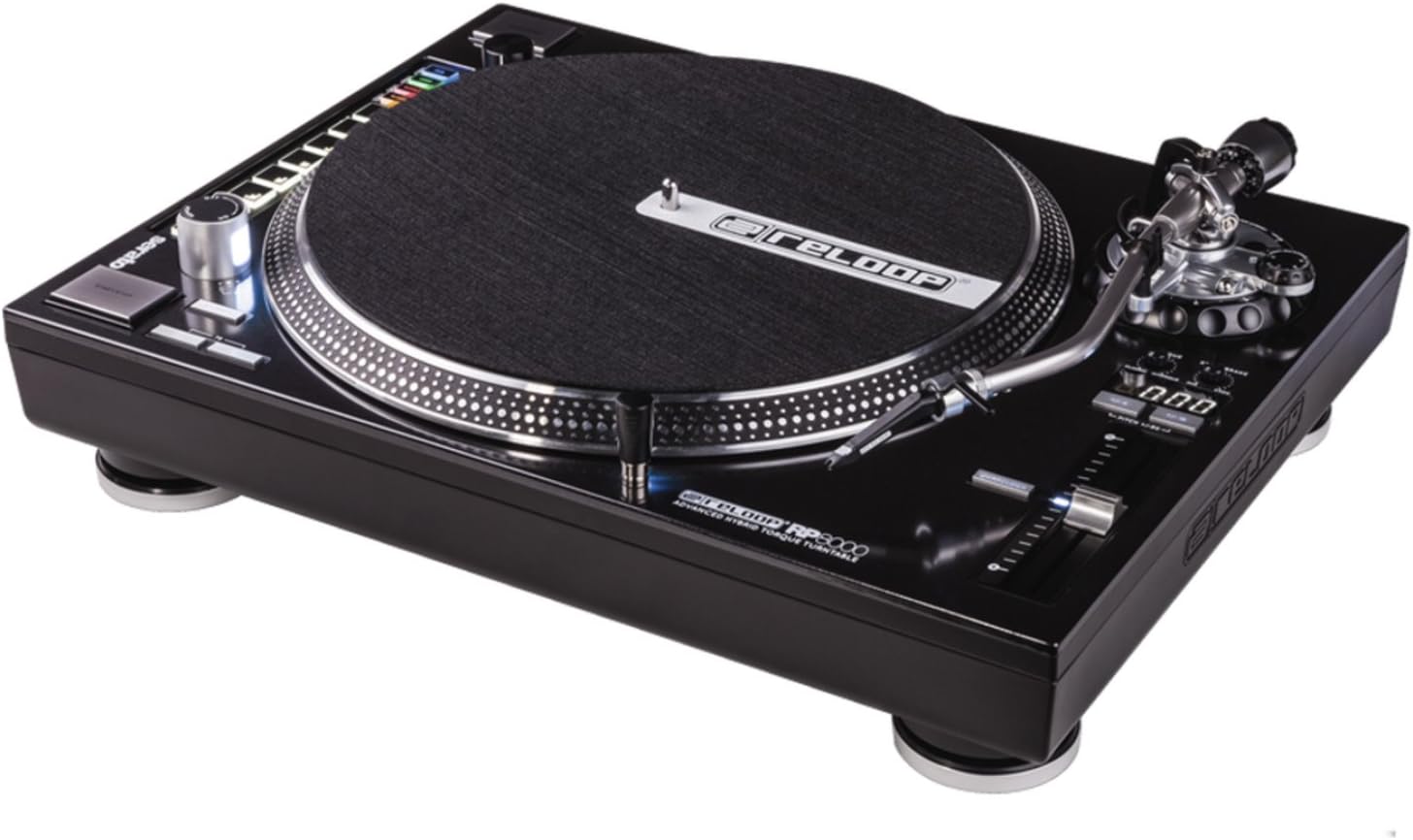
1 paveikslas: Iš viršaus į apačią view of the Reloop RP-8000 turntable, showcasing the platter, tone arm, pitch fader, and MIDI control section with performance pads.

2 paveikslas: Kampuotas view of the Reloop RP-8000, highlighting the robust construction, the illuminated platter edge, and the integrated MIDI controls on the left side.

3 paveikslas: Rear panel of the Reloop RP-8000, showing the audio output (Phono/Line), USB ports (USB A and TT Link), power input, and power switch. Note the additional start/stop button for vertical setup.
Pagrindiniai komponentai:
- Lėkštė: The rotating surface where records are placed.
- Toninė rankena: Laiko kasetę ir adatą, sekdamas plokštelės griovelius.
- Pikis Faderis: Adjusts the playback speed (BPM).
- Pradžios / sustabdymo mygtukai: Controls platter rotation. An additional button is provided for battle setup.
- MIDI Control Section: Features a Trax encoder, 8 backlit drum pads, and mode selection buttons for software control.
- Phono/Line Output: RCA jacks for audio output, with a switch to select between phono (turntable level) and line (mixer/amp level) output.
- USB prievadai: For connecting to a computer and linking multiple turntables.
Sąranka
1. Išpakavimas ir įdėjimas
- Atsargiai išimkite patefoną iš pakuotės.
- Place the unit on a stable, level surface away from direct vibrations.
- Užtikrinkite tinkamą vėdinimą aplink įrenginį.
2. Tone Arm and Cartridge Assembly
- Attach your preferred headshell and cartridge (sold separately) to the tone arm.
- Install the counterweight onto the rear of the tone arm.
- Adjust the counterweight to balance the tone arm horizontally. Refer to your cartridge's instructions for recommended tracking force.
- Set the anti-skate dial to match the tracking force.
3. Jungtys
- Garso jungtis: Connect the RCA cables from the turntable's PHONO/LINE output to your mixer or ampgyvesnis.
- If connecting to a PHONO input on your mixer/amp, set the turntable's PHONO/LINE switch to TELEFONAS.
- If connecting to a LINE input, set the turntable's PHONO/LINE switch to LINIJA.
- Connect the ground wire to the ground terminal on your mixer/amp to reduce hum.
- USB jungtis: Connect the USB cable from the turntable's USB port to your computer for MIDI control and DVS (Digital Vinyl System) functionality.
- Turntable Link (TT Link): For linking multiple RP-8000 units, connect them in series using standard USB cables. Only one turntable needs to be connected to the computer.
- Maitinimo jungtis: Connect the power cable to the turntable and then to a suitable power outlet.
Naudojimo instrukcijos
1. Pagrindinis atkūrimas
- Place a record on the platter and put the slipmat on top.
- Select the desired speed (33, 45, or 78 RPM) using the speed selection buttons.
- Paspauskite START/STOP mygtuką, kad pradėtumėte sukti plokštelę.
- Carefully lower the tone arm onto the record using the cue lever.
- Adjust the pitch using the pitch fader as needed.
2. Pitch Control
- The pitch fader allows for precise adjustment of playback speed.
- Use the Pitch Range buttons (+/-8%, +/-16%, +/-50%) to select the desired pitch adjustment range.
- The LCD display shows the current pitch percentage.
- Press the Quartz Lock button to return the pitch to 0% (nominal speed).
3. MIDI Control and Performance Modes
The RP-8000 features an integrated MIDI control section for seamless integration with DJ software.
- Trax Encoder: Use this large encoder to browse through playlists and load tracks in your DJ software.
- „Performance Pads“: The 8 backlit drum pads offer various performance modes:
- „Hot Cue“ režimas: Trigger up to 8 hot cue points.
- Ciklo režimas: Set and trigger loops.
- Sample režimas: Access and play samples.
- Vartotojo režimas: Freely assign MIDI functions to the pads and other control elements.
- Dual Performance Mode: Activate two modes simultaneously (e.g., Hot Cue and Loop) by pressing their respective buttons. The pads will be split to control both functions.
- Turntable Link Mode: Connect up to four RP-8000 turntables via USB. The units automatically assign themselves to available decks in your DJ software, requiring only one USB connection to your computer.
- Atbulinės eigos mygtukas: Instantly reverses platter rotation.
- Adjustable Start/Stop Time: Use the dedicated dials to fine-tune the platter's start and brake times for customized performance.
Priežiūra
- Valymas: Įrenginį nuvalykite minkšta, sausa šluoste. Įsisenėjusius nešvarumus lengvai nuvalykite.amp cloth can be used, but ensure no liquid enters the unit. Avoid abrasive cleaners.
- Rašiklio priežiūra: Regularly clean your stylus with a soft brush designed for this purpose. Replace the stylus when it shows signs of wear to prevent damage to your records.
- Apsauga nuo dulkių: Use a dust cover (if available) when the turntable is not in use to protect it from dust and debris.
Trikčių šalinimas
| Problema | Galima priežastis | Sprendimas |
|---|---|---|
| Nėra garso ar mažas garsumas | Incorrect PHONO/LINE switch setting; loose RCA cables; faulty cartridge/stylus. | Ensure PHONO/LINE switch matches input; check cable connections; inspect/replace cartridge/stylus. |
| Dumbimo triukšmas | Ground wire not connected; interference from other electronics. | Connect ground wire to mixer/amp; move turntable away from other electronic devices. |
| Lėkštė nesisuka | Power not connected; power switch off; START/STOP button not pressed. | Check power cable; ensure power switch is ON; press START/STOP button. |
| MIDI controls not responding | USB cable not connected; incorrect software settings; outdated firmware. | Ensure USB cable is connected; check DJ software MIDI settings; update turntable firmware if available. |
If the problem persists after attempting these solutions, please contact Reloop customer support.
Specifikacijos
| Funkcija | Detalė |
|---|---|
| Modelio pavadinimas | RP-8000 MK2 (AMS-RP-8000) |
| Variklio tipas | AC Motor, Quartz-driven Direct Drive |
| Prekės svoris | 22 svaro (apie 9.98 kg) |
| Gaminio matmenys (I x P x A) | 20.66 x 16.53 x 7.48 colio (apytiksliai 52.5 x 42 x 19 cm) |
| Ryšio technologija | Wired (RCA, USB 2.0) |
| Maitinimo šaltinis | Su laidu elektra |
| ttage | 220 Volts (Note: Check specific unit for local voltagsuderinamumas) |
| Techninės įrangos sąsaja | USB 2.0 |
| Suderinami įrenginiai | Asmeninis kompiuteris |
| Signalo formatas | Skaitmeninis |
Garantija ir palaikymas
For information regarding warranty coverage, please refer to the warranty card included with your product or visit the official Reloop website. Reloop offers various protection plans for extended coverage, which may be purchased separately.
For technical support, troubleshooting assistance beyond this manual, or spare parts, please contact Reloop customer service through their official websvetainėje arba įgaliotųjų platintojų. Išsaugokite pirkimo kvitą kaip pirkimo įrodymą garantijos pretenzijoms.
Pastaba: The user manual (PDF) is also available for download at https://manuals.plus/m/8eb0b60ccb1c6d10ac93577b129a938bfbac889fdb461902d354afc8d19b78dd.


