1. Įvadas
Thank you for choosing the Pro'sKit PT-5501I Variable Speed Rotary Tool Kit. This manual provides essential information for the safe and efficient operation, maintenance, and troubleshooting of your new rotary tool. Please read this manual thoroughly before using the tool and retain it for future reference.

1.1 paveikslas: The Pro'sKit PT-5501I Variable Speed Rotary Tool. This image shows the main rotary tool unit, highlighting its ergonomic design and power cord connection.
2. Saugos instrukcijos
Always observe basic safety precautions to reduce the risk of fire, electric shock, and personal injury when using this tool.
- Darbo zonos sauga: Darbo vieta turi būti švari ir gerai apšviesta. Netvarkingos arba tamsios vietos skatina nelaimingus atsitikimus. Nenaudokite elektrinių įrankių sprogioje aplinkoje, pavyzdžiui, ten, kur yra degių skysčių, dujų ar dulkių.
- Elektros sauga: Elektrinių įrankių kištukai turi atitikti lizdą. Niekada jokiu būdu nekeiskite kištuko. Venkite kūno kontakto su įžemintais paviršiais, tokiais kaip vamzdžiai, radiatoriai, viryklės ir šaldytuvai.
- Asmeninis saugumas: Always wear eye protection. Use a dust mask if operating in dusty conditions. Do not overreach. Keep proper footing and balance at all times. Dress properly; avoid loose clothing or jewelry.
- Įrankio naudojimas ir priežiūra: Nenaudokite elektrinio įrankio per jėgą. Naudokite savo darbui tinkamą elektrinį įrankį. Prieš atlikdami bet kokius pakeitimus, keisdami priedus ar padėdami elektrinius įrankius sandėliuoti, atjunkite kištuką nuo maitinimo šaltinio.
- Priežiūra: Prižiūrėkite elektrinius įrankius. Patikrinkite, ar judančios dalys nesutampa ar neprisiriša, ar jos nesulaužytos, ar nėra kitų sąlygų, kurios gali turėti įtakos elektrinio įrankio veikimui.
3. Pakuotės turinys
The Pro'sKit PT-5501I Variable Speed Rotary Tool Kit includes the following items:
- Pro'sKit PT-5501I Rotary Tool (230V)
- Lankstus velenas
- 40-piece Multipurpose Accessory Set
- Dėklas nešiojimui
- Instrukcijų vadovas

3.1 paveikslas: Contents of the Pro'sKit PT-5501I Rotary Tool Kit. This image displays the rotary tool, flexible shaft, various accessories, and the carrying case.
4. Produkto ypatybės
The Pro'sKit PT-5501I Rotary Tool is designed for versatility and precision, offering a range of features for various applications:
- Kintamo greičio valdymas: Adjust speed from 10,000 to 32,000 RPM for optimal performance across different materials and tasks.
- Lankstus velenas: Provides enhanced comfort and precision for detailed work in hard-to-reach areas.
- Veleno užraktas: Facilitates quick and easy accessory changes.
- External Carbon Brushes: Designed for convenient replacement, extending tool lifespan.
- Daugiafunkciai priedai: Includes a 40-piece set suitable for cutting, sanding, polishing, drilling, and burr removal.

4.1 paveikslas: Baigėsiview of the Pro'sKit PT-5501I Rotary Tool Kit and its accessories. This image illustrates the various components and their potential applications, such as polishing and precision engineering.
5. Sąranka
Follow these steps to set up your rotary tool for operation:
- Išpakavimas: Carefully remove all components from the carrying case. Inspect for any damage.
- Selecting an Accessory: Choose the appropriate accessory for your task (e.g., grinding stone, sanding drum, drill bit).
- Inserting an Accessory:
- Press and hold the spindle lock button located on the tool head.
- Unscrew the collet nut counter-clockwise until the collet jaws open.
- Įstatykite priedo kotą iki galo į įvorę.
- Tighten the collet nut clockwise by hand, then release the spindle lock button. Ensure the accessory is securely held.
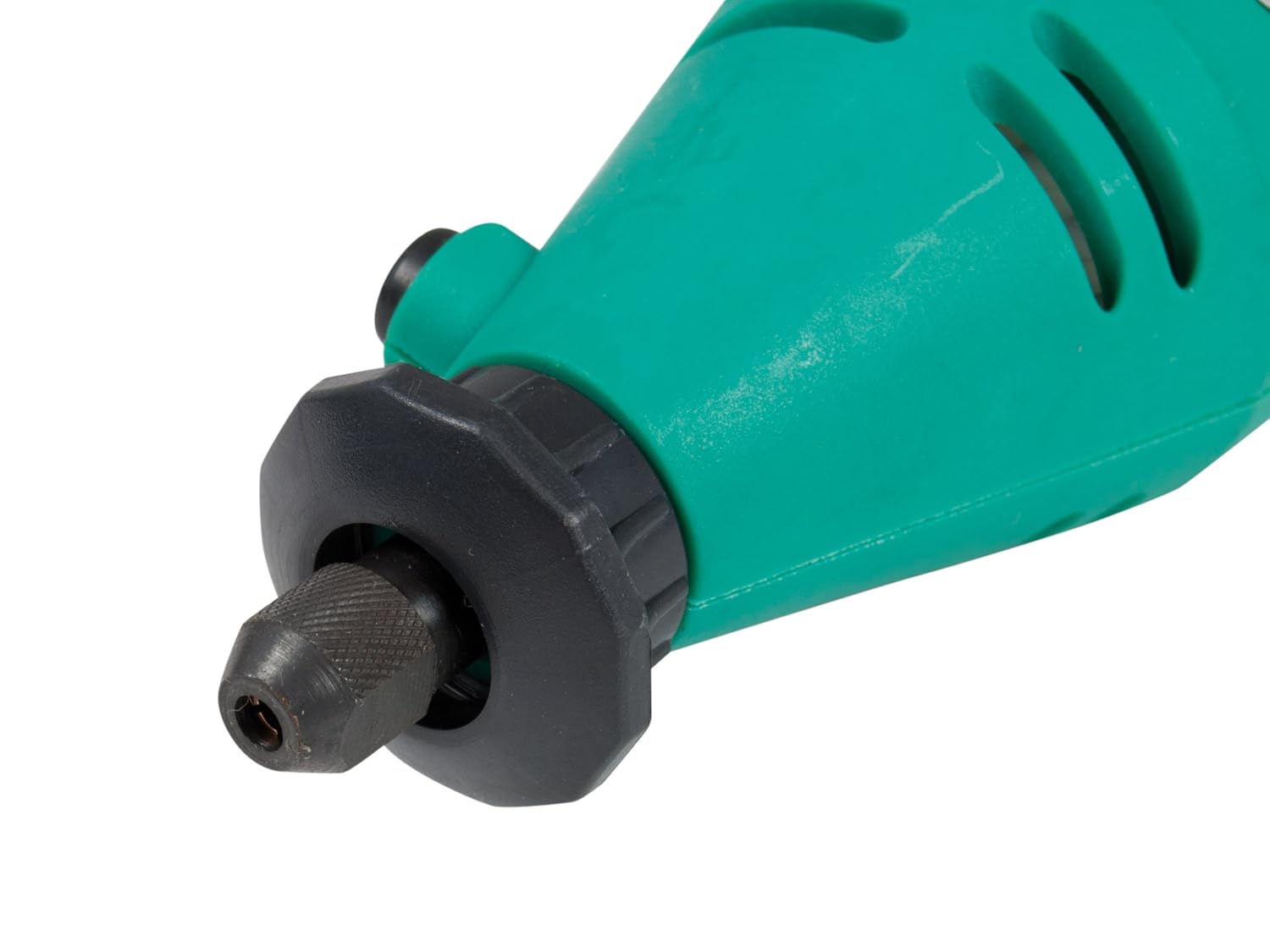
5.1 paveikslas: Iš arti view of the rotary tool's chuck and spindle lock mechanism. This image details how accessories are inserted and secured.
- Attaching the Flexible Shaft (Optional):
- Įsitikinkite, kad sukamasis įrankis yra atjungtas nuo elektros tinklo.
- Remove the collet nut and collet from the rotary tool.
- Screw the flexible shaft coupling onto the rotary tool's threaded collar until secure.
- Insert the flexible shaft's inner drive cable into the rotary tool's chuck.
- Įstatykite norimą priedą į lanksčiojo veleno įvorę ir priveržkite.
- Maitinimo jungtis: Plug the tool into a standard 230V AC power outlet.
6. Naudojimo instrukcijos
Prieš pradėdami eksploatuoti, įsitikinkite, kad suprantate ir laikotės visų saugos priemonių.
- Įjungimas / išjungimas: Locate the ON/OFF switch on the tool body. Slide it to the 'ON' position to start the tool and to the 'OFF' position to stop it.
- Greičio reguliavimas: Use the variable speed dial to select the desired RPM. Start with a lower speed and gradually increase it as needed for your application and material.
- Darbas su įrankiu:
- Hold the tool firmly with both hands or use the flexible shaft for precision.
- Apply light, consistent pressure. Do not force the tool, as this can lead to overheating or damage to the tool or workpiece.
- Prieš liesdami ruošinį, leiskite įrankiui pasiekti visą greitį.
- For cutting, sanding, polishing, drilling, and burr removal, use the appropriate accessory and technique. Refer to accessory-specific instructions if available.
- Aušinimas: During extended use, allow the tool to cool periodically to prevent overheating.
7. Priežiūra
Regular maintenance ensures optimal performance and extends the life of your rotary tool.
- Valymas: After each use, unplug the tool and clean the housing with a soft, damp cloth. Use a brush to remove dust and debris from ventilation openings. Do not use harsh chemicals or abrasive cleaners.
- Anglies šepetėlių keitimas: The tool is equipped with external carbon brushes for easy replacement. When the tool's performance decreases or it stops working, the carbon brushes may need replacement. Refer to the diagram on the tool for the location of the brush caps. Unscrew the caps, remove the old brushes, and insert new ones, ensuring they are seated correctly. Replace the caps securely.
- Priedų priežiūra: Clean accessories after use. Store them in the provided carrying case to prevent damage and loss.
- Saugykla: Store the tool and all accessories in the original carrying case in a dry, secure location, out of reach of children.

7.1 paveikslas: The Pro'sKit PT-5501I Rotary Tool Kit stored in its carrying case. Proper storage protects the tool and accessories.
8. Problemų sprendimas
If you encounter issues with your Pro'sKit PT-5501I Rotary Tool, refer to the following table:
| Problema | Galima priežastis | Sprendimas |
|---|---|---|
| Įrankis neįsijungia | Nėra maitinimo šaltinio; Sugedęs jungiklis; Susidėvėję anglies šepetėliai | Patikrinkite maitinimo jungtį; Patikrinkite lizdą; Pakeiskite jungiklį; Pakeiskite anglinius šepetėlius. |
| Loss of power/Reduced speed | Worn carbon brushes; Overload; Loose connection | Replace carbon brushes; Reduce pressure on workpiece; Check power cord. |
| Per didelė vibracija | Bent accessory shank; Improperly seated accessory | Replace bent accessory; Re-seat accessory securely in collet. |
| Įrankis perkaista | Nuolatinis intensyvus naudojimas; Užsikimšusios ventiliacijos angos | Allow tool to cool; Clear ventilation slots; Reduce workload. |
Jei problema išlieka ir išbandžius šiuos sprendimus, susisiekite su klientų aptarnavimo tarnyba.
9. Specifikacijos
| Specifikacija | Detalė |
|---|---|
| Modelio numeris | PT-5501I |
| Prekės ženklas | Pro'sKit |
| ttage | 230 voltų |
| Maitinimo šaltinis | Su laidu elektra |
| Minimalus sukimosi greitis | 10,000 aps./min |
| Maksimalus sukimosi greitis | 32,000 aps./min |
| Prekės svoris | 1.4 kilogramo (1 kg 400 g) |
| Gaminio matmenys (I x P x A) | 23.5x28.5x7 cm |
| Rekomenduojami naudojimo būdai | Cutting, Sanding, Polishing, Drilling, Burr Removal |
| Ypatinga funkcija | Kintamasis greitis |
| Įtraukti komponentai | Rotary Tool, Flexible Shaft, 40-piece Accessory Set, Carrying Case |
10. Garantija ir palaikymas
Pro'sKit products are manufactured to high-quality standards. For warranty information, technical support, or service inquiries, please refer to the contact details provided with your purchase documentation or visit the official Pro'sKit websvetainėje. Išsaugokite pirkimo įrodymą, jei prireiktų pateikti garantinį ieškinį.


