1. Įvadas
This manual provides essential instructions for the proper setup, operation, and maintenance of your AmazonBasics 10-Port USB 3.0 Hub. Please read this manual thoroughly before using the product to ensure optimal performance and safety. Keep this manual for future reference.
2. Saugos instrukcijos
- Nelaikykite įrenginio drėgmės, tiesioginių saulės spindulių ar ekstremalių temperatūrų veikiamo.
- Nebandykite ardyti ar modifikuoti įrenginio. Tai gali panaikinti garantiją ir sukelti pavojų saugumui.
- Use only the provided power adapter. Using an incompatible power adapter may damage the device or connected peripherals.
- Prietaisą laikykite vaikams nepasiekiamoje vietoje.
- Ensure proper ventilation around the hub during operation.
3. Pakuotės turinys
Patikrinkite, ar jūsų pakuotėje yra visi toliau išvardyti daiktai:
- AmazonBasics 10-Port USB 3.0 Hub
- Maitinimo adapteris (DC 15V)
- USB 3.0 duomenų kabelis
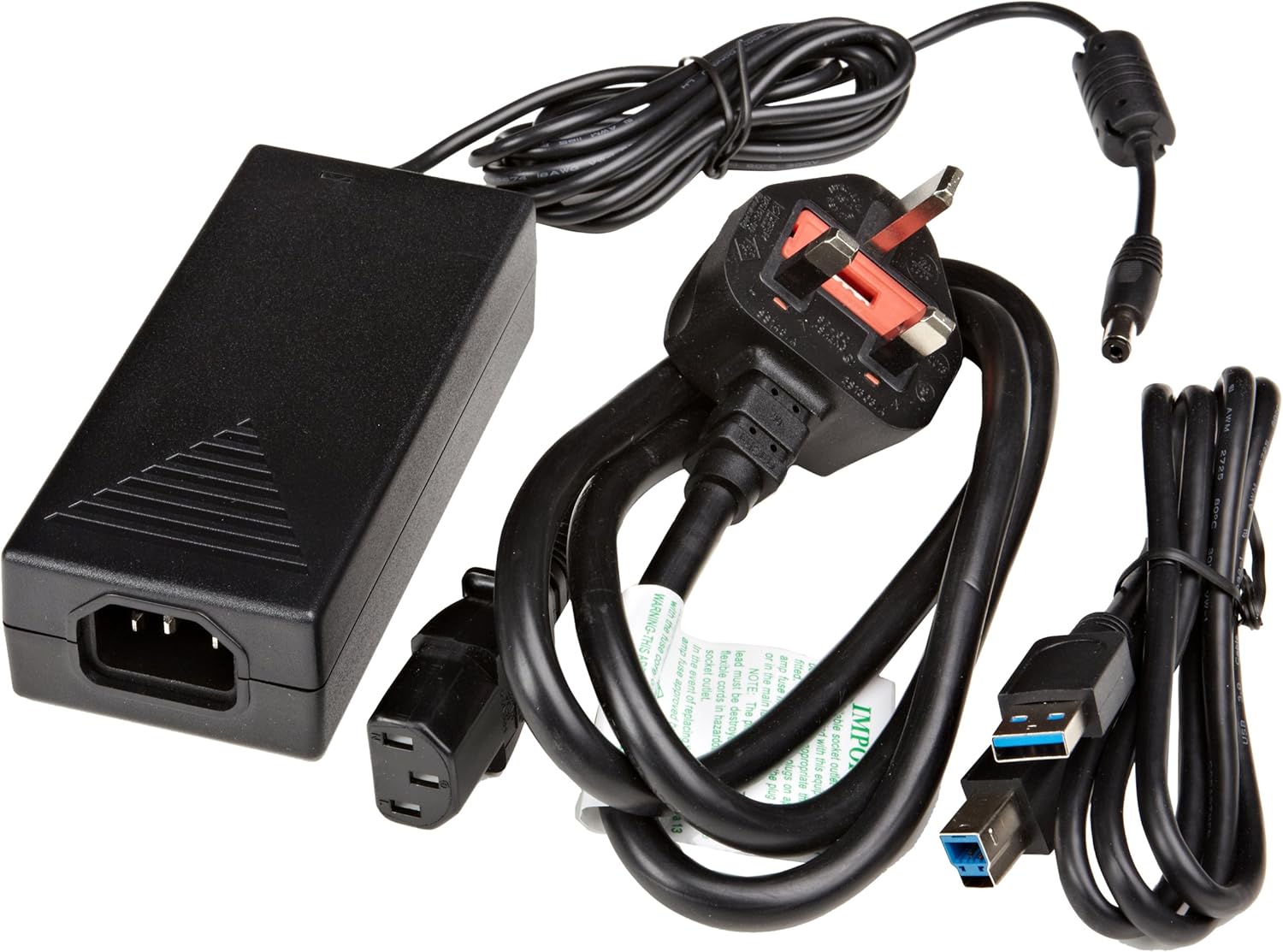
3.1 paveikslas: The image displays the AmazonBasics 10-Port USB 3.0 Hub, its power adapter, and a USB 3.0 data cable, which are the typical contents found in the product packaging.
4. Produktas baigtasview
The AmazonBasics 10-Port USB 3.0 Hub expands your computer's connectivity, offering ten USB 3.0 ports for various peripherals. It supports high-speed data transfer and is backward compatible with USB 2.0 devices.
4.1 Priekinė ir šoninė dalys View

4.1 paveikslas: This image shows the front and left side of the USB hub. On the front, three USB 3.0 ports are visible, two of which are labeled 'Fast'. The left side features the upstream USB 3.0 port for connecting to a computer and the DC 15V power input.
4.2 Top and Rear View

4.2 paveikslas: Šis paveikslėlis pateikia vaizdą iš viršaus į apačią view of the USB hub, highlighting five additional USB 3.0 ports located on the rear panel. An 'ON/OFF' switch is also visible on the side, allowing users to power the hub on or off.
4.3 Apačia View

4.3 paveikslas: Dugnas view of the hub shows four rubber feet for stability and a product label containing regulatory information and the model number.
5. Sąrankos vadovas
Follow these steps to set up your USB 3.0 hub:
- Prijunkite maitinimo adapterį: Plug the provided power adapter into the DC 15V input port on the side of the USB hub. Then, plug the power adapter into a standard electrical outlet.
- Prisijunkite prie kompiuterio: Use the supplied USB 3.0 data cable to connect the upstream USB 3.0 port on the hub (located on the side) to an available USB 3.0 port on your computer.
- Maitinimas: If the hub has an ON/OFF switch (refer to Figure 4.2), ensure it is in the 'ON' position.
- Prijunkite išorinius įrenginius: You can now connect your USB devices (e.g., external hard drives, keyboards, mice, flash drives) to any of the ten available USB 3.0 ports on the hub.
The hub supports automatic switching between self-power and bus-power mode. For optimal performance with multiple high-power devices, ensure the power adapter is connected.
6. Operacija
Once connected, the AmazonBasics 10-Port USB 3.0 Hub operates automatically. Your computer should recognize connected devices without requiring additional drivers for most operating systems.
- USB 3.0 Speed: The hub supports SuperSpeed (5 Gbps), High Speed (480 Mbps), Full Speed (12 Mbps), and Low Speed (1.5 Mbps) data transfer rates, depending on the connected device and your computer's USB port capabilities.
- Įrenginio suderinamumas: The hub is compatible with both USB 3.0 and USB 2.0 specifications, allowing you to connect a wide range of USB devices.
- Galios valdymas: The hub intelligently manages power distribution to connected devices. For devices requiring more power, ensure the external power adapter is connected.
7. Problemų sprendimas
If you encounter issues with your USB hub, refer to the following common problems and solutions:
| Problema | Galimas sprendimas |
|---|---|
| Devices are not recognized. |
|
| Lėtas duomenų perdavimo greitis. |
|
| Stebulė neįsijungia. |
|
| Intermittent device connection. |
|
8. Specifikacijos
- Modelio numeris: HU37A0V1-UK
- Prievadai: 10 x USB 3.0
- Duomenų perdavimo sparta: Iki 5 Gb/s (USB 3.0 SuperSpeed)
- Atgalinis suderinamumas: USB 2.0, USB 1.1
- Maitinimo įvestis: 15 V nuolatinė srovė (per pridedamą maitinimo adapterį)
- Matmenys (PxPxH): Apytiksliai 5.71 x 2.96 x 1.06 colio (14.5 x 7.5 x 2.7 cm)
- Svoris: Maždaug 1.29 svarų (0.58 kg)
- Operacinės sistemos suderinamumas: Windows, macOS, Linux (driver-free for most systems)
9. Priežiūra ir priežiūra
- Stebulę valykite minkšta, sausa šluoste. Nenaudokite skystų valiklių ar aerozolių.
- Venkite užkimšti ventiliacijos angas.
- Nenaudojamą stebulę laikykite vėsioje, sausoje vietoje.
10. Informacija apie perdirbimą
Dispose of this product according to local regulations. Do not dispose of it with general household waste. For more information on recycling electronic waste, contact your local authorities or the retailer where you purchased the product.
11. Garantija ir palaikymas
For warranty information or technical support, please refer to the AmazonBasics support page or contact Amazon customer service directly. Details can typically be found on the Amazon websvetainės skiltyje „Pagalba“ arba „Klientų aptarnavimas“.


