Įvadas
This manual provides essential information for the safe and efficient operation of your InFocus IN124a XGA Wireless-Ready Projector. Please read this manual thoroughly before using the projector and retain it for future reference. This projector is designed for displaying content with XGA (1024 x 768) native resolution, offering 3500 lumens of brightness and a 15000:1 contrast ratio.
Saugos informacija
- Elektros sauga: Always connect the projector to a grounded power outlet. Do not use damaged power cords. Disconnect power before cleaning or servicing.
- Šiluma ir vėdinimas: Ensure adequate ventilation around the projector. Do not block ventilation openings. Avoid placing the projector near heat sources.
- Lamp Sauga: Projektorius lamp operates at high temperatures and pressures. Allow the projector to cool down before moving or replacing the lamp. Do not look directly into the lens when the lamp yra įjungtas.
- Tvarkymas: Su projektoriumi elkitės atsargiai. Venkite jo numesti ir stipriai sutrenkti.
- Drėgmė: Saugokite projektorių nuo lietaus, drėgmės ar per didelės drėgmės.
Pakuotės turinys
Patikrinkite, ar pakuotėje yra visi reikalingi daiktai:
- InFocus IN124a Projector
- HDMI kabelis
- VGA laidas
- Maitinimo laidas
- Remote Control (not explicitly listed but standard)
- Optional USB adapter for wireless connectivity (if purchased separately)
Produktas baigtasview
Familiarize yourself with the physical components and connections of your InFocus IN124a projector.

This image displays the rear panel of the InFocus IN124a projector, highlighting various connectivity options including HDMI, VGA (Computer 1 and 2), Monitor Out, S-Video, Video, Audio In (1 and 2), Audio Out, RS-232, USB-B, USB Mini-B, and USB-A ports. The power input is located on the lower left.

The top panel of the InFocus IN124a projector is shown, featuring the control buttons for power, menu navigation (up, down, left, right, enter), source selection, blank screen function, and indicators for temperature and lamp status. The focus and zoom adjustment rings are also visible.

A priekis view of the InFocus IN124a projector, showing the main projection lens and the power indicator light. The focus and zoom rings are visible near the lens.

Šis paveikslėlis rodo šoną view of the InFocus IN124a projector, emphasizing the ventilation grilles designed for heat dissipation, crucial for maintaining optimal operating temperature.
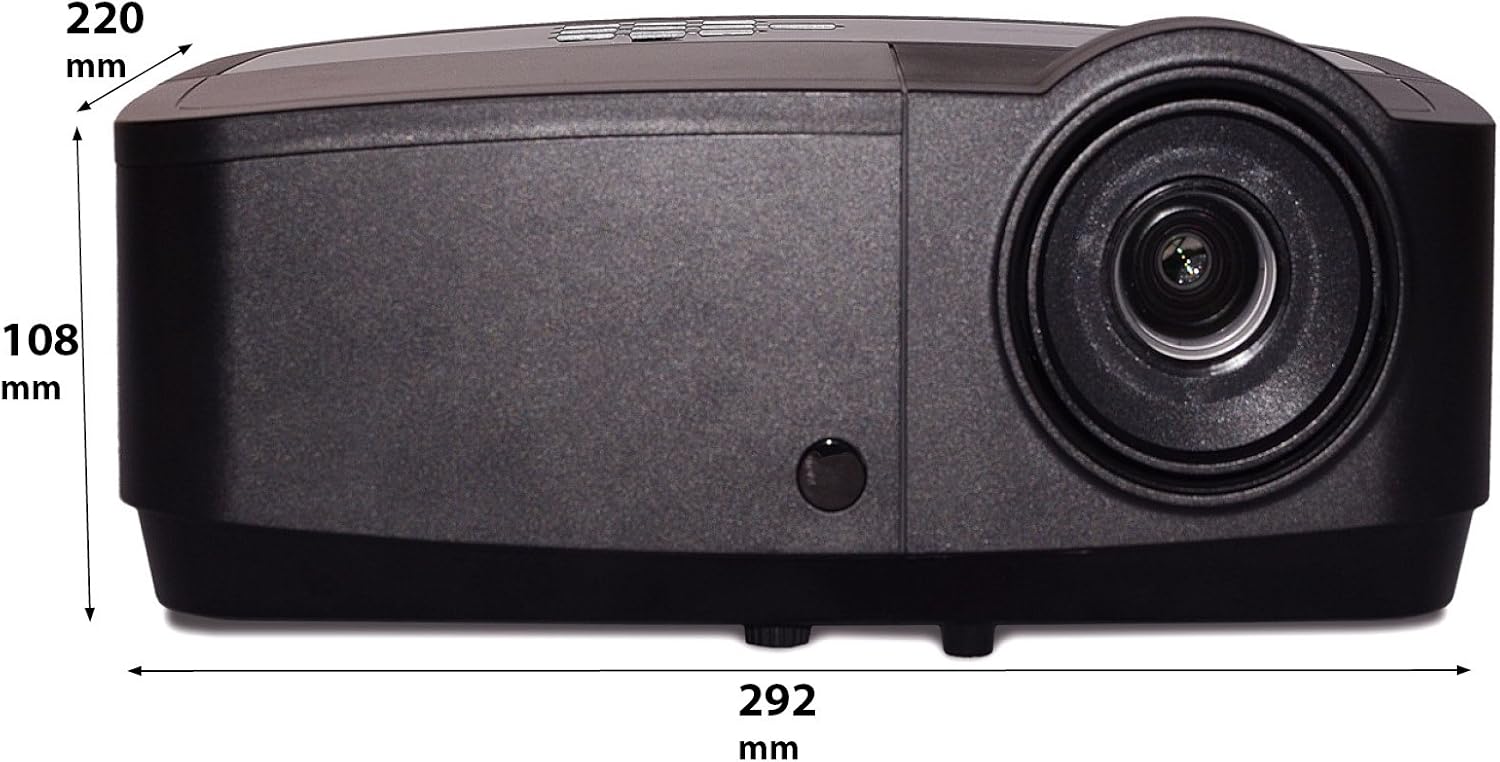
Šiame paveikslėlyje parodytas šoninis profilisfile of the InFocus IN124a projector, illustrating its physical dimensions: approximately 292 mm in length, 108 mm in height, and 220 mm in width.
Sąranka
1. Įdėjimas
Position the projector on a stable, flat surface or mount it securely. Ensure the projector is at an appropriate distance from the screen to achieve the desired image size. Avoid direct sunlight or strong ambient light on the screen for optimal viewing.
2. Maitinimo prijungimas
- Prijunkite maitinimo laidą prie projektoriaus maitinimo įvado.
- Kitą maitinimo laido galą įkiškite į įžemintą elektros lizdą.
3. Vaizdo šaltinių prijungimas
The IN124a offers multiple connectivity options:
- HDMI: Prijunkite šaltinio įrenginį (pvz., nešiojamąjį kompiuterį, „Blu-ray“ grotuvą) HDMI kabeliu prie projektoriaus HDMI prievado.
- VGA (Computer 1/2): Use a VGA cable to connect your computer to either the 'COMPUTER 1' or 'COMPUTER 2' port.
- S-vaizdo / vaizdo įrašas: For older devices, connect S-Video or composite video cables to the respective ports.
- USB: The USB-A port can be used for displaying content directly from a USB drive. The USB-B port supports USB display functionality.
- Garsas: Connect external audio sources to 'AUDIO 1' or 'AUDIO 2' inputs, and use 'AUDIO OUT' for external speakers if needed.
4. Wireless Setup (Optional)
For wireless connectivity, an optional USB adapter is required. Insert the wireless USB adapter into the designated USB port on the projector. Refer to the adapter's specific instructions for software installation and connection procedures on your source device.
Veikiantis
1. Įjungimas/išjungimas
- Maitinimas: Press the 'Power' button on the projector's control panel or remote control. The power indicator light will turn steady blue.
- Išjungti: Press the 'Power' button again. A confirmation message may appear. Press 'Power' a second time to confirm shutdown. The fan will continue to run briefly to cool the lamp before shutting down completely.
2. Adjusting Image
- Fokusas: Sukite fokusavimo žiedą aplink objektyvą, kol vaizdas taps ryškus ir aiškus.
- Mastelio keitimas: Rotate the zoom ring around the lens to adjust the image size without moving the projector.
- Keystone korekcija: Jei vaizdas atrodo trapecijos formos, naudokite projektoriaus meniu esančią trapecijos korekcijos funkciją, kad vaizdas būtų kvadratinis.
3. Šaltinio pasirinkimas
Press the 'Source' button on the control panel or remote control repeatedly to cycle through available input sources (HDMI, Computer 1, Computer 2, S-Video, Video, USB). The projector will automatically detect an active signal.
4. Meniu naršymas
Press the 'Menu' button to access the On-Screen Display (OSD) menu. Use the arrow buttons to navigate through options and 'Enter' to select. Press 'Menu' or 'Exit' to close the OSD.
5. 3D režimas
The InFocus IN124a is 3D-Ready. To utilize 3D functionality, you will need compatible 3D content, a 3D-capable source device, and active 3D glasses. Refer to your 3D source device's manual for specific setup instructions. The projector will automatically detect a 3D signal when available.
Priežiūra
1. Lamp Pakeitimas
Projektorius lamp tarnavimo laikas yra iki 10 000 valandų. Kai lamp life is nearing its end, a warning message may appear, or the lamp indicator light will illuminate. Only replace the lamp with an authorized InFocus replacement lamp. Always allow the projector to cool completely before attempting lamp pakeitimas.
2. Valymas
- Projektorius Casing: Naudokite minkštą, nepūkuotą audinį dampened with a mild, non-abrasive cleaner. Do not use harsh chemicals.
- Objektyvas: Gently wipe the lens with a lens cleaning cloth or lens tissue. Avoid touching the lens surface with your fingers.
- Oro angos: Periodically check and clean the air vents to prevent dust buildup, which can lead to overheating. Use a soft brush or compressed air to clear obstructions.
Trikčių šalinimas
Jei kyla problemų dėl projektoriaus, žr. šias dažniausiai pasitaikančias problemas ir sprendimus:
| Problema | Galima priežastis | Sprendimas |
|---|---|---|
| Vaizdas nerodomas | Neprijungtas maitinimas; Neteisingas įvesties šaltinis; Šaltinio įrenginys neaktyvus. | Check power connection; Select correct input source; Ensure source device is on and outputting signal. |
| Vaizdas neryškus arba nefokusuotas | Lens focus not adjusted; Projector too close/far from screen. | Adjust the focus ring on the lens; Adjust projector distance or use zoom ring. |
| Nuotolinio valdymo pultas neveikia | Batteries depleted; Obstruction between remote and projector; Remote sensor blocked. | Replace batteries; Remove obstructions; Ensure remote sensor on projector is clear. |
| Projektorius perkaito ir išsijungia | Užsikimšusi ventiliacija; Dulkių turintis oro filtras. | Ensure vents are clear; Clean air filter (if applicable) and vents. |
Specifikacijos
| Funkcija | Specifikacija |
|---|---|
| Gimtoji raiška | XGA (1024 x 768) |
| Ryškumas | 3500 liumenų |
| Kontrasto santykis | 15000:1 |
| Lamp Gyvenimas | Iki 7,000 XNUMX valandų (ekologinis režimas) |
| Ryšio technologija | Wireless (with optional adapter), HDMI, USB video |
| Ypatinga funkcija | 3D paruošta |
| Gaminio matmenys | 14.25 x 12 x 7.75 colio (36.2 x 30.5 x 19.7 cm) |
| Prekės svoris | 5.4 svaro (2.45 kg) |
| Rekomenduojami naudojimo būdai | Viduje/lauke |
Garantija ir palaikymas
For warranty information and technical support, please refer to the warranty card included with your product or visit the official InFocus websvetainėje. Išsaugokite pirkimo kvitą kaip pirkimo įrodymą garantiniams reikalavimams.


