1. Įvadas
This manual provides essential information for the safe and efficient operation of your InFocus IN2126a WXGA Network Projector. Please read this manual thoroughly before using the projector and retain it for future reference. The InFocus IN2126a is designed for versatile use in various environments, offering high brightness and network capabilities.
2. Saugos informacija
Kad nesugadintumėte projektoriaus ir užtikrintumėte naudotojo saugumą, laikykitės šių saugos priemonių:
- Neužblokuokite ventiliacijos angų. Užtikrinkite pakankamą oro srautą aplink projektorių.
- Nežiūrėkite tiesiai į projektoriaus objektyvą, kai lamp įjungtas. Ryški šviesa gali pažeisti akis.
- Nestatykite projektoriaus tiesioginiuose saulės spinduliuose, šalia šilumos šaltinių arba aplinkoje, kurioje yra didelė drėgmė ar daug dulkių.
- Naudokite tik prie projektoriaus pridėtą maitinimo laidą.
- Visus techninės priežiūros darbus patikėkite kvalifikuotiems techninės priežiūros specialistams. Nebandykite patys atidaryti ar taisyti projektoriaus.
3. Produktas baigtasview
Familiarize yourself with the components and features of your InFocus IN2126a projector.
3.1 Projektoriaus komponentai
1 pav.: Priekinė pusė view of the InFocus IN2126a projector, showing the lens and ventilation.

2 pav.: šonas view of the InFocus IN2126a projector, highlighting the ventilation grilles.
3.2 Galinio skydelio jungtys
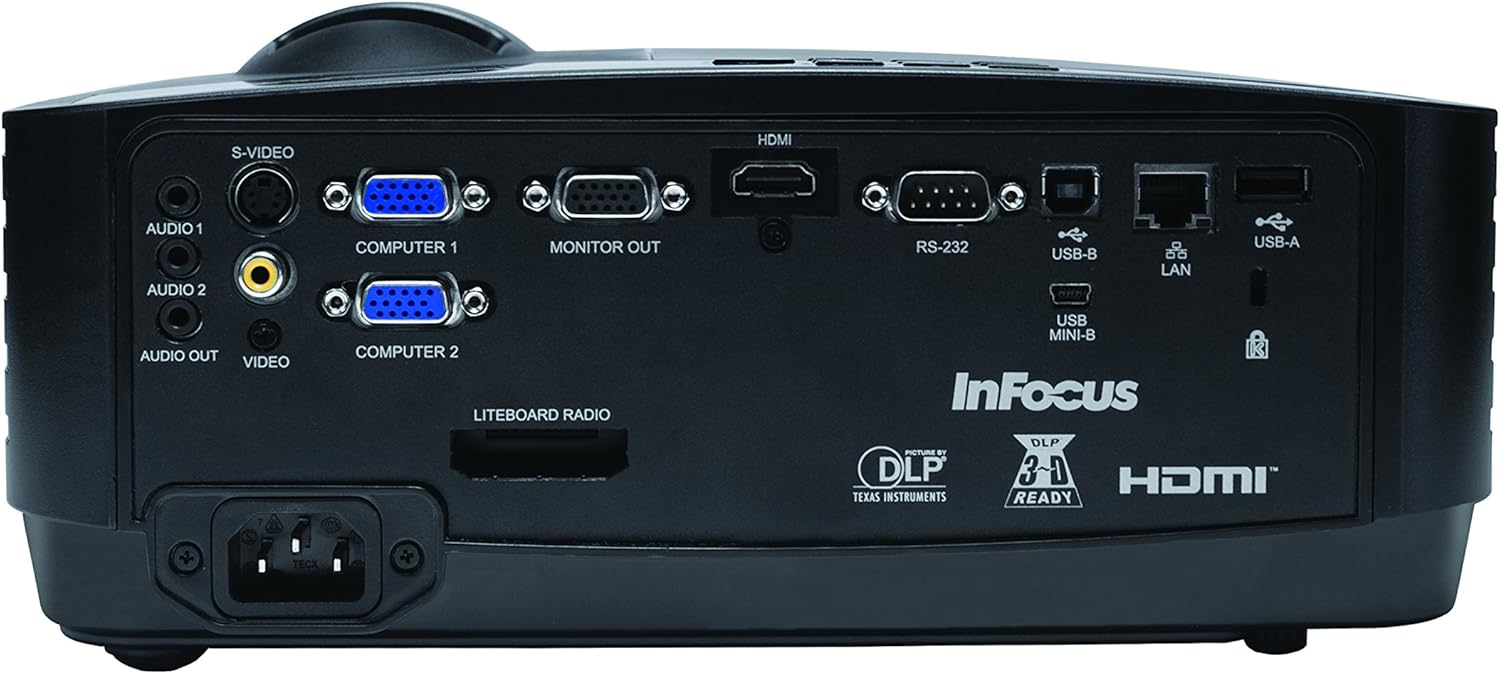
Galiniame skydelyje yra įvairios įvesties ir išvesties jungtys išoriniams įrenginiams prijungti.
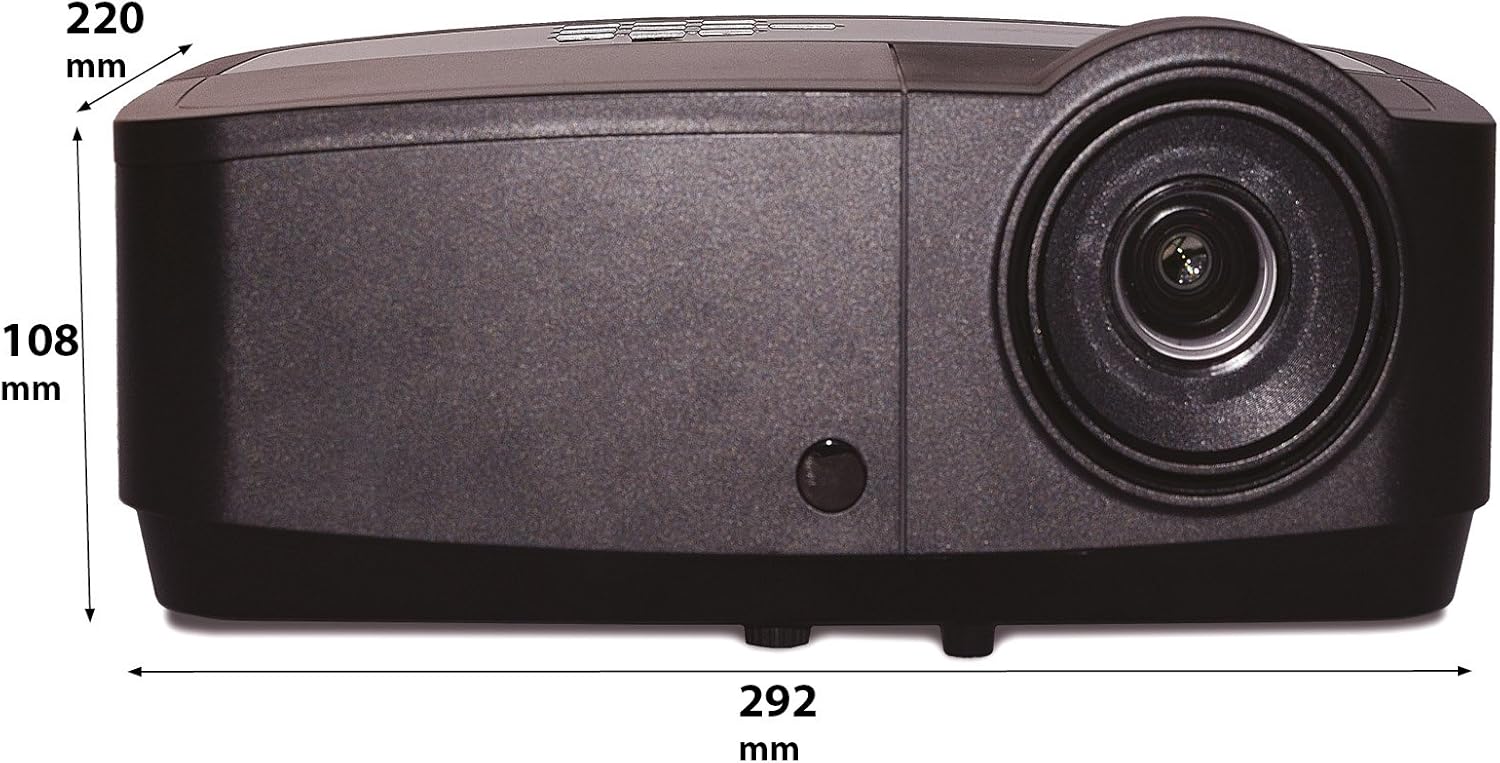
Figure 3: Rear panel of the InFocus IN2126a projector, displaying various connectivity ports including HDMI, VGA, USB, and LAN.
- HDMI: Skaitmeniniam vaizdo ir garso įėjimui.
- COMPUTER 1 / COMPUTER 2 (VGA): Analoginei vaizdo įvestiai iš kompiuterių.
- MONITOR OUT (VGA): Skirta išoriniam monitoriui prijungti.
- USB-B / USB Mini-B: For service or specific USB functions.
- USB-A: For connecting USB devices, such as a wireless adapter.
- LAN (RJ45): Dėl tinklo ryšio.
- RS-232: Serijiniam valdymui.
- AUDIO 1 / AUDIO 2 (RCA): Dėl garso įvesties.
- GARSO IŠĖJIMAS: Skirta išorinėms garso sistemoms prijungti.
- VIDEO (RCA): Kompozitiniam vaizdo įėjimui.
- S-VIDEO: For S-Video input.
- Maitinimo įvadas: Maitinimo laido prijungimui.
3.3 Viršutinio skydelio valdikliai
The top panel features controls for basic projector functions and image adjustments.

Figure 4: Top panel of the InFocus IN2126a projector, showing the control buttons and focus/zoom rings.
- Maitinimo mygtukas: Įjungia arba išjungia projektorių.
- Meniu / Išėjimo mygtukas: Accesses or exits the on-screen display (OSD) menu.
- Naršymo mygtukai (aukštyn, žemyn, kairėn, dešinėn): Naršo meniu parinktis.
- Įvesties mygtukas: Patvirtina meniu pasirinkimus.
- Šaltinio mygtukas: Parenka įvesties šaltinius.
- Blank Button: Temporarily blanks the screen.
- Automatinis mygtukas: Automatiškai koreguoja vaizdo nustatymus.
- Fokusavimo žiedas: Reguliuoja vaizdo ryškumą.
- Mastelio keitimo žiedas: Reguliuoja vaizdo dydį.
3.4 Matmenys
Understanding the physical dimensions is important for installation and placement.

Figure 5: Diagram illustrating the dimensions of the InFocus IN2126a projector (292mm length, 220mm width, 108mm height).
4. Sąranka
4.1 Projektoriaus išdėstymas
Place the projector on a stable, flat surface or mount it securely. Ensure the projector is positioned at an appropriate distance from the screen to achieve the desired image size. Maintain sufficient space around the projector for proper ventilation.
4.2 Įrenginių prijungimas
- Maitinimo jungtis: Prijunkite maitinimo laidą prie projektoriaus maitinimo įvado, o tada – prie įžeminto elektros lizdo.
- Vaizdo įrašo šaltinis:
- For digital sources (e.g., Blu-ray player, laptop), use an HDMI cable to connect to the HDMI port.
- For analog computer sources, use a VGA cable to connect to the COMPUTER 1 or COMPUTER 2 port.
- For other video sources, use the appropriate S-VIDEO or VIDEO (RCA) connections.
- Garso šaltinis: If your video source does not transmit audio via HDMI, connect audio cables to the AUDIO 1 or AUDIO 2 ports.
- Tinklo prisijungimas: Norėdami prisijungti prie laidinio tinklo, prijunkite Ethernet kabelį prie LAN prievado.
- Belaidis ryšys: If using a compatible wireless adapter (sold separately), insert it into the USB-A port.
4.3 Įjungimas / išjungimas
- Norėdami įjungti: Press the Power button on the projector's top panel or the remote control. The power indicator light will illuminate.
- Norėdami išjungti: Press the Power button again. The projector will enter a cooling cycle before shutting down completely. Do not unplug the projector during the cooling cycle.
5. Projektoriaus valdymas
5.1 Šaltinio pasirinkimas
After powering on, the projector may automatically detect an active input source. If not, or to switch sources:
- Paspauskite Šaltinis projektoriaus arba nuotolinio valdymo pulto mygtuką.
- Use the navigation buttons to highlight the desired input source (e.g., HDMI, Computer 1, Video).
- Paspauskite Įeikite norėdami pasirinkti šaltinį.
5.2 Vaizdo koregavimas
- Fokusas: Pasukite Fokusas ring on the projector lens until the image appears sharp and clear.
- Mastelio keitimas: Pasukite Padidinti ring on the projector lens to adjust the image size to fit your screen.
- Keystone korekcija: If the image appears trapezoidal, use the keystone correction feature in the OSD menu to square the image.
5.3 Ekrano meniu (OSD)
The OSD menu allows you to configure various projector settings.
- Paspauskite Meniu mygtuką, kad atidarytumėte OSD meniu.
- Naudokite Aukštyn/Žemyn navigation buttons to select a menu category.
- Naudokite Kairė/dešinė navigation buttons to adjust settings or enter sub-menus.
- Paspauskite Įeikite kad patvirtintumėte pakeitimus.
- Paspauskite Išeiti to close the OSD menu.
5.4 Belaidis ryšys
The IN2126a is wireless-ready. To enable wireless display, a compatible InFocus wireless adapter (sold separately) must be connected to the USB-A port. Refer to the wireless adapter's specific instructions for setup and connection procedures.
5.5 3D funkcionalumas
The projector supports 3D content. To view 3D content, you will need a compatible 3D source, 3D glasses, and appropriate 3D content. Refer to the projector's OSD menu for 3D settings and ensure your source device is configured for 3D output.
6. Priežiūra
Reguliarus techninis aptarnavimas užtikrina optimalų veikimą ir pailgina projektoriaus tarnavimo laiką.
6.1 Lamp Pakeitimas
Projektorius lamp has a limited lifespan (approximately 4000 hours). When the lamp indikatorius užsidega arba vaizdo ryškumas gerokai sumažėja, lamp needs replacement. Always use an authorized InFocus replacement lampIšsamesnės informacijos ieškokite išsamiame techninės priežiūros vadove.amp replacement instructions or contact customer support.
6.2 Filtro valymas
Dust accumulation on the air filter can impede airflow and cause overheating. Regularly clean the air filter to maintain proper ventilation. Turn off and unplug the projector before cleaning. Use a soft brush or vacuum cleaner to remove dust from the filter cover.
6.3 Bendras valymas
- Projektorius Casing: Naudokite minkštą, nepūkuotą audinį dampened with a mild, non-abrasive cleaner. Do not use harsh chemicals.
- Objektyvas: Use a lens cleaning cloth and specialized lens cleaning solution. Avoid touching the lens surface with your fingers.
7. Problemų sprendimas
Jei kyla problemų dėl projektoriaus, žr. šias dažniausiai pasitaikančias problemas ir sprendimus:
| Problema | Galima priežastis | Sprendimas |
|---|---|---|
| Ekrane nėra vaizdo | Pasirinktas neteisingas įvesties šaltinis; Atsilaisvinęs kabelis; Projektorius veikia budėjimo režimu. | Verify input source; Check all cable connections; Press power button to wake from standby. |
| Vaizdas neryškus | Nenustatytas fokusavimas; projektorius per arti/per toli nuo ekrano. | Adjust the focus ring; Reposition the projector and adjust zoom. |
| Vaizdas yra trapecijos formos | Projektorius nėra statmenas ekranui. | Use keystone correction in the OSD menu. |
| Nėra garso | Audio cables not connected; Volume too low; Muted. | Check audio cable connections; Adjust volume; Unmute projector. |
| Projektorius perkaito ir išsijungia | Užsikimšusi ventiliacija; Užsiteršęs oro filtras. | Ensure clear airflow around projector; Clean the air filter. |
For more detailed troubleshooting, consult the complete user manual or contact InFocus customer support.
8. Specifikacijos
Key technical specifications for the InFocus IN2126a WXGA Network Projector:
- Modelio pavadinimas: IN2126a
- Ekrano tipas: DLP
- Vietinė skiriamoji geba: 1280 x 800 (WXGA)
- Ryškumas: 3500 liumenų
- Kontrasto santykis: 15000:1
- Spalvų atkūrimas: 1.07 milijardo spalvų (30 bitų)
- Šviesos šaltinio veikimo laikas: 4000 valandų
- Ryšio technologija: Wireless-ready, HDMI 1.4, VGA (x2), USB (Type-A, Mini-B, Type-B), LAN (RJ45), RS-232, Audio In (x2), Audio Out, Video (RCA), S-Video
- Ypatingos savybės: 3D-Ready, Network Projector
- Formos faktorius: Nešiojami
- Montavimo tipas: Stalviršio laikiklis
- Prekės svoris: 7.1 svaro
9. Garantija ir palaikymas
For information regarding your product's warranty, please refer to the warranty card included with your purchase or visit the official InFocus website. For technical support, service, or to purchase accessories, please contact InFocus customer service through their official channels.


