1. Įvadas
This manual provides detailed instructions for the setup, operation, and maintenance of your TechniSat DIGITRADIO 51 DAB+ Alarm Clock Radio. Please read this manual thoroughly before using the device to ensure proper functionality and safety.
2. Saugos informacija
- Ensure the power adapter is connected to a readily accessible power outlet.
- Saugokite prietaisą nuo lašančio ar purslančio vandens.
- Ant prietaiso nedėkite daiktų, pripildytų skysčių, pavyzdžiui, vazų.
- Nestatykite prietaiso šalia šilumos šaltinių arba tiesioginiuose saulės spinduliuose.
- Naudokite tik su prietaisu pateiktą maitinimo adapterį.
- Nebandykite patys atidaryti ar taisyti įrenginio. Visus techninės priežiūros darbus patikėkite kvalifikuotiems specialistams.
- Prietaisą valykite tik sausa, minkšta šluoste.
3. Pakuotės turinys
Patikrinkite, ar pakuotėje yra visi reikalingi daiktai:
- TechniSat DIGITRADIO 51 Alarm Clock Radio (Black)
- Maitinimo adapteris
- Wired Antenna
- Instrukcijų vadovas
4. Produktas baigtasview
4.1 Priekis View

1 pav.: priekis view of the DIGITRADIO 51, featuring the central speaker and the clear LCD display.
4.2 Viršutinis valdymo skydelis

Figure 2: Top control panel with various buttons for radio functions, alarm settings, and volume control.
- DAB/FM mygtukas: Perjungia DAB+ ir FM radijo režimus.
- Presets (1, 2): Išsaugo ir iškviečia mėgstamiausias radijo stotis.
- < / > Buttons: Navigates menus or tunes radio frequencies.
- Select/Menu Button: Patvirtina pasirinkimus arba atidaro meniu.
- Garsumo +/- mygtukai: Reguliuoja garso garsumą.
- Alarm (1, 2) Buttons: Nustato ir įjungia 1 arba 2 žadintuvą.
- Miego mygtukas: Įjungia miego laikmačio funkciją.
- Snooze Buttons: Temporarily silences an active alarm.
- Maitinimo mygtukas: Įjungia arba išjungia įrenginį.
4.3 Galinės jungtys
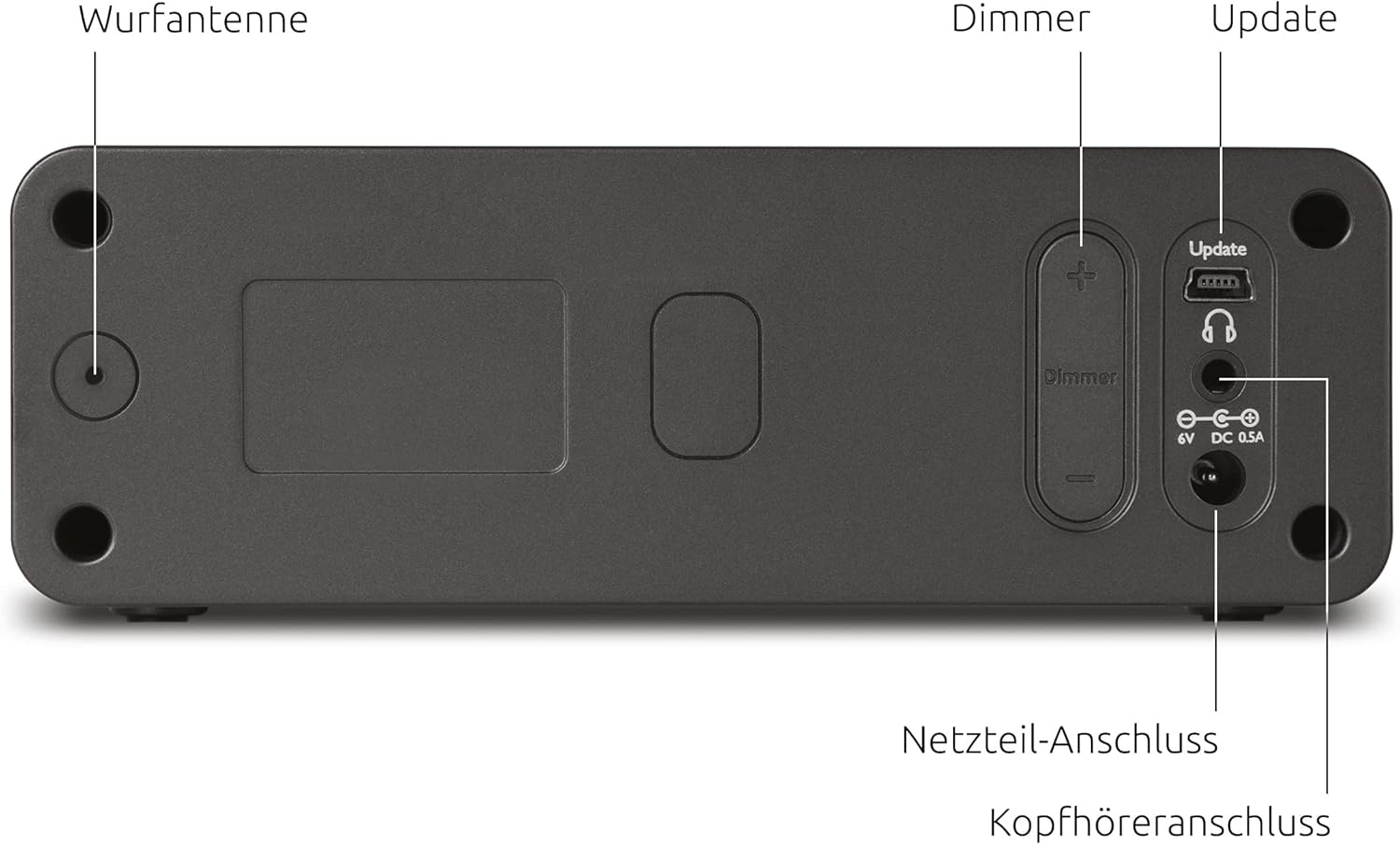
Figure 3: Rear panel connections, including the wired antenna, dimmer controls, USB port for updates, headphone jack, and power input.
- Wired Antenna Input: Connect the supplied wired antenna for optimal radio reception.
- Dimmer Controls (+/-): Reguliuoja LCD ekrano ryškumą.
- Update (USB) Port: Dėl būsimų programinės įrangos atnaujinimų.
- Ausinių jungtis: 3.5 mm lizdas privačiam klausymuisi.
- Maitinimo adapterio jungtis: Connect the external power adapter here.
4.4 Ekrano funkcijos

4 pav. Išsamus view of the LCD display, highlighting its dimmable feature, time display, and information about the current radio program.
- Pritemdomas: The display brightness can be adjusted.
- Laiko rodymas: Rodo dabartinį laiką.
- LCD technologija: Provides clear text and icons.
- Informacinis ekranas: Shows radio station name, program details, and alarm status.
4.5 Pagrindinės funkcijosview

5 pav. Baigtaview of comfort functions including dual alarm, customizable alarm schedules, sleep timer, and multiple snooze options.
5. Sąranka
5.1 Maitinimo jungtis
- Connect the power adapter cable to the 'Power Adapter Connection' port on the rear of the radio.
- Plug the power adapter into a standard wall outlet (230V, 50Hz).
5.2 Antenos prijungimas
- Uncoil the wired antenna completely.
- Insert the antenna connector into the 'Wired Antenna Input' on the rear of the radio.
- Position the antenna for optimal reception.
5.3 Initial Power On and Station Scan
- Press the Power button on the top panel to turn on the radio.
- The radio will typically perform an automatic scan for DAB+ stations upon first use. This may take a few minutes.
- The time and date will usually be set automatically via the DAB+ signal.
6. Naudojimo instrukcijos
6.1 Switching Between DAB+ and FM
Paspauskite DAB / FM button to toggle between DAB+ digital radio and FM analog radio modes.
6.2 Radijo stočių paieška
- DAB+ režimas: Naudokite < ir > buttons to browse available DAB+ stations. Press Pasirinkite/Meniu kad patvirtintumėte savo pasirinkimą.
- FM režimas: Naudokite < ir > buttons to manually tune to FM frequencies. The radio may automatically stop at strong signals.
6.3 Saving and Recalling Presets
- Nustatykite norimą radijo stotį.
- Paspauskite ir palaikykite vieną iš Preset (1 or 2) buttons until the display confirms the station has been saved.
- Norėdami iškviesti išsaugotą stotį, tiesiog paspauskite atitinkamą Preset (1 or 2) trumpai mygtuką.
6.4 Garsumo reguliavimas
Paspauskite Tomas + or Apimtis - buttons to increase or decrease the audio output.
6.5 Signalų nustatymas
The DIGITRADIO 51 features two independent alarms (Alarm 1 and Alarm 2).
- Paspauskite ir palaikykite arba Signalas 1 or Signalas 2 button to enter alarm setup.
- Naudokite < ir > buttons to adjust the hour and minute, then press Pasirinkite/Meniu kad patvirtintumėte kiekvieną nustatymą.
- Set the alarm source (DAB, FM, or Buzzer).
- Choose the alarm frequency (Daily, Weekdays, Weekends, or Once).
- Sureguliuokite žadintuvo garsumą.
- Paspauskite Pasirinkite/Meniu to save the alarm settings.
- Norėdami įjungti / išjungti žadintuvą, trumpai paspauskite atitinkamą Signalas 1 or Signalas 2 mygtuką. Kai aktyvus, ekrane pasirodys žadintuvo piktograma.
6.6 Snausti funkcija
When an alarm sounds, press any Snausti button to temporarily silence the alarm for a set period (e.g., 9 minutes). The alarm will sound again after the snooze period.
6.7 Display Dimming
Naudokite Dimmer + ir Pritemdymas - buttons on the rear of the device to adjust the brightness level of the LCD display.
6.8 Miego laikmatis
Miego laikmatis leidžia radijui groti nustatytą laiką, prieš automatiškai išsijungiant.
- Paspauskite Miegoti mygtuką.
- Pakartotinai paspauskite Miegoti button to cycle through the available sleep timer durations (e.g., 15, 30, 45, 60, 90 minutes, or Off).
- Radijas automatiškai išsijungs po pasirinkto laiko.
6.9 Ausinių naudojimas
Connect standard 3.5mm headphones to the 'Headphone Connection' jack on the rear of the device for private listening. The internal speaker will be muted automatically.
7. Priežiūra
7.1 Valymas
- Prieš valydami prietaisą visada ištraukite kištuką iš elektros lizdo.
- Išorinius paviršius valykite minkštu, sausu, nepūkuotu skudurėliu.
- Nenaudokite skystų valiklių, abrazyvinių valiklių ar cheminių purškiklių, nes jie gali pažeisti apdailą ar vidinius komponentus.
8. Problemų sprendimas
| Problema | Galima priežastis | Sprendimas |
|---|---|---|
| Nėra maitinimo / Ekranas išjungtas | Maitinimo adapteris neprijungtas arba sugedęs. | Check power adapter connection to the radio and wall outlet. Ensure the outlet is functional. |
| No DAB+ or FM reception / Poor sound quality | Antenna not connected or poorly positioned. Weak signal in your area. | Ensure the wired antenna is fully connected and uncoiled. Try repositioning the antenna or the radio. Perform a new station scan. |
| Signalizacija neskamba | Alarm not activated. Incorrect alarm time or source set. Volume too low. | Verify the alarm is activated (icon on display). Check alarm time, source, and volume settings. |
| Ekranas per ryškus/tamsus | Reikia pakoreguoti pritemdymo nustatymus. | Use the Dimmer +/- buttons on the rear of the device to adjust brightness. |
9. Specifikacijos

6 pav.: Gaminio matmenys, skirti išdėstymo nuorodai.
- Prekinis ženklas: TechniSat
- Modelis: DIGITRADIO 51 (0000/4981)
- Tuner technologija: DAB+, FM
- Garsiakalbio išėjimo galia: 1.5 vatų
- Ekrano tipas: LCD, pritemdomas
- Maitinimo šaltinis: Su laidu elektra
- ttage: 230 voltų
- Dažnis: 50 Hz
- Ryšys: 3.5mm Audio (Headphone)
- Gaminio matmenys (P x G x A): 14.9 x 12.6 x 4.9 cm
- Prekės svoris: 436 g
- Medžiaga: Plastikiniai
- Ypatingos savybės: Dual Alarm, Snooze Function, Auto Shut-Off Timer
10. Garantija ir palaikymas
Dėl garantijos informacijos ir techninės pagalbos žr. kartu su pirkiniu pateiktus dokumentus arba apsilankykite oficialioje „TechniSat“ svetainėje. websvetainėje. Išsaugokite pirkimo įrodymą, jei prireiktų pateikti garantinį ieškinį.


