1. Įvadas
The Muse M-195 CDB is a versatile radio alarm clock designed to provide reliable timekeeping, alarm functions, and high-quality radio reception. It supports both Digital Audio Broadcasting (DAB+) and Frequency Modulation (FM) radio bands, featuring Radio Data System (RDS) for FM stations. The device includes a clear, backlit LCD display with adjustable brightness, dual alarms, snooze, and sleep timer functions. Its compact design and telescopic antenna ensure optimal performance and ease of use.
2. Saugos informacija
- Maitinimo šaltinis: Use only the provided USB power adapter and cable. Ensure the power outlet voltage matches the adapter's requirements.
- Vanduo ir drėgmė: Do not expose the unit to rain, moisture, or dripping/splashing liquids. Keep it away from sources of water such as bathtubs, sinks, or swimming pools.
- Šiluma: Nestatykite įrenginio šalia šilumos šaltinių, tokių kaip radiatoriai, šildytuvai, viryklės ar kiti prietaisai (įskaitant ampkeltuvai), kurie gamina šilumą.
- Vėdinimas: Užtikrinkite tinkamą vėdinimą. Neužblokuokite jokių ventiliacijos angų.
- Valymas: Unplug the unit from the power source before cleaning. Use a soft, dry cloth. Do not use liquid cleaners or aerosol cleaners.
- Aptarnavimas: Nemėginkite patys aptarnauti šio gaminio. Visą techninę priežiūrą patikėkite kvalifikuotam aptarnavimo personalui.
3. Pakuotės turinys
Patikrinkite, ar jūsų pakuotėje yra visi toliau išvardyti daiktai:
- Muse M-195 CDB Radio Alarm Clock
- USB maitinimo adapteris
- USB kabelis
- Vartotojo vadovas (šis dokumentas)
4. Produktas baigtasview
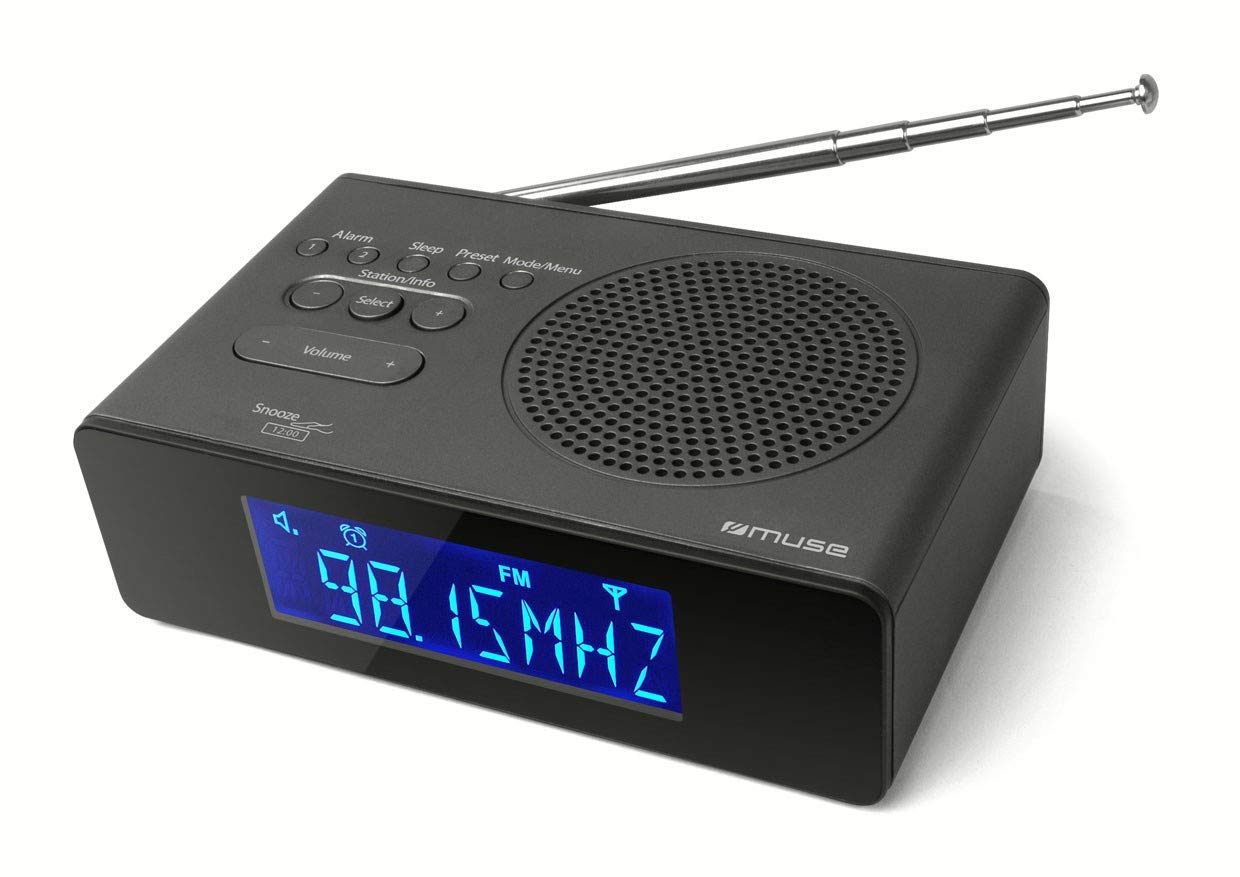
Familiarize yourself with the various parts and controls of your Muse M-195 CDB radio alarm clock.

1 paveikslas: Priekyje ir viršuje view of the Muse M-195 CDB, showing the LCD display, speaker grille, and control buttons.
The front panel features a large LCD display for time, date, and radio information. The top panel houses the main control buttons and the integrated speaker. The telescopic antenna is located at the rear for optimal radio reception. The rear panel also includes the USB power input.
2 paveikslas: The Muse M-195 CDB positioned on a bedside table, illustrating its compact size and display visibility.
5. Sąranka
5.1 Maitinimo jungtis
- Connect the supplied USB cable to the USB power input port on the rear of the M-195 CDB.
- Plug the other end of the USB cable into the provided USB power adapter.
- Insert the USB power adapter into a standard wall outlet.
- Įrenginys įsijungs, o ekranas užsidegs.
5.2 Antenos reguliavimas
For optimal radio reception, fully extend the telescopic antenna located at the rear of the unit. Adjust its position for the best signal quality, especially when tuning into DAB+ or FM stations.
5.3 Pradinis laiko nustatymas
Upon initial power-on, the M-195 CDB will attempt to automatically synchronize its time and date via DAB+ or FM RDS signals. Ensure the antenna is extended for this process. If automatic synchronization is not successful or you wish to set the time manually, refer to the 'Setting Time and Date' section in Operating Instructions.
6. Naudojimo instrukcijos
6.1 Maitinimo įjungimas/išjungimas
Paspauskite GALIA button (usually located on the top or rear) to turn the unit on or off.
6.2 Laiko ir datos nustatymas
If the time is not set automatically via DAB+ or FM RDS, or if you prefer manual adjustment:
- Telefonui veikiant laukimo režimu, paspauskite ir palaikykite LAIKO NUSTATYMAS button (or similar, refer to button labels).
- Naudokite DERINIMAS/NUSTATYMAS buttons (or +/-) to adjust the hour, then press LAIKO NUSTATYMAS patvirtinti.
- Pakartokite su minutėmis, metais, mėnesiu ir diena.
- Paspauskite LAIKO NUSTATYMAS dar kartą, kad išeitumėte iš nustatymo režimo.
6.3 Radio Operation (DAB+/DAB and FM)
The M-195 CDB supports both digital (DAB+/DAB) and analog (FM) radio reception.
6.3.1 Selecting Radio Band
Paspauskite REŽIMAS or BAND mygtuką, norėdami perjungti DAB ir FM režimus.
6.3.2 Automatic Station Scan (DAB)
- DAB režimu paspauskite ir palaikykite NUSKAITYTI or AUTOMATINIS TUNE mygtuką.
- The radio will scan for available DAB stations and store them automatically.
6.3.3 Manual Tuning (FM)
- FM režimu paspauskite TUNINGAS +/- mygtukais, kad rankiniu būdu reguliuotumėte dažnį.
- Paspauskite ir palaikykite TUNINGAS +/- automatiniam kitos prieinamos stoties nuskaitymui.
6.3.4 Išankstinių nustatymų išsaugojimas ir iškvietimas
The unit can store up to 20 stations (10 DAB+/DAB, 10 FM).
- Nustatykite norimą stotį.
- Paspauskite ir palaikykite NUSTATYMAS or MEM mygtuką.
- Naudokite DERINIMAS/NUSTATYMAS mygtukais pasirinkite iš anksto nustatytos stoties numerį (1–10).
- Paspauskite NUSTATYMAS or MEM dar kartą, kad patvirtintumėte ir išsaugotumėte.
- Norėdami iškviesti išankstinį nustatymą, trumpai paspauskite NUSTATYMAS mygtuką ir naudokite DERINIMAS/NUSTATYMAS , kad pasirinktumėte norimą išankstinį nustatymą.
6.4 Signalizacijos nustatymai
The M-195 CDB features two independent alarms (Alarm 1 and Alarm 2).
- Telefonui veikiant laukimo režimu, paspauskite ir palaikykite 1 pavojaus signalas or 2 pavojaus signalas mygtuką.
- Naudokite DERINIMAS/NUSTATYMAS buttons to adjust the alarm hour, then press the alarm button to confirm.
- Kartokite kelias minutes.
- Select alarm source (Buzzer, DAB, or FM) and desired volume level.
- Select alarm frequency (Daily, Weekdays, Weekends, Once).
- Press the alarm button again to activate the alarm and exit setting mode. An alarm icon will appear on the display.
6.5 Snausti funkcija
Kai suskamba žadintuvas, paspauskite SNAIGĖ button (often a large button on top or by pressing the unit down) to temporarily silence the alarm for a few minutes. The alarm will sound again after the snooze period.
6.6 Miego laikmatis
Miego laikmatis leidžia radijui groti nustatytą laiką, prieš automatiškai išsijungiant.
- Kol groja radijas, paspauskite MIEGAS pakartotinai spauskite mygtuką, kad perjungtumėte galimus miego laikus (pvz., 15, 30, 60, 90 minučių, IŠJUNGTA).
- Radijas automatiškai išsijungs po pasirinkto laiko.
6.7 Ekrano ryškumas (pritemdymas)
Paspauskite REŽIMAS button (or similar) repeatedly to adjust the brightness level of the LCD display to your preference.
7. Priežiūra
7.1 Valymas
To clean the unit, unplug it from the power source. Use a soft, dry, lint-free cloth to wipe the surfaces. Do not use abrasive cleaners, waxes, or solvents as they may damage the finish.
7.2 Bendroji priežiūra
- Nedėkite ant įrenginio sunkių daiktų.
- Nenumeskite įrenginio ir nedarykite jam stiprių smūgių.
- Saugokite įrenginį nuo stiprių magnetinių laukų.
8. Problemų sprendimas
| Problema | Galima priežastis | Sprendimas |
|---|---|---|
| Nėra galios | Neprijungtas maitinimo laidas; neveikia maitinimo lizdas. | Ensure the USB cable and adapter are securely connected. Try a different power outlet. |
| Prastas radijo priėmimas | Antena neištiesta; silpnas signalas; trukdžiai. | Fully extend and adjust the telescopic antenna. Move the unit to a different location. Keep away from other electronic devices. |
| Signalizacija neskamba | Signalizacija neaktyvuota; Signalizacijos garsumas per mažas; Neteisingas žadintuvo laikas. | Ensure the alarm icon is displayed. Check alarm volume settings. Verify the alarm time is correctly set. |
| Ekranas per ryškus/tamsus | Reikia pakoreguoti pritemdymo nustatymus. | Paspauskite REŽIMAS mygtuką, kad perjungtumėte ryškumo lygius. |
| Mygtukai nereaguoja | Laikinas programinės įrangos triktis. | Unplug the unit from power for a few minutes, then plug it back in to reset. |
9. Specifikacijos
| Prekės ženklas | Mūza |
| Modelio pavadinimas | M-195 CDB |
| Modelio metai | 2014 |
| Gaminio matmenys | 15.5 x 9.5 x 4.7 cm |
| Produkto svoris | 420 g |
| Ekrano technologija | LCD |
| Ekrano tipas | Skaitmeninis |
| Derintuvo technologija | DAB |
| Palaikomos radijo dažnių juostos | DAB, DAB+, FM |
| Maitinimo šaltinis | Su laidu elektra |
| Išėjimo galia | 2 vatų |
| Ryšio technologija | USB |
| Signalizacijos skaičius | 2 |
10. Garantija ir palaikymas
This product is covered by a manufacturer's warranty. Please refer to the warranty card included in your package or contact your retailer for specific warranty terms and conditions. For technical support or service inquiries, please contact Muse customer service through their official websvetainėje arba kontaktinę informaciją, pateiktą kartu su pirkimo dokumentais.


