Įvadas
The Vivitar Tag & Blast Wireless Bluetooth Speaker is designed for portable audio enjoyment. This speaker features Bluetooth technology for wireless connectivity with compatible devices, offering a digital stereo sound experience. Its compact design makes it suitable for use in various outdoor and indoor settings. The speaker includes a rechargeable battery for extended use.
Kas yra dėžutėje
- „Vivitar“ Tag & Blast Wireless Bluetooth Speaker
Produktas baigtasview
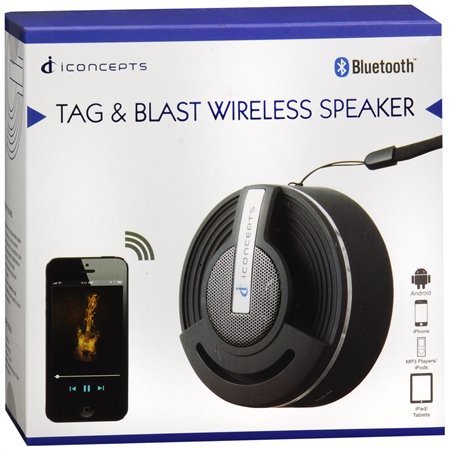
The Vivitar Tag & Blast speaker is engineered for simplicity and portability. Below is an image of the speaker, highlighting its general appearance.
Pagrindinės funkcijos:
- Bluetooth technology for wireless audio streaming.
- Compatibility with various Bluetooth-enabled devices such as iPod, iPhone, iPad, smartphones, and tablets.
- Designed for ultimate portability, allowing you to take your music anywhere.
Sąranka
Garsiakalbio įkrovimas
The Vivitar Tag & Blast speaker is powered by a rechargeable battery. Before initial use, ensure the speaker is fully charged.
- Suraskite garsiakalbio įkrovimo prievadą.
- Connect the appropriate charging cable (not specified in product details, typically USB) to the speaker and a power source.
- Allow the speaker to charge until the charging indicator (if present) shows a full charge.
"Bluetooth" poravimas
Norėdami prijungti garsiakalbį prie „Bluetooth“ įrenginio:
- Ensure the speaker is powered on and in pairing mode. (Refer to the speaker's physical controls for specific pairing button/indicator, if available).
- Savo įrenginyje (išmaniajame telefone, planšetiniame kompiuteryje ir kt.) eikite į „Bluetooth“ nustatymus.
- Įjunkite Bluetooth ir ieškokite galimų įrenginių.
- Select "Vivitar Tag & Blast" or a similar name from the list of found devices.
- Once connected, the speaker will indicate a successful pairing (e.g., an audible tone or LED indicator).
Naudojimo instrukcijos
Maitinimo įjungimas/išjungimas
To power the speaker on or off, locate the power button (control method is 'Touch' as per specifications) and press and hold it until the speaker indicates power status (e.g., LED light, sound cue).
Garso atkūrimas
Once paired with your device, audio played on your device will stream through the Vivitar Tag & Blast speaker. Use your connected device to control playback (play/pause, skip tracks) and volume.
Priežiūra
To ensure the longevity and optimal performance of your Vivitar Tag & Blast speaker:
- Garsiakalbį valykite minkštu, sausu skudurėliu. Venkite naudoti stiprias chemines medžiagas ar abrazyvinius valiklius.
- Nelaikykite garsiakalbio ekstremaliose temperatūrose, tiesioginiuose saulės spinduliuose ar didelėje drėgmėje.
- While designed for outdoor use, the speaker is not waterproof. Avoid submerging it in water or exposing it to heavy rain.
- Nenaudojamą garsiakalbį laikykite vėsioje, sausoje vietoje.
Trikčių šalinimas
If you encounter issues with your Vivitar Tag & Blast speaker, try the following solutions:
- Nėra galios: Ensure the speaker is fully charged. Connect it to a power source and allow it to charge for at least 30 minutes before attempting to power it on again.
- Nepavyksta susieti su įrenginiu:
- Įsitikinkite, kad garsiakalbis yra susiejimo režimu.
- Įsitikinkite, kad jūsų įrenginyje įjungtas „Bluetooth“ ryšys ir jis yra diapazone (paprastai 10 metrų arba 33 pėdų).
- Išjunkite ir įjunkite garsiakalbį ir savo įrenginio „Bluetooth“.
- If previously paired, try forgetting the speaker from your device's Bluetooth list and re-pairing.
- Nėra garso arba mažas garsumas:
- Patikrinkite garsumo lygius tiek garsiakalbyje, tiek prijungtame įrenginyje.
- Įsitikinkite, kad garsiakalbis tinkamai susietas ir prijungtas prie jūsų įrenginio.
- Pabandykite leisti garsą iš kitos programos ar šaltinio savo įrenginyje.
- Prasta garso kokybė:
- Perkelkite garsiakalbį arčiau savo įrenginio, kad sumažintumėte trukdžius.
- Įsitikinkite, kad tarp garsiakalbio ir jūsų įrenginio nėra jokių kliūčių.
- Check for other active Bluetooth devices in the vicinity that might cause interference.
Specifikacijos
| Funkcija | Detalė |
|---|---|
| Modelio pavadinimas | BTSP-TAG |
| Prekės ženklas | „Vivitar“ |
| Ryšio technologija | Bluetooth |
| Belaidžio ryšio technologija | Bluetooth |
| Garsiakalbio tipas | Knygų lentyna (nešiojama) |
| Garso išvesties režimas | Stereo |
| Erdvinio garso kanalo konfigūracija | 2.0 |
| Kontrolės metodas | Palieskite |
| Maitinimo šaltinis | Maitinamas baterijomis |
| Baterijos | Reikalingos 2 ličio jonų baterijos (pridedamos) |
| Suderinami įrenginiai | MP3 grotuvas, išmanusis telefonas, planšetinis kompiuteris |
| Rekomenduojami naudojimo būdai | For Smartphones or Tablets, For Outdoor Use |
| Spalva | Sidabras |
| Gaminio matmenys | 5 x 2.5 x 5 colio |
| Prekės svoris | 7.2 uncijos (0.45 svaro) |
| Yra atsparus vandeniui | NETEISINGA |
| Gamintojas | Sakar International, Inc. |
Garantija ir palaikymas
The Vivitar Tag & Blast Wireless Bluetooth Speaker comes with a Ribota garantija. For specific details regarding warranty coverage, duration, and how to obtain service, please refer to the warranty card included with your product or contact Vivitar customer support directly. Contact information for support can typically be found on the manufacturer's official websvetainėje arba ant produkto pakuotės.


