1. Įvadas
This manual provides instructions for the installation, operation, and maintenance of your Cisco SG100-24-NA 24-Port Gigabit Switch. This unmanaged switch is designed to provide high-performance network connectivity for small to medium-sized businesses, offering ease of use and simple setup without complex configuration.
Please read this manual thoroughly before using the device to ensure proper setup and to maximize its performance and longevity.
2. Produktas baigtasview
2.1 Pagrindinės savybės
- 24 gigabitų Ethernet prievadai: Užtikrina didelės spartos laidinį ryšį keliems įrenginiams.
- 2 Combo Mini-GBIC Ports: Offers flexible uplink options using fiber optic or copper connections.
- Nevaldomas jungiklis: Plug-and-play operation requires no software configuration.
- Didelis našumas: Supports a switching capacity of 48 Gbps and a forwarding capacity of 35.7 mpps for efficient data transfer.
- Energiją taupantis: Designed for optimal power consumption.
- Kompaktiškas dizainas: Suitable for desktop or rack-mount installations.
2.2 Pakuotės turinys
The Cisco SG100-24-NA package typically includes:
- Cisco SG100-24-NA 24-Port Gigabit Switch
- Maitinimo laidas
- Mounting Kit (for rack-mount, if applicable)
- Greitos pradžios vadovas
Note: Contents may vary slightly depending on the region and specific product bundle.
2.3 Fizinis aprašymas
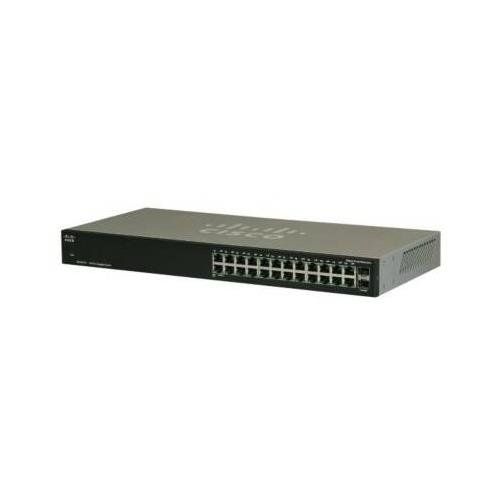
1 pav.: priekis View of the Cisco SG100-24-NA Switch. This image shows the front panel of the switch, featuring 24 RJ-45 Gigabit Ethernet ports and status indicator LEDs for each port. The Cisco logo is visible on the left.

2 pav.: galinis View of the Cisco SG100-24-NA Switch. This image displays the rear panel, including the power input connector and product label with serial number and regulatory information.

3 pav.: šonas View of the Cisco SG100-24-NA Switch. This image illustrates the side panel, highlighting the ventilation grilles designed for heat dissipation to ensure optimal performance.
3. Sąrankos instrukcijos
Follow these steps to set up your Cisco SG100-24-NA Gigabit Switch:
3.1 Svetainės paruošimas
- Vieta: Place the switch on a flat, stable surface or mount it in a standard 19-inch equipment rack. Ensure adequate ventilation around the device.
- Galia: Connect the switch to a grounded power outlet. Ensure the power source meets the switch's electrical requirements.
- Aplinka: Avoid placing the switch near heat sources, in direct sunlight, or in areas with excessive dust or moisture.
3.2 Jungiklio prijungimas
- Prijunkite maitinimą: Plug the provided power cord into the power input on the rear panel of the switch and then into a suitable electrical outlet.
- Prijunkite tinklo įrenginius: Use standard Ethernet cables (Cat5e or higher) to connect your network devices (computers, servers, access points, routers) to any of the 24 RJ-45 Gigabit Ethernet ports on the front panel.
- Prijungti „Uplink“ (neprivaloma): If using the Mini-GBIC ports for fiber or copper uplinks, insert the appropriate SFP module (not included) into one of the combo Mini-GBIC slots and connect the corresponding cable.
- Patikrinkite ryšius: Once devices are connected, check the LED indicators on the front panel. A solid green LED typically indicates a valid link, and a blinking LED indicates network activity.
The Cisco SG100-24-NA is an unmanaged switch, meaning it operates automatically without requiring any software configuration. Once powered on and connected, it will begin forwarding network traffic.
4. Naudojimo instrukcijos
The Cisco SG100-24-NA is designed for simple, plug-and-play operation. No user configuration is required for basic functionality.
4.1 Maitinimo įjungimas/išjungimas
- Maitinimas: Prijunkite maitinimo laidą prie jungiklio ir maitinimo lizdo. Jungiklis įsijungs automatiškai.
- Išjungti: Disconnect the power cord from the switch or the power outlet.
Note: There is no dedicated power button on this model.
4.2 LED indikatoriai
Each RJ-45 port has an associated LED indicator:
- Tvirtai žalia: Indicates a valid network link at Gigabit (1000 Mbps) speed.
- Tvirtas gintaras: Indicates a valid network link at 10/100 Mbps speed.
- Blinking Green/Amber: Rodo tinklo aktyvumą (duomenų perdavimą / priėmimą) tame prievade.
- Išjungta: No link detected or port is inactive.
A system LED (usually on the far left) indicates the overall status of the switch. Refer to the Quick Start Guide for specific system LED behavior.
5. Priežiūra
The Cisco SG100-24-NA switch requires minimal maintenance to ensure optimal performance and longevity.
5.1 Valymas
- Periodically clean the exterior of the switch with a soft, dry, lint-free cloth.
- Nenaudokite skystų ar aerozolinių valiklių, nes jie gali pažeisti prietaisą.
- Įsitikinkite, kad ventiliacijos angos nėra užkimštos dulkėmis ir nėra jokių kliūčių.
5.2 Aplinkosaugos aspektai
- Operate the switch within its specified temperature and humidity ranges (refer to specifications).
- Užtikrinkite tinkamą oro srautą, kad išvengtumėte perkaitimo.
6. Problemų sprendimas
If you encounter issues with your Cisco SG100-24-NA switch, refer to the following common troubleshooting steps:
6.1 Nėra galios
- Įsitikinkite, kad maitinimo laidas yra tvirtai prijungtas tiek prie jungiklio, tiek prie veikiančio elektros lizdo.
- Patikrinkite, ar maitinimo lizdas veikia, prijungdami prie jo kitą įrenginį.
- Check the system LED on the switch; if it's off, there might be a power issue.
6.2 Prievado lemputė „Nėra ryšio“
- Įsitikinkite, kad Ethernet kabelis yra tvirtai prijungtas prie komutatoriaus prievado ir prijungto įrenginio.
- Išbandykite kitą Ethernet kabelį, kad atmestumėte gedimo galimybę.
- Prijunkite įrenginį prie kito komutatoriaus prievado.
- Patikrinkite, ar prijungtas įrenginys įjungtas ir veikia tinkamai.
6.3 Slow Network Connection
- Ensure all connected devices and cables support Gigabit Ethernet for optimal speed.
- Patikrinkite, ar nėra per didelio tinklo srauto arba pralaidumą eikvojančių programų.
- Verify that the link light for the port is solid green (Gigabit speed) and not amber (10/100 Mbps).
- Iš naujo paleiskite jungiklį ir prijungtus įrenginius.
7. Specifikacijos
| Modelis | SG100-24-NA |
| Uostai | 24 x 10/100/1000 Mbps RJ-45, 2 x Combo Mini-GBIC (shared with 2 RJ-45 ports) |
| Perjungimo talpa | 48 Gbps |
| Persiuntimo pajėgumai | 35.7 mps |
| Jumbo Frame palaikymas | 9216 baitai |
| MAC adresų lentelės dydis | 8000 įrašų |
| Matmenys (I x P x A) | Maždaug 21.75 x 12.25 x 4 colio (pakuotės matmenys) |
| Svoris | Maždaug 6.74 svaro |
| Galia | 100-240V AC, 50-60 Hz, internal universal power supply |
| Darbinė temperatūra | nuo 0° iki 40°C (32° iki 104°F) |
| Laikymo temperatūra | -20° iki 70°C (nuo -4° iki 158°F) |
| Darbinė drėgmė | Nuo 10% iki 90% nekondensuojantis |
Note: Specifications are subject to change without notice. For the most current information, please refer to the official Cisco product page or documentation.
8. Garantija ir palaikymas
8.1 Gaminio garantija
Cisco products typically come with a limited hardware warranty. The exact terms and duration of the warranty may vary by region and product. Please refer to the warranty information included with your product packaging or visit the official Cisco website for detailed warranty statements.
8.2 Techninė pagalba
For technical assistance, product documentation, software downloads, and community forums, please visit the official Cisco Support website. You may need your product's serial number for support inquiries.
„Cisco“ palaikymas Websvetainė: https://www.cisco.com/c/en/us/support/index.html


