Įvadas
This manual provides instructions for the proper setup, operation, and maintenance of your Linq IT-H408 4-Port USB 2.0 Hub. This device allows you to expand a single USB port into four, each with an independent on/off switch, facilitating efficient management of connected peripherals.
Produktas baigtasview
The Linq IT-H408 is a USB 2.0 hub designed to provide four additional USB ports. Each port features an individual power switch, allowing you to control power to connected devices independently. It supports data transfer speeds of up to 480 Mbps.
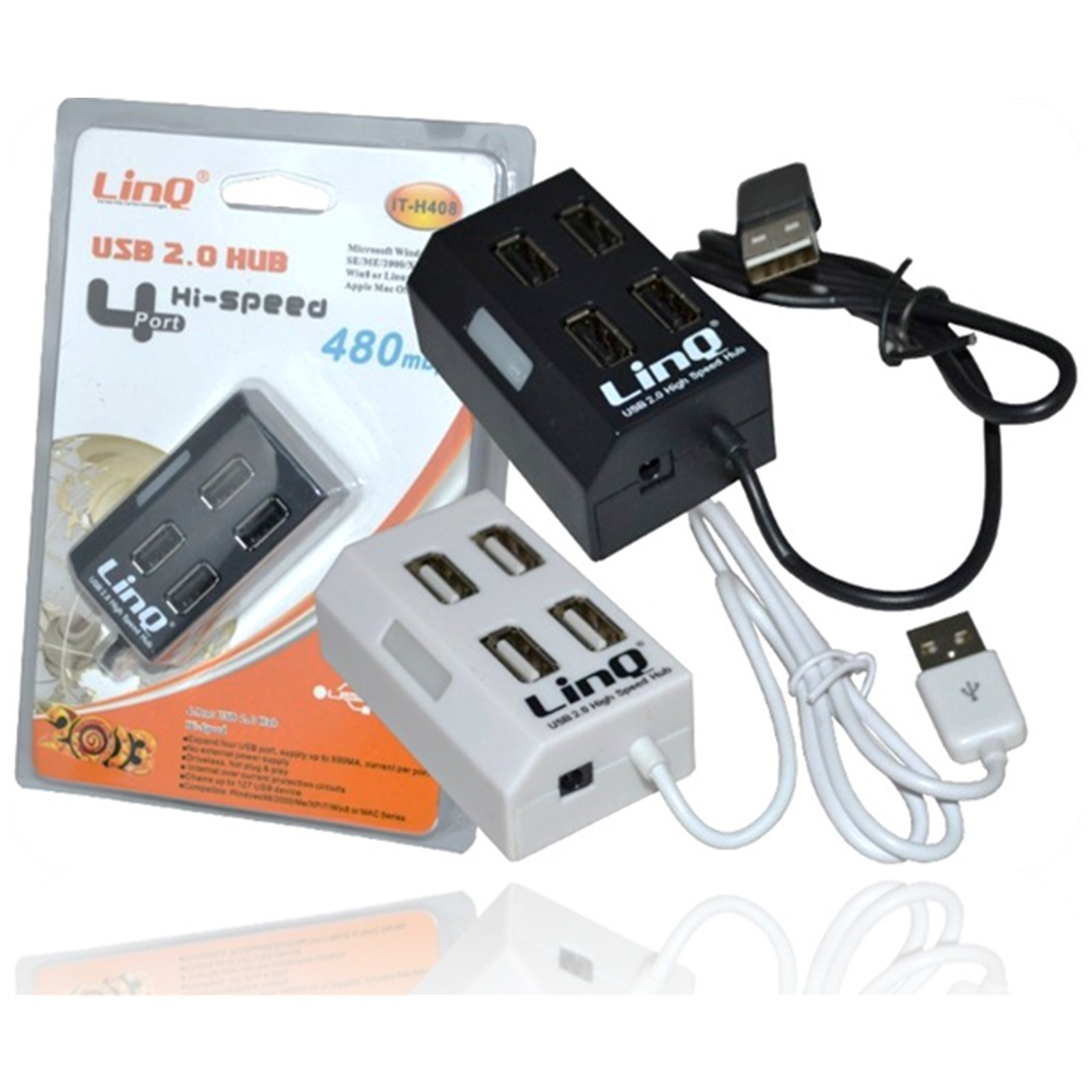
Figure 1: Linq IT-H408 4-Port USB 2.0 Hub. This image displays the hub's compact form factor, highlighting the four USB ports and their corresponding individual power switches, along with the integrated USB cable for connection to a host device.
Sąrankos instrukcijos
- Išpakuokite centrą: Carefully remove the Linq IT-H408 USB Hub from its packaging.
- Prisijunkite prie kompiuterio: Plug the integrated USB cable from the hub into an available USB 2.0 or USB 3.0 port on your computer.
- Tvarkyklės diegimas: The hub is plug-and-play and typically does not require additional driver installation for compatible operating systems (Windows 98/2000/ME/XP/7/8, Mac OS series). Your operating system should automatically detect and configure the device.
- Prijunkite išorinius įrenginius: Plug your USB devices (e.g., flash drives, keyboards, mice) into the available ports on the Linq IT-H408 hub.
Stebulės valdymas
- Powering On/Off Ports: Each USB port on the Linq IT-H408 has an independent on/off switch. Press the switch corresponding to the desired port to toggle its power state. An indicator light (if present) will illuminate when the port is active.
- Įrenginių prijungimas: Insert your USB device into an available port. Ensure the port is powered on using its individual switch.
- Duomenų perdavimas: The hub supports USB 2.0 data transfer speeds up to 480 Mbps. Performance may vary based on the connected device and host system.
- Energijos suvartojimas: For high-power devices, ensure your computer's USB port can supply sufficient power. If multiple high-power devices are connected, an external power adapter (not included) might be required for optimal performance, if the hub supports it.
Priežiūra
- Valymas: Use a soft, dry cloth to clean the exterior of the hub. Avoid using liquid cleaners or solvents.
- Saugykla: Kai nenaudojate, laikykite šakotį vėsioje, sausoje vietoje, toliau nuo tiesioginių saulės spindulių ir ekstremalių temperatūrų.
- Tvarkymas: Saugokite stebulę nuo kritimo ir stiprių smūgių. Nebandykite ardyti įrenginio.
Trikčių šalinimas
Įrenginys neatpažintas:
- Ensure the hub's USB cable is securely connected to your computer.
- Verify that the individual switch for the connected port is in the "on" position.
- Pabandykite prijungti šakotuvą prie kito kompiuterio USB prievado.
- Test the connected device by plugging it directly into your computer's USB port to rule out device issues.
- Iš naujo paleiskite kompiuterį.
Mažas duomenų perdavimo greitis:
- Ensure both the hub and the connected device are USB 2.0 compatible for optimal USB 2.0 speeds.
- Jei ryšys sulėtėja, venkite vienu metu prijungti kelis didelės spartos įrenginius.
- Ensure the hub is connected to a USB 2.0 or higher port on your computer.
Pertraukiamas ryšys:
- Patikrinkite visas kabelių jungtis, ar jos nėra atsilaisvinusios.
- Ensure the hub is not placed near sources of strong electromagnetic interference.
- If using a desktop computer, try connecting the hub to a rear USB port directly on the motherboard.
Specifikacijos
| Modelio numeris | IT-H408 (Internal: 6950029010495) |
| Prekės ženklas | Linq |
| Sąsaja | USB 2.0 |
| Prievadų skaičius | 4 (with individual switches) |
| Duomenų perdavimo sparta | Iki 480 Mbps |
| Suderinamos operacinės sistemos | Windows 98 / 2000 / ME / XP / 7 / 8, Mac OS series |
| Spalva | Balta, Juoda |
| Matmenys (apytiksliai) | 19 x 11.6 x 5 cm (pakuotės matmenys) |
| Svoris (apytiksliai) | 80 gramų |
| Reikalingos baterijos | Nr |
Garantija ir palaikymas
Specific warranty information for the Linq IT-H408 USB Hub is typically provided at the point of purchase or within the product packaging. Please refer to your purchase documentation for details regarding warranty coverage and duration.
For technical support or further assistance, please contact your retailer or visit the official Linq websvetainėje. Išsaugokite pirkimo kvitą kaip pirkimo įrodymą bet kokiems garantiniams prašymams.


