1. Įvadas
This manual provides essential information for the safe and efficient installation, operation, and maintenance of your APEX AL-A300ATX 300W ATX12V Power Supply. Please read this manual thoroughly before installation and retain it for future reference.
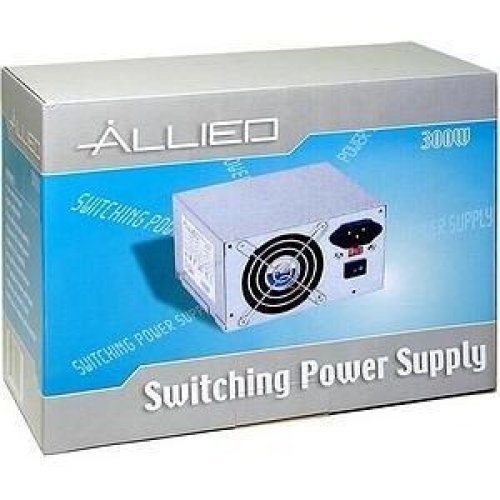
Image: The AL-A300ATX 300W ATX12V Power Supply shown in its retail packaging, indicating it is a "Switching Power Supply" from "ALLIED".
2. Saugos informacija
Always observe the following safety precautions to prevent injury or damage to the power supply or other components:
- Prieš montuodami arba išmontuodami, įsitikinkite, kad maitinimo šaltinis yra atjungtas nuo kintamosios srovės lizdo.
- Neatidarykite maitinimo šaltinio c.asing. Didelis tūristages are present inside, even when disconnected. There are no user-serviceable parts.
- Install the power supply in a well-ventilated area. Do not block ventilation openings.
- Saugokite maitinimo šaltinį nuo drėgmės ar ekstremalių temperatūrų.
- Use only the cables provided or approved for use with this power supply.
- If the power supply is damaged or malfunctioning, discontinue use immediately and contact support.
3. Pakuotės turinys
Patikrinkite, ar pakuotėje yra visi reikalingi daiktai:
- APEX AL-A300ATX 300W ATX12V Power Supply Unit
- Kintamosios srovės maitinimo laidas (gali skirtis priklausomai nuo regiono)
- Tvirtinimo varžtai
- Vartotojo vadovas (šis dokumentas)
4. Sąranka ir diegimas
Follow these steps to install the power supply into your computer system:
- Paruošimas:
- Turn off your computer and unplug the AC power cord from the wall outlet.
- Open your computer case. Refer to your computer case manual for specific instructions.
- Jei keičiate esamą maitinimo šaltinį, atjunkite visus laidus nuo seno maitinimo šaltinio ir išimkite jį iš korpuso.
- Maitinimo bloko montavimas:
- Carefully slide the AL-A300ATX power supply into the designated PSU bay in your computer case.
- Suderinkite maitinimo šaltinio varžtų skyles su korpuso skylėmis.
- Pritvirtinkite maitinimo šaltinį naudodami pateiktus tvirtinimo varžtus.
- Prijungimo kabeliai:
- 24-Pin ATX Main Power Connector: Connect this large connector to the corresponding port on your motherboard. Ensure it clicks into place.
- CPU Power Connector (4-pin or 8-pin): Connect the appropriate CPU power cable to the CPU power port on your motherboard.
- SATA maitinimo jungtys: Connect these flat connectors to your SATA hard drives, SSDs, and optical drives.
- Molex (Peripheral) Connectors: Connect these 4-pin connectors to older drives or case fans if needed.
- PCI-E Power Connectors (if applicable): If your graphics card requires additional power, connect the appropriate PCI-E power cable from the PSU to the graphics card. This model is listed with a "24 Pin" PCI-Express Connector Configuration, implying the main ATX connector.
- Kabelių valdymas: Tvarkingai išvedžiokite laidus, kad pagerintumėte oro cirkuliaciją ir pagerintumėte estetiką korpuse.
- Galutinis patikrinimas: Dar kartą patikrinkite visas jungtis, kad įsitikintumėte, jog jos saugios.
- Uždaryti bylą: Close your computer case and secure it.
5. Naudojimo instrukcijos
After successful installation, follow these steps to power on your system:
- Prijunkite kintamosios srovės maitinimą: Plug the AC power cord into the power supply's inlet and then into a grounded wall outlet or surge protector.
- Maitinimo jungiklis: Locate the power switch on the back of the power supply (usually a rocker switch labeled "I" for ON and "O" for OFF). Ensure it is in the "ON" (I) position.
- Kompiuterio įjungimas: Press the power button on your computer case. The system should now power on.
To turn off your computer, always use the operating system's shutdown procedure. Do not use the power supply's switch for regular shutdowns, as this can lead to data loss or system instability.
6. Priežiūra
Proper maintenance helps ensure the longevity and optimal performance of your power supply:
- Dulkių valymas: Periodically (every 3-6 months, depending on environment) clean dust from the power supply's fan and ventilation grilles using compressed air. Ensure the computer is powered off and unplugged before cleaning.
- Oro srautas: Ensure that the computer case has adequate airflow and that the power supply's fan is not obstructed.
- Kabelių valdymas: Maintain tidy cable routing to prevent obstruction of airflow.
7. Problemų sprendimas
Jei kyla problemų dėl maitinimo šaltinio, žr. šias dažniausiai pasitaikančias problemas ir sprendimus:
| Problema | Galima priežastis | Sprendimas |
|---|---|---|
| Kompiuteris neįsijungia. |
|
|
| Sistema įsijungia, bet iš karto išsijungia. |
|
|
| Ventiliatorius triukšmingai veikia arba nesisuka. |
|
|
If the problem persists after attempting these solutions, contact APEX customer support or a qualified technician.
8. Specifikacijos
| Funkcija | Detalė |
|---|---|
| Modelio pavadinimas | AL-A300ATX |
| Prekės ženklas | APEX |
| Išėjimo vattage | 300 vatų |
| Formos faktorius | ATX 12V |
| Suderinami įrenginiai | Asmeninis kompiuteris |
| Jungties tipas | ATX (24 Pin PCI-Express Connector Configuration) |
| Aušinimo būdas | Oras |
| Minimalus įvesties tūristage | 110 voltai (kintamoji srovė) |
| Prekės svoris | 3.64 svaro |
| Pakuotės matmenys | 9.6 x 7.2 x 4.1 colio |
| Pasiekiama pirmoji data | 22 m. balandžio 2014 d |
9. Garantija ir palaikymas
For information regarding warranty coverage, technical support, or service, please refer to the official APEX websvetainėje arba susisiekite tiesiogiai su jų klientų aptarnavimo tarnyba. Išsaugokite pirkimo kvitą kaip pirkimo įrodymą.
APEX Contact Information: Please visit the official APEX websvetainę, kurioje rasite naujausią kontaktinę informaciją ir pagalbos išteklius.


