1. Įvadas
This manual provides comprehensive instructions for the proper installation, configuration, operation, and maintenance of the MOXA CA-104-T 4-Port RS-232 PC/104 Module. This module is designed to expand serial communication capabilities in embedded systems, offering robust performance across a wide temperature range. Please read this manual thoroughly before attempting to install or operate the device.
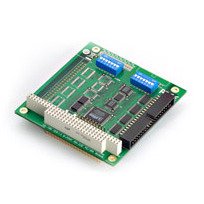
Image 1: MOXA CA-104-T 4-Port RS-232 PC/104 Module. This image displays the compact design of the PC/104 module with its four RS-232 serial ports.
2. Sąranka ir diegimas
Follow these steps to correctly install the CA-104-T module into your PC/104 system:
- Sistemos paruošimas: Power off your PC/104 system and disconnect all power sources. Ensure the system is placed on a stable, anti-static surface.
- Modulio išdėstymas: Carefully align the CA-104-T module with the PC/104 expansion bus connectors on your host board. Apply even pressure to seat the module firmly into the connectors.
- Securing the Module: Use appropriate standoffs and screws to secure the module to the host board, preventing movement and ensuring stable connections.
- Connecting Serial Devices: Connect your RS-232 compatible devices to the serial ports on the CA-104-T module using standard serial cables. Ensure secure connections.
- Maitinimas: Reconnect power to your PC/104 system and power it on.
- Tvarkyklės diegimas: Install the necessary device drivers for the CA-104-T module on your operating system. Refer to the MOXA website for the latest driver versions and installation guides.
3. Naudojimo instrukcijos
Once the CA-104-T module is physically installed and drivers are loaded, it is ready for operation. The module provides four independent RS-232 serial ports.
- Prievado konfigūracija: Each serial port can be configured individually through your operating system's device manager or through MOXA's provided utility software. Settings typically include baud rate, data bits, parity, and stop bits.
- Duomenų perdavimas: Use standard serial communication protocols and software applications to transmit and receive data through the configured ports.
- Temperatūros veikimas: The CA-104-T is designed for reliable operation in a wide temperature range of -40 to 85°C. Ensure your system's overall thermal management is adequate for the operating environment.
4. Priežiūra
The MOXA CA-104-T module is designed for high reliability and requires minimal maintenance. Adhere to the following guidelines:
- Aplinkos kontrolė: Operate the module within its specified temperature and humidity ranges to ensure optimal performance and longevity.
- Valymas: If necessary, gently clean the module's exterior with a soft, dry cloth. Avoid using liquid cleaners or solvents.
- Programinės įrangos / tvarkyklių atnaujinimai: Periodically check the MOXA website for updated drivers or firmware that may enhance performance or address known issues.
- Fizinė apžiūra: Occasionally inspect the module for any signs of physical damage or loose connections.
5. Problemų sprendimas
If you encounter issues with your CA-104-T module, consider the following troubleshooting steps:
- Modulis neaptiktas:
- Ensure the module is correctly seated in the PC/104 slot.
- Verify that the system's BIOS or operating system recognizes the PC/104 bus.
- Check if the correct drivers are installed and updated.
- Ryšio klaidos:
- Confirm that the serial cable connections are secure and correct.
- Verify that the baud rate, data bits, parity, and stop bits settings match between the module and the connected device.
- Test with a different serial cable or device if possible.
- Operacija su pertraukomis:
- Check for power supply stability to the PC/104 system.
- Įsitikinkite, kad darbinė aplinka atitinka nurodytą temperatūros diapazoną.
- Inspect for any physical damage or loose components on the module.
If problems persist after following these steps, contact MOXA technical support for further assistance.
6. Specifikacijos
| Funkcija | Aprašymas |
|---|---|
| Prekės ženklas | Moxa |
| Modelio numeris | CA-104 |
| Uostai | 4 x RS-232 |
| Sąsaja | PC/104 |
| Darbinė temperatūra | -40 iki 85°C (nuo -40 iki 185°F) |
| Suderinami įrenginiai | Desktop (PC/104 systems) |
| UPC | 720355974411 |
7. Informacija apie garantiją
MOXA products are covered by a limited warranty. For detailed information regarding the warranty period, terms, and conditions applicable to the CA-104-T module, please refer to the official MOXA websvetainėje arba garantijos kortelėje, pridėtoje prie jūsų gaminio. Išsaugokite pirkimo kvitą kaip pirkimo įrodymą garantijos pretenzijoms.
8. Techninė pagalba
For technical assistance, driver downloads, or further product information, please visit the official MOXA websvetainėje. website provides a comprehensive knowledge base, FAQs, and contact information for regional support centers. When contacting support, please have your product model number (CA-104-T) and any relevant system information ready.
MOXA Official Websvetainė: www.moxa.com