1. Įvadas
The Intel NUC DE3815TYKHE is a compact, fanless mini PC designed for various applications, including thin clients, digital signage, and embedded solutions. This kit provides a flexible platform with support for a 2.5-inch storage drive, offering a customizable computing experience in a small form factor.
2. Pakuotės turinys
Patikrinkite, ar pakuotėje yra visi reikalingi daiktai:
- Intel NUC DE3815TYKHE Unit
- Kintamos srovės adapteris
- VESA Mounting Bracket (with screws)
- Greito paleidimo vadovas (jei pridėtas)
3. Fizinis viršusview
3.1 Priekinis skydelis
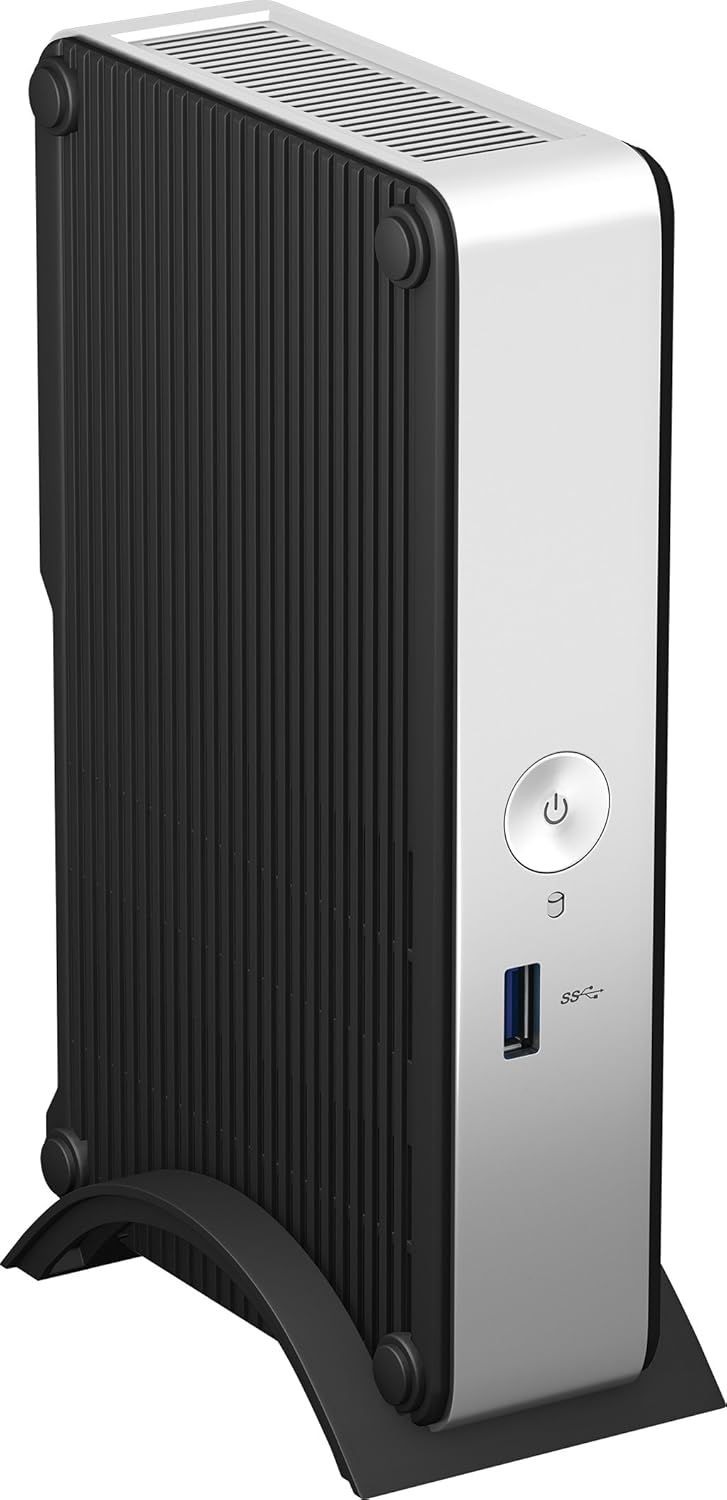
The front panel provides essential connectivity and controls.

1 vaizdas: Priekyje view of the Intel NUC DE3815TYKHE. This image displays the compact, fanless design of the unit, highlighting the power button and a single blue USB 3.0 port on the front for easy access.
- Maitinimo mygtukas: Naudojamas įrenginiui įjungti arba išjungti.
- USB 3.0 prievadas: Skirta didelės spartos USB įrenginiams prijungti.
3.2 Galinis skydelis
The rear panel houses various ports for display, network, and peripherals.

2 vaizdas: Galinis view of the Intel NUC DE3815TYKHE. This image details the available rear ports, including VGA, HDMI, two USB ports, an Ethernet port, and a headphone/microphone jack, along with the power input.
- VGA prievadas: For connecting to older monitors or projectors.
- HDMI prievadas: For connecting to modern displays with audio support.
- USB 2.0 prievadai (x2): Skirta standartiniams USB įrenginiams prijungti.
- Ethernet prievadas (RJ-45): Laidinio tinklo ryšiui.
- Ausinių / mikrofono lizdas: Garso įvesties ir išvesties jungtims.
- DC maitinimo įvestis: Kintamosios srovės adapterio prijungimui.
3.3 Vidiniai komponentai
Accessing the internal components is necessary for memory and storage installation.
3 vaizdas: Intel NUC DE3815TYKHE unit displayed alongside its internal motherboard. This view illustrates the compact size of the main unit and the layout of the internal components, including the processor, memory slot, and connectors for storage.
- DDR3L SODIMM Slot: For installing system memory.
- 2.5-inch Drive Bay: For installing a SATA HDD or SSD.
- Belaidės antenos: Built-in for wireless connectivity.
- eMMC Storage: 4GB embedded storage for operating system or data.
4. Sąranka
Follow these steps to prepare your Intel NUC for operation.
4.1 Atminties (RAM) diegimas
- Unscrew and remove the bottom cover of the NUC unit.
- Locate the DDR3L SODIMM slot on the motherboard.
- Align the notch on the SODIMM module with the notch in the slot.
- Insert the module at a 45-degree angle and press down until the retaining clips snap into place.
4.2 Installing a 2.5-inch Storage Drive
- With the bottom cover removed, locate the 2.5-inch drive bay.
- Connect the SATA data and power cables from the NUC to your 2.5-inch HDD or SSD.
- Secure the drive within the bay using the provided screws (if applicable).
- Replace the bottom cover and secure it with screws.
4.3 Išorinių įrenginių prijungimas
- Ekranas: Connect your monitor to the HDMI or VGA port.
- Klaviatūra ir pelė: Connect USB keyboard and mouse to any available USB ports.
- Tinklas: For wired internet, connect an Ethernet cable to the RJ-45 port. For wireless, ensure antennas are clear.
- Garsas: Connect headphones or speakers to the audio jack if needed.
4.4 Įjungimas
- Connect the AC power adapter to the DC power input on the rear panel.
- Įkiškite maitinimo adapterį į sieninį lizdą.
- Press the power button on the front panel to turn on the NUC.
5. Operacinės sistemos diegimas
The Intel NUC DE3815TYKHE supports multiple operating systems. You will need to install your preferred OS onto the internal eMMC storage or the 2.5-inch drive you installed.
- Prepare a bootable USB drive with your chosen operating system (e.g., Windows, Linux).
- Connect the USB drive to a USB port on the NUC.
- Power on the NUC and enter the BIOS/UEFI setup (usually by pressing F2 during boot) to configure the boot order.
- Vykdykite ekrane pateikiamas instrukcijas, kad įdiegtumėte operacinę sistemą.
6. Priežiūra
The fanless design of the Intel NUC DE3815TYKHE minimizes maintenance requirements.
- Valymas: Periodically wipe the exterior with a soft, dry cloth. Avoid using liquid cleaners directly on the unit.
- Vėdinimas: Ensure the ventilation slots are not obstructed to allow for proper passive cooling.
- Programinės įrangos atnaujinimai: Siekiant optimalaus našumo ir saugumo, nuolat atnaujinkite operacinę sistemą ir tvarkykles.
7. Problemų sprendimas
If you encounter issues, refer to the following common troubleshooting steps.
- Nėra galios: Įsitikinkite, kad maitinimo adapteris yra tvirtai prijungtas tiek prie NUC, tiek prie veikiančio maitinimo lizdo. Išbandykite lizdą su kitu įrenginiu.
- Nėra ekrano: Verify that the monitor is powered on and correctly connected to the NUC's HDMI or VGA port. Try a different cable or monitor if possible.
- Operacinė sistema nepaleidžiama: Check the boot order in the BIOS/UEFI settings. Ensure the installed storage drive is detected and contains a valid operating system.
- Periferinis įrenginys neaptiktas: Ensure USB devices are properly seated in the ports. Try a different USB port or device.
- Nėra tinklo ryšio: For wired connections, check the Ethernet cable and router. For wireless, ensure Wi-Fi is enabled in the OS and the NUC is within range of a network.
8. Specifikacijos
| Funkcija | Detalė |
|---|---|
| Modelio pavadinimas | DE3815TYKHE |
| Procesorius | Intel Atom Processor (e.g., E3815) |
| RAM | 4 GB DDR3L 1333 (SODIMM slot for expansion) |
| Vidinė saugykla | 4GB eMMC (embedded MultiMediaCard) |
| Saugyklos išplėtimas | Internal 2.5-inch SATA HDD/SSD bay |
| Grafika | Integruota Intel Graphics |
| Vaizdo išvestis | HDMI, VGA |
| USB prievadai | 1x USB 3.0 (priekyje), 2x USB 2.0 (gale) |
| Garsas | Kombinuotas ausinių/mikrofono lizdas |
| Tinklas | Ethernet (RJ-45), Built-in Wireless Antennas |
| Dizainas | Be ventiliatoriaus |
| Operacinės sistemos palaikymas | Multiple OS options (e.g., Windows, Linux) |
| Spalva | Metallic gray plastic ring with black sides |
9. Garantija ir palaikymas
Dėl garantijos informacijos ir techninės pagalbos kreipkitės į oficialią „Intel“ svetainę. websvetainėje arba susisiekite su pirkimo vieta. Išsaugokite pirkimo įrodymą garantiniams reikalavimams.
- Palaikymas internetu: Apsilankykite Intel Support for DE3815TYKHE for drivers, downloads, and troubleshooting resources.
- Susisiekite: Refer to the Intel support page for contact options.


