1. Įvadas ir pabaigaview
The Tenda TEH1048 is a 48-port 10/100Mbps Ethernet Switch designed for expanding network connectivity in various environments, including small to medium-sized businesses. It provides reliable, high-speed network expansion without requiring complex configuration. The switch features a robust metal casing suitable for rack mounting. It supports non-blocking wire-speed forwarding across all 48 RJ45 ports and includes features like auto MDI/MDI-X crossover detection and flow control for efficient data transmission.
Pagrindinės funkcijos:
- Complies with IEEE802.3, IEEE802.3u Ethernet Standards. Offers 48 10/100Mbps Auto-Negotiation RJ45 ports.
- Supports Auto MDI/MDIX to simplify network setup and maintenance.
- Supports NWAY Auto-Negotiation function, automatically detecting transmission rate and duplex modes to choose the best network connectivity.
- Supports IEEE802.3x full-duplex flow control and half-duplex backpressure flow control.
2. Kas yra dėžutėje
Prašome patikrinti, ar pakuotėje yra visi reikalingi daiktai:
- Tenda TEH1048 48-port unmanaged 10/100 Mbps Ethernet switch
- Vartotojo vadovas
- Vienas maitinimo laidas
- Two mounting ears
- Aštuoni varžtai
- Keturios guminės pėdos
3. Sąrankos instrukcijos
3.1 Išpakavimas ir įdėjimas
Carefully remove the switch and all accessories from the packaging. Place the switch on a stable, flat surface or mount it in a standard 19-inch equipment rack using the provided mounting ears and screws. Ensure adequate ventilation around the device to prevent overheating.
3.2 Maitinimo prijungimas
- Connect one end of the provided power cord to the power inlet on the rear panel of the TEH1048 switch.
- Plug the other end of the power cord into a standard AC power outlet (100-240V AC, 50/60Hz).
- Įsitikinkite, kad priekiniame skydelyje šviečia maitinimo šviesos diodas, rodantis, kad jungiklis gauna maitinimą.
3.3 Tinklo įrenginių prijungimas
The TEH1048 is a Plug-and-Play device, requiring no software configuration for basic operation.
- Connect Ethernet cables from your network devices (e.g., computers, servers, network printers, routers) to any of the 48 RJ45 ports on the front panel of the switch.
- The switch's Auto MDI/MDIX feature automatically detects the cable type (straight-through or crossover), so you do not need to use specific cable types for different connections.
- Observe the Link/Act LEDs next to each port. A solid green LED indicates a successful network link, and a blinking LED indicates data activity.
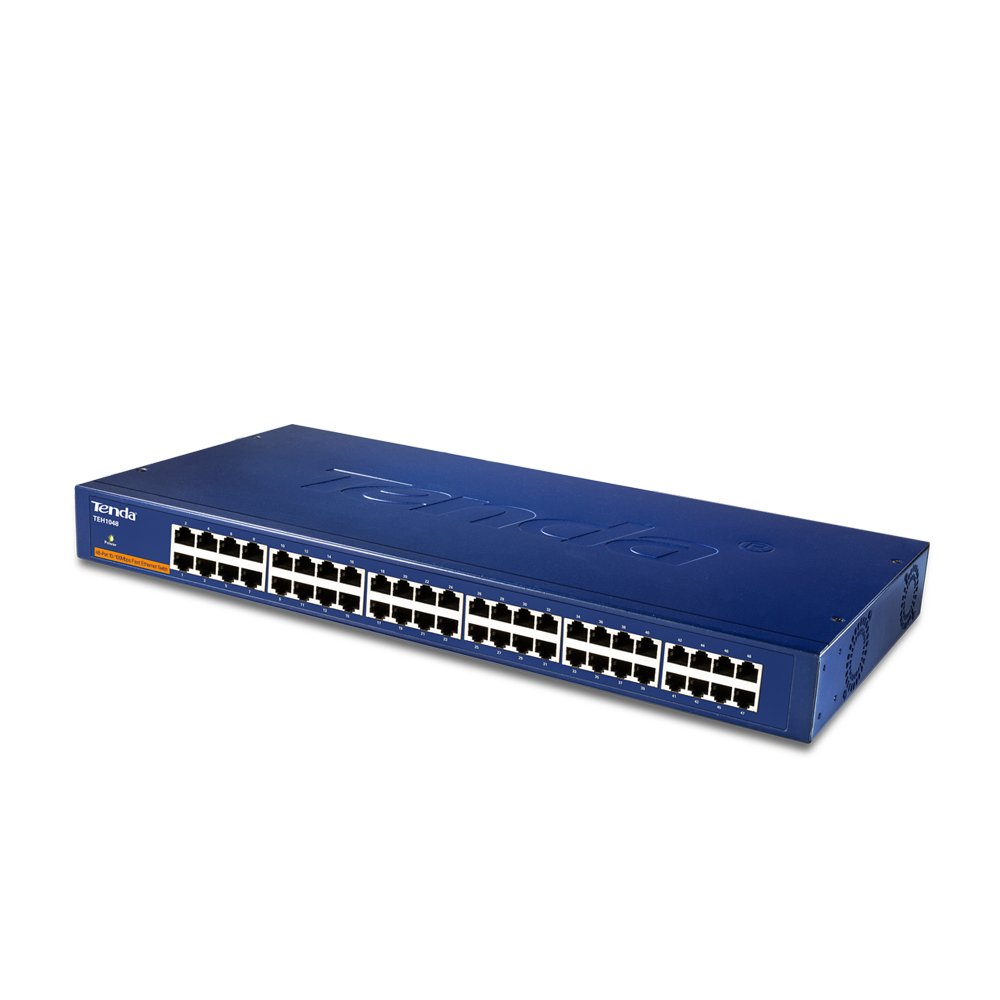
Priekyje view of the Tenda TEH1048 48-Port 10/100Mbps Ethernet Switch. This image displays the front panel of the Tenda TEH1048 switch, highlighting its 48 Ethernet ports, the power indicator LED, and the Tenda logo. The ports are clearly labeled for easy identification.
4. Jungiklio valdymas
The Tenda TEH1048 is an unmanaged switch, meaning it operates automatically without requiring user configuration. Once powered on and connected to network devices, it begins forwarding data.
4.1 Plug and Play Operation
The switch is designed for immediate use. Simply connect your devices, and the switch will automatically detect their speed (10Mbps or 100Mbps) and duplex mode (half or full) using NWAY Auto-Negotiation. It will then establish the optimal connection.
4.2 LED indikatoriai
- Maitinimo šviesos diodas: Šviečia, kai jungiklis įjungtas.
- Ryšio / veiksmo šviesos diodai (kiekvienam prievadui):
- Tvirtai žalia: Indicates a successful network link.
- Mirksi žaliai: Indicates data transmission or reception activity on the port.
- Išjungta: No link detected or device is not connected.
5. Priežiūra
To ensure optimal performance and longevity of your Tenda TEH1048 switch, follow these maintenance guidelines:
- Valymas: Reguliariai valykite jungiklio išorę minkštu, sausu skudurėliu. Nenaudokite skystų ar aerozolinių valiklių.
- Vėdinimas: Ensure that the ventilation openings are not blocked. Maintain adequate space around the switch for proper airflow.
- Aplinka: Jungiklį naudokite nurodytose temperatūros ir drėgmės ribose. Saugokite jį nuo tiesioginių saulės spindulių, per didelio karščio ar drėgmės.
- Kabelių valdymas: Tinklo kabelius laikykite tvarkingus, nesulenktus ar neperlenktus, kad nesuprastėtų signalas.
6. Problemų sprendimas
If you encounter issues with your Tenda TEH1048 switch, refer to the following common troubleshooting steps:
- Nėra galios:
- Check if the power cord is securely connected to both the switch and the power outlet.
- Patikrinkite, ar maitinimo lizdas veikia, prijungdami prie jo kitą įrenginį.
- Ensure the Power LED on the switch is illuminated.
- Nėra nuorodos uoste:
- Įsitikinkite, kad Ethernet kabelis yra tvirtai prijungtas prie komutatoriaus prievado ir tinklo įrenginio.
- Check the integrity of the Ethernet cable; try a different cable if necessary.
- Patikrinkite, ar prijungtas tinklo įrenginys įjungtas ir veikia tinkamai.
- Confirm that the Link/Act LED for that port is solid green.
- Slow Network Connection:
- Ensure all connected devices are operating at their expected speeds.
- Check for excessive network traffic or bottlenecks upstream (e.g., router, internet connection).
- Verify that cables are not damaged or too long, which can affect performance.
- Pertraukiamas ryšys:
- Patikrinkite visas kabelių jungtis, ar jos nėra atsilaisvinusios ar pažeistos.
- Įsitikinkite, kad jungiklis yra gerai vėdinamoje vietoje, kad jis neperkaistų.
- Consider restarting the switch and connected devices.
7. Specifikacijos
| Funkcija | Specifikacija |
|---|---|
| Prekės ženklas | Tenda |
| Modelio numeris | TEH1048 |
| Uostai | 48 x 10/100 Mbps RJ45 prievadų |
| Standartai | IEEE 802.3, IEEE 802.3u |
| Srauto valdymas | IEEE 802.3x (Full-Duplex), Backpressure (Half-Duplex) |
| MAC adresų lentelė | 4K entries with Learning and Aging |
| Automatinis MDI/MDIX | Palaikoma |
| Maitinimo įvestis | AC 100-240V, 50/60Hz |
| Gaminio matmenys (IxPxH) | 12.3 x 4.4 x 44 cm |
| Prekės svoris | 3.4 kg |
| Bylos medžiaga | Metalas |
| Montavimas | Galima montuoti ant stovo |
8. Informacija apie garantiją
Tenda products are covered by a limited warranty. The specific terms and duration of the warranty may vary by region and product type. Please refer to the warranty card included with your product or visit the official Tenda websvetainėje rasite išsamią informaciją apie garantiją ir registracijos procedūras.
9. Techninė pagalba
For technical assistance, product inquiries, or to report issues, please contact Tenda customer support. Support resources, including FAQs, firmware updates, and contact information, are typically available on the official Tenda website. When contacting support, please have your product model number (TEH1048) and serial number ready.
Oficiali Tenda Websvetainė: www.tenda.com.cn


