1. Įvadas
This instruction manual provides essential information for the proper installation, operation, and maintenance of your Intel Core i7-5820K Desktop Processor. Please read this manual thoroughly before proceeding with installation to ensure optimal performance and system stability. This processor is designed for high-performance desktop computing, offering advanced multi-core processing capabilities.
2. Produktas baigtasview
The Intel Core i7-5820K is a high-performance desktop processor featuring 6 cores and 12 threads, enabled by Intel's Hyper-Threading Technology. It operates at a base clock speed of 3.3GHz and includes 15MB of Intel Smart Cache. This processor is part of the Intel Haswell-E family and is designed for the LGA2011-v3 socket on X99 chipset motherboards. It supports DDR4 memory, providing a robust foundation for demanding applications, gaming, and content creation.

Figure 2.1: Intel Core i7-5820K Processor Retail Box. This image displays the packaging for the Intel Core i7-5820K processor, highlighting its branding and key features.
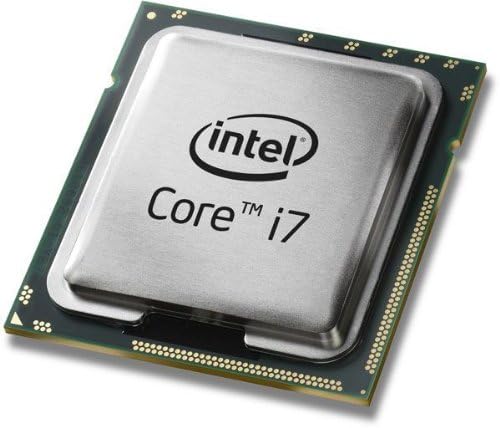
Figure 2.2: Intel Core i7-5820K Processor Top View. This image shows the top surface of the processor, featuring the Intel Core i7 branding.
3. Savybės
- 6 branduolių / 12 gijų: Enhanced multitasking and parallel processing capabilities.
- „Intel Hyper-Threading“ technologija: Allows each processor core to work on two tasks simultaneously, improving overall performance.
- Intel Smart Cache: Dynamically allocates shared cache to each processor core based on workload, significantly reducing latency to frequently used data.
- Intel Quick Path Interconnect (QPI): High-speed point-to-point interconnect for improved system performance.
- Integruotas atminties valdiklis: Supports DDR4-2133 memory for faster data access.
- Intel HD Boost: Enhances performance for multimedia and data-intensive applications.
- Turbo Boost Technology 2.0: Dynamically increases the processor's frequency as needed by taking advantage of thermal and power headroom.
- Atrakintas procesorius: Allows for overclocking to achieve higher performance (requires compatible motherboard and cooling).
4. Sąranka ir diegimas
Installing a processor requires careful handling and adherence to specific procedures. It is recommended that installation be performed by a qualified technician. Ensure your motherboard is compatible with the LGA2011-v3 socket and X99 chipset, and supports DDR4 memory.
4.1. Prieš pradėdami
- Suderinamumo patikrinimas: Verify that your motherboard supports the Intel Core i7-5820K processor (LGA2011-v3 socket, X99 chipset).
- Išjungti: Always disconnect the power supply from the wall outlet before opening your computer case.
- Statinė iškrova: Kad išvengtumėte elektrostatinės iškrovos (ESD) sukeltos žalos, dėvėkite antistatinę riešo apyrankę arba dažnai lieskite įžemintą metalinį objektą.
- Aušinimo tirpalas: This processor is sold as "CPU Only" and does not include a stock cooler. A high-quality aftermarket CPU cooler (air or liquid) is required for proper operation and thermal management.
- Terminė pasta: Have thermal paste ready, as it is essential for efficient heat transfer between the CPU and the cooler.
4.2. Procesoriaus diegimo veiksmai
- Atidaryti procesoriaus lizdą: Locate the CPU socket on your motherboard. Carefully open the socket retention mechanism by pushing down and out on the lever(s).
- Orientuokite procesorių: Align the triangular gold arrow on the corner of the processor with the corresponding mark on the CPU socket. Ensure the notches on the processor align with the keys in the socket.
- Įterpti procesorių: Gently place the processor straight down into the socket. Do not force it. If it does not seat easily, re-check the alignment.
- Uždaryti procesoriaus lizdą: Close the socket retention mechanism by pushing the lever(s) back into place until they click.
- Taikyti terminę pastą: Apply a small amount of thermal paste (typically a pea-sized dot) to the center of the CPU's integrated heat spreader (IHS).
- Įdiekite procesoriaus aušintuvą: Follow the instructions provided with your aftermarket CPU cooler to properly install it onto the motherboard, ensuring firm and even contact with the CPU. Connect the cooler's fan cable to the designated CPU_FAN header on the motherboard.

Figure 4.1: Intel Core i7-5820K Processor Angled View. This image provides an angled perspective of the processor, showing its metallic heat spreader and green substrate.
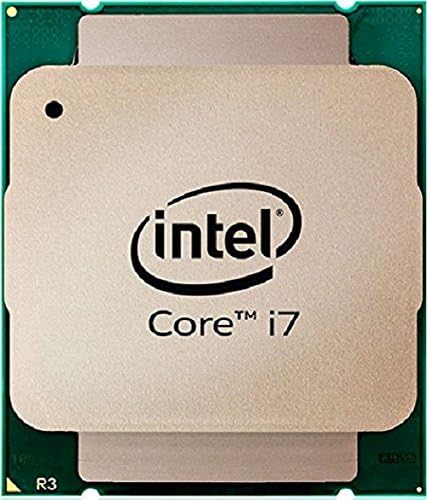
Figure 4.2: Intel Core i7-5820K Processor Bottom View. This image displays the underside of the processor, showing the contact pads that interface with the motherboard socket.
5. Procesoriaus valdymas
Once installed, the Intel Core i7-5820K processor operates automatically within your system. Its performance is managed by the operating system and motherboard BIOS/UEFI settings.
5.1. Bendrasis naudojimas
- The processor will dynamically adjust its clock speed and power consumption based on workload, utilizing Intel Turbo Boost Technology 2.0 for peak performance when needed.
- Ensure your operating system and drivers (especially chipset drivers) are up to date for optimal performance and stability.
- For multi-GPU configurations (SLI/CrossFire), be aware that the i7-5820K provides 28 PCIe lanes. While sufficient for many setups, high-end multi-GPU configurations or extensive PCIe storage might benefit from processors with 40 lanes.
5.2. Perkrovimas (pažengusiems vartotojams)
The Intel Core i7-5820K is an unlocked processor, allowing for overclocking to achieve higher clock speeds. Overclocking can increase performance but also generates more heat and may void your warranty if not done correctly. Proceed with caution and at your own risk.
- Reikalavimai: Overclocking requires a compatible X99 motherboard with robust power delivery, an effective high-performance cooling solution, and adequate power supply.
- BIOS / UEFI nustatymai: Adjust CPU core ratio, voltage, and other parameters within your motherboard's BIOS/UEFI interface.
- Stebėjimas: Use reliable software to monitor CPU temperature and stability during and after overclocking.
- Stabilumo testas: Thoroughly test system stability with stress testing software after any overclocking adjustments.
6. Priežiūra
The Intel Core i7-5820K processor itself requires minimal maintenance. However, maintaining the overall system environment is crucial for its longevity and performance.
- Dulkių šalinimas: Regularly clean your computer case and CPU cooler to prevent dust buildup, which can impede airflow and lead to higher temperatures. Use compressed air for this purpose.
- Terminė pasta: Over several years, thermal paste can dry out and become less effective. If you notice consistently high CPU temperatures, consider reapplying fresh thermal paste. This involves carefully removing the CPU cooler, cleaning off old paste, and applying new paste.
- Sistemos atnaujinimai: Keep your operating system, motherboard BIOS/UEFI, and drivers updated to ensure compatibility and access to performance improvements or bug fixes.
7. Problemų sprendimas
If you encounter issues with your system after installing the processor, consider the following troubleshooting steps:
- Nėra maitinimo / nėra ekrano:
- Įsitikinkite, kad visi maitinimo kabeliai (24 kontaktų ATX, 8 kontaktų CPU) yra tvirtai prijungti prie pagrindinės plokštės.
- Verify that the CPU is correctly seated in its socket and the retention mechanism is fully closed.
- Check that RAM modules are properly seated in their slots.
- Consult your motherboard manual for POST (Power-On Self-Test) codes or diagnostic LEDs, which can indicate specific hardware issues.
- Sistemos nestabilumas / gedimai:
- Monitor CPU temperatures using software. High temperatures can lead to throttling or crashes. Ensure your CPU cooler is properly installed and functioning.
- If overclocked, revert to default BIOS settings to rule out overclocking as the cause.
- Paleiskite atminties diagnostikos įrankius, kad patikrintumėte, ar nėra RAM problemų.
- Prastas našumas:
- Ensure your operating system power plan is set to "High Performance."
- Verify that all drivers, especially chipset drivers, are installed and up to date.
- Check for background applications consuming excessive CPU resources.
If issues persist, consult your motherboard's support resources or Intel's official support channels.
8. Specifikacijos
| Funkcija | Specifikacija |
|---|---|
| Procesoriaus modelis | Intel Core i7-5820K |
| Prekės modelio numeris | BX80648I75820K |
| Šerdys | 6 |
| Siūlai | 12 |
| Bazinis laikrodžio greitis | 3.3 GHz |
| Maksimalus turbo dažnis | 3.6 GHz |
| Talpykla | 15 MB „Intel“ išmanioji talpykla |
| Lizdo tipas | LGA2011-v3 |
| Palaikomi atminties tipai | DDR4-2133 |
| Max Memory Channels | 4 |
| PCIe juostos | 28 |
| Šiluminės konstrukcijos galia (TDP) | 140 W |
| Procesoriaus grafika | None (Requires discrete graphics card) |
| Gaminio matmenys (IxPxH) | 5.5 x 5.5 x 2 colio |
| Prekės svoris | 4.8 uncijos |
| Pasiekiama pirmoji data | 29 m. rugpjūčio 2014 d |
9. Garantija ir palaikymas
For detailed warranty information, please refer to Intel's official website or the warranty documentation included with your purchase. Intel provides technical support for its products.
9.1. Teisinis atsisakymas
Please note that a 15% restocking fee may apply if the product is opened or used. A 10-day return policy is typically in effect. Review the specific terms and conditions of your retailer at the time of purchase.
9.2. Susisiekimas su palaikymo tarnyba
For technical assistance, driver downloads, or further product information, visit the official Intel support websvetainė:


