Produktas baigtasview
The Logitech K480 Bluetooth Multi-Device Keyboard is designed for seamless typing across multiple devices. This versatile keyboard allows you to switch effortlessly between your computer, tablet, and smartphone with a simple turn of a dial. It features a familiar keyboard layout with shortcut keys optimized for Windows, Mac, Chrome OS, Android, and iOS mobile devices. The integrated cradle securely holds your phone or tablet at an optimal viewing angle while you type.
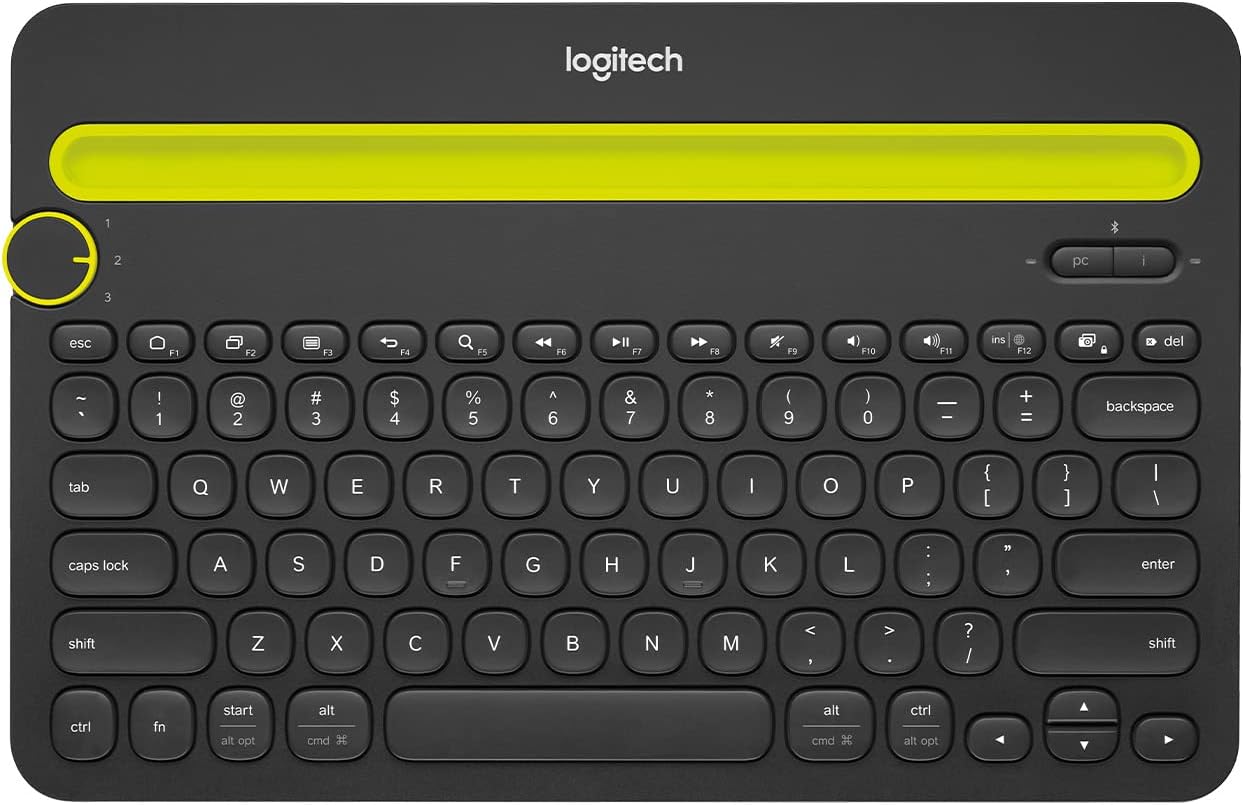
1 pav.: priekis view of the Logitech K480 Bluetooth Multi-Device Keyboard.
Sąranka
1. Akumuliatoriaus įdėjimas
The Logitech K480 keyboard comes with two pre-installed AAA batteries. To access the battery compartment, slide open the cover on the underside of the keyboard. Ensure the batteries are correctly oriented according to the polarity indicators. Close the cover securely.

Figure 2: Underside of the keyboard showing the battery compartment and on/off switch.
2. Įjunkite maitinimą
Locate the On/Off switch on the underside of the keyboard. Slide the switch to the 'On' position. A small LED indicator on the top right of the keyboard will illuminate briefly.
3. „Bluetooth“ poravimas
- Turn the Easy-Switch dial on the left side of the keyboard to select one of the three available channels (1, 2, or 3).
- Press and hold the 'i' (for iOS/Mac) or 'pc' (for Windows/Android/Chrome OS) button above the Easy-Switch dial for 3 seconds until the LED indicator for the selected channel starts blinking rapidly. This indicates the keyboard is in pairing mode.
- On your device (computer, tablet, or smartphone), go to Bluetooth settings and enable Bluetooth.
- Look for "Keyboard K480" in the list of available devices and select it.
- Follow the on-screen instructions to complete the pairing process, which may involve typing a code on the K480 keyboard and pressing Enter.
- Once successfully paired, the LED indicator will glow solid blue for a few seconds and then turn off.

Figure 3: Easy-Switch dial and pairing buttons for multi-device connectivity.
4. Integrated Cradle Usage
The integrated cradle at the top of the keyboard is designed to hold your smartphone or tablet. Simply place your device into the slot. The cradle supports most phones and tablets up to 10.5 mm (0.4 inches) thick and 258 mm (10 inches) wide, providing an ideal angle for typing and viewing.

Figure 4: The integrated cradle securely holds your devices for comfortable typing.
Naudojimo instrukcijos
Perjungimas tarp įrenginių
To switch between your paired devices, simply turn the Easy-Switch dial to the corresponding channel number (1, 2, or 3) where your device is paired. The keyboard will automatically connect to the selected device, allowing you to seamlessly continue typing.
Video 1: Demonstrates switching between devices using the Easy-Switch dial.
Using Shortcut Keys
The K480 keyboard features a familiar layout with dedicated shortcut keys for various operating systems. These keys provide quick access to common functions such as media control, volume adjustment, and screen lock. Refer to your device's operating system documentation for specific shortcut key functionalities.
Priežiūra
Baterijos keitimas
The keyboard uses 2 AAA batteries. When the battery indicator light (located near the On/Off switch) turns red, it's time to replace the batteries. Open the battery compartment on the underside of the keyboard, remove the old batteries, and insert new AAA batteries, ensuring correct polarity. Close the compartment securely.
Valymas
Klaviatūrai valyti naudokite minkštą, nepūkuotą šluostę. Įsisenėjusius nešvarumus šiek tiek nuvalykite.ampen the cloth with water or a mild cleaning solution. Avoid using abrasive cleaners or harsh chemicals. The keyboard is spill-resistant, meaning it can withstand minor liquid spills (up to 60ml), but it should not be immersed in liquid.

Figure 5: The keyboard is designed to be spill-resistant for everyday use.
Trikčių šalinimas
- Klaviatūra neprisijungia: Ensure the keyboard is powered on and the Easy-Switch dial is set to the correct channel. Check that Bluetooth is enabled on your device and the keyboard is within range (up to 10 meters). Try re-pairing the keyboard if the issue persists.
- Typing lag or missed characters: This could be due to interference. Try moving the keyboard closer to your device or away from other wireless devices. Ensure your device's operating system is up to date.
- Battery life issues: Ensure you are using fresh, high-quality AAA batteries. Turn off the keyboard when not in use to conserve battery life.
- Device not fitting in cradle: The cradle supports devices up to 10.5 mm (0.4 inches) thick and 258 mm (10 inches) wide. Remove bulky cases if your device does not fit.
Specifikacijos
| Funkcija | Detalė |
|---|---|
| Prekės ženklas | Logitech |
| Modelio numeris | 920-006342 |
| Aparatinės įrangos platforma | Nešiojamasis kompiuteris, planšetinis kompiuteris, išmanusis telefonas |
| Operacinės sistemos suderinamumas | „Windows 10“, „11“ arba naujesnė versija; „Chrome OS“; „macOS 10.14“ arba naujesnė versija; „iOS 11“ arba naujesnė versija; „iPadOS 13.1“ arba naujesnė versija; „Android 7“ arba naujesnė versija |
| Ryšio technologija | Bluetooth |
| Prekės svoris | 1.81 svaro (820 g) |
| Gaminio matmenys (IxPxH) | 12.2 x 1.61 x 7.91 colio |
| Maitinimo šaltinis | Maitinamas su baterijomis (pridedamos 2 AAA baterijos) |
| Ypatingos savybės | Portable, Spill Resistant, Hotkeys and Media Keys, Multi-Device Switching |
Garantija ir palaikymas
Teisinis atsisakymas: All items are without warranty. All purchases are As-Is.
For further assistance or detailed information, please refer to the official User Guide PDF available čia.


