„Logitech M280“ belaidės pelės vartotojo vadovas
Modelis: M280 (910-004287)
1. Produktas baigtasview
The Logitech M280 Wireless Mouse is designed for comfort and efficiency, featuring contoured grips made of soft rubber for extended use. Its energy-efficient engineering provides an impressive 18-month battery life, with an automatic sleep function when not in use. Experience ultra-precise and responsive tracking with Logitech Advanced Optical Tracking. The included Nano receiver offers convenient and reliable wireless connectivity.

Figure 1: Logitech M280 Wireless Mouse
2. Kas yra dėžutėje
- Logitech M280 belaidė pelė
- Nano imtuvas
- 1 AA baterija (iš anksto įdiegta arba pridėta)
3. Sąrankos vadovas
3.1. Baterijos įdėjimas
- Raskite baterijų skyriaus dangtelį pelės apačioje.
- Nustumkite dangtelį, kad atidarytumėte skyrių.
- Įdėkite pridėtą AA bateriją, užtikrindami teisingą poliškumą (+/-).
- Uždėkite baterijų skyriaus dangtelį, kol jis spragtelėdamas tvirtai užsifiksuos.
3.2. Nano imtuvo prijungimas
- Remove the Nano receiver from its storage slot inside the battery compartment (if applicable).
- Plug the Nano receiver into an available USB port on your computer.
- Turn on the mouse using the On/Off switch located on the underside. The mouse should automatically connect to the receiver.

Figure 2: Mouse features and receiver storage
4. Pelės valdymas
4.1. Pagrindinės funkcijos
- Kairysis spustelėjimas: Pirminė atranka ir aktyvavimas.
- Dešiniuoju pelės mygtuku spustelėkite: Pasiekia kontekstinius meniu.
- Slinkties ratukas: Slinkite aukštyn arba žemyn per dokumentus ir web pages. The scroll wheel is designed for precise, quiet operation.

Figure 3: Precise Scrolling with the M280
4.2. Advanced Optical Tracking
The Logitech M280 utilizes advanced optical tracking technology, providing smooth and precise cursor control on a variety of surfaces. This technology ensures high responsiveness and accuracy for daily tasks.

Figure 4: Smooth Navigation and Precise Scrolling on Most Operating Systems
4.3. Ergonomiškas dizainas
The mouse features a contoured shape with soft rubber grips, specifically crafted for the right hand to provide enhanced comfort during prolonged use. This ergonomic design helps reduce strain and fatigue.

Figure 5: Contoured Shape & Grips for Enhanced Comfort
5. Priežiūra
5.1. Baterijos keitimas
When the mouse's performance degrades or the indicator light (if present) signals low battery, replace the AA battery by following the steps in Section 3.1. The M280 is designed for energy efficiency, offering up to 18 months of battery life.
5.2. Valymas
To maintain optimal performance, regularly clean the mouse's optical sensor and the surface of the mouse with a soft, dry cloth. Avoid using harsh chemicals or abrasive materials.
6. Problemų sprendimas
6.1. No Cursor Movement or Unresponsive Mouse
- Įsitikinkite, kad pelė yra pasukta ON using the switch on the underside.
- Patikrinkite bateriją. Pakeiskite ją, jei ji išsikrovusi arba jos beveik nėra.
- Ensure the Nano receiver is securely plugged into a working USB port on your computer. Try a different USB port.
- Iš naujo paleiskite kompiuterį.
6.2. Lag or Intermittent Connectivity
- Move the mouse closer to the Nano receiver. The wireless range is approximately 10 meters (33 feet).
- Avoid using the mouse on metallic surfaces, which can interfere with the wireless signal.
- Remove any large metal objects between the mouse and the receiver.
- Jei naudojate USB šakotuvą, pabandykite imtuvą prijungti tiesiai prie kompiuterio.
7. Specifikacijos
| Funkcija | Specifikacija |
|---|---|
| Modelis | M280 (910-004287) |
| Ryšys | Wireless (RF 2.4 GHz) via Nano USB Receiver |
| Judesio aptikimo technologija | Pažangus optinis sekimas |
| Baterijos tipas | 1 x AA baterija |
| Baterijos veikimo laikas | Iki 18 mėnesių |
| belaidis diapazonas | Iki 10 metrų (33 pėdų) |
| Matmenys (IxPxH) | 105.4 mm x 67.9 mm x 38.4 mm (4.15 x 2.67 x 1.51 colio) |
| Svoris | 91 g (3.21 uncijos) |
| Operacinės sistemos suderinamumas | „Windows“, „MacOS“, „ChromeOS“, „Linux“. |
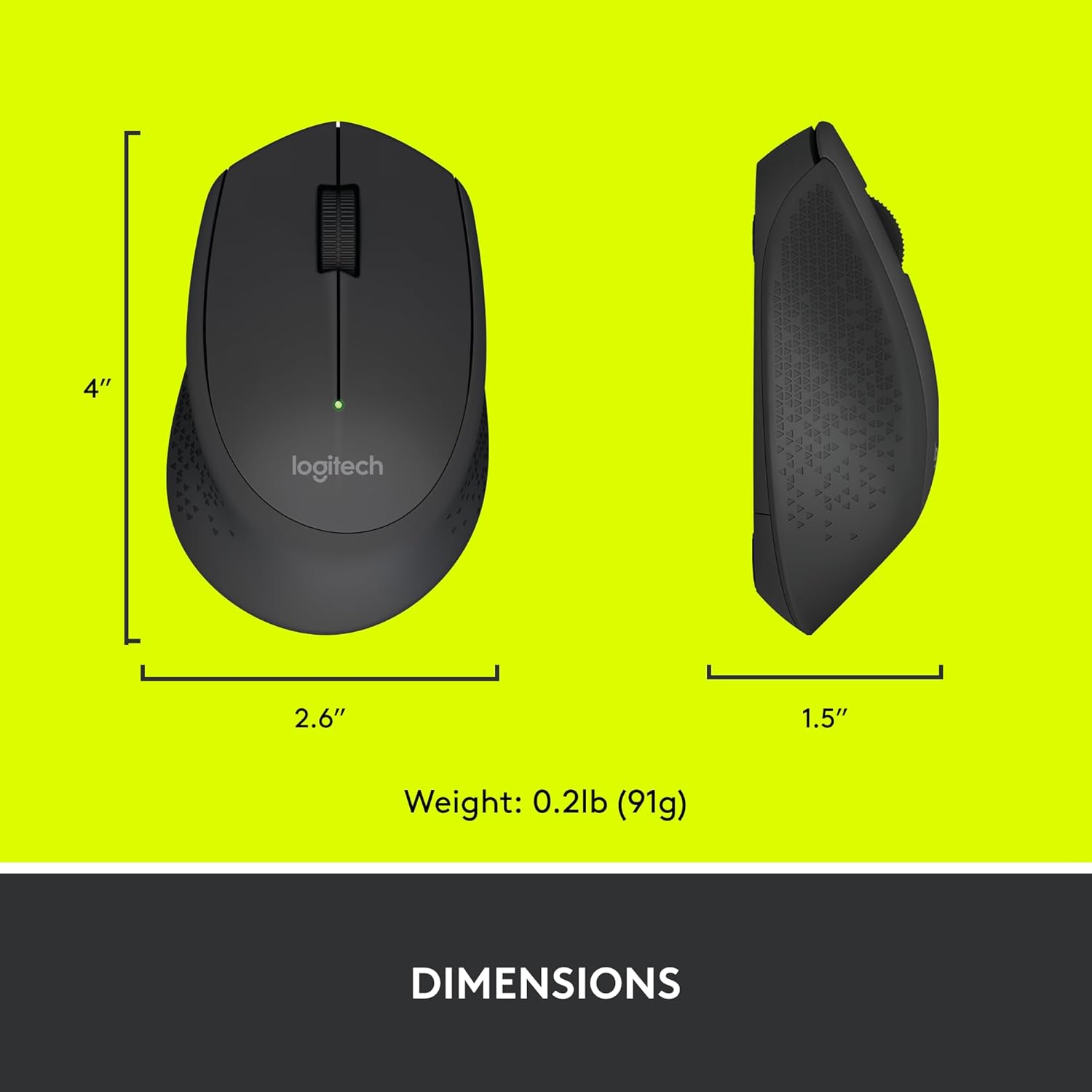
Figure 6: Logitech M280 Dimensions
8. Garantija ir palaikymas
Dėl garantijos informacijos ir techninės pagalbos apsilankykite oficialioje „Logitech“ palaikymo svetainėje website or refer to the warranty card included with your product. You can also find frequently asked questions and troubleshooting tips online.
Norėdami gauti daugiau išteklių, apsilankykite „Logitech“ parduotuvė „Amazon“ svetainėje.


