Įvadas
This manual provides comprehensive instructions for the setup, operation, and maintenance of your Genius SW-2.1 355 Speaker System. Please read this manual thoroughly before using the product to ensure proper functionality and to maximize your listening experience.
Saugos informacija
Kad nesugadintumėte įrenginio ar nesusižalotumėte, laikykitės šių saugos priemonių:
- Saugokite garsiakalbius nuo vandens ar drėgmės.
- Avoid placing the speakers near heat sources or in direct sunlight.
- Užtikrinkite tinkamą vėdinimą aplink žemųjų dažnių garsiakalbį, kad jis neperkaistų.
- Naudokite tik su įrenginiu pateiktą maitinimo adapterį.
- Nebandykite patys atidaryti ar taisyti įrenginio. Visus techninės priežiūros darbus patikėkite kvalifikuotiems specialistams.
- Laikyti vaikams nepasiekiamoje vietoje.
Pakuotės turinys
Patikrinkite, ar pakuotėje yra visi reikalingi daiktai:
- 1 x Subwoofer unit
- 2 x palydoviniai garsiakalbiai
- 1 x Audio input cable (3.5mm stereo jack)
- 1x maitinimo adapteris
- 1 x Naudotojo vadovas (šis dokumentas)
Produktas baigtasview
The Genius SW-2.1 355 Speaker System consists of a subwoofer and two satellite speakers designed to deliver clear audio and powerful bass for your multimedia needs.
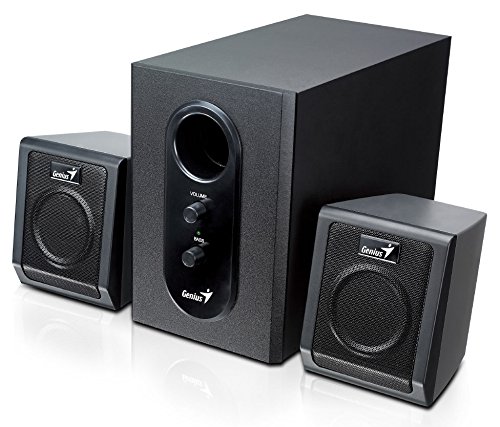
This image displays the Genius SW-2.1 355 Speaker System. It features a central, larger subwoofer unit with volume and bass control knobs on its front panel, and two smaller satellite speakers positioned on either side. All components are black.
Komponentai:
- Žemų dažnių garsiakalbis: The main unit housing the bass driver and control panel.
- Palydoviniai garsiakalbiai: Du kompaktiški garsiakalbiai vidutinio ir aukšto dažnio garsui.
- Valdymo skydelis: Located on the subwoofer, featuring Volume and Bass adjustment knobs.
Sąranka
- Garsiakalbių išdėstymas: Place the subwoofer on the floor or a sturdy surface. Position the satellite speakers on either side of your listening area, facing towards you for optimal stereo separation.
- Palydovinių garsiakalbių prijungimas: Connect the cables from the two satellite speakers to the corresponding output jacks on the rear of the subwoofer unit. Ensure a secure connection.
- Garso šaltinio prijungimas: Connect one end of the 3.5mm audio input cable to the "Audio In" jack on the subwoofer. Connect the other end to the audio output jack (e.g., headphone jack) of your computer, MP3 player, smartphone, or other audio source.
- Maitinimo prijungimas: Plug the power adapter into the DC input jack on the subwoofer. Then, plug the power adapter into a standard electrical outlet.
- Maitinimas: Turn on the speaker system using the power switch, usually integrated with the volume knob.
Operacija
- Maitinimo įjungimas / išjungimas ir garsumo valdymas: The main knob on the subwoofer controls both power and overall volume. Rotate clockwise to turn on and increase volume; rotate counter-clockwise to decrease volume and turn off.
- Žemųjų dažnių reguliavimas: Use the "Bass" knob on the subwoofer to adjust the level of low-frequency sound. Rotate clockwise to increase bass, and counter-clockwise to decrease it, according to your preference.
- Garso šaltinio garsumas: For optimal sound quality, set the volume on your audio source (computer, phone, etc.) to about 75% and then use the speaker system's volume control for fine adjustments.
Priežiūra
- Valymas: Garsiakalbių paviršiams valyti naudokite minkštą, sausą šluostę. Nenaudokite skystų valiklių ar abrazyvinių medžiagų.
- Saugykla: Jei garsiakalbius ilgesnį laiką sandėliuosite, atjunkite juos nuo maitinimo šaltinio ir laikykite vėsioje, sausoje vietoje.
- Kabelių valdymas: Kad nepažeistumėte, įsitikinkite, kad laidai nėra susipainioję ar suspausti.
Trikčių šalinimas
| Problema | Galima priežastis | Sprendimas |
|---|---|---|
| Nėra garso |
|
|
| Iškraipytas garsas |
|
|
| Silpnas bosas |
|
|
Specifikacijos
| Funkcija | Detalė |
|---|---|
| Modelio pavadinimas | SW-2.1 355 |
| Garsiakalbio tipas | 2.1 Channel Multimedia Speaker System (Bookshelf, Satellite, Subwoofer) |
| Bendra išėjimo galia | 10 Watts RMS (5W Subwoofer + 2.5W x 2 Satellites) |
| Medžiaga | Wood (Subwoofer) |
| Ryšio technologija | Laidinis (3.5 mm garso įvestis) |
| Suderinami įrenginiai | MP3 Player, Personal Computer, Smartphones, Tablets, Televisions |
| Valdikliai | Garsumas, bosas |
| Maitinimo šaltinis | DC |
| Prekės svoris | 2.78 kg |
| Pakuotės matmenys | 39.6 x 25 x 18.4 cm |
Garantija ir palaikymas
Genius products are designed for reliability and performance. For information regarding warranty coverage, technical support, or service inquiries, please refer to the warranty card included with your product or visit the official Genius websvetainėje. Išsaugokite pirkimo kvitą kaip pirkimo įrodymą.


