1. Įvadas
This manual provides detailed instructions for the proper use, setup, and maintenance of your Genius HS-920BT Bluetooth Headset. Please read this manual thoroughly before using the device to ensure optimal performance and longevity.
The Genius HS-920BT is a versatile Bluetooth headset designed for wireless audio streaming and hands-free communication with compatible devices such as smartphones, tablets, and PCs.
2. Pakuotės turinys
Patikrinkite, ar pakuotėje yra visi reikalingi daiktai:
- Genius HS-920BT Bluetooth Headset
- USB įkrovimo laidas
- Multi-language User Manual (this document)
3. Produktas baigtasview
The HS-920BT headset features an adjustable headband and comfortable earcups, integrating controls for audio playback and call management.
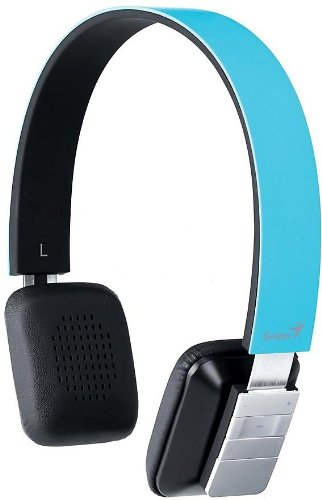
Figure 1: Genius HS-920BT Bluetooth Headset (Blue)
This image displays the Genius HS-920BT Bluetooth Headset in blue, viewed from an angle, highlighting its adjustable headband and earcup design.
Pagrindinės funkcijos:
- Wireless Bluetooth connectivity for audio and calls (A2DP support)
- Integrated rechargeable Lithium-Ion battery
- Integruotas mikrofonas bendravimui laisvų rankų įranga
- On-ear controls for volume adjustment, track skipping (AVRCP support)
- Reguliuojamas galvos diržas patogiam pritaikymui
- 40 mm driver units for clear sound
4. Sąranka
4.1 Ausinių įkrovimas
Before initial use, fully charge the headset. Use the provided USB charging cable.
- Prijunkite mažąjį USB įkrovimo laido galą prie ausinių įkrovimo prievado.
- Prijunkite didesnį USB kabelio galą prie maitinamo USB prievado (pvz., kompiuterio, USB sieninio adapterio).
- The LED indicator on the headset will illuminate during charging and change color or turn off when fully charged. Refer to the headset's LED behavior for specific indications.
Pilnas įkrovimas paprastai trunka maždaug 2–3 valandas.
4.2 Susiejimas su „Bluetooth“ įrenginiu
To use the HS-920BT wirelessly, you must pair it with your Bluetooth-enabled device.
- Maitinimas: Press and hold the Power button on the headset until the LED indicator flashes, usually alternating blue and red, indicating pairing mode.
- Suaktyvinkite „Bluetooth“: On your smartphone, tablet, or PC, enable Bluetooth functionality.
- Ieškokite Įrenginiai: In your device's Bluetooth settings, search for available devices. The headset should appear as "HS-920BT".
- Pasirinkite ir suporuokite: Select "HS-920BT" from the list. If prompted for a passcode, enter "0000" (four zeros).
- Patvirtinimas: Once paired, the headset's LED indicator will typically flash blue slowly, and your device will confirm the connection.
The headset will automatically attempt to reconnect to the last paired device when powered on, if that device's Bluetooth is active and within range.
5. Naudojimo instrukcijos
The HS-920BT features intuitive controls located on the earcup.

Figure 2: Earcup Controls of HS-920BT
This image shows a close-up of the right earcup of the Genius HS-920BT Bluetooth Headset, detailing the control buttons for power, volume, and track navigation.
5.1 Maitinimo įjungimas/išjungimas
- Maitinimas: Paspauskite ir palaikykite maitinimo mygtuką maždaug 3 sekundes, kol LED indikatorius mirksės mėlynai.
- Išjungti: Paspauskite ir palaikykite maitinimo mygtuką maždaug 3 sekundes, kol užges LED indikatorius.
5.2 Muzikos atkūrimas
- Leisti / pristabdyti: Vieną kartą paspauskite paleidimo/pauzės mygtuką.
- Kitas takelis: Press the "Next Track" button (usually marked with a forward arrow).
- Ankstesnis takelis: Press the "Previous Track" button (usually marked with a backward arrow).
5.3 Skambučių valdymas
- Atsiliepti / Baigti skambutį: Press the Multi-function button (often the same as Play/Pause) once during an incoming call to answer, or once during a call to end it.
- Atmesti skambutį: Įeinančio skambučio metu paspauskite ir maždaug 2 sekundes palaikykite nuspaudę daugiafunkcį mygtuką.
- Perrink paskutinį numerį: Kai nekalbate telefonu, dukart paspauskite daugiafunkcį mygtuką.
5.4 Garsumo valdymas
- Padidinti garsumą: Paspauskite garsumo didinimo mygtuką (+).
- Sumažinti garsumą: Paspauskite garsumo mažinimo mygtuką (-).
6. Priežiūra
Proper care ensures the longevity of your headset.
- Valymas: Ausinėms valyti naudokite minkštą, sausą šluostę. Nenaudokite abrazyvinių valiklių ar tirpiklių.
- Saugykla: Laikykite ausines vėsioje, sausoje vietoje, toliau nuo tiesioginių saulės spindulių ir ekstremalių temperatūrų.
- Akumuliatoriaus priežiūra: Norėdami išsaugoti baterijos veikimo laiką, venkite dažnai jos visiškai iškrauti. Reguliariai kraukite ausines, net jei jų nenaudojate ilgą laiką.
- Vandens ekspozicija: Ausinės nėra atsparios vandeniui. Venkite vandens ar per didelės drėgmės.
7. Problemų sprendimas
If you encounter issues with your HS-920BT headset, refer to the following common solutions:
| Problema | Galimas sprendimas |
|---|---|
| Ausinės neįsijungia. | Įsitikinkite, kad akumuliatorius įkrautas. Prijunkite ausines prie maitinimo šaltinio naudodami USB laidą. |
| Nepavyksta susieti ausinių su įrenginiu. |
|
| Nėra garso arba garsas per mažas. |
|
| Skambučių kokybė prasta. |
|
8. Specifikacijos
| Modelio pavadinimas: | HS-920BT |
| Belaidė technologija: | Bluetooth |
| Vairuotojo blokai: | 40 mm |
| Baterija: | Įmontuotas įkraunamas ličio jonų akumuliatorius |
| Valdymo tipas: | Volume Control, Track Navigation, Call Management |
| Mikrofonas: | Įmontuotas |
| Palaikomas „Pro“files: | A2DP, AVRCP |
| Techninės įrangos platforma: | Kompiuteris, išmanusis telefonas, planšetinis kompiuteris |
| Prekės svoris: | 110 gramų |
| Matmenys (PxPxH): | 13.6 x 17.3 x 2.9 cm |
9. Garantija ir palaikymas
For warranty information and technical support, please refer to the warranty card included with your product or visit the official Genius websvetainėje. Išsaugokite pirkimo kvitą kaip pirkimo įrodymą.
For further assistance, you may contact Genius customer service through their official channels.


