1. Įvadas
Thank you for choosing the WiMiUS Q1 4K WiFi Waterproof Action Camera. This manual provides essential information for setting up, operating, and maintaining your device. Please read it carefully before use to ensure optimal performance and longevity of your camera.

Image 1.1: WiMiUS Q1 4K WiFi Waterproof Action Camera. This image displays the camera in its retail packaging, highlighting its 4K Full HD capabilities, 40m waterproof rating, WiFi connectivity, 170-degree wide angle, and 2.0-inch LCD screen.
2. Pakuotės turinys
Patikrinkite, ar jūsų siuntinyje yra visi toliau išvardyti daiktai:
- 1 x WiMiUS Q1 4K Action Camera
- 2 x 900 mAh įkraunamos baterijos
- 1 x akumuliatoriaus įkrovimo dokas
- Various mounting accessories (e.g., waterproof case, helmet mounts, bicycle mount, adhesive mounts, clips, bandages, tethers, USB cable, cleaning cloth)
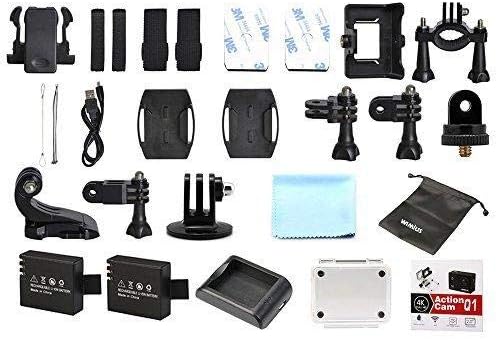
Image 2.1: WiMiUS Q1 Action Camera Accessories. This image shows the comprehensive set of accessories included with the camera, such as various mounts, straps, a charging dock, two batteries, a USB cable, and a cleaning cloth.
3. Fotoaparatas baigtasview
Familiarize yourself with the camera's buttons and ports:

Image 3.1: WiMiUS Q1 Camera Labeled Parts. This diagram illustrates the various components of the camera, including the Power/Mode button, OK button, UP/WiFi button, Down button, Speaker, Microphone, Micro SD card slot, USB port, HDMI port, Charging Indicator, Operation Indicator, and WiFi Indicator.
- Maitinimo / režimo mygtukas: Paspauskite ir palaikykite, kad įjungtumėte / išjungtumėte. Trumpai paspauskite, kad perjungtumėte režimus.
- Gerai mygtukas: Confirm selection, start/stop recording, or take a photo.
- UP/WiFi Button: Navigate up in menus. Press and hold to activate/deactivate WiFi.
- Žemyn mygtukas: Navigate down in menus.
- Pranešėjas: Garso išvestis.
- Mikrofonas: Audio input for recording.
- „Micro SD“ lizdas: Insert Micro SD card (up to 64GB, not included).
- USB prievadas: Įkrovimui ir duomenų perdavimui.
- HDMI prievadas: Skirta prijungti prie išorinio ekrano.
- Įkrovimo indikatorius: Rodo įkrovimo būseną.
- Veikimo indikatorius: Shows camera's operational status.
- WiFi indikatorius: Rodo „Wi-Fi“ ryšio būseną.
4. Sąranka
4.1. Akumuliatoriaus įdėjimas
- Atidarykite baterijų skyriaus dangtelį, esantį fotoaparato apačioje.
- Insert a fully charged 900mAh battery, ensuring the correct orientation.
- Saugiai uždarykite akumuliatoriaus skyriaus dangtelį.
4.2. Micro SD kortelės įdėjimas
A Micro SD card (not included) is required for storing photos and videos. The camera supports cards up to 64GB.
- Raskite „Micro SD“ kortelės lizdą kameros šone.
- Insert the Micro SD card with the contacts facing the camera's front until it clicks into place.
- Norėdami išimti, švelniai stumkite kortelę, kol ji iššoks.
4.3. Akumuliatoriaus įkrovimas
Use the provided charging dock and USB cable to charge the batteries. A full charge takes approximately 3 hours.
- Įdėkite akumuliatorių į įkrovimo doką.
- Connect the charging dock to a USB power source (5V 1A) using the USB cable.
- The charging indicator on the dock will show the charging status.
4.4. Vandeniui atsparaus dėklo naudojimas
The waterproof case allows the camera to be used underwater up to 40 meters. Ensure the case is properly sealed before submerging.
- Įdėkite fotoaparatą į vandeniui atsparų dėklą.
- Tvirtai uždarykite skląstį, kad užtikrintumėte sandarumą.
- Before first use, test the empty waterproof case in water to confirm no leaks.
5. Naudojimo instrukcijos
5.1. Maitinimo įjungimas/išjungimas
- Maitinimas: Paspauskite ir palaikykite Maitinimas / režimas mygtuką 3 sekundes.
- Išjungti: Paspauskite ir palaikykite Maitinimas / režimas mygtuką 3 sekundes.
5.2. Režimo perjungimas
Trumpai paspauskite Maitinimas / režimas button to cycle through different modes: Video Recording, Photo Shooting, Playback, and Settings.
5.3. Vaizdo įrašymas
- Perjunkite į vaizdo įrašymo režimą.
- Paspauskite OK button to start recording. The operation indicator will flash.
- Paspauskite OK button again to stop recording. The operation indicator will stop flashing.
Vaizdo įrašų rezoliucijos: 4K@30FPS, 2.7K@30FPS, 1080P@60FPS, 720P@120FPS.
Special Video Modes:
- Laiko tarpas: Intervals of 0.5S, 1S, 2S, 5S, 10S, 30S, 60S.
- Ciklo įrašymas: 2min, 3min, 5min segments.
- Lėtas judėjimas: 1080P@60FPS, 720P@120FPS.
5.4. Fotosesija
- Switch to Photo Shooting mode.
- Paspauskite OK mygtuką, kad padarytumėte nuotrauką.
Nuotraukų raiška: 16M, 14M, 12M, 8M, 5M.
Nuotraukų režimai: Single, Self-Timer (3S/5S/10S), Continuous Shot (3P/S, 5P/S, 10P/S, 20P/S).
5.5. „Wi-Fi“ ryšys
Connect your camera to a smartphone or tablet via Wi-Fi for remote control and file perkėlimas.
- Download the official WiMiUS app from your device's app store.
- On the camera, press and hold the UP/WiFi button to activate Wi-Fi. The Wi-Fi indicator will light up.
- On your smartphone/tablet, go to Wi-Fi settings and connect to the camera's Wi-Fi network (SSID usually starts with 'WiMiUS' or similar).
- Open the WiMiUS app to control the camera remotely.
5.6. Atkūrimas
Norėdami iš naujoview jūsų įrašyti vaizdo įrašai ir nuotraukos:
- Switch to Playback mode using the Maitinimas / režimas mygtuką.
- Naudokite UP ir Žemyn buttons to navigate through your files.
- Paspauskite OK mygtuką prie view pasirinktas file.
6. Priežiūra
6.1. Valymas
- Use a soft, lint-free cloth to clean the camera lens and LCD screen.
- Įstrigusiems dėmėms lengvai nuvalykiteampNuplaukite šluostę vandeniu. Venkite stiprių cheminių medžiagų.
- Ensure the camera is dry before closing any ports or compartments.
6.2. Sandėliavimas
- Fotoaparatą laikykite vėsioje, sausoje vietoje, toliau nuo tiesioginių saulės spindulių ir ekstremalių temperatūrų.
- Išimkite baterijas, jei fotoaparatas bus nenaudojamas ilgesnį laiką.
7. Problemų sprendimas
- Kamera neįsijungia: Ensure the battery is fully charged and correctly inserted. Try using the second battery.
- SD kortelės klaida: Ensure the Micro SD card is correctly inserted and formatted (FAT32 recommended). Try a different compatible Micro SD card.
- Prasta vaizdo įrašų / nuotraukų kokybė: Check lens for smudges. Ensure adequate lighting. Verify resolution settings.
- „Wi-Fi“ ryšio problemos: Ensure Wi-Fi is enabled on the camera and your mobile device. Restart both devices. Check for app updates.
- Kameros užšalimas: Išimkite ir vėl įdėkite bateriją, kad iš naujo nustatytumėte fotoaparato gamyklinius nustatymus.
8. Specifikacijos
| Modelis | WiMiUS Q1 |
| LCD ekranas | 2.0'' LTPS |
| Objektyvas | 170-degree A+ High Resolution Wide Angle |
| Vaizdo raiška | 4K@30FPS, 2.7K@30FPS, 1080P@60FPS, 720P@120FPS |
| Vaizdo įrašo formatas | MOV (H.264) |
| Nuotraukų raiška | 16M/14M/12M/8M/5M |
| Sandėliavimas | Micro SD Card, up to 64GB (Class 10 or higher recommended) |
| Baterija | 2 x 900mAh Rechargeable Li-ion |
| Įkrovimo laikas | Maždaug 3 val |
| Ryšys | USB 2.0, „Wi-Fi“ |
| Sistemos suderinamumas | Windows XP/Vista/Win7 or above, Mac OS |
| Ypatingos savybės | Time Lapse, Loop Recording, Slow Motion, Waterproof (with case) |
| Optinis priartinimas | 10x |
| Jutiklio tipas | CMOS |
9. Garantija ir palaikymas
For warranty information and technical support, please refer to the documentation provided with your purchase or visit the official WiMiUS websvetainėje. Išsaugokite pirkimo įrodymą garantiniams reikalavimams.


