1. Įvadas
This manual provides detailed instructions for the installation, operation, maintenance, and troubleshooting of your Fantec QB-35US3-6G 4-Bay External Hard Drive Enclosure. This device is designed to house up to four 3.5-inch SATA I/II/III hard drives, offering high-speed data transfer via USB 3.0 SuperSpeed and eSATA connections. It features 6G support and an 80mm temperature-controlled fan for optimal performance and drive longevity.

1 pav.: priekis view of the Fantec QB-35US3-6G Enclosure.
2. Pakuotės turinys
Prieš tęsdami montavimą, įsitikinkite, kad pakuotėje yra visi komponentai:
- Fantec QB-35US3-6G Enclosure
- Maitinimo adapteris ir maitinimo laidas
- USB 3.0 kabelis
- eSATA Cable
- Kietojo disko montavimo varžtai
- Vartotojo vadovas (šis dokumentas)

Figure 2: Fantec QB-35US3-6G Enclosure with all included accessories.
3. Sąrankos instrukcijos
3.1 Kietojo disko įrengimas
- Įsitikinkite, kad korpusas yra išjungtas ir atjungtas nuo kompiuterio.
- Open the front door of the enclosure to reveal the hard drive bays.
- Slide each 3.5-inch SATA hard drive into an available bay until it is securely seated. Ensure the SATA connectors align properly.
- Secure each hard drive using the provided screws, if necessary, to prevent movement.
- Close the front door of the enclosure.

Figure 3: Hard drive bays accessible by opening the front door.
3.2 Prijungimas prie kompiuterio
The QB-35US3-6G supports both USB 3.0 SuperSpeed and eSATA connections.
- Prijunkite maitinimo adapterį prie korpuso maitinimo įvesties, o tada – prie maitinimo lizdo.
- Pasirinkite pageidaujamą ryšio būdą:
- USB 3.0: Connect one end of the USB 3.0 cable to the SUPERSEED USB 3.0 connector on the enclosure and the other end to an available USB 3.0 port on your computer.
- eSATA: Connect one end of the eSATA cable to the eSATA connector on the enclosure and the other end to an available eSATA port on your computer.
- Press the power button on the enclosure to turn it on.
- Your operating system should detect the new hardware. For new hard drives, you may need to initialize and format them through your operating system's Disk Management utility (Windows) or Disk Utility (macOS).

Figure 4: Rear panel with eSATA and USB 3.0 connectors.
3.3 Initializing Hard Drives (for new drives or drives over 2TB)
For new hard drives, or existing drives larger than 2TB, proper initialization is crucial:
- For drives over 2TB: It is highly recommended to initialize these drives using the GPT (GUID skaidinių lentelė) partitioning scheme. MBR (Master Boot Record) partitioning is limited to 2TB and may cause data loss or recognition issues with larger drives.
- Access your operating system's disk management tool (e.g., Disk Management in Windows, Disk Utility in macOS) to initialize and format your drives.
4. Naudojimo instrukcijos
The Fantec QB-35US3-6G features several controls and indicators on its front panel for easy operation.
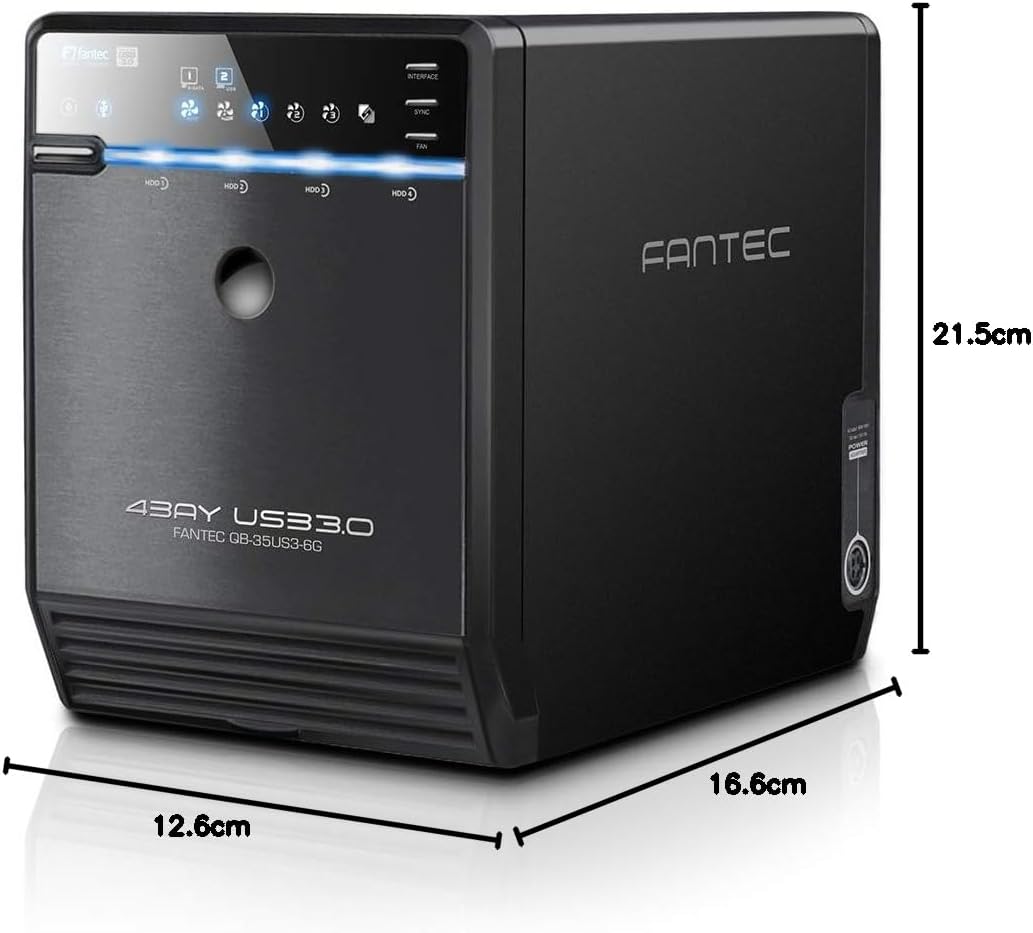
Figure 5: Labeled diagram of the enclosure's controls and ports.
- Maitinimo mygtukas (5): Press to turn the enclosure on or off.
- Interface Selection (10): Hold down the "INTERFACE" button to switch between USB 3.0 and eSATA connection modes. The Status LED for interface selection (6) will indicate the active interface.
- Power Off Synchronization (9): Hold down the "SYNC" button to adjust the power off and standby behavior. This feature allows the enclosure to synchronize its power state with your computer.
- Fan Speed Selection (8): Press the "FAN" button to cycle through different fan speed settings. The Status LED for fan speed (7) will indicate the current setting.
- HDD Activity LEDs: Individual LEDs for each hard drive indicate activity (read/write operations).
5. Priežiūra
5.1 Bendras valymas
To ensure optimal performance and longevity, keep the enclosure clean:
- Išoriniams paviršiams valyti naudokite minkštą, sausą šluostę.
- Periodically clean the fan vents to prevent dust buildup, which can impede airflow and cooling efficiency. Use compressed air for best results.
- Do not use liquid cleaners or solvents directly on the enclosure.
5.2 Ventiliatoriaus keitimas
The 80mm thermal-controlled fan (1) is designed for easy replacement, contributing to the product's long-term usability. Refer to the manufacturer's guidelines or contact support for specific fan replacement procedures if needed.
6. Problemų sprendimas
If you encounter issues with your Fantec QB-35US3-6G, refer to the following common troubleshooting steps:
- Kompiuteris neatpažįsta korpuso:
- Ensure the power cable is securely connected and the enclosure is powered on.
- Verify the USB or eSATA cable is properly connected to both the enclosure and the computer.
- Hold down the "INTERFACE" button (10) to ensure the correct connection mode (USB or eSATA) is selected.
- Pabandykite prijungti prie kito kompiuterio USB arba eSATA prievado.
- Hard drives not appearing in operating system:
- For new drives, ensure they have been initialized and formatted via your operating system's disk management utility.
- If using drives larger than 2TB, confirm they were initialized with GPT (GUID skaidinių lentelė). MBR initialization for drives over 2TB can lead to recognition issues or apparent data loss.
- Check that hard drives are securely seated in their bays.
- Enclosure does not power off/enter standby with computer:
- Hold down the "SYNC" button (9) to adjust the power off synchronization settings.
- Fan noise is too loud:
- Press the "FAN" button (8) to cycle through different fan speed settings. Select a lower speed if temperatures allow.
- Ensure fan vents are clear of dust and obstructions.
- LEDs are excessively bright:
- The enclosure's LEDs are designed to be bright. There is no built-in adjustment for LED brightness.
7. Specifikacijos
| Funkcija | Specifikacija |
|---|---|
| Modelio numeris | QB-35US3-6G |
| Kietojo disko formos faktorius | 3.5 colių |
| Maksimalus palaikomų įrenginių skaičius | 4 |
| Kietojo disko sąsaja | SATA I/II/III |
| Ryšio technologija | USB 3.0 SuperSpeed, eSATA |
| Data Transfer Rate (USB 3.0) | Iki 5 Gbit/s |
| Data Transfer Rate (eSATA) | Up to 6 Gbit/s (6G Support) |
| Aušinimas | 80mm Thermal Controlled Fan |
| Medžiaga | Aliuminis |
| Spalva | Juoda |
| Operacinės sistemos suderinamumas | Microsoft Windows Vista/7/8/8.1/10, Mac OS X |
| Gaminio matmenys (I x P x A) | 21.5 x 12.6 x 16.6 cm |
| Prekės svoris | 1.8 kg |
8. Garantija ir palaikymas
For warranty information and technical support, please refer to the documentation provided with your purchase or visit the official Fantec website. Contact the retailer or manufacturer directly for assistance with product defects, returns, or technical inquiries.


