1. Įvadas
The Bogen 1126-BG-UTI1 is a single-zone paging controller designed to integrate a paging system with a telephone system. It provides a reliable interface for making announcements over a public address system from a telephone. This manual provides detailed instructions for the proper installation, operation, and maintenance of your Bogen paging controller.
2. Svarbi saugos informacija
Prieš naudodami šį įrenginį, perskaitykite ir supraskite visas saugos instrukcijas. Išsaugokite šį vadovą ateičiai.
- Maitinimo šaltinis: Prijunkite įrenginį tik prie nurodyto maitinimo šaltinio, kurio įtampatage.
- Drėgmė: Saugokite įrenginį nuo lietaus ar drėgmės.
- Vėdinimas: Užtikrinkite tinkamą vėdinimą. Neužblokuokite ventiliacijos angų.
- Aptarnavimas: Visus techninės priežiūros darbus patikėkite kvalifikuotiems techninės priežiūros darbuotojams. Nebandykite patys atlikti šio gaminio techninės priežiūros.
- Valymas: Valykite tik sausa šluoste.
3. Pakuotės turinys
Patikrinkite, ar pakuotėje yra visi reikalingi daiktai:
- Bogen 1126-BG-UTI1 Single Zone Paging Controller Unit
- Maitinimo adapteris
- Vartotojo vadovas (šis dokumentas)
- Tvirtinimo detalės (jei taikoma)
4. Produktas baigtasview
The Bogen 1126-BG-UTI1 features various ports and indicators for seamless integration and operation. Familiarize yourself with the unit's components before installation.
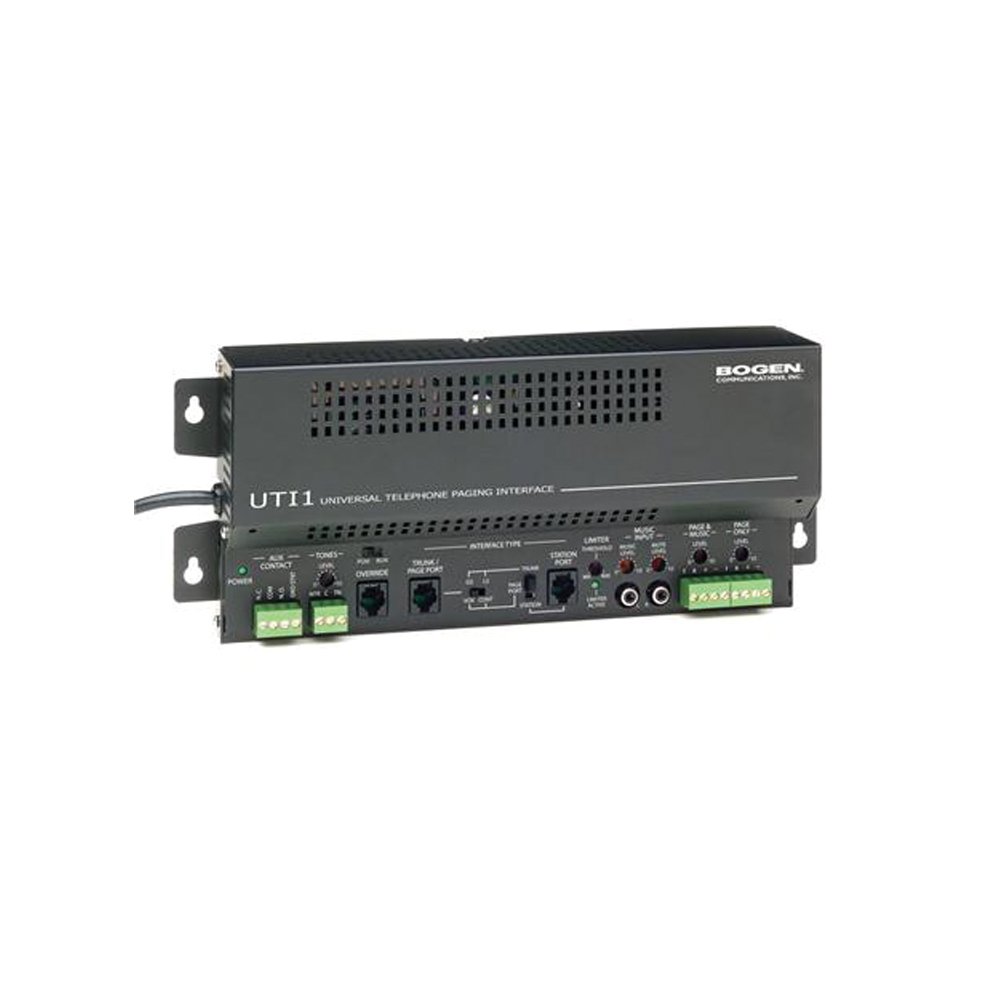
1 paveikslas: Priekyje view of the Bogen Single Zone Paging Controller. This image displays the main unit, highlighting its compact design and essential connection points for audio input and output, as well as power. The various ports and indicators are visible, crucial for understanding the device's functionality and connectivity.
4.1 Priekinis skydelis
- Maitinimo šviesos diodas: Nurodo maitinimo būseną.
- Įvesties lygio valdymas: Adjusts the audio input sensitivity.
- Išvesties lygio valdymas: Reguliuoja garso išvesties garsumą.
4.2 Galinis skydelis
- Telephone Line Input: RJ-11 jack for connecting to the telephone system.
- Garso išvestis: RCA or screw terminal connections for connecting to an ampgyvesnis.
- Maitinimo įvestis: Jack for connecting the power adapter.
- MOH Output: Music On Hold output (if applicable).
5. Sąranka ir diegimas
Follow these steps to properly install your paging controller:
- Montavimas: Choose a suitable location for the controller, away from excessive heat or moisture. Secure the unit using appropriate mounting hardware if desired.
- Connect to Telephone System: Connect an RJ-11 cable from your telephone system's paging port or a suitable analog extension to the "Telephone Line Input" on the controller. Consult your telephone system's manual for specific paging port details.
- Prisijunkite prie Ampgyvybingesnis: Connect the "Audio Output" of the paging controller to an available input on your paging amplifier. Ensure correct polarity if using screw terminals.
- Prijunkite maitinimą: Plug the provided power adapter into the "Power Input" jack on the controller, then plug the adapter into a standard electrical outlet. The Power LED should illuminate.
- Initial Level Adjustment: Start with the Input Level and Output Level controls set to their minimum positions.
6. Naudojimo instrukcijos
Once installed, the Bogen 1126-BG-UTI1 is ready for operation.
6.1 Making a Page
- From a telephone connected to the system, dial the designated paging access code or extension.
- Wait for the confirmation tone or voice prompt from the paging controller.
- Speak clearly into the telephone handset to make your announcement.
- Hang up the telephone when finished.
6.2 Garso lygių reguliavimas
- Įvesties lygis: Slowly increase the "Input Level Control" until the paging audio is clear and distortion-free. If the audio is too loud or distorted, decrease this level.
- Išėjimo lygis: Adjust the "Output Level Control" to achieve the desired volume through the paging speakers. This should be done in conjunction with the ampkeltuvo garsumo reguliatorius.
7. Priežiūra
The Bogen 1126-BG-UTI1 is designed for reliable operation with minimal maintenance.
- Valymas: Periodically wipe the unit with a soft, dry cloth. Do not use liquid cleaners or aerosols.
- Vėdinimas: Ensure that ventilation openings remain clear of dust and debris.
- Jungtys: Occasionally check all cable connections to ensure they are secure.
8. Problemų sprendimas
If you encounter issues, refer to the following troubleshooting guide:
| Problema | Galima priežastis | Sprendimas |
|---|---|---|
| No power indicator light. | Power adapter not connected or faulty; no power at outlet. | Check power adapter connection. Verify outlet has power. Test with another adapter if available. |
| No paging audio. | Incorrect telephone system connection; amplifier off or muted; audio levels too low. | Verify telephone line and audio output connections. Ensure amplifier is on and not muted. Adjust Input and Output Level controls. |
| Paging audio is distorted. | Input or output levels set too high. | Reduce Input Level and/or Output Level controls. |
| Cannot access paging from telephone. | Incorrect paging access code; telephone system not configured correctly. | Confirm the correct paging access code with your telephone system administrator. Verify telephone system programming. |
If the problem persists after attempting these solutions, contact Bogen technical support.
9. Specifikacijos
| Funkcija | Detalė |
|---|---|
| Modelio numeris | 1126-BG-UTI1 |
| Prekės ženklas | Bogenas |
| Pakuotės matmenys | 15 x 9 x 7 colio |
| Prekės svoris | 6.7 svaro |
| ASIN | B00P1AOL2C |
| Gamintojas | Bogenas |
| Paging Zones | Viena zona |
| Suderinamumas | Telephone systems with analog paging port or extension |
10. Garantija ir palaikymas
Bogen products are designed for durability and performance. For specific warranty information, please refer to the warranty card included with your product or visit the official Bogen website. Technical support is available to assist with any questions or issues you may encounter.
- Palaikymas internetu: Apsilankykite www.bogen.com/support for FAQs, documentation, and contact information.
- Kontaktinė informacija: Refer to the Bogen website for current telephone numbers and email addresses for technical assistance.


