1. Įvadas
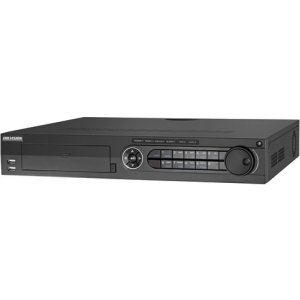
The Hikvision DS-7316HQHI-SH is a 16-channel Tribrid Digital Video Recorder (DVR) designed for advanced surveillance systems. This DVR supports Turbo HD, analog, and 1080P IP cameras, offering versatile compatibility for various security setups. It features H.264 video compression for efficient storage and supports auto-detection of camera types. This manual provides essential information for the proper installation, operation, and maintenance of your DVR system.
2. Saugos instrukcijos
Prieš naudodami įrenginį, atidžiai perskaitykite šias saugos instrukcijas, kad išvengtumėte sužalojimų ar žalos.
- Užtikrinkite maitinimo šaltinio ttage yra stabilus ir atitinka įrenginio reikalavimus.
- Do not place the device in direct sunlight, near heat sources, or in environments with high humidity or dust.
- Avoid placing heavy objects on top of the DVR.
- Use only Hikvision-approved accessories and power adapters.
- Prieš atlikdami bet kokias techninės priežiūros ar montavimo procedūras, atjunkite maitinimą.
- Properly ground the device to prevent electrical shock.
3. Pakuotės turinys
Verify that all items are present in the package. If any items are missing or damaged, contact your supplier.
- Hikvision DS-7316HQHI-SH DVR Unit
- Maitinimo adapteris
- USB pelė
- SATA kabeliai (HDD prijungimui)
- Screws (for HDD installation)
- Greitos pradžios vadovas
4. Produktas baigtasview
4.1 Priekinis skydelis

The front panel of the DVR provides access to essential controls and indicators. It typically includes:
- USB prievadai: For connecting a mouse, USB flash drive, or external storage.
- Būklės rodikliai: LEDs for power, HDD activity, and network status.
- Valdymo mygtukai: Navigation and selection buttons for menu operation.
- IR imtuvas: Nuotolinio valdymo pultui (jei taikoma).
4.2 Galinio skydelio jungtys
The rear panel houses all the necessary ports for connecting cameras, monitors, network, and power. Key connections include:
- Vaizdo įvestis: BNC connectors for 16 Turbo HD/Analog cameras.
- Vaizdo įrašo išvestis: HDMI ir VGA prievadai monitoriaus prijungimui.
- Garso įvestis / išvestis: RCA jungtys garso įrenginiams.
- LAN prievadas: RJ45 Ethernet prievadas tinklo prijungimui.
- USB prievadai: Papildomi USB prievadai periferiniams įrenginiams.
- Aliarmo įvestis/išvestis: Terminal blocks for alarm input and output devices.
- Maitinimo įvestis: 12 V nuolatinės srovės maitinimo lizdas.
5. Sąranka
5.1 Aparatinės įrangos diegimas
- Kietojo disko (HDD) diegimas:
- Atsukite ir nuimkite DVR viršutinį dangtelį.
- Prijunkite SATA duomenų kabelį ir maitinimo kabelį prie kietojo disko.
- Align the HDD with the screw holes at the bottom of the DVR chassis and secure it with the provided screws.
- Uždėkite viršutinį dangtelį ir pritvirtinkite jį varžtais.
- Kameros jungtys: Connect your Turbo HD, analog, or IP cameras to the corresponding video input ports on the rear panel using BNC connectors. For IP cameras, ensure they are connected to the same network as the DVR.
- Monitoriaus jungtis: Prijunkite monitorių prie HDMI arba VGA išvesties prievado galiniame skydelyje.
- Pelės jungtis: Connect the USB mouse to a USB port on the front or rear panel.
- Tinklo prisijungimas: Connect an Ethernet cable from your router/switch to the LAN port on the DVR.
- Maitinimo jungtis: Connect the power adapter to the DVR's power input and then plug it into a power outlet.
5.2 Pradinis įjungimas ir konfigūracija
After connecting all hardware, power on the DVR. The system will boot up, and you will be prompted to set up basic configurations.
- Create Admin Password: Follow the on-screen prompts to create a strong administrator password.
- Activate HDD: The newly installed HDD will need to be initialized or formatted by the DVR. Navigate to Menu > HDD > HDD Management formatuoti diską.
- Tinklo nustatymai: Configure network parameters (IP address, subnet mask, gateway, DNS) to enable remote access and IP camera integration. You can use DHCP or static IP.
- Data ir laikas: Nustatykite teisingą datą, laiką ir laiko juostą.
- Kameros aptikimas: The DVR will automatically detect connected Turbo HD and analog cameras. For IP cameras, you may need to add them manually via Menu > Camera > IP Camera.
6. Naudojimo instrukcijos
6.1 Vartotojo sąsajos navigacija
Use the connected USB mouse to navigate the DVR's graphical user interface (GUI). Right-click to access the main menu, and left-click to select options.
- Tiesiogiai View: Displays real-time video feeds from all connected cameras.
- Pagrindinis meniu: Provides access to all system settings, recording, playback, and advanced features.
- Atkūrimas: Leidžia reviewįrašytas kvailystage.
- Atsarginė kopija: For exporting recorded video to a USB device.
6.2 Įrašymo konfigūracija
To configure recording settings:
- Eikite į Main Menu > Record > Parameters.
- Select the desired camera and configure settings such as resolution, frame rate, and bit rate.
- Eikite į Pagrindinis meniu > Įrašyti > Tvarkaraštis to set up continuous, motion-detection, or alarm-triggered recording schedules for each camera.
6.3 Atkūrimas
To play back recorded footage:
- Iš tiesioginio view, spustelėkite dešiniuoju pelės mygtuku ir pasirinkite AtkūrimasArba eikite į Pagrindinis meniu > Atkūrimas.
- Select the camera(s) and the date/time range you wish to review.
- Use the timeline and control buttons (play, pause, fast forward, rewind) to navigate through the footage.
6.4 Nuotolinė prieiga
To access your DVR remotely:
- Ensure the DVR is connected to the internet and network settings are correctly configured.
- Download and install the Hik-Connect app on your mobile device or the iVMS-4200 client software on your computer.
- Register an account and add your DVR using its serial number or QR code.
- Follow the app/software instructions to view tiesioginius transliacijas, atkurti įrašus ir nuotoliniu būdu valdyti nustatymus.
7. Priežiūra
7.1 Kietojo disko valdymas
Regularly check the status of your hard drive to ensure optimal recording performance. Go to Main Menu > HDD > HDD Management į view disk status, remaining capacity, and perform formatting if necessary. It is recommended to format the HDD periodically (e.g., every 6-12 months) to maintain performance, after backing up any critical data.
7.2 Firmware atnaujinimai
Keep your DVR's firmware updated to benefit from new features, security enhancements, and bug fixes. Download the latest firmware from the official Hikvision website. Update the firmware via USB or network through Main Menu > Maintenance > Upgrade.
7.3 Valymas
Periodically clean the exterior of the DVR with a soft, dry cloth. Ensure ventilation openings are free from dust to prevent overheating. Do not use liquid cleaners or aerosols directly on the device.
8. Problemų sprendimas
| Problema | Galima priežastis | Sprendimas |
|---|---|---|
| Nėra vaizdo išvesties monitoriuje | Loose HDMI/VGA cable; Incorrect monitor input; DVR not powered on. | Check cable connections; Select correct input on monitor; Verify DVR power. |
| Nėra fotoaparato vaizdo | Camera not powered; Loose BNC cable; Incorrect camera type selected; IP camera not configured. | Check camera power and connections; Verify camera type in DVR settings; Add/configure IP camera. |
| Nėra įrašymo | HDD not initialized/formatted; Recording schedule not set; HDD full. | Initialize/format HDD; Configure recording schedule; Check HDD capacity. |
| Nepavyksta nuotoliniu būdu pasiekti vaizdo registratoriaus | Network cable disconnected; Incorrect network settings; Router firewall blocking ports. | Check network cable; Verify DVR network settings (IP, DNS); Configure port forwarding on router or enable UPnP. |
9. Specifikacijos
| Funkcija | Detalė |
|---|---|
| Modelio numeris | DS-7316HQHI-SH-2TB |
| Vaizdo įrašų įėjimai | 16 Channels (Turbo HD/Analog) + 2 IP Cameras (1080P) |
| Vaizdo įrašų suspaudimas | H.264 |
| Vaizdo išvestis | HDMI, VGA |
| Garso įvestis/išvestis | Taip |
| Signalizacija I/O | Taip |
| Tinklo sąsaja | 1 RJ45 10M/100M/1000M Ethernet sąsaja |
| USB sąsaja | 2 x USB 2.0 (front), 1 x USB 3.0 (rear) |
| Kietasis diskas | 2TB pre-installed (supports up to 2 SATA HDDs) |
| Maitinimo šaltinis | 12V DC |
| Gaminio matmenys | 390 x 445 x 70 inches (Note: This dimension appears unusually large and may be a unit conversion error in the source data. Please refer to official product documentation for accurate dimensions.) |
| Prekės svoris | 1 svaro |
10. Garantija ir palaikymas
Hikvision products typically come with a limited warranty. For detailed warranty information, please refer to the warranty card included with your product or visit the official Hikvision website. For technical support, product registration, or service inquiries, please contact Hikvision customer support or your authorized dealer.
Oficialus Websvetainė: www.hikvision.com


