1. Įvadas
The Pursonic UV Toothbrush Sanitizer Holder S20 is designed to provide a hygienic storage solution for your oral care items. This wall-mounted unit utilizes UV light technology to sanitize toothbrushes, including most manual and electric toothbrush heads, as well as razors. It also features a convenient toothpaste holder, helping to keep your bathroom organized and your oral hygiene tools clean.
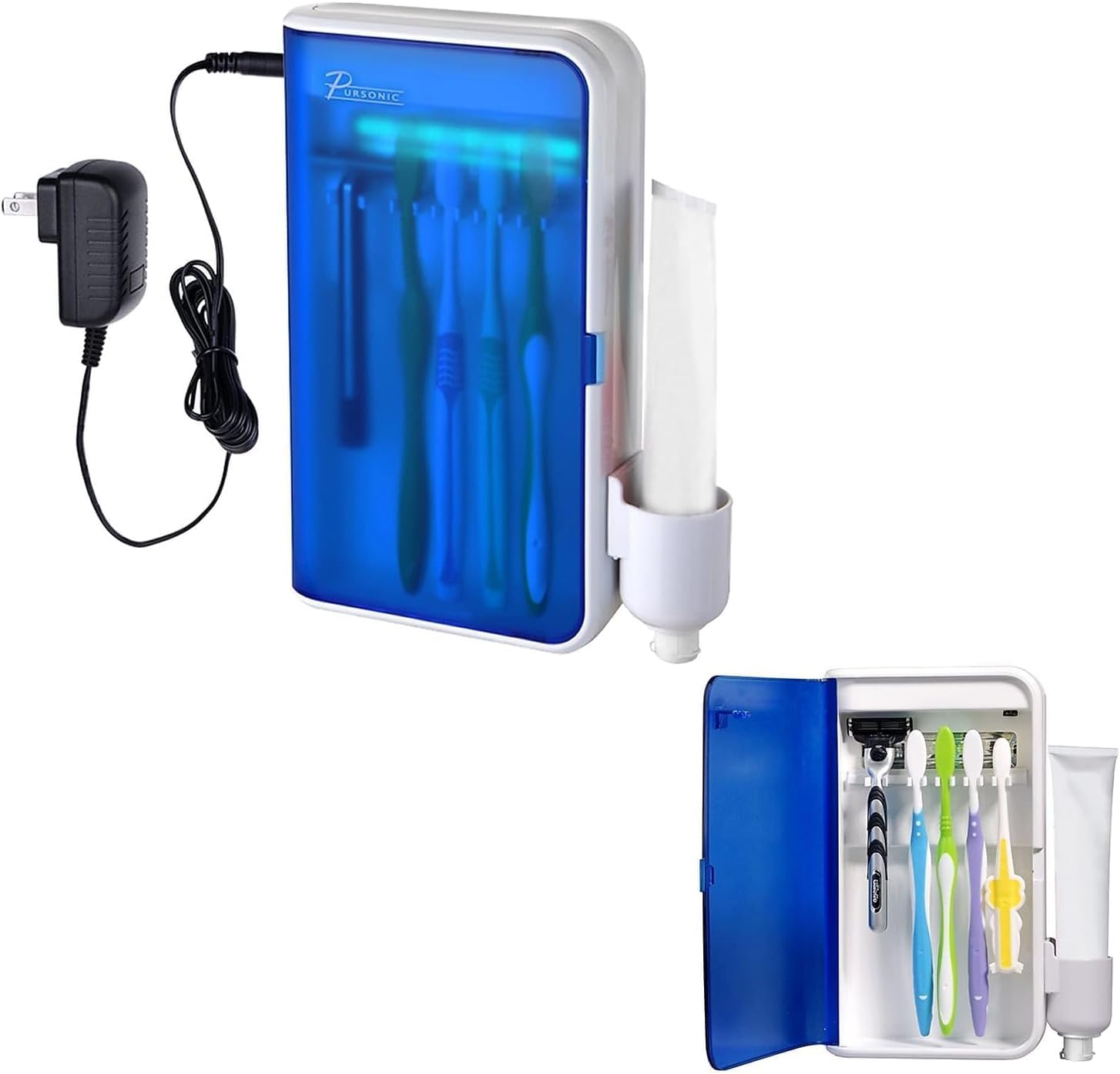
Image: Pursonic UV Toothbrush Sanitizer Holder S20, showing the unit and its packaging.
2. Pakuotės turinys
Patikrinkite pakuotę, ar joje yra šie daiktai:
- Pursonic UV Toothbrush Sanitizer Holder (Model S20)
- Maitinimo adapteris
- Sienos laikiklis
- 3M dvipusė lipni juosta
- Toothpaste Holder Attachment
- Vartotojo vadovas

Image: The Pursonic UV Toothbrush Sanitizer Holder with its power adapter and toothpaste holder attachment.
3. Savybės
- Advanced UV Sanitization: Utilizes UV light to effectively clean toothbrushes and razors.
- Daugiafunkcis dizainas: Features five slots for toothbrushes, a dedicated toothpaste holder, and space for razors.
- Prie sienos montuojamas patogumas: Saves counter space and installs easily with included 3M double-sided tape.
- Automatinis laikmatis: UV light operates for 5-8 minutes per cycle for optimal sanitization.
- Platus suderinamumas: Accommodates most manual toothbrushes, electric toothbrush heads, and standard razors.
- Patvarus ir lengvai valomas: Sleek design with sturdy construction for long-lasting use and simple maintenance.

Image: Key features of the sanitizer, highlighting the 5-8 minute sanitizing timer and easy-wipe clean design.
4. Saugos informacija
- Do not look directly at the UV light when it is active.
- Saugokite prietaisą nuo vandens ir drėgmės, kad išvengtumėte elektros pavojaus.
- Ensure the device is securely mounted to prevent it from falling.
- Prieš valydami prietaisą ištraukite iš elektros tinklo.
- Šis prietaisas skirtas naudoti tik buityje.
5. Sąranka ir diegimas
The Pursonic UV Toothbrush Sanitizer Holder is designed for wall mounting. Follow these steps for installation:
- Pasirinkite vietą: Select a smooth, clean surface in your bathroom, such as tile, marble, glass, metal, or wood. Ensure the surface is dry and free from dust or grease.
- Nuvalykite paviršių: Wipe the chosen wall area thoroughly with a clean cloth and allow it to dry completely.
- Taikyti klijus: Peel the backing from the 3M double-sided adhesive tape and firmly press it onto the back of the wall mount bracket.
- Sumontuokite laikiklį: Press the bracket firmly onto the cleaned wall surface. Apply pressure for at least 30 seconds to ensure strong adhesion. It is recommended to let the adhesive set for 24 hours before hanging the unit.
- Hang the Sanitizer Unit: Once the bracket is securely attached, carefully hang the Pursonic UV Toothbrush Sanitizer Holder onto the bracket.
- Attach Toothpaste Holder: Slide the toothpaste holder attachment onto the side of the main unit.
- Prijunkite maitinimą: Plug the power adapter into the unit and then into a suitable electrical outlet.

Image: Visual guide for wall mounting, showing steps from cleaning the wall to hanging the unit and cup.
6. Naudojimo instrukcijos
Using your Pursonic UV Toothbrush Sanitizer Holder is simple:
- Atidaryk duris: Gently open the front door of the sanitizer unit.
- Vietos elementai: Insert your toothbrushes (up to five) and/or razors into the designated slots. Ensure the bristles/blades face the UV light bulb for effective sanitization. If using an electric toothbrush, you may need to detach the head if the full brush is too tall.
- Uždarykite duris: Close the front door firmly. The UV light will automatically activate for a cycle of 5-8 minutes. A blue light will indicate that the sanitization process is active.
- Ciklo pabaiga: The UV light will automatically turn off after the sanitization cycle is complete. You can then open the door and retrieve your clean items.
For optimal hygiene, it is recommended to sanitize your toothbrushes after each use or at least once daily.

Image: The sanitizer unit with its door open, displaying toothbrushes and a razor placed inside for sanitization.

Image: Illustration of UV light technology effectively cleaning a toothbrush head.
7. Priežiūra
Regular cleaning will ensure the longevity and effectiveness of your sanitizer:
- Įrenginio valymas: Unplug the device from the power outlet. Use a soft, damp cloth to wipe the exterior and interior surfaces. Avoid abrasive cleaners or harsh chemicals.
- Cleaning the Toothpaste Holder: The toothpaste holder attachment can be removed for separate cleaning. Wash it with soap and water, then dry thoroughly before reattaching.
- UV lemputė: The UV bulb is designed for long-term use. If replacement is ever needed, please contact customer support.
- Preventing Mold: Ensure toothbrushes are not excessively wet when placed in the sanitizer to prevent moisture buildup. The unit is designed to be easy to clean to prevent mold growth.
8. Problemų sprendimas
| Problema | Galima priežastis | Sprendimas |
|---|---|---|
| UV light does not turn on. |
|
|
| Durys neužsidaro iki galo. |
|
|
| Unit falls off the wall. |
|
|
9. Specifikacijos
- Prekinis ženklas: Pursonic
- Modelio pavadinimas: S20
- Medžiaga: Plastikiniai
- Spalva: Baltas
- Gaminio matmenys: 5.75 colio ilgio x 2.25 colių pločio x 7.5 colio aukščio
- Montavimo tipas: Sieninis laikiklis
- Skyrių skaičius: 5 (for toothbrushes)
- Prekės svoris: 1 svaras
- UPC: 881314244393
- Gamintojas: Samsonic Trading Company, Inc
- Reikalingos baterijos: Taip
10. Garantija ir palaikymas
For warranty information, technical support, or customer service inquiries, please visit the official Pursonic websvetainėje arba susisiekite su klientų aptarnavimo komanda.
Oficialus Websvetainė: www.pursonicusa.com


