1. Įvadas
This manual provides detailed instructions for the VIZIO SB2920-C6 29-inch 2.0 Channel Sound Bar. This sound bar is designed to enhance your audio experience for television, music, and home theater content. It features two full-range stereo speakers and DTS audio technologies for improved sound quality. The compact and streamlined design allows for versatile placement options.
2. Kas yra dėžutėje
Prieš tęsdami sąranką, įsitikinkite, kad yra visi komponentai.
- VIZIO SB2920-C6 29 colių 2.0 kanalų garso juosta
- Nuotolinio valdymo pultas
- 2 x AAA baterijos (nuotolinio valdymo pultui)
- Optinis garso kabelis
- Digital Coaxial Cable
- Stereo RCA laidai
- Maitinimo kabelis
3. Produktas baigtasview
3.1 Priekis View

1 pav.: priekis view of the VIZIO SB2920-C6 Sound Bar, showcasindėl savo elegantiško, juodo dizaino.
3.2 Viršutinio skydelio valdikliai

Figure 2: Close-up of the top panel, showing buttons for Power, Input, Bluetooth Pairing, Volume Down, and Volume Up.
3.3 Galinio skydelio jungtys

Figure 3: Full rear view of the sound bar, illustrating all available input and output ports.

Figure 4: Close-up of the rear panel showing AUX (1) and AUX (2) input ports.
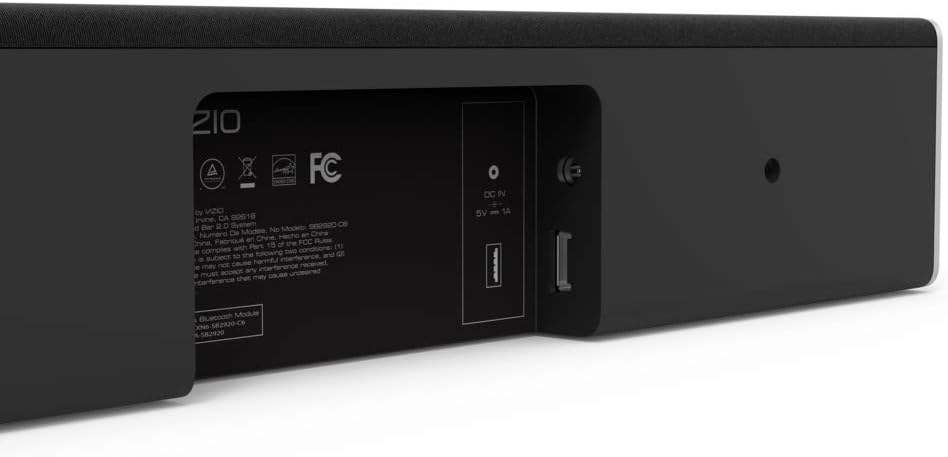
Figure 5: Close-up of the rear panel showing DIGITAL (Coaxial), OPTICAL, and SUB OUT ports.
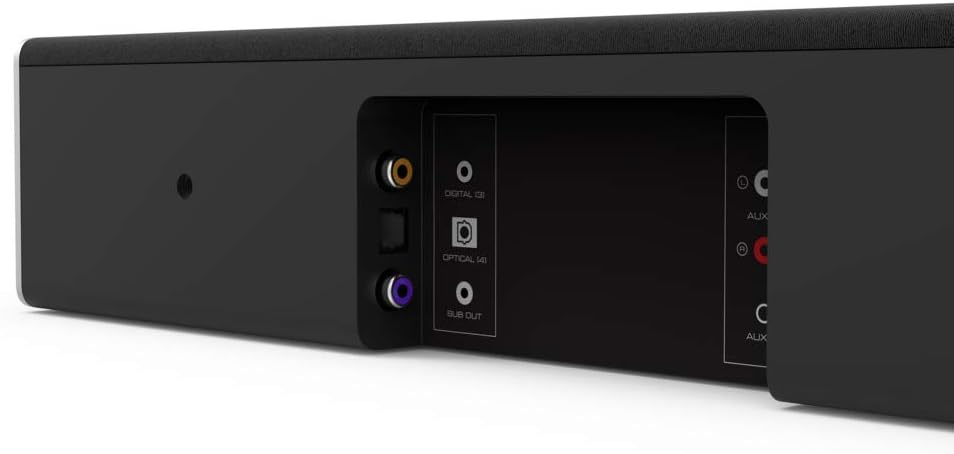
Figure 6: Close-up of the rear panel showing DC IN (power) and USB (Service Only) ports.
3.4 Matmenys

Figure 7: Diagram illustrating the dimensions of the VIZIO SB2920-C6 Sound Bar: 3 inches Depth x 29 inches Width x 3 inches Height.
4. Sąranka
Follow these steps to set up your VIZIO SB2920-C6 Sound Bar.
4.1 Įdėjimas
- Place the sound bar on a flat surface below your TV or mount it on a wall. Ensure it is centered with your TV for optimal sound distribution.
- Keep the sound bar clear of obstructions that could block the sound.
4.2 Prijungimas prie televizoriaus
Pasirinkite vieną iš šių prisijungimo būdų:
- Optical Cable (Recommended for best audio quality):
Connect one end of the optical cable to the OPTICAL port on the sound bar (Figure 5) and the other end to the Optical Digital Audio Out port on your TV. - Digital Coaxial Cable:
Connect one end of the digital coaxial cable to the DIGITAL port on the sound bar (Figure 5) and the other end to the Coaxial Digital Audio Out port on your TV. - RCA Stereo Cables:
Connect the red and white RCA cables to the AUX (1) ports on the sound bar (Figure 4) and the corresponding red and white Audio Out ports on your TV.
4.3 Maitinimo jungtis
Connect the power cable to the DC IN port on the sound bar (Figure 6) and then plug the other end into a wall outlet.
4.4 Vaizdo įrašo vadovas sąrankai
Video 1: Official VIZIO guide on how to set up your VIZIO Sound Bar, demonstrating connection and initial configuration.
5. Naudojimo instrukcijos
5.1 Maitinimo įjungimas/išjungimas
- Paspauskite Galia button on the sound bar (Figure 2) or the remote control to turn the unit on or off.
5.2 Garsumo reguliavimas
- Naudokite Garsumo padidinimas (+) ir Patildyti (-) buttons on the sound bar (Figure 2) or the remote control to adjust the sound level.
5.3 Įvesties šaltinio pasirinkimas
- Paspauskite Įvestis button on the sound bar (Figure 2) or the remote control to cycle through available input sources (Optical, Digital, AUX 1, AUX 2, Bluetooth).
5.4 Bluetooth poravimas
- Paspauskite ir palaikykite Bluetooth button on the sound bar (Figure 2) or the remote control for 3 seconds to enter pairing mode. The LED indicators on the sound bar will flash.
- On your mobile device, search for the VIZIO sound bar in the Bluetooth settings and select it to pair.
5.5 Garso patobulinimai
- The remote control includes buttons for Bosas, EQ, ir Treble to customize your audio experience.
- DTS technologies such as DTS Studio Sound, DTS TruVolume, and DTS TruSurround are integrated to optimize sound quality. Refer to the full user manual for detailed adjustments.
6. Priežiūra
To ensure the longevity and optimal performance of your VIZIO SB2920-C6 Sound Bar, follow these maintenance guidelines:
- Valymas: Use a soft, dry cloth to clean the surface of the sound bar. Avoid using liquid cleaners or abrasive materials, as they may damage the finish.
- Vėdinimas: Ensure that the sound bar's vents are not blocked to prevent overheating.
- Saugykla: Jei garso juostą ilgesnį laiką nenaudosite, atjunkite ją nuo maitinimo šaltinio ir laikykite vėsioje, sausoje vietoje.
7. Problemų sprendimas
Jei kyla problemų dėl garso juostos, žr. šiuos dažniausiai pasitaikančius sprendimus:
| Problema | Galimas sprendimas |
|---|---|
| No sound from the sound bar |
|
| Garsas nutrūksta su pertraukomis |
|
| „Bluetooth“ įrenginio nepavyksta susieti |
|
| Prasta garso kokybė |
|
8. Specifikacijos
| Funkcija | Detalė |
|---|---|
| Modelio pavadinimas | SB2920-C6 |
| Garsiakalbio tipas | Garso juosta |
| Erdvinio garso kanalo konfigūracija | 2.0 |
| Ryšio technologija | Bluetooth |
| Belaidžio ryšio technologija | Bluetooth |
| Garso išvesties režimas | Stereo, erdvinis garsas |
| Ypatingos savybės | Bass Boost, Wireless |
| Suderinami įrenginiai | Personal Computer, Phones, Smartphone, Tablet, Television |
| Kontrolės metodas | Nuotolinis |
| Spalva | Juoda |
| Gaminio matmenys (D x P x A) | 3" x 29" x 3" |
| Prekės svoris | 4.5 svaro |
| Montavimo tipas | Sieninis laikiklis |
| Reikalingos baterijos | 2 AAA (įtraukta) |
9. Garantija ir palaikymas
The VIZIO SB2920-C6 Sound Bar typically comes with a 12-month limited warranty. For specific warranty details, registration, and technical support, please refer to the official VIZIO website or contact VIZIO customer service directly. Keep your purchase receipt for warranty claims.
Palaikymas internetu: Apsilankykite www.vizio.com/support
Klientų aptarnavimas: Refer to your product packaging or the VIZIO support websvetainė, kurioje pateikiama naujausia kontaktinė informacija.


