Įvadas
This manual provides detailed instructions for the safe and effective use of your Proster Digital LCD Anemometer Thermometer. This device is designed for measuring wind speed and temperature, suitable for various outdoor activities and professional applications. Please read this manual thoroughly before operating the device and keep it for future reference.
Produkto savybės
- Measures wind speed and temperature.
- LCD display with backlight for clear readings in various lighting conditions.
- Data hold function to freeze current readings.
- Automatic and manual power off options.
- High-precision pressure sensor for quick response.
- External thermistor for accurate temperature measurement.
- Multiple wind speed units: m/s, km/h, ft/min, knots, mph.
- Temperature units: Celsius (°C) and Fahrenheit (°F).
- Beaufort scale indicator.
- Baterijos būsenos indikatorius.
Pakuotės turinys
Išpakuodami patikrinkite, ar yra visi toliau išvardyti daiktai ir ar jie yra geros būklės:
- 1 x Proster Digital Anemometer
- 1 x CR2032 3V baterija
- 1 x dirželis
- 1 x Vartotojo vadovas
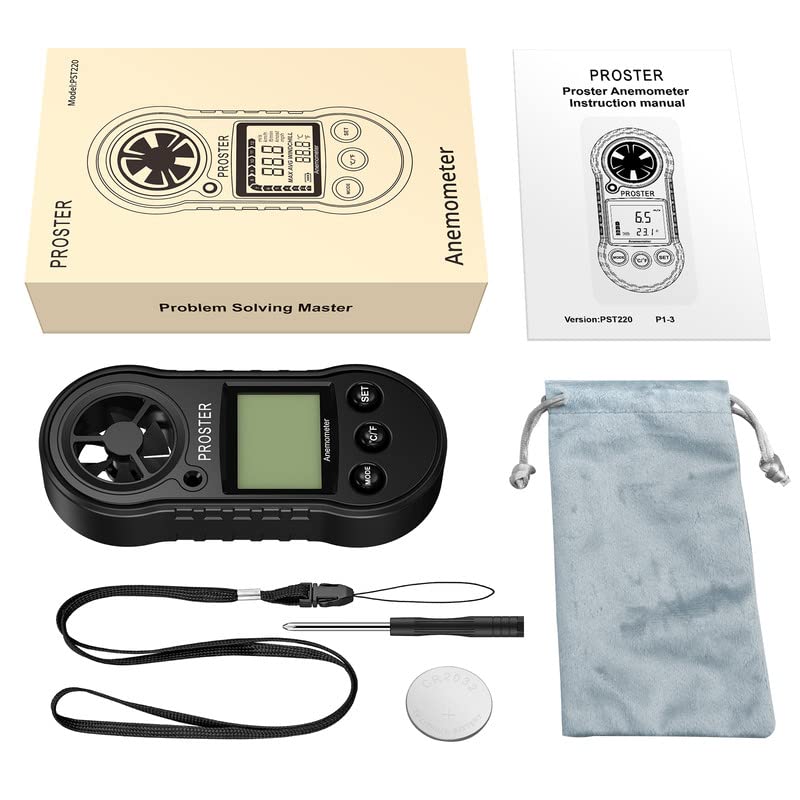
Image: Contents of the Proster Digital Anemometer package, showing the device, a CR2032 battery, a lanyard, and the instruction manual.
Įrenginys baigtasview
Familiarize yourself with the components of your anemometer:
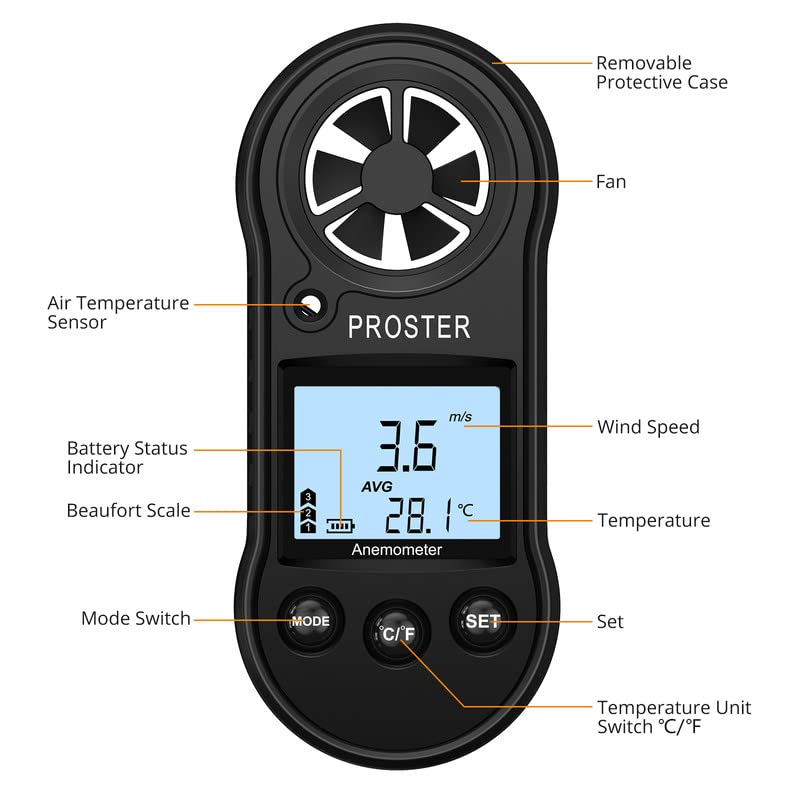
Image: Detailed diagram of the Proster Digital Anemometer, labeling its key parts including the fan, air temperature sensor, LCD display, control buttons (Mode, C/F, Set), battery status indicator, and removable protective case.
- Nuimamas apsauginis dėklas: Protects the device when not in use.
- Ventiliatorius: Measures wind speed. Ensure it is unobstructed.
- Air Temperature Sensor: Detects ambient air temperature.
- Baterijos būsenos indikatorius: Shows remaining battery life on the LCD.
- Beaufort Scale: Visual indicator of wind force.
- Wind Speed Display: Shows current, average, or maximum wind speed.
- Temperatūros rodymas: Shows current air temperature.
- MODE jungiklis: Cycles through measurement modes (Current, Max, Average).
- °C/°F mygtukas: Perjungia temperatūros matavimo vienetus pagal Celsijų ir Farenheitą.
- SET mygtukas: Used for various settings and data hold function.
Sąranka
1. Akumuliatoriaus įdėjimas
- Suraskite akumuliatoriaus skyrių įrenginio gale.
- Use a small screwdriver or coin to open the battery cover by turning it counter-clockwise to the "OPEN" position.
- Insert the CR2032 3V lithium battery with the positive (+) side facing up.
- Replace the battery cover and turn it clockwise to the "CLOSE" position to secure it.
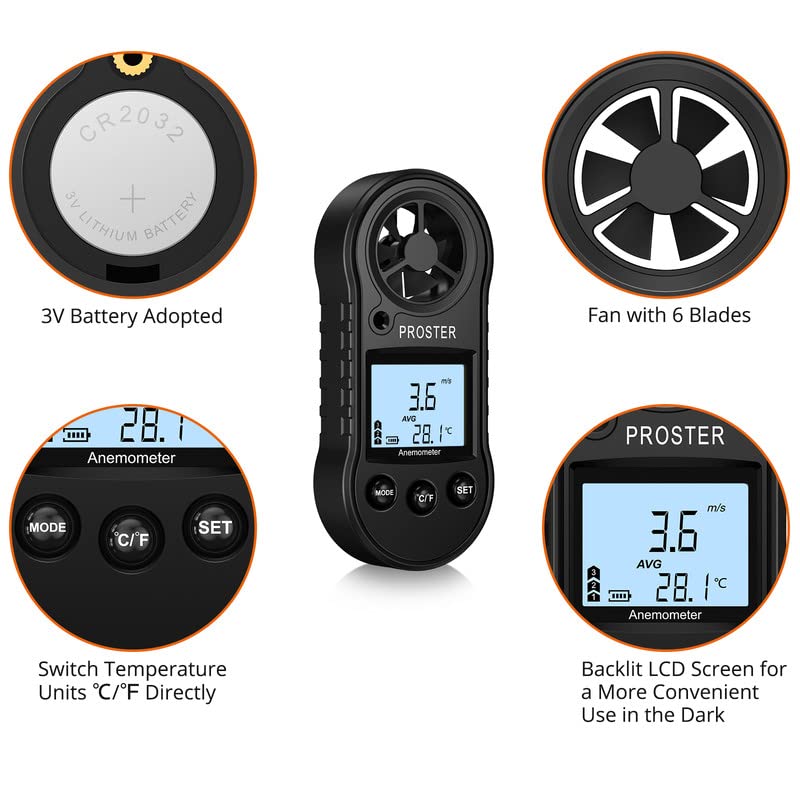
Image: Illustration showing the CR2032 battery being inserted into the compartment and a close-up of the device's fan and LCD display.
2. Virvelės pritvirtinimas
Thread the provided lanyard through the designated loop on the device to prevent accidental drops during use.
Naudojimo instrukcijos
1. Maitinimo įjungimas/išjungimas
- Norėdami įjungti: Paspauskite REŽIMAS button briefly. The LCD will light up.
- To Power Off Manually: Paspauskite ir palaikykite REŽIMAS mygtuką maždaug 3 sekundes.
- Automatinis išjungimas: Įrenginys automatiškai išsijungs po 14 minučių neveikimo, kad būtų taupoma baterija.
2. Changing Wind Speed Units
Įjungę įrenginį, paspauskite NUSTATYTI button briefly to cycle through the available wind speed units: m/s, km/h, ft/min, knots, mph.
3. Changing Temperature Units
Paspauskite ° C / ° F button briefly to switch between Celsius (°C) and Fahrenheit (°F).
4. Matavimo režimai
Paspauskite REŽIMAS button (after initial power-on) to cycle through the following wind speed measurement display modes:
- Current Wind Speed: Displays the instantaneous wind speed.
- Maximum Wind Speed (MAX): Displays the highest wind speed recorded since the device was powered on or reset.
- Average Wind Speed (AVG): Displays the average wind speed over the measurement period.
To reset the MAX/AVG readings, press and hold the NUSTATYTI button while in MAX or AVG mode until the display clears or resets.
5. Apšvietimo valdymas
The backlight automatically activates when the device is powered on. It will turn off after a short period of inactivity to save battery. There is no manual control for the backlight.
6. Matavimų atlikimas
Hold the anemometer upright, ensuring the fan is exposed to the wind flow. The wind speed and temperature will be displayed on the LCD. For accurate temperature readings, allow the device to stabilize in the environment for a few minutes.
Priežiūra
- Valymas: Wipe the device with a soft, dry cloth. Do not use abrasive cleaners or solvents. Ensure the fan blades are free from dust and debris.
- Saugykla: When not in use for extended periods, remove the battery to prevent leakage. Store the device in a cool, dry place, away from direct sunlight and extreme temperatures.
- Fan Care: Avoid touching the fan blades directly. If the fan becomes stiff or dirty, gently clean it with a soft brush or compressed air. Do not apply lubricants.
- Baterijos keitimas: Replace the CR2032 battery when the low battery indicator appears on the display. Dispose of old batteries responsibly.
Trikčių šalinimas
| Problema | Galima priežastis | Sprendimas |
|---|---|---|
| Įrenginys neįsijungia. | Baterija išsikrovusi arba neteisingai įdėta. | Check battery orientation. Replace with a new CR2032 battery. |
| Inaccurate wind speed readings. | Fan obstructed or damaged. Device not held correctly. | Ensure fan is clean and rotates freely. Hold the device upright and directly into the wind. |
| Netikslūs temperatūros rodmenys. | Device not stabilized to ambient temperature. Sensor obstructed. | Allow device to acclimate to the environment for several minutes. Ensure temperature sensor is clear. |
| Ekranas blankus arba mirga. | Senka baterija. | Pakeiskite CR2032 bateriją. |
Specifikacijos
| Modelio numeris | TL0090 |
| Vėjo greičio matavimo diapazonas | 0 - 30 m/s, 0 - 90 km/h, 0 - 65 mph, 0 - 55 knots |
| Vėjo greičio rezoliucija | 0.1 m/s, 0.3 km/h, 0.2 mph, 0.2 knots |
| Oro temperatūros diapazonas | -10 °C iki 45 °C (14 °F iki 113 °F) |
| Temperatūros raiška | 0.2 °C |
| Temperatūros tikslumas | ± 2 °C |
| Darbinė drėgmė | Less than or equal to 90% RH |
| Laikymo temperatūra | -40 °C iki 60 °C (nuo -40 °F iki 140 °F) |
| Maitinimo šaltinis | 1 x CR2032 3V Lithium Battery |
| Matmenys (IxPxH) | 4.13 x 1.57 x 0.71 cm (112 x 49 x 21 mm) |
| Svoris | 49.9 gramų |
| Medžiaga | Polipropilenas (PP) |
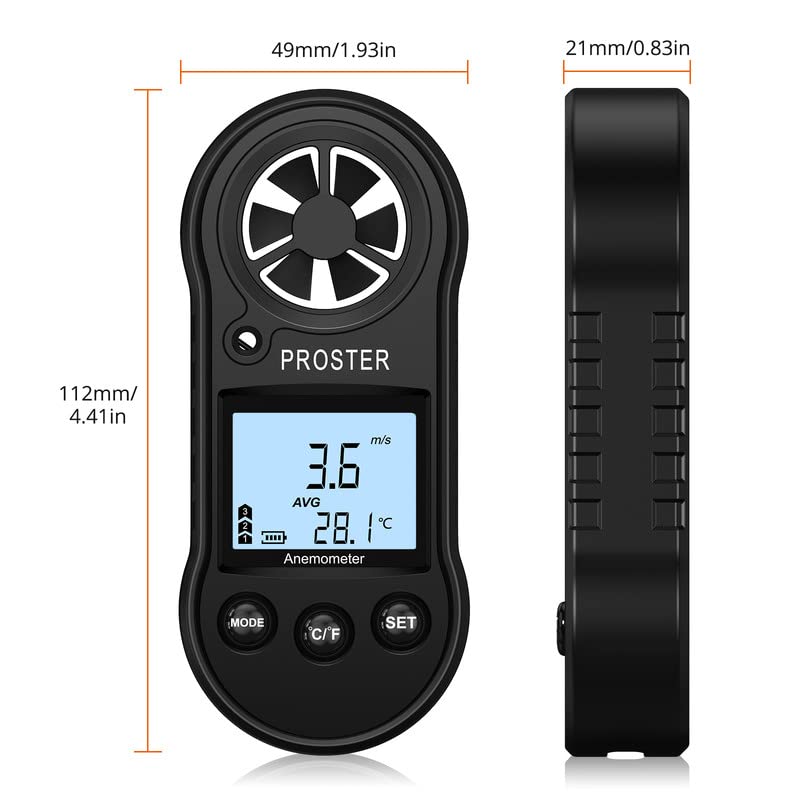
Image: Diagram illustrating the physical dimensions of the Proster Digital Anemometer.
Garantija ir palaikymas
Informacija apie garantiją
Proster products are designed and manufactured to high-quality standards. For specific warranty details, please refer to the warranty card included with your purchase or visit the official Proster websvetainėje. Išsaugokite pirkimo kvitą kaip pirkimo įrodymą garantiniams reikalavimams.
Pagalba klientams
If you encounter any issues or have questions regarding your Proster Digital LCD Anemometer Thermometer, please contact Proster customer support. Contact information can typically be found on the product packaging, the official Proster websvetainėje arba per savo mažmenininką.
Norėdami gauti daugiau informacijos, apsilankykite Proster Store.