1. Įvadas
This manual provides essential information for the proper installation, operation, and maintenance of your ICOM M424G 21 Fixed Mount VHF Radio with Internal GPS. Please read this manual thoroughly before using the radio to ensure safe and efficient operation.
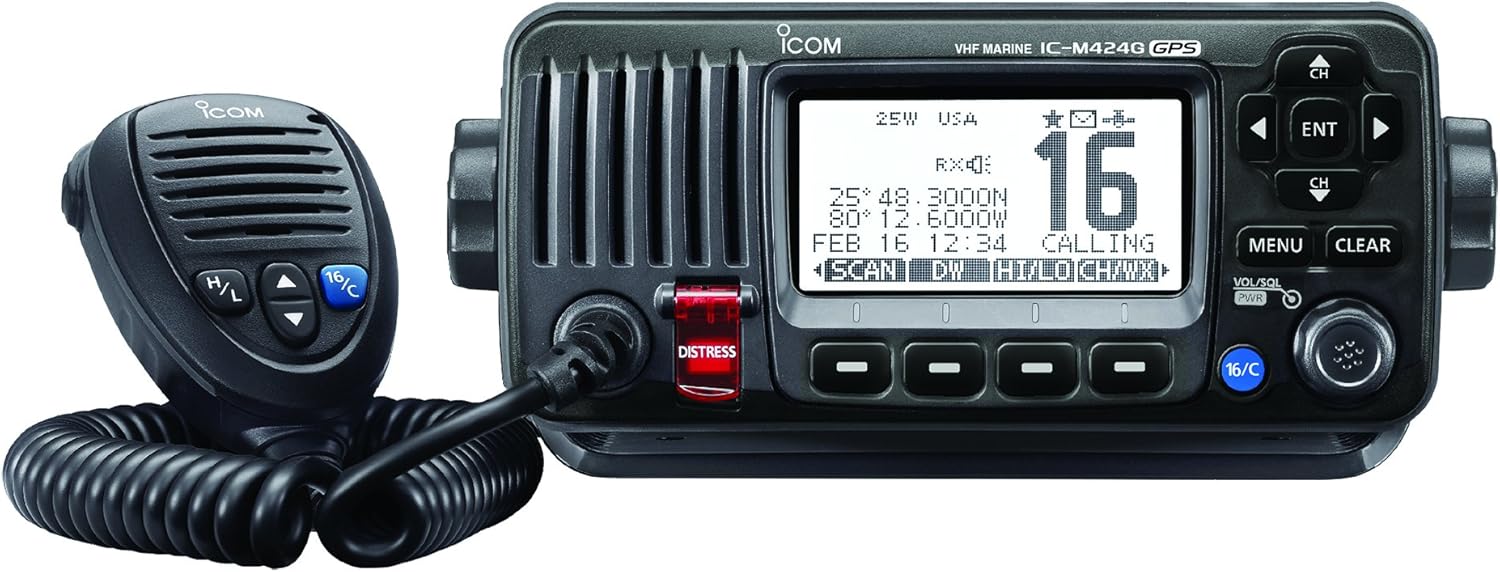
Priekyje view of the ICOM M424G 21 VHF radio, showing the main unit with its display, control buttons, and rotary knobs, alongside the connected hand microphone.
2. Sąranka
2.1 Išpakavimas
Patikrinkite, ar yra visi komponentai:
- ICOM M424G 21 VHF Radio Unit
- Rankinis mikrofonas
- Mounting Bracket (may be sold separately)
- Maitinimo kabelis
- Vartotojo vadovas (šis dokumentas)
2.2 Montavimas
The ICOM M424G 21 can be flush-mounted or installed using a bracket. Ensure the mounting location provides adequate ventilation and is protected from direct exposure to extreme weather conditions, although the unit offers IPX7 submersible protection.
- Įleistinis montavimas: Requires careful cutting of the dashboard or panel. Refer to the provided template for precise dimensions.
- Laikiklio montavimas: Secure the supplied or compatible mounting bracket to a stable surface. Attach the radio unit to the bracket using the provided hardware. Note that some brackets may be sold separately.
2.3 Elektros jungtys
Connect the radio to a 12-volt DC power source. Ensure proper polarity (red to positive, black to negative) and use appropriate fusing. Connect the VHF antenna to the antenna connector on the rear of the unit. The internal GPS receiver does not require an external GPS antenna.
3. Naudojimo instrukcijos
3.1 Įjungimas / išjungimas ir pagrindiniai valdikliai
- Galia: Paspauskite ir palaikykite VOL/SQL PWR rankenėlę, kad įjungtumėte arba išjungtumėte įrenginį.
- Apimtis: Pasukite VOL/SQL PWR knob to adjust the speaker volume.
- Squelch: Paspauskite VOL/SQL PWR knob momentarily, then rotate to adjust the squelch level to eliminate background noise.
- Kanalo pasirinkimas: Naudokite Kanalo aukštyn/žemyn buttons or the channel selector knob to change channels.
- Channel 16/Call Channel: Paspauskite skirtą 16/C button for instant access to Channel 16 (distress and calling) or the user-programmed call channel.
3.2 Išplėstinės funkcijos
- Dual/Tri-Watch Function: Monitor Channel 16 and/or the call channel while operating on another channel. This feature is crucial for safety and communication.
- DSC (Digital Selective Calling): The M424G 21 supports DSC for distress calls, individual calls, group calls, and all ships calls. The internal GPS provides your position for distress signals.
- Weather Channels with Alert Function: Access NOAA weather channels and receive alerts for severe weather conditions.
- Aqua Quake Draining Function: This feature emits a vibrating sound to clear water from the speaker grille, maintaining clear audio even after exposure to water.
- MA-500TR AIS Transponder Compatibility: The radio is compatible with the MA-500TR AIS Transponder for enhanced vessel tracking and collision avoidance.
- Triukšmą slopinantis mikrofonas: The included microphone is designed to reduce background noise, ensuring clear voice transmission in noisy environments.
4. Priežiūra
4.1 Valymas
Regularly clean the radio unit and microphone with a soft, damp cloth. Do not use abrasive cleaners or solvents. Ensure the speaker grille is clear of debris, especially after exposure to water, and utilize the Aqua Quake function.
4.2 Water Protection
The ICOM M424G 21 offers IPX7 submersible protection, meaning it can withstand immersion in 1 meter of water for 30 minutes. While robust, avoid unnecessary exposure to water and ensure all caps and covers are securely fastened.
5. Problemų sprendimas
If you experience issues with your ICOM M424G 21, consider the following basic checks:
- Nėra galios: Patikrinkite maitinimo kabelio jungtis, saugiklį ir akumuliatoriaus įtampątage.
- Nėra garso / prastas garsas: Adjust volume and squelch. Ensure the microphone is properly connected. Use the Aqua Quake function if water exposure is suspected.
- No Transmission/Poor Range: Check antenna connection and condition. Ensure power output is set correctly (1W or 25W).
- GPS negauna padėties: Įsitikinkite, kad įrenginyje yra švarus view of the sky. Allow sufficient time for initial acquisition.
For persistent issues, consult a qualified marine electronics technician or contact ICOM customer support.
6. Specifikacijos
| Funkcija | Vertė |
|---|---|
| Gaminio matmenys | 9 x 8 x 3 colio |
| Prekės svoris | 1.2 svaro |
| ASIN | B00SXH8DP6 |
| Prekės modelio numeris | M424G 21 |
| Ypatingos savybės | Povandeninis |
| Kitos ekrano funkcijos | Bevielis |
| Spalva | Aqua |
| Kas yra dėžutėje | Radio, User Manual |
| Gamintojas | ICOM |
| Pasiekiama pirmoji data | 28 m. sausio 2015 d |
| Prekės ženklas | ICOM |
| Kanalų skaičius | 21 |
| Dažnių diapazonas | 156.000 MHz–174 MHz |
| Maksimalus pokalbio diapazonas | 5 mylių |
| ttage | 12 voltų |
| Atsparumo vandeniui lygis | Atsparus vandeniui (IPX7) |
7. Garantija ir palaikymas
For warranty information, please refer to the documentation included with your product or visit the official ICOM website. For technical support, service, or replacement parts, please contact ICOM customer service directly.